การแนะนำ
The EKSA E1000WT Wireless Gaming Headset is designed to provide an immersive audio experience for gamers across multiple platforms. Featuring 2.4GHz ultra-low latency wireless technology, 7.1 surround sound, and an AI noise-cancelling microphone, this headset ensures clear communication and precise audio positioning. Its ergonomic design and long battery life make it suitable for extended gaming sessions.

The EKSA E1000WT Wireless Gaming Headset, featuring vibrant RGB lighting on the earcups and a detachable microphone, shown alongside its compact USB dongle for wireless connectivity.
คุณสมบัติหลัก
- 2.4GHz Ultra-Low Latency: Ensures stable and lossless sound quality transmission with less than 35ms delay for an immersive, lag-free wireless gaming experience.
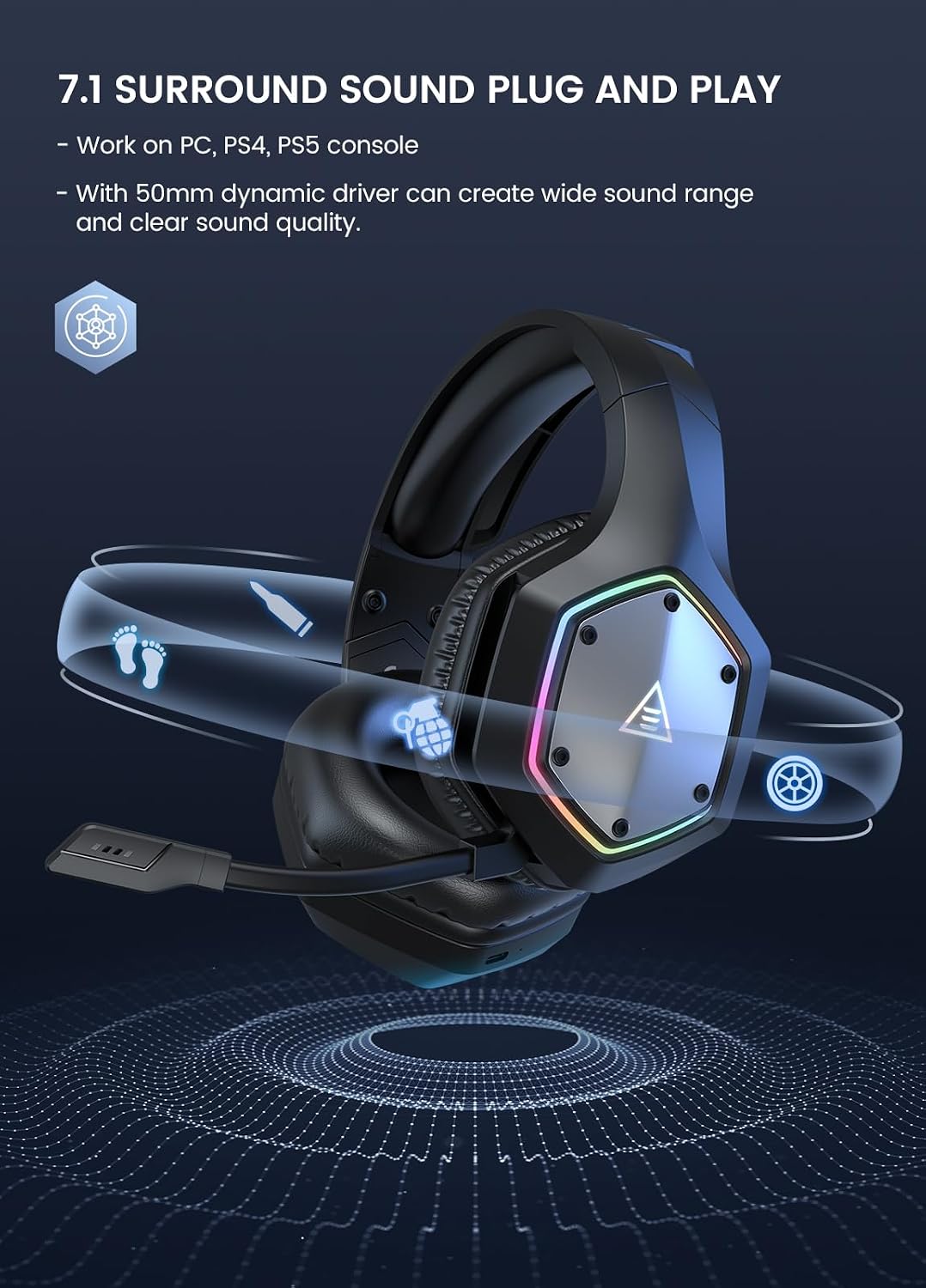
- Plug and Play 7.1 Surround Sound: Upgraded 50mm drivers deliver powerful bass and immersive sound, allowing precise audio positioning for footsteps and gunshots. No additional software is required for 7.1 surround sound on compatible devices.
- อายุการใช้งานแบตเตอรี่ยาวนาน: Equipped with a 1500mAh rechargeable battery, providing up to 36 hours of continuous wireless use (lights off) on a 2.5-hour charge. Includes a 3.5mm audio cable for wired mode.
- ไมโครโฟนตัดเสียงรบกวนด้วยระบบ AI: Built-in AI chip isolates voice and eliminates up to 96% of distracting background noise, ensuring clear in-game communication.
- Stress-Free Wear: Premium soft memory protein sponge earpads and an adjustable headband provide extreme comfort for extended periods.

A banner showcasing the key features of the EKSA E1000WT headset, including 2.4GHz mode, ENC noise-cancelling mic, 7.1 surround sound, 36-hour battery life, RGB lights, 50mm drivers, and wired mode.

เกิดการระเบิดขึ้น view diagram illustrating the 50mm Neodymium Drivers, emphasizing their role in producing a wide sound range and clear sound quality.
เนื้อหาแพ็คเกจ
- EKSA E1000WT Headset
- USB-A ดองเกิล
- สายสัญญาณเสียงขนาด 3.5 มม
- คู่มือการใช้งาน
- กระเป๋าใส่ของ
- คู่มือแนะนำ

The EKSA E1000WT headset displayed with its USB dongle and 3.5mm audio cable, representing the core components included in the package.
การตั้งค่า
Wireless Connection (2.4GHz)
For wireless use, simply plug the USB-A dongle into a compatible device. The headset will automatically connect, providing a stable and low-latency audio experience.
A close-up of the 2.4GHz USB dongle, highlighting its compact design and the wireless transmission technology.
Wired Connection (3.5mm)
For wired use, connect the provided 3.5mm audio cable to the headset's 3.5mm port and then to your desired device. This mode is ideal when battery power is low or for devices that do not support USB audio.
ความเข้ากันได้
The EKSA E1000WT headset offers broad compatibility:
- แบบไร้สาย (ตัวรับสัญญาณ USB): PC, PS5, PS4, Laptops.
- ต่อสาย (สายสัญญาณเสียง 3.5 มม.): PS4, PS5, Nintendo Switch, Xbox One S/X, Mobile Devices.

A visual representation of the headset's wide compatibility, showing connections to PC, Laptop, PS5, PS4 via USB dongle, and Xbox, PS4, PS5, Mobile Devices, and Switch via 3.5mm interface.
คำแนะนำการใช้งาน
การควบคุมบนหูฟัง
The headset features convenient on-ear controls for easy adjustments during gameplay or calls:
- Volume Adjuster: Scroll up for Volume +, scroll down for Volume -.
- ปุ่มไมค์: Press for 3 seconds for ENC (Environmental Noise Cancellation) On/Off. Click once for Microphone On/Off (with voice alert).
- ปุ่มเปิด/ปิด: Press for 3 seconds for Power On/Off. Click once for Surround Sound On/Off. Double-click for Light On/Off.
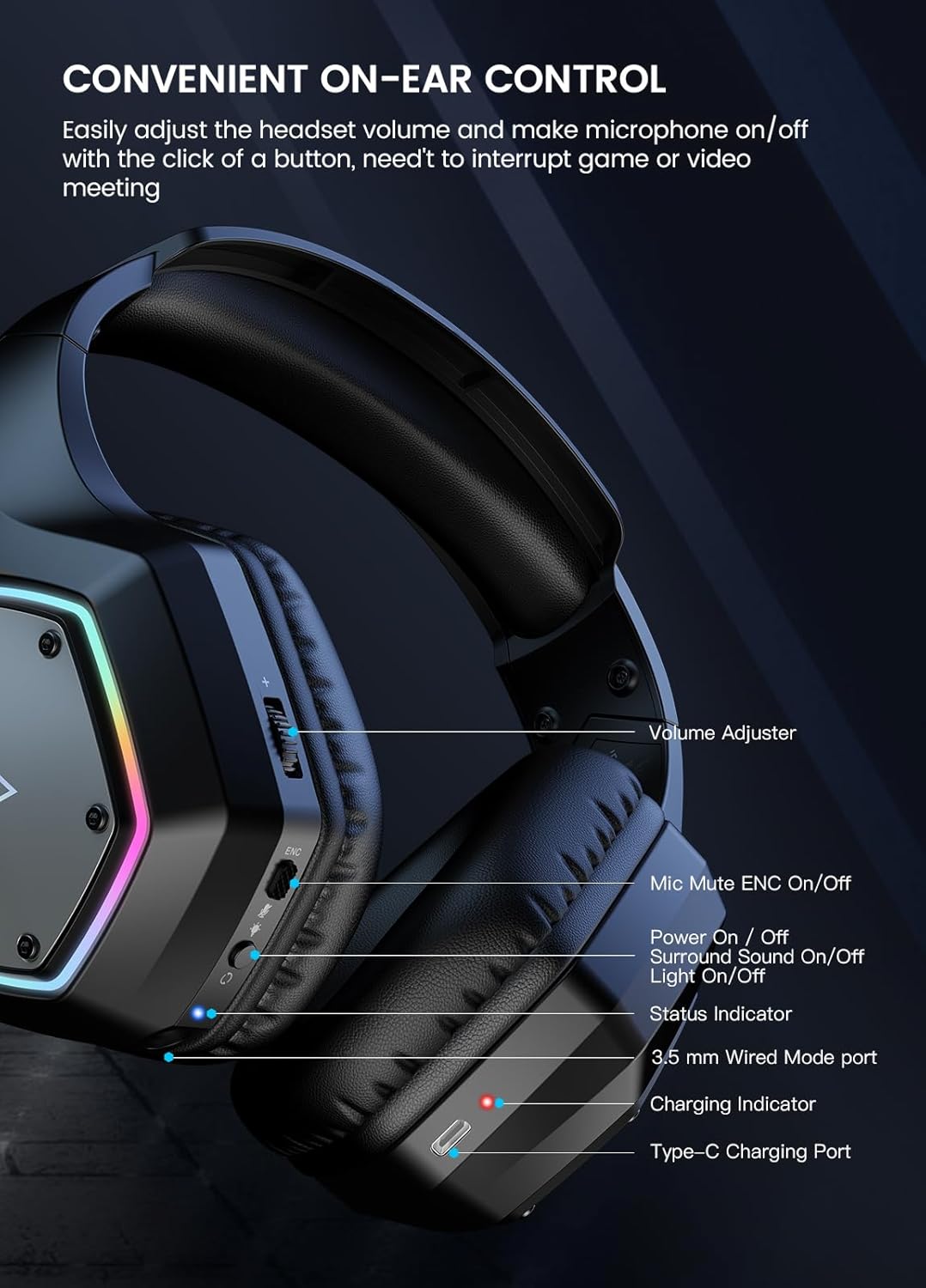
รายละเอียด view of the left earcup, illustrating the various control buttons and ports, including the volume adjuster, mic mute, power button, status indicator, 3.5mm port, and Type-C charging port.
การใช้งานไมโครโฟน
The adjustable cardioid microphone with AI noise cancellation ensures your voice is captured clearly while minimizing background noise. Adjust the microphone's position for optimal voice pickup.

A close-up of the headset's AI Intelligent Noise Cancelling Microphone, highlighting its 360-degree extensive pickup and 120-degree flexible adjustable design.
ไฟ RGB
The headset features gradual colorful RGB lighting on the earcups. To extend battery life, you can turn off the RGB lights using the power button (double-click).

The EKSA E1000WT headset displayed on a stand, showcasing its gradual colorful RGB lighting on the earcups. A note advises turning off RGB lights to extend battery usage time.
การซ่อมบำรุง
Proper maintenance ensures the longevity and optimal performance of your EKSA E1000WT headset:
- การทำความสะอาด: ใช้ผ้าแห้งนุ่มเช็ดทำความสะอาดที่ครอบหูและแถบคาดศีรษะ หลีกเลี่ยงการใช้สารเคมีรุนแรงหรือวัสดุที่มีฤทธิ์กัดกร่อน
- พื้นที่จัดเก็บ: When not in use, store the headset in its provided carry pouch to protect it from dust and scratches.
- การดูแลสายเคเบิล: หลีกเลี่ยงการดัดงอหรือดึงสายเคเบิลอย่างรุนแรงเพื่อป้องกันความเสียหาย
- แบตเตอรี่: For optimal battery health, avoid fully discharging the headset frequently. Charge it regularly, even if not in constant use.
การแก้ไขปัญหา
| ปัญหา | สารละลาย |
|---|---|
| ไม่มีเสียงจากหูฟัง | Check volume levels on both headset and device. Ensure correct connection (USB dongle or 3.5mm cable). Verify headset is powered on. |
| ไมโครโฟนไม่ทำงาน | Ensure microphone is not muted (check mic button). Verify microphone is enabled in device sound settings. Re-plug the headset/dongle. |
| คุณภาพเสียงไม่ดี / สัญญาณรบกวน | Ensure headset is within range of the USB dongle (if wireless). Check for interference from other 2.4GHz devices. Try a different USB port or 3.5mm jack. |
| Headset not connecting wirelessly | Ensure the USB dongle is properly inserted. Power cycle the headset and dongle. Check device drivers for the headset. |
| ไฟ RGB ไม่ทำงาน | Double-click the power button to toggle RGB lights. Ensure headset has sufficient battery charge. |
ข้อมูลจำเพาะ
| คุณสมบัติ | รายละเอียด |
|---|---|
| ชื่อรุ่น | EKSA E1000WT |
| เทคโนโลยีการเชื่อมต่อ | Wireless (2.4GHz RF) & Wired (3.5mm) |
| แจ็คหูฟัง | USB & 3.5mm |
| เส้นผ่านศูนย์กลางของลำโพง | 50มม. |
| ช่วงความถี่ | 20 เฮิรตซ์ - 20 กิโลเฮิรตซ์ |
| ความไวของไมโครโฟน | -42dB ± 3dB |
| ขนาดไมโครโฟน | 6.0มม.*2.7มม. |
| อายุการใช้งานแบตเตอรี่ | Up to 36 Hours (lights off) |
| เวลาในการชาร์จ | 2.5 ชั่วโมง |
| เวลาแฝงของเสียง | 35 มิลลิวินาที |
| รูปทรงของหูฟัง | วงรี |
| น้ำหนักสินค้า | 1.23 ปอนด์ |
การรับประกันและการสนับสนุน
EKSA products typically come with a manufacturer's warranty. For specific warranty details and duration, please refer to the warranty card included in your product packaging or visit the official EKSA webเว็บไซต์.
For technical support, troubleshooting assistance, or any product-related inquiries, please contact EKSA customer support:
- อีเมล: support@eksa.co.in (as per packaging information)
- หมายเลขโทรศัพท์ (อินเดีย): +918929388620 (as per packaging information)
You may also find helpful resources and FAQs on the EKSA official webเว็บไซต์.


