1. บทนำ
This manual provides detailed instructions for the installation, operation, and maintenance of your Ctronics CTIPC-790C-EU 5MP PTZ Wi-Fi Security Camera. Please read this manual thoroughly before using the product to ensure proper function and safety. This camera is designed for both indoor and outdoor surveillance, offering high-resolution video, advanced detection features, and flexible connectivity.

รูปที่ 1 : ด้านหน้า view of the Ctronics 5MP PTZ Wi-Fi Security Camera. This image displays the camera's dome shape, lens, and LED illuminators.
2. เนื้อหาบรรจุภัณฑ์
ตรวจสอบว่าสินค้าทั้งหมดที่ระบุไว้ด้านล่างนี้รวมอยู่ในแพ็คเกจของคุณแล้ว หากมีสินค้าใดสูญหายหรือเสียหาย โปรดติดต่อฝ่ายสนับสนุนลูกค้า
- Ctronics CTIPC-790C-EU 5MP PTZ Wi-Fi Security Camera
- อะแดปเตอร์แปลงไฟ
- สายชาร์จ
- คู่มือการใช้งาน
- ตัวยึด
- สกรูยึด
3. สินค้าหมดview
The Ctronics CTIPC-790C-EU camera offers advanced surveillance capabilities:
- ความละเอียด 5MP Ultra HD: Provides clear 2560x1920 pixel video and images, offering more detail than 1080P or 4MP cameras.
- Dual-Band Wi-Fi (2.4/5GHz): Supports both 2.4GHz for extended range and better penetration, and 5GHz for faster transmission and reduced interference.
- ฟังก์ชันการทำงานของ PTZ: Pan 355° and Tilt 90° for comprehensive area coverage.
- AI Human Detection & Auto Tracking: Intelligent technology reduces false alarms by up to 95% and automatically tracks detected human movement.
- การมองเห็นสีกลางคืน: Achieves full-color night vision up to 25 meters or infrared night vision up to 30 meters for clear visibility in low-light conditions.
- เสียงสองทาง: ไมโครโฟนและลำโพงในตัวสำหรับการสื่อสารทางไกล
- กันฝนระดับ IP66: Durable construction suitable for outdoor use in various weather conditions.
- ตัวเลือกการจัดเก็บที่ยืดหยุ่น: Supports continuous 24/7 recording to a microSD card (up to 128GB), cloud storage, or FTP.

Figure 2: This image illustrates the superior clarity of 5MP resolution compared to 2MP, highlighting finer details in a vehicle.
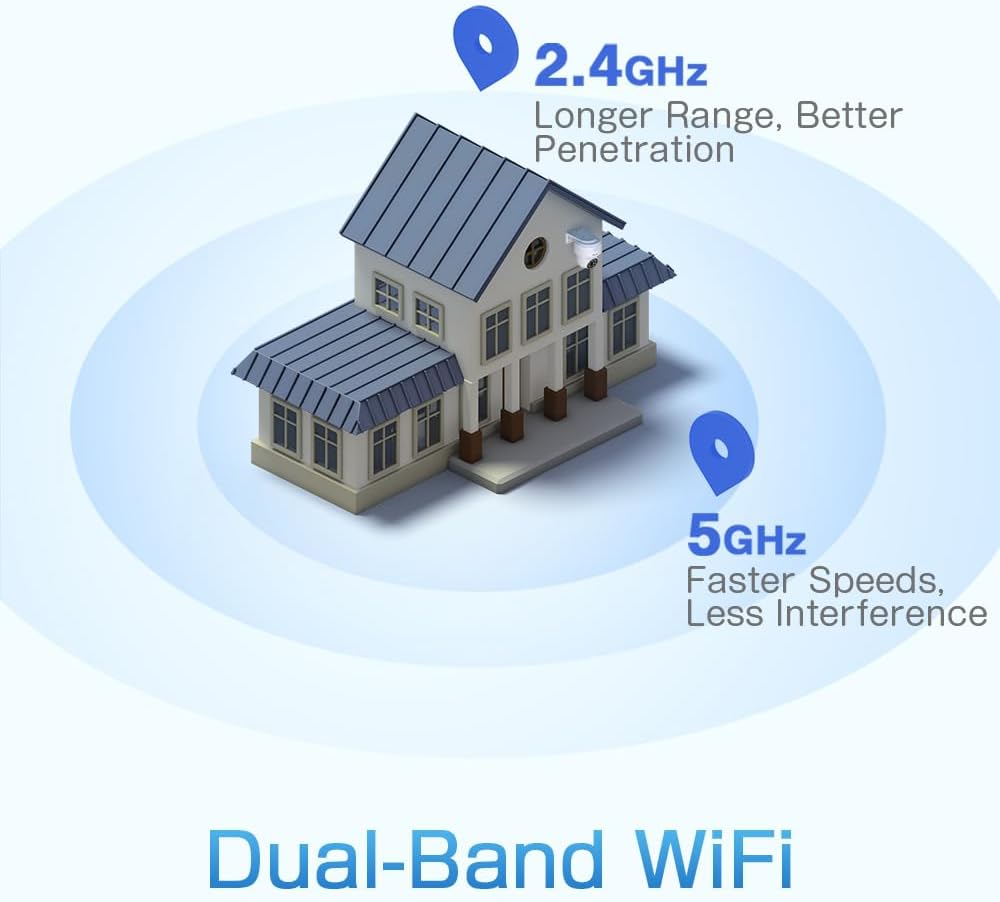
Figure 3: A diagram depicting a house with Wi-Fi signals. The 2.4GHz signal offers longer range and better penetration, while the 5GHz signal provides faster speeds and less interference.
4. การตั้งค่า
4.1 การติดตั้งทางกายภาพ
The camera can be mounted on a wall or ceiling. Ensure the mounting location provides a clear field of view และอยู่ในระยะสัญญาณ Wi-Fi
- เลือกตำแหน่ง: Select a suitable indoor or outdoor location. The camera is IP66 waterproof, making it resistant to dust and water jets.
- การติดตั้ง:
- ติดผนัง: Use the provided mounting bracket and screws to secure the camera to a wall.
- ติดเพดาน: The camera can also be mounted directly to a ceiling.
- ปรับมุม: After mounting, adjust the camera's orientation as needed.

Figure 4: This image displays two installation methods: wall mounting using a bracket and ceiling mounting.

Figure 5: This image illustrates both ceiling and wall installation options, emphasizing the camera's IP66 waterproof rating by showing it under simulated rain.
4.2 การเชื่อมต่อสายไฟ
Connect the provided power adapter to the camera's power input and then plug it into a standard electrical outlet. Ensure the connection is secure.
4.3 การเชื่อมต่อเครือข่าย
The camera supports both 2.4GHz and 5GHz Wi-Fi networks. For initial setup, it is recommended to place the camera near your Wi-Fi router.
- ดาวน์โหลดแอพ: Download the Ctronics Pro or CamHi Pro app from your smartphone's app store (available for iOS and Android). For PC, use HiP2P Client software.
- ลงทะเบียนบัญชี: เปิดแอปและลงทะเบียนบัญชีใหม่หรือเข้าสู่ระบบหากคุณมีบัญชีอยู่แล้ว
- เพิ่มกล้อง: ทำตามคำแนะนำในแอปเพื่อเพิ่มกล้องของคุณ ซึ่งโดยทั่วไปจะเกี่ยวข้องกับการสแกนคิวอาร์โค้ดบนกล้องหรือป้อนรหัสประจำตัวด้วยตนเอง
- เชื่อมต่อกับ Wi-Fi: Select your desired 2.4GHz or 5GHz Wi-Fi network and enter the password. The camera will connect to the network.
5. คู่มือการใช้งาน
5.1 สด View และการควบคุม PTZ
Once connected, you can access the live video feed through the Ctronics app or PC software.
- ฟีดสด: Tap on the camera in the app to view the real-time video stream.
- แพน/เอียง: Use the directional controls within the app to rotate the camera horizontally (pan 355°) and vertically (tilt 90°).
- ซูม: Digital zoom is available through the app.
- ตำแหน่งที่กำหนดไว้ล่วงหน้า: Set up to 8 preset positions for quick navigation to specific areas.
5.2 การตรวจจับมนุษย์และการติดตามอัตโนมัติด้วย AI
The camera's intelligent detection system can identify human shapes and track their movement.
- เปิดใช้งานการตรวจจับ: In the app settings, enable AI Human Detection.
- Adjust Sensitivity & Area: Customize the detection sensitivity and define specific detection zones to minimize false alarms.
- ติดตามอัตโนมัติ: When enabled, the camera will automatically follow detected human movement within its field of view.
- การแจ้งเตือน: Receive instant notifications via the app or email when motion is detected. The camera can also trigger customizable sound and light alarms.

Figure 6: This image shows the camera detecting a person at night, with an alarm notification displayed on a smartphone, illustrating the human detection and auto-tracking features.
5.3 การมองเห็นตอนกลางคืน
The camera offers enhanced night vision capabilities:
- การมองเห็นตอนกลางคืนแบบสีเต็มรูปแบบ: When spotlights are activated, the camera can provide full-color video in low-light conditions up to 25 meters.
- อินฟราเรดคืนวิสัยทัศน์: In complete darkness, the camera automatically switches to infrared mode, providing clear black and white video up to 30 meters.

Figure 7: An image showing the camera mounted outdoors at night, with its spotlights illuminated to provide full-color night vision. A smartphone displays the live feed.
5.4 เสียงสองทาง
Use the two-way audio feature to communicate with individuals near the camera.
- พูด: Press and hold the microphone icon in the app to speak through the camera's speaker.
- ฟัง: Enable the speaker icon to listen to audio from the camera's microphone.
5.5 การบันทึกและการเก็บรักษา
กล้องรองรับวิธีการบันทึกและจัดเก็บข้อมูลหลากหลายวิธี:
- การ์ด MicroSD: Insert a microSD card (up to 128GB, not included) into the designated slot for local 24/7 continuous recording.
- การเก็บข้อมูลบนคลาวด์: Subscribe to a cloud storage service (if available) for off-site video backup.
- เอฟทีพี: Configure FTP settings in the app to upload recordings to an FTP server.

Figure 8: This image illustrates the camera's 24/7 recording capability and various recording modes, including a timeline view on a smartphone and a filmstrip showing recorded events.
6. การบำรุงรักษา
6.1 การทำความสะอาด
Regularly clean the camera lens and housing to ensure optimal image quality and performance.
- ใช้แบบนุ่มๆamp cloth to wipe the camera's exterior.
- สำหรับเลนส์ ให้ใช้ผ้าเช็ดเลนส์และน้ำยาเฉพาะทางเพื่อป้องกันรอยขีดข่วน
- อย่าใช้สารเคมีรุนแรงหรือน้ำยาทำความสะอาดที่มีฤทธิ์กัดกร่อน
การอัปเดตเฟิร์มแวร์ 6.2 รายการ
Periodically check for firmware updates through the Ctronics app. Keeping your camera's firmware updated ensures access to the latest features and security enhancements.
7 การแก้ไขปัญหา
หากคุณพบปัญหาเกี่ยวกับกล้องของคุณ โปรดดูวิธีแก้ไขทั่วไปต่อไปนี้:
| ปัญหา | วิธีแก้ปัญหาที่เป็นไปได้ |
|---|---|
| กล้องไม่เชื่อมต่อกับ Wi-Fi |
|
| คุณภาพของภาพไม่ดี |
|
| ไม่มีการแจ้งเตือนการตรวจจับการเคลื่อนไหว |
|
| การ์ด microSD ไม่สามารถบันทึกได้ |
|
For further assistance, please contact Ctronics customer support.
8. ข้อมูลจำเพาะ
Key technical specifications for the Ctronics CTIPC-790C-EU camera:
| คุณสมบัติ | ข้อมูลจำเพาะ |
|---|---|
| ชื่อรุ่น | CTIPC-790C-EU |
| ปณิธาน | 5MP (2560x1920) |
| เทคโนโลยีไร้สาย | ไวไฟ (2.4GHz/5GHz) |
| มุมกระทะ | 355 องศา |
| มุมเอียง | 90 องศา |
| ช่วงการมองเห็นตอนกลางคืน | 25 Meters (Color), 30 Meters (IR) |
| ระดับความต้านทานต่อน้ำ | IP66 (กันน้ำ) |
| ตัวเลือกการจัดเก็บข้อมูล | MicroSD (up to 128GB), Cloud, FTP |
| แหล่งพลังงาน | Electric Cable (12 Volts, 12 Watts) |
| ประเภทการติดตั้ง | Wall Mount, Screw-in |
| วัสดุ | อะคริโลไนไตรล์ บิวทาไดอีน สไตรีน (ABS) |
| อุปกรณ์ที่รองรับ | คอมพิวเตอร์ สมาร์ทโฟน แท็บเล็ต |
| การรองรับระบบปฏิบัติการ | แอนดรอยด์, iOS, Windows, Mac OS |
9. การรับประกันและการสนับสนุน
Ctronics products are designed for reliability and performance. For warranty information and technical support, please refer to the official Ctronics webหรือติดต่อฝ่ายบริการลูกค้าโดยตรง โปรดเก็บใบเสร็จรับเงินไว้เป็นหลักฐานการซื้อสำหรับการเรียกร้องการรับประกัน
- การสนับสนุนทางออนไลน์: เยี่ยมชมเจ้าหน้าที่ Ctronics webไซต์สำหรับคำถามที่พบบ่อย คำแนะนำในการแก้ไขปัญหา และการดาวน์โหลดซอฟต์แวร์
- การสนับสนุนทางอีเมล์: Contact Ctronics customer service via email for technical assistance.


