1. บทนำ
This manual provides detailed instructions for the assembly, operation, and maintenance of your MOTPK 39 Inch Small Gaming Desk. Please read this manual thoroughly before assembly and use to ensure proper function and safety.

2. ข้อมูลด้านความปลอดภัย
คำเตือนด้านความปลอดภัยที่สำคัญ:
- The desk has a maximum weight limit of 110 ปอนด์ (50 กก.)ห้ามใช้เกินขีดจำกัดนี้เพื่อป้องกันความเสียหายหรือการบาดเจ็บ
- Always use the desk on a flat and stable surface to ensure stability and prevent tipping.
- Exercise caution during assembly to avoid injury. It is recommended to have assistance if needed.
- Keep all electrical components (power outlets, LED lights) away from liquids.
- ตรวจสอบให้แน่ใจว่าสายเคเบิลทั้งหมดได้รับการจัดเก็บอย่างเป็นระเบียบเพื่อป้องกันอันตรายจากการสะดุดล้ม
3. เนื้อหาบรรจุภัณฑ์
ตรวจสอบให้แน่ใจว่ามีชิ้นส่วนครบทุกชิ้นก่อนเริ่มประกอบ หากมีชิ้นส่วนใดขาดหายหรือเสียหาย โปรดติดต่อฝ่ายบริการลูกค้า
- Desktop Board (with Carbon Fiber Texture)
- ชั้นวางจอภาพ
- T-Shaped Metal Legs (2)
- Built-in Power Outlet Strip (3 AC outlets, 2 USB ports)
- LED Lights Controller
- Metal Cup Holder
- ที่แขวนหูฟัง
- อุปกรณ์ประกอบ (สกรู, โบลต์, ฯลฯ)
- อุปกรณ์ประกอบ (ประแจหกเหลี่ยม, ไขควง)
- คู่มือการติดตั้ง
4. คำแนะนำในการประกอบ
Assembly is required for this product. A detailed installation manual and step-by-step video are provided with the product to guide you through the process. It is recommended that หนึ่งคน perform the assembly, and all necessary tools are included.
4.1. รายการตรวจสอบก่อนการประกอบ
- จัดเตรียมพื้นที่ให้กว้างขวางสำหรับการชุมนุม
- แกะส่วนประกอบทั้งหมดออกและตรวจสอบกับรายการเนื้อหาในแพ็คเกจ
- เก็บชิ้นส่วนเล็ก ๆ ให้พ้นจากการเข้าถึงเด็ก
4.2. ขั้นตอนการประกอบเสร็จสิ้นview
- Attach the T-shaped metal legs to the desktop board using the provided hardware. Ensure all connections are secure for optimal stability.
- Install the monitor shelf onto the designated area of the desktop.
- Mount the built-in power outlet strip to the underside of the monitor shelf or desktop as indicated in the manual.
- Attach the LED lights controller, cup holder, and headphone hook to their respective positions.
- Connect the LED light strips to the controller and the power outlet strip.
- Plug the desk's main power cord (6.6 feet) into a wall outlet.


5. คู่มือการใช้งาน
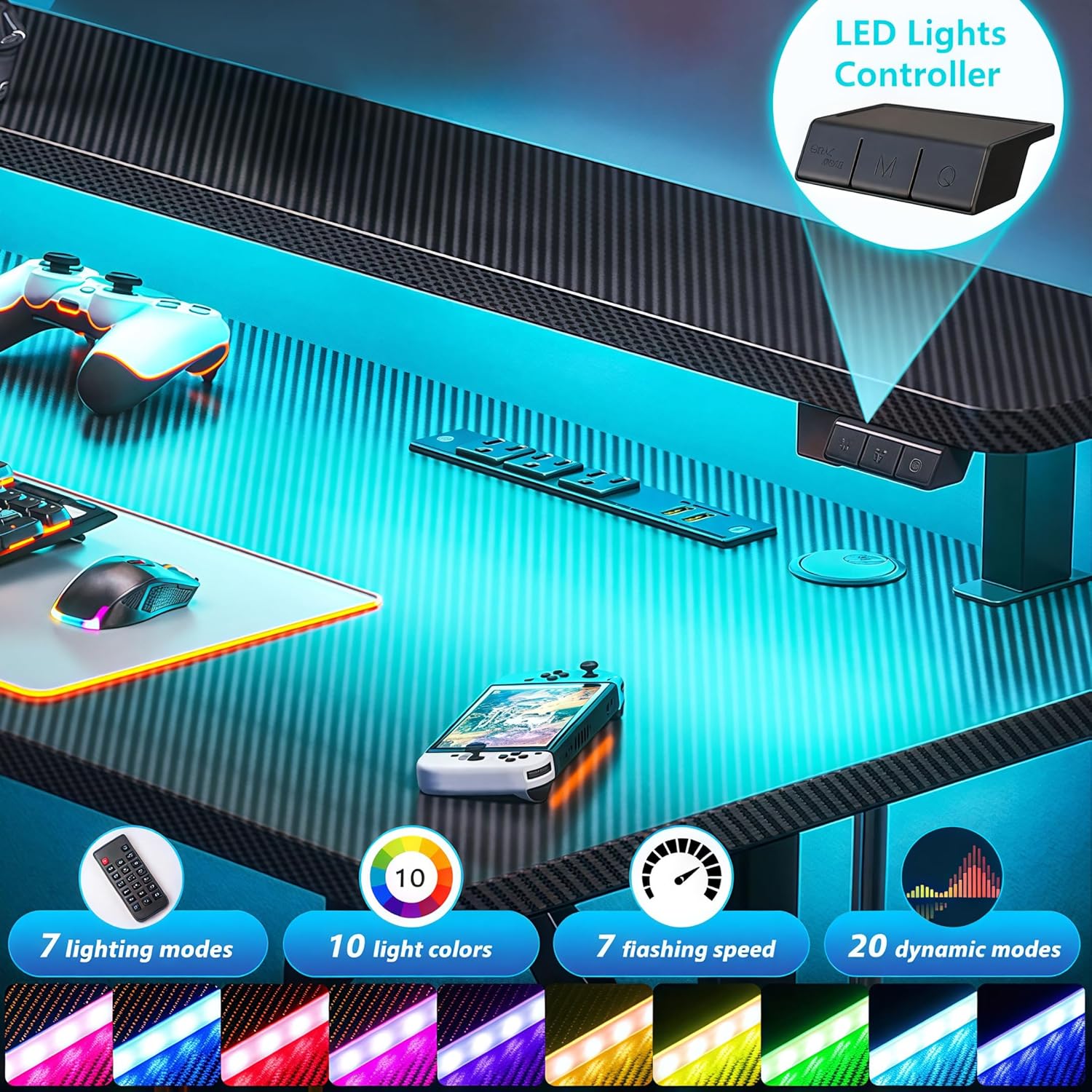
5.1. การใช้งานไฟ LED
The desk features customizable LED lights with 20 dynamic lighting modes. Use the integrated controller to manage the lighting effects.
- ปุ่มเปิด/ปิด: กดเพื่อเปิดหรือปิดไฟ LED
- 'M' (Dynamic Mode) Button: Cycle through 20 dynamic lighting modes.
- 'C' (Static Color) Button: Select from 10 static color options.
- การควบคุมความเร็ว/ความสว่าง: Adjust the speed of dynamic modes or the brightness of static colors.

5.2. Power Outlets Usage
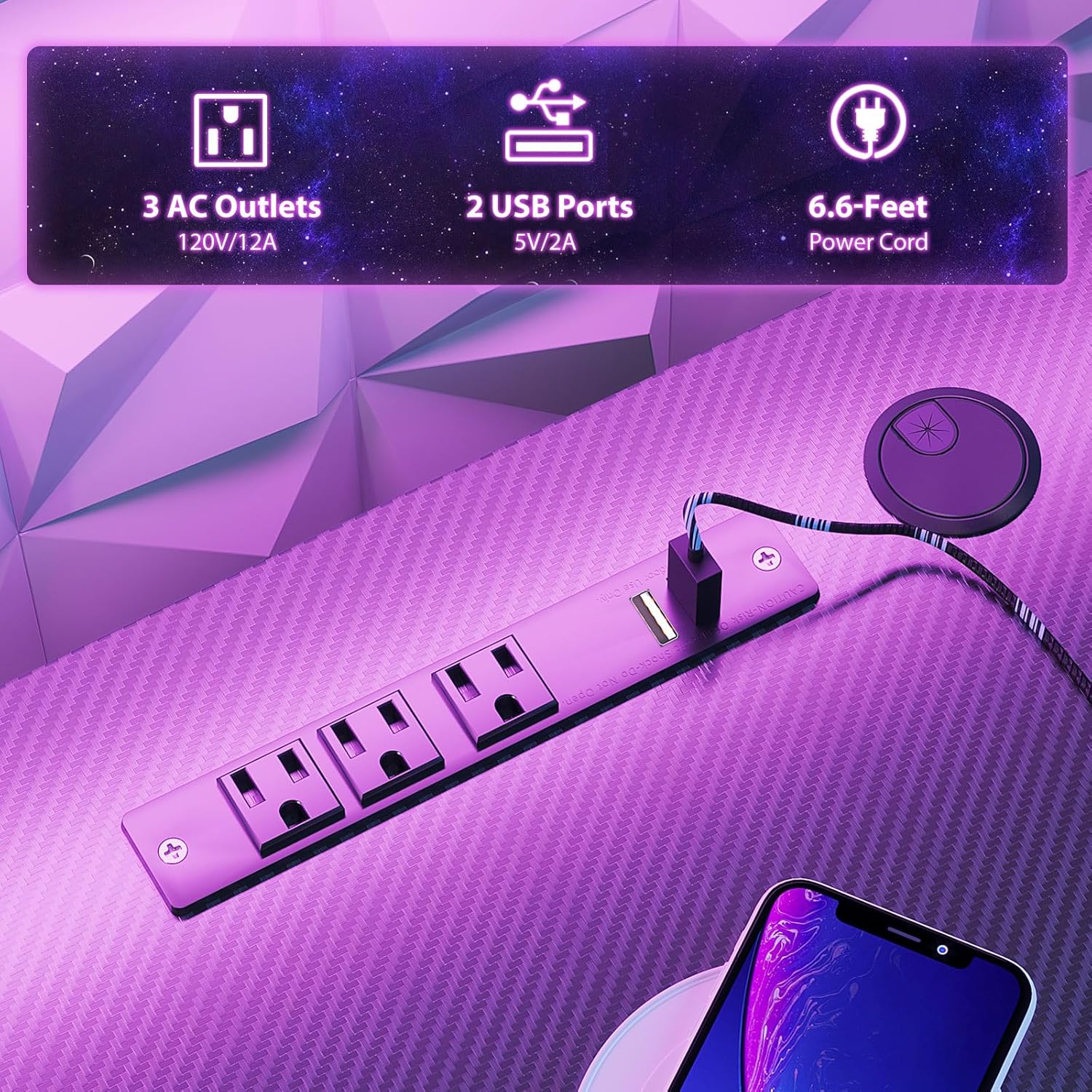
The integrated charging station provides convenient power for your devices.
- เต้ารับไฟฟ้ากระแสสลับ: Three 120V/12A AC outlets are available for powering monitors, computers, and other electronics.
- พอร์ต USB: มีพอร์ต USB ขนาด 5V/2A จำนวน 2 พอร์ต สำหรับชาร์จสมาร์ทโฟน แท็บเล็ต และอุปกรณ์อื่นๆ ที่ใช้พลังงานจาก USB
- Ensure the desk's main power cord is securely plugged into a functional wall outlet.
5.3. Monitor Shelf Utilization
The full-sized monitor shelf is designed to optimize viewing angles and maximize desk space.
- The shelf can accommodate up to two 24-inch monitors.
- It can also support a monitor arm or gaming consoles like a PS5.
- Positioning monitors on the shelf helps maintain an ergonomic sitting posture.


5.4. Accessory Usage
The desk includes a metal cup holder and a headphone hook for convenience.
- ที่วางแก้วน้ำ: Attach the metal cup holder to either side of the desk for easy access to beverages.
- ที่เกี่ยวหูฟัง: Utilize the headphone hook to keep your headphones organized and within reach.


6. การบำรุงรักษา
Regular maintenance helps prolong the life and appearance of your gaming desk.
- การทำความสะอาด: Wipe the carbon fiber textured desktop and metal frame with a soft, damp ผ้า หลีกเลี่ยงน้ำยาทำความสะอาดที่มีฤทธิ์กัดกร่อนหรือสารเคมีรุนแรงที่อาจทำลายพื้นผิวได้
- ส่วนประกอบไฟฟ้า: Ensure the power outlets and LED lights are kept dry. Do not attempt to clean them with liquids.
- ฮาร์ดแวร์: Periodically check all screws and bolts to ensure they remain tight. Retighten if necessary to maintain desk stability.
7 การแก้ไขปัญหา
If you encounter issues with your MOTPK Gaming Desk, refer to the following common solutions:
- โต๊ะโยกเยก: Ensure all assembly screws are tightened. Verify the desk is on a flat, even surface. Adjust leveling feet if present.
- ไฟ LED ไม่ทำงาน: Check if the main power cord is securely plugged into the wall outlet. Ensure the LED light strips are properly connected to the controller and the power source. Press the ON/OFF button on the controller.
- ปลั๊กไฟใช้งานไม่ได้: Confirm the desk's main power cord is plugged in. Test the wall outlet with another device to ensure it is functional. Check for any tripped circuit breakers.
- ส่วนที่หายไป: If parts are missing upon arrival, contact customer support immediately with your purchase details.
8. ข้อมูลจำเพาะ
| คุณสมบัติ | ข้อมูลจำเพาะ |
|---|---|
| หมายเลขรุ่น | เอ็มเคบี04010401002 |
| ขนาดสินค้า (ลึก x กว้าง x สูง) | ลึก 19.68 นิ้ว x กว้าง 39.37 นิ้ว x สูง 34.69 นิ้ว |
| น้ำหนักสินค้า | 27 ปอนด์ (12.25 กก.) |
| คำแนะนำน้ำหนักสูงสุด | 110 ปอนด์ (50 กก.) |
| ประเภทวัสดุยอดนิยม | Engineered Wood (Carbon Fiber Texture) |
| วัสดุฐาน | โลหะ (เหล็ก) |
| สี | สีดำ |
| คุณสมบัติพิเศษ | Built-in Power Outlet, Carbon Fiber Texture, LED Lights, T-shaped legs, Monitor Shelf, Metal Cup Holder, Headphone Hook |
| ปลั๊กไฟ | เต้ารับไฟฟ้ากระแสสลับ 3 ช่อง (120V/12A) |
| พอร์ต USB | พอร์ต USB 2 ช่อง (5V/2A) |
| ความยาวสายไฟ | 6.6 ฟุต |
| โหมดไฟ LED | โหมดไดนามิก 20 โหมด, สีคงที่ 10 สี |
| จำเป็นต้องประกอบ | ใช่ |
| บุคคลที่แนะนำสำหรับการประกอบ | 1 |
| มีเครื่องมือประกอบมาให้ด้วย | ใช่ |
9. การรับประกันและการสนับสนุน
MOTPK is committed to providing high-quality products and excellent pre-sales and after-sales service. For any questions, concerns, or assistance with your product, please refer to the contact information provided with your purchase or visit the official MOTPK webเว็บไซต์.
โปรดเก็บหลักฐานการซื้อของคุณไว้สำหรับการเรียกร้องการรับประกันหรือการสอบถามการสนับสนุน


