การแนะนำ
ขอบคุณสำหรับการซื้อasing the Denver KMS-20B Karaoke Speaker. This manual provides essential information for the safe and efficient operation of your device. Please read these instructions carefully before use and retain them for future reference.
ข้อมูลด้านความปลอดภัยที่สำคัญ
- ห้ามให้อุปกรณ์โดนฝน ความชื้น หรืออุณหภูมิที่สูงหรือต่ำเกินไป
- หลีกเลี่ยงการทำอุปกรณ์หล่นหรือกระแทกอย่างรุนแรง
- อย่าพยายามถอดประกอบหรือซ่อมแซมอุปกรณ์ด้วยตนเอง แนะนำให้ส่งช่างผู้ชำนาญการไปรับบริการทั้งหมด
- เก็บอุปกรณ์ให้ห่างจากแหล่งความร้อนและแสงแดดโดยตรง
- ใช้เฉพาะสายชาร์จและอะแดปเตอร์ไฟที่ระบุเท่านั้น
- กำจัดแบตเตอรี่อย่างมีความรับผิดชอบตามกฎระเบียบท้องถิ่น
เนื้อหาแพ็คเกจ
ตรวจสอบให้แน่ใจว่ามีรายการทั้งหมดอยู่ในบรรจุภัณฑ์:
- Denver KMS-20B Karaoke Speaker
- คู่มือเริ่มต้นอย่างรวดเร็ว
- Power Cable (USB Type A)
สินค้าเกินview
Familiarize yourself with the components and controls of your Denver KMS-20B Karaoke Speaker.
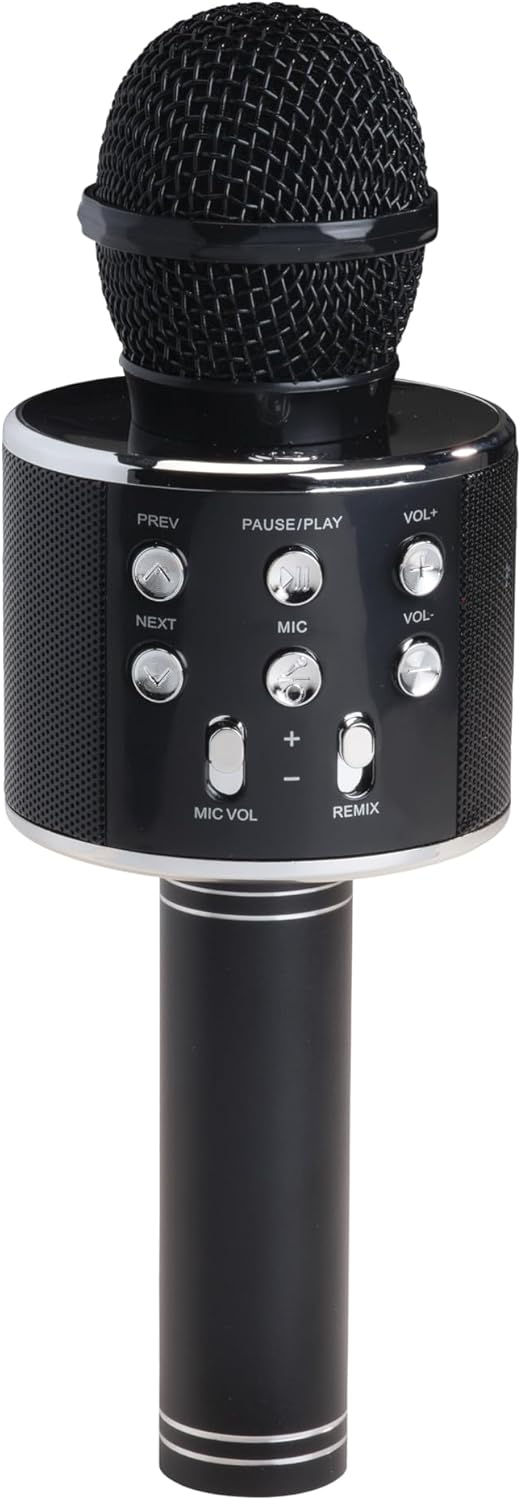
รูปที่ 1 : ด้านหน้า View. This image displays the main body of the karaoke speaker, featuring the microphone grille at the top and the central control panel with various buttons for playback and volume adjustments.
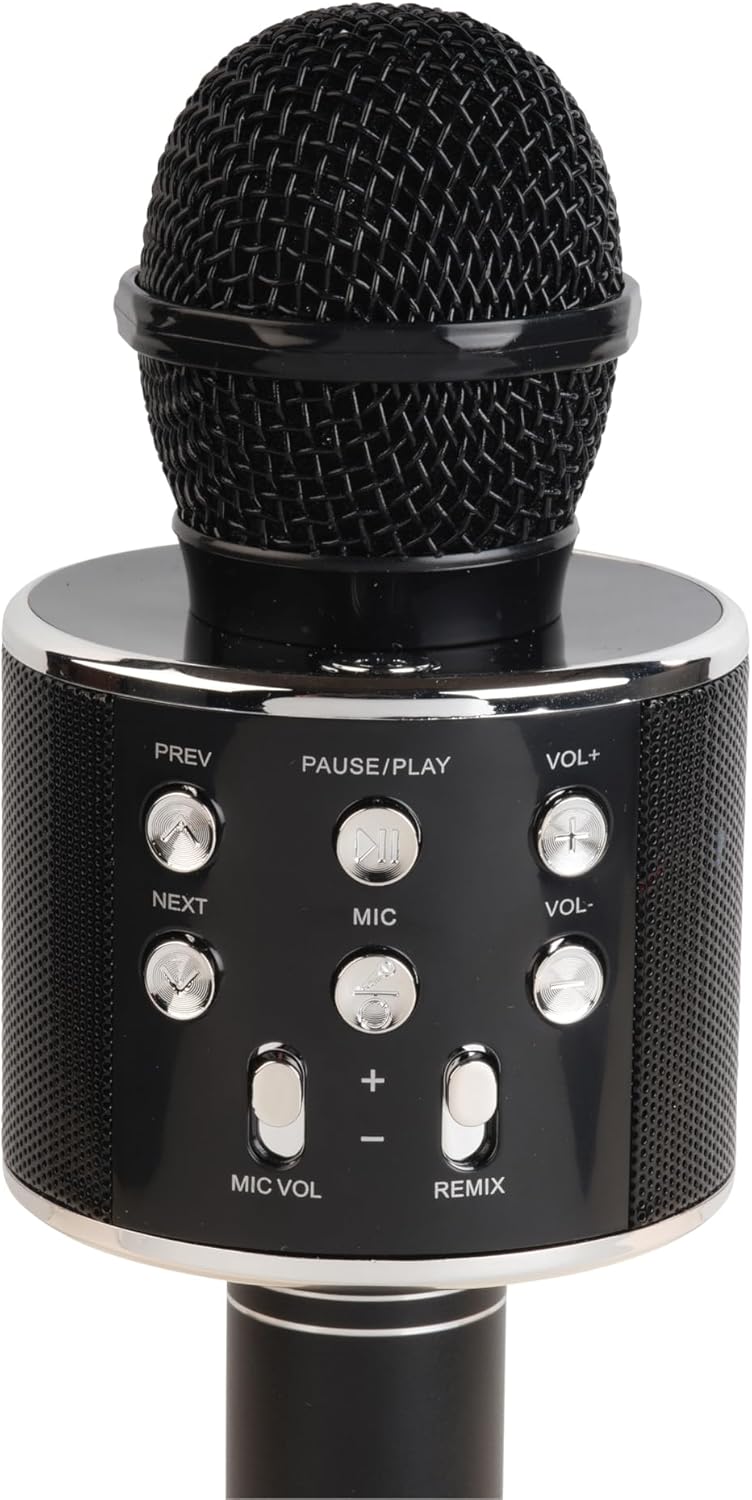
Figure 2: Control Panel Detail. A closer look at the control panel, highlighting buttons such as PREV, NEXT, PAUSE/PLAY, VOL+, VOL-, MIC, MIC VOL, and REMIX. The power button is also visible.

Figure 3: Bottom Ports. This image shows the bottom section of the speaker handle, revealing the charging port (5V 0.5A), a USB port, and a 3.5mm headphone jack for external connections.
ฟังก์ชั่นแผงควบคุม:
- ปุ่มเปิด/ปิด: กดค้างไว้เพื่อเปิด/ปิดลำโพง
- หยุดชั่วคราว/เล่น: กดเพื่อเล่นหรือหยุดเพลงชั่วคราว
- PREV (Previous): กดเพื่อไปยังเพลงก่อนหน้า
- ต่อไป: กดเพื่อไปยังเพลงถัดไป
- VOL+ (เพิ่มระดับเสียง): กดเพื่อเพิ่มระดับเสียงของลำโพง
- VOL- (ลดระดับเสียง): กดเพื่อลดระดับเสียงของลำโพง
- ไมค์: Press to activate/deactivate the microphone.
- MIC VOL (+/-): ปรับระดับเสียงไมโครโฟน
- REMIX: Activates/deactivates the echo effect for the microphone.
พอร์ต:
- Charging Port (5V 0.5A): สำหรับชาร์จแบตเตอรี่ภายใน
- พอร์ต USB: สำหรับเล่นเพลงจากแฟลชไดรฟ์ USB
- แจ็คหูฟัง 3.5 มม.: สำหรับเชื่อมต่อหูฟังหรืออุปกรณ์เสียงภายนอก
การตั้งค่า
1. ชาร์จลำโพง
- Connect the provided power cable to the charging port (5V 0.5A) on the speaker.
- ต่อปลายอีกด้านของสายเคเบิลเข้ากับอะแดปเตอร์แปลงไฟ USB ที่ใช้งานร่วมกันได้ (ไม่ได้รวมอยู่ในชุด) หรือพอร์ต USB บนคอมพิวเตอร์
- ไฟแสดงสถานะการชาร์จ (ถ้ามี) จะสว่างขึ้นขณะชาร์จ และจะดับลงหรือเปลี่ยนสีเมื่อชาร์จเต็มแล้ว
- ควรชาร์จแบตเตอรี่จนเต็มประมาณ 2-3 ชั่วโมงก่อนใช้งานครั้งแรก
2. การเปิด/ปิดเครื่อง
- To turn ON: Press and hold the Power button until the indicator light illuminates and you hear an audible prompt.
- To turn OFF: Press and hold the Power button again until the indicator light turns off and you hear an audible prompt.
3. การจับคู่บลูทู ธ
- ตรวจสอบให้แน่ใจว่าลำโพงเปิดอยู่ ลำโพงจะเข้าสู่โหมดจับคู่บลูทูธโดยอัตโนมัติ ซึ่งจะแสดงด้วยไฟ LED กระพริบและมีเสียงแจ้งเตือน
- บนอุปกรณ์เคลื่อนที่ของคุณ (สมาร์ทโฟน แท็บเล็ต ฯลฯ) เปิดใช้งานบลูทูธและค้นหาอุปกรณ์ที่มีอยู่
- Select "KMS-20B" from the list of found devices.
- Once successfully paired, the LED indicator will stop flashing, and you will hear a confirmation sound.
- The speaker will automatically connect to the last paired device when powered on, if it is within range and Bluetooth is enabled.
คำแนะนำการใช้งาน
Music Playback (Bluetooth/USB)
- บลูทูธ: After successful pairing, start playing music on your connected device. The audio will stream through the KMS-20B speaker.
- ยูเอสบี: ใส่แฟลชไดรฟ์ USB ที่มีไฟล์เสียง MP3 files into the USB port. The speaker will automatically detect and begin playing music from the drive.
- หยุดชั่วคราว/เล่น: Press this button to pause or resume music playback.
- ก่อนหน้า/ถัดไป: Press these buttons to skip to the previous or next track.
- ฉบับ+/ฉบับ-: Press these buttons to adjust the main speaker volume.
การใช้งานไมโครโฟน
- Activating Microphone: กดปุ่ม ไมค์ button to turn on the microphone function. Press it again to turn off.
- ปริมาณไมโครโฟน: ใช้ MIC VOL (+/-) buttons to increase or decrease the microphone's output volume.
- Echo Effect (REMIX): กดปุ่ม รีมิกซ์ button to activate or deactivate the echo effect for your voice. This adds a reverberation effect, common in karaoke.
การซ่อมบำรุง
- การทำความสะอาด: ใช้ผ้านุ่มและแห้งเช็ดทำความสะอาดภายนอกลำโพง ห้ามใช้น้ำยาทำความสะอาดหรือสารละลายที่มีฤทธิ์กัดกร่อน
- พื้นที่จัดเก็บ: เมื่อไม่ได้ใช้งานเป็นเวลานาน ควรเก็บลำโพงไว้ในที่แห้งและเย็น หลีกเลี่ยงแสงแดดโดยตรงและอุณหภูมิที่สูงหรือต่ำเกินไป
- การดูแลแบตเตอรี่ To prolong battery life, fully charge the speaker at least once every three months, even if not in regular use.
การแก้ไขปัญหา
| ปัญหา | สาเหตุที่เป็นไปได้ | สารละลาย |
|---|---|---|
| ลําโพงไม่เปิดขึ้น | แบตเตอรี่อ่อน | ชาร์จลำโพงให้เต็ม |
| ไม่สามารถจับคู่ผ่านบลูทูธได้ | Bluetooth is off on your device; speaker is not in pairing mode; too far from device. | Ensure Bluetooth is enabled on your device. Power cycle the speaker to enter pairing mode. Move device closer to speaker (within 10 meters). |
| ไม่มีเสียงจากลำโพง | ระดับเสียงเบาเกินไป; ไม่ได้เชื่อมต่ออุปกรณ์; แหล่งสัญญาณเข้าไม่ถูกต้อง | Increase speaker and device volume. Ensure Bluetooth is connected or USB is properly inserted. |
| ไมโครโฟนไม่ทำงาน | Microphone function is off; MIC VOL is too low. | Press the MIC button to activate. Increase MIC VOL. |
ข้อมูลจำเพาะ
- แบบอย่าง: KMS-20B
- ยี่ห้อ: เดนเวอร์
- การเชื่อมต่อ: Bluetooth, USB Type A, 3.5mm Jack
- แหล่งพลังงาน: ใช้พลังงานจากแบตเตอรี่
- ประเภทแบตเตอรี่: ลิเธียมไอออน (แบบชาร์จไฟได้)
- อินพุตการชาร์จ: 5V 0.5A (via USB Type A)
- ขนาด : 7.8 x 7.8 x 23 ซม. (ประมาณ 3.07 x 3.07 x 9.06 นิ้ว)
- น้ำหนัก: 340 กรัม (ประมาณ 0.75 ปอนด์)
- ส่วนประกอบที่รวมอยู่: Quick Start Guide, Power Cable
การรับประกันและการสนับสนุน
For warranty information and technical support, please refer to the warranty card included with your product or visit the official Denver webไซต์ โปรดเก็บใบเสร็จรับเงินไว้เป็นหลักฐานการซื้อ


