1. บทนำและเรื่องอื่นๆview
ยินดีต้อนรับสู่คู่มือการใช้งานสำหรับเครื่องออกกำลังกายแบบวงรี HAMMER Ellypsis E3500 รุ่นใหม่ของคุณ เครื่องออกกำลังกายแบบวงรีที่ทันสมัยรุ่นนี้ มาในสีดำ Stealth Black ผสานการออกแบบชั้นเยี่ยมเข้ากับหลักสรีรศาสตร์ที่เหมาะสมที่สุด เพื่อมอบประสบการณ์การออกกำลังกายที่มีประสิทธิภาพและสะดวกสบาย ออกแบบมาเพื่อรองรับเป้าหมายการออกกำลังกายที่หลากหลาย ตั้งแต่สุขภาพหัวใจและหลอดเลือดไปจนถึงการเสริมสร้างกล้ามเนื้อและการเผาผลาญไขมัน
เครื่องปั่นจักรยาน E3500 มีช่วงก้าวที่กว้างถึง 52 ซม. และระยะห่างระหว่างแป้นเหยียบที่ออกแบบตามหลักสรีรศาสตร์ 13 ซม. ช่วยให้การเคลื่อนไหวเป็นธรรมชาติและราบรื่น คอมพิวเตอร์ LCD ที่ใช้งานง่ายแสดงข้อมูลและฟังก์ชั่นการฝึกซ้อมที่จำเป็นทั้งหมดได้อย่างรวดเร็ว รวมถึงการตรวจสอบอัตราการเต้นของหัวใจผ่านเซ็นเซอร์ในตัว เครื่องปั่นจักรยานนี้ยังใช้งานร่วมกับแอปพลิเคชันฟิตเนสยอดนิยม เช่น Zwift และ Kinomap ได้ ช่วยให้คุณดื่มด่ำไปกับโลกแห่งการฝึกซ้อมเสมือนจริงและเส้นทางแบบโต้ตอบได้

รูปที่ 1: เครื่องออกกำลังกายแบบวงรี HAMMER Ellypsis E3500 สีดำเงา ออกแบบมาเพื่อการออกกำลังกายที่บ้านอย่างถูกหลักสรีรศาสตร์และมีประสิทธิภาพ
2. ข้อมูลด้านความปลอดภัย
โปรดอ่านคำแนะนำด้านความปลอดภัยทั้งหมดอย่างละเอียดก่อนประกอบหรือใช้งานเครื่อง HAMMER Ellypsis E3500 การไม่ปฏิบัติตามคำแนะนำเหล่านี้อาจส่งผลให้เกิดการบาดเจ็บหรือความเสียหายต่ออุปกรณ์ได้
- ปรึกษาแพทย์: ก่อนเริ่มโปรแกรมออกกำลังกายใหม่ใดๆ โดยเฉพาะอย่างยิ่งหากคุณมีปัญหาสุขภาพอยู่แล้ว ควรปรึกษาผู้เชี่ยวชาญด้านสุขภาพก่อน
- การประกอบ: ตรวจสอบให้แน่ใจว่าได้ประกอบและขันชิ้นส่วนทั้งหมดอย่างถูกต้องตามคำแนะนำ ห้ามใช้เครื่องหากชิ้นส่วนใดชำรุดหรือสูญหาย
- การจัดวาง: วางเครื่องออกกำลังกายแบบวงรีบนพื้นผิวเรียบและมั่นคง ตรวจสอบให้แน่ใจว่ามีพื้นที่ว่างรอบเครื่องเพียงพอ (อย่างน้อย 0.6 เมตร หรือ 2 ฟุต) เพื่อความปลอดภัยในการใช้งานและการเคลื่อนไหว
- ขีดจำกัดน้ำหนักผู้ใช้: ห้ามใช้งานเกินน้ำหนักผู้ใช้สูงสุด 150 กิโลกรัม (330 ปอนด์)
- เด็กและสัตว์เลี้ยง: โปรดกันเด็กและสัตว์เลี้ยงให้ออกห่างจากเครื่องขณะใช้งาน อุปกรณ์นี้ไม่ใช่ของเล่น
- การแต่งกายที่เหมาะสม: ควรสวมใส่ชุดกีฬาและรองเท้ากีฬาที่เหมาะสม หลีกเลี่ยงเสื้อผ้าหลวมๆ ที่อาจไปเกี่ยวติดกับชิ้นส่วนที่เคลื่อนไหวได้
- วอร์มอัพและคูลดาวน์: ควรวอร์มร่างกายก่อนออกกำลังกายและคูลดาวน์หลังออกกำลังกายเสมอ เพื่อป้องกันอาการกล้ามเนื้อตึง
- หยุดหากรู้สึกไม่สบาย: หากคุณมีอาการเวียนศีรษะ คลื่นไส้ เจ็บหน้าอก หรืออาการผิดปกติอื่น ๆ ให้หยุดออกกำลังกายทันทีและปรึกษาแพทย์
- การซ่อมบำรุง: ตรวจสอบเครื่องจักรอย่างสม่ำเสมอเพื่อดูร่องรอยการสึกหรอ อย่าพยายามซ่อมแซมเครื่องจักรเกินกว่าคำแนะนำในการบำรุงรักษาที่ระบุไว้ในคู่มือนี้
3. เนื้อหาบรรจุภัณฑ์
โปรดแกะกล่องชิ้นส่วนทั้งหมดอย่างระมัดระวัง และตรวจสอบว่าคุณได้รับชิ้นส่วนทั้งหมดตามรายการด้านล่าง หากมีชิ้นส่วนใดขาดหายหรือเสียหาย โปรดติดต่อฝ่ายบริการลูกค้า
- การประกอบเฟรมหลัก
- กันโคลงหน้าและหลัง
- ก้านเหยียบและแป้นเหยียบ (2 ชุด)
- แฮนด์บาร์ (แบบคงที่และแบบเคลื่อนที่ได้)
- หน่วยคอนโซล/จอแสดงผล
- ชุดอุปกรณ์ฮาร์ดแวร์ (น็อต แหวนรอง น็อตตัวเมีย เครื่องมือ)
- อะแดปเตอร์แปลงไฟ
- คู่มือการใช้งาน (เอกสารนี้)
4. คำแนะนำในการประกอบ
โดยทั่วไปแล้ว การประกอบต้องใช้คนสองคน โปรดทำตามขั้นตอนเหล่านี้อย่างระมัดระวัง โปรดดูแผนภาพประกอบการประกอบที่แนบมาเพื่อเป็นแนวทาง
- แกะกล่องและเตรียมพร้อม: นำชิ้นส่วนทั้งหมดออกจากบรรจุภัณฑ์ วางชิ้นส่วนทั้งหมดบนพื้นผิวเรียบและสะอาด ตรวจสอบให้แน่ใจว่าได้นำวัสดุบรรจุภัณฑ์ทั้งหมดออกจากตัวเครื่องหลักแล้ว
- ติดตั้งตัวกันโคลง: ยึดเหล็กกันโคลงด้านหน้าและด้านหลังเข้ากับโครงหลักโดยใช้สลักเกลียวและแหวนรองที่ให้มา ตรวจสอบให้แน่ใจว่ายึดแน่นเพื่อความมั่นคง
- ติดตั้งก้านเหยียบ: ประกอบแขนเหยียบเข้ากับกลไกขับเคลื่อนหลัก สังเกตเครื่องหมายซ้ายและขวา ยึดให้แน่นด้วยอุปกรณ์ที่เหมาะสม
- ติดตั้งแฮนด์จักรยาน: เชื่อมต่อแฮนด์ด้านคงที่เข้ากับโครงหลัก จากนั้น ติดตั้งแฮนด์ด้านที่เคลื่อนที่ได้เข้ากับแขนเหยียบและส่วนรองรับด้านบนของโครงหลัก ตรวจสอบให้แน่ใจว่าจุดหมุนทั้งหมดแน่นหนาดีแล้ว
- เชื่อมต่อคอนโซล: เชื่อมต่อสายเคเบิลเซ็นเซอร์จากตัวเครื่องหลักเข้ากับชุดควบคุมอย่างระมัดระวัง จากนั้นติดตั้งชุดควบคุมลงบนแท่นยึดที่กำหนดไว้
- การตรวจสอบขั้นสุดท้าย: ตรวจสอบน็อตและจุดเชื่อมต่อทั้งหมดอีกครั้งเพื่อให้แน่ใจว่าแน่นหนาดีแล้ว จากนั้นเสียบอะแดปเตอร์แปลงไฟ
5. คู่มือการใช้งาน
5.1. คอนโซลและจอแสดงผล
หน้าจอ LCD ที่ใช้งานง่ายจะแสดงข้อมูลการออกกำลังกายของคุณแบบเรียลไทม์

รูปที่ 2: หน้าจอควบคุมของเครื่องออกกำลังกายแบบวงรี แสดงข้อมูลการออกกำลังกาย พร้อมคุณสมบัติหลัก เช่น ล้อหมุน 20 กก. โปรแกรมฝึก 11 โปรแกรม และระยะก้าว 52 ซม.
- จอแสดงผล LCD: แสดงเวลา ระยะทาง ความเร็ว แคลอรีที่เผาผลาญ และอัตราการเต้นของหัวใจ
- ปุ่ม: เลื่อนดูเมนู เลือกโปรแกรม และปรับแรงต้าน ดูรายละเอียดการทำงานของปุ่มต่างๆ ได้ในส่วนเฉพาะของแต่ละเครื่องในคู่มือฉบับเต็ม
- ที่วางแท็บเล็ต: มีที่วางสำหรับสมาร์ทโฟนหรือแท็บเล็ตในตัวเพื่อความสะดวกในการใช้งาน
5.2. โครงการฝึกอบรม
เครื่องออกกำลังกาย Ellypsis E3500 มีโปรแกรมหลากหลายให้เลือกใช้ตามความต้องการด้านการออกกำลังกายของคุณ:
- 11 โปรแกรมการฝึกอบรม: โปรแกรมสำเร็จรูปที่ออกแบบมาสำหรับระดับความฟิตและเป้าหมายที่แตกต่างกัน
- 4 โปรแกรมวัดอัตราการเต้นของหัวใจ: กำหนดเป้าหมายช่วงอัตราการเต้นของหัวใจที่เฉพาะเจาะจงเพื่อการฝึกฝนระบบหัวใจและหลอดเลือดที่มีประสิทธิภาพ
- 4 ผู้ใช้ Profiles: บันทึกข้อมูลและความคืบหน้าของผู้ใช้แต่ละราย
- โปรแกรมด้วยตนเอง: ปรับค่าแรงต้านและพารามิเตอร์การออกกำลังกายด้วยตนเองระหว่างการใช้งาน
5.3 การเชื่อมต่อแอปพลิเคชัน (Kinomap และ Zwift)
ยกระดับประสบการณ์การฝึกของคุณด้วยการเชื่อมต่อเครื่องออกกำลังกายแบบวงรีเข้ากับ Kinomap และ Zwift ผ่านบลูทูธ

รูปที่ 3: ผู้ใช้งานกำลังใช้งานแผงควบคุมของเครื่องออกกำลังกายแบบวงรี ซึ่งแสดงการเชื่อมต่อกับแอปพลิเคชันด้านฟิตเนส เช่น Kinomap และ Zwift สำหรับการออกกำลังกายแบบโต้ตอบและถ่ายทอดสด
- ดาวน์โหลดแอป: ดาวน์โหลดแอป Kinomap และ/หรือ Zwift จาก App Store ของอุปกรณ์ของคุณ
- เปิดใช้งานบลูทูธ: ตรวจสอบให้แน่ใจว่าได้เปิดใช้งาน Bluetooth บนสมาร์ทโฟนหรือแท็บเล็ตของคุณแล้ว
- เชื่อมต่อ: เปิดแอปพลิเคชันฟิตเนสและทำตามคำแนะนำในแอปเพื่อเชื่อมต่อกับเครื่องฝึกปั่นจักรยาน HAMMER Ellypsis E3500 โดยปกติแอปจะตรวจจับเครื่องฝึกได้โดยอัตโนมัติ
- สำรวจ: เพลิดเพลินไปกับเส้นทางแบบอินเตอร์แอคทีฟ ฟังก์ชั่นเล่นหลายคน และการออกกำลังกายสดๆ
5.4. การปรับความชัน
เครื่องออกกำลังกาย Ellypsis E3500 มีระบบปรับความสูงได้ 3 ระดับ ช่วยให้คุณปรับเปลี่ยนการออกกำลังกายและเน้นกล้ามเนื้อกลุ่มต่างๆ ได้
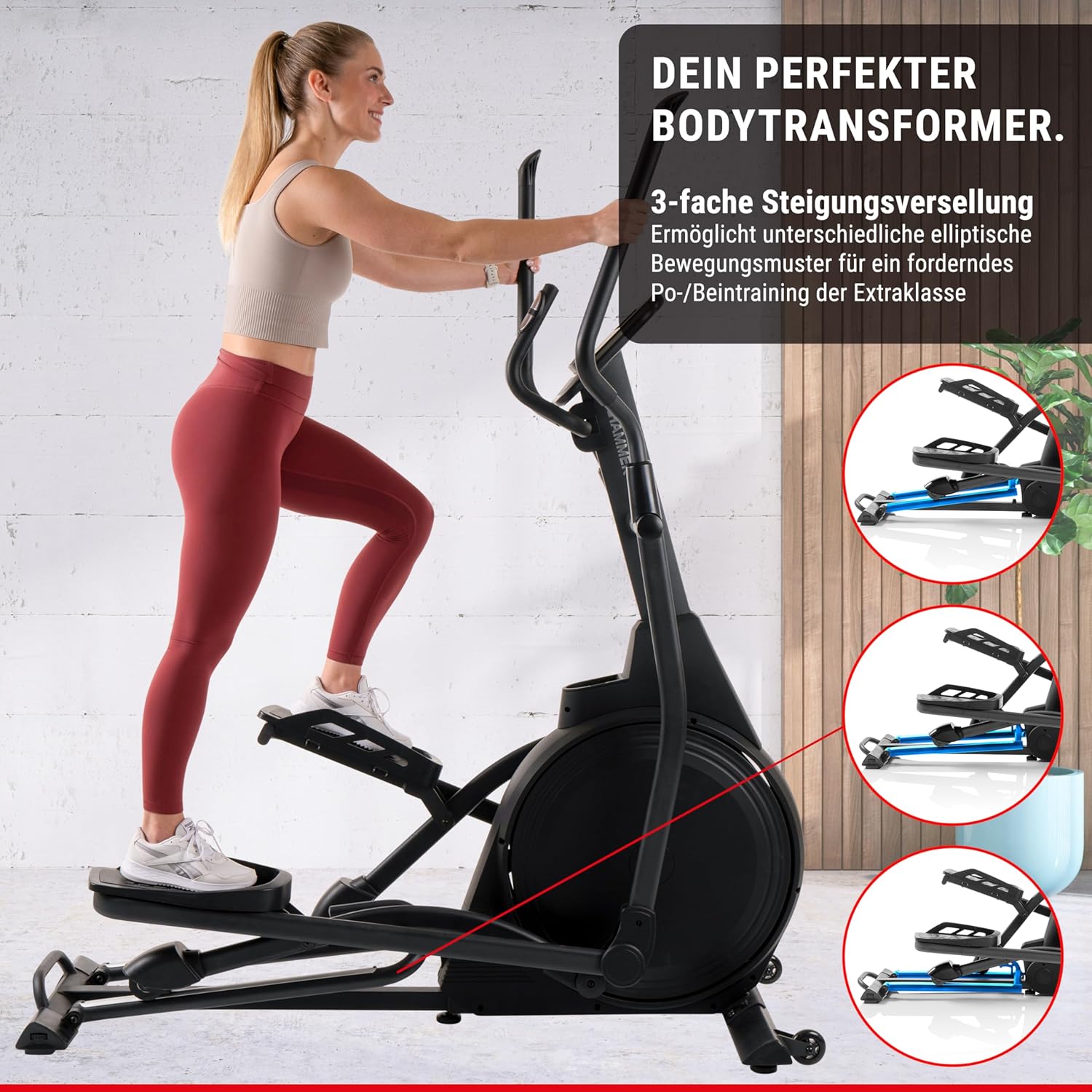
ภาพที่ 4: เครื่องออกกำลังกายแบบวงรีที่แสดงให้เห็นถึงความสามารถในการปรับระดับความเอียงได้ 3 ระดับ ซึ่งช่วยให้สามารถเคลื่อนไหวแบบวงรีได้หลากหลายรูปแบบเพื่อเน้นกล้ามเนื้อขาและสะโพกส่วนต่างๆ
- การปรับความลาดเอียง: กลไกปรับความเอียงอยู่ด้านหน้าของเครื่อง โปรดอ่านคู่มือฉบับละเอียดเพื่อดูคำแนะนำเฉพาะเกี่ยวกับการปรับความเอียงอย่างปลอดภัย
- การกำหนดเป้าหมายของกล้ามเนื้อ: การปรับความลาดชันให้สูงขึ้นจะเน้นกล้ามเนื้อสะโพกและต้นขาด้านหลัง ในขณะที่การปรับความลาดชันให้ต่ำลงจะเน้นกล้ามเนื้อต้นขาด้านหน้า
5.5 ตรวจสอบอัตราการเต้นของหัวใจ
เซ็นเซอร์วัดอัตราการเต้นของหัวใจที่ติดตั้งอยู่บนแฮนด์จักรยาน ช่วยให้คุณสามารถตรวจสอบชีพจรขณะออกกำลังกายได้
- การใช้งาน: ระหว่างออกกำลังกาย ให้จับเซ็นเซอร์วัดอัตราการเต้นของหัวใจให้แน่นด้วยมือทั้งสองข้าง อัตราการเต้นของหัวใจจะแสดงบนหน้าจอควบคุม
- ความแม่นยำ: เพื่อให้ได้ผลลัพธ์ที่แม่นยำที่สุด โปรดตรวจสอบให้แน่ใจว่ามือของคุณสะอาดและแห้ง
6. การบำรุงรักษา
การบำรุงรักษาอย่างสม่ำเสมอจะช่วยให้เครื่องออกกำลังกายแบบวงรีของคุณมีอายุการใช้งานยาวนานและทำงานได้อย่างมีประสิทธิภาพสูงสุด
- การทำความสะอาด: เช็ดเครื่องด้วยโฆษณาamp หลังการใช้ทุกครั้งเพื่อขจัดเหงื่อและฝุ่น หลีกเลี่ยงน้ำยาทำความสะอาดที่มีฤทธิ์กัดกร่อน
- การหล่อลื่น: ตรวจสอบและหล่อลื่นชิ้นส่วนที่เคลื่อนไหวเป็นระยะตามที่ระบุไว้ในส่วนการบำรุงรักษาโดยละเอียดของคู่มือฉบับเต็ม
- การตรวจสอบ: ตรวจสอบความแน่นของน็อต สลักเกลียว และข้อต่อทั้งหมดอย่างสม่ำเสมอ ขันน็อตที่หลวมให้แน่น ตรวจสอบร่องรอยการสึกหรอของรางอลูมิเนียมและล้อ
- การทำงานที่เงียบ: เครื่อง E3500 ใช้ตลับลูกปืนคุณภาพสูงเพื่อการทำงานที่เงียบ หากคุณสังเกตเห็นเสียงผิดปกติใดๆ โปรดดูส่วนการแก้ไขปัญหา
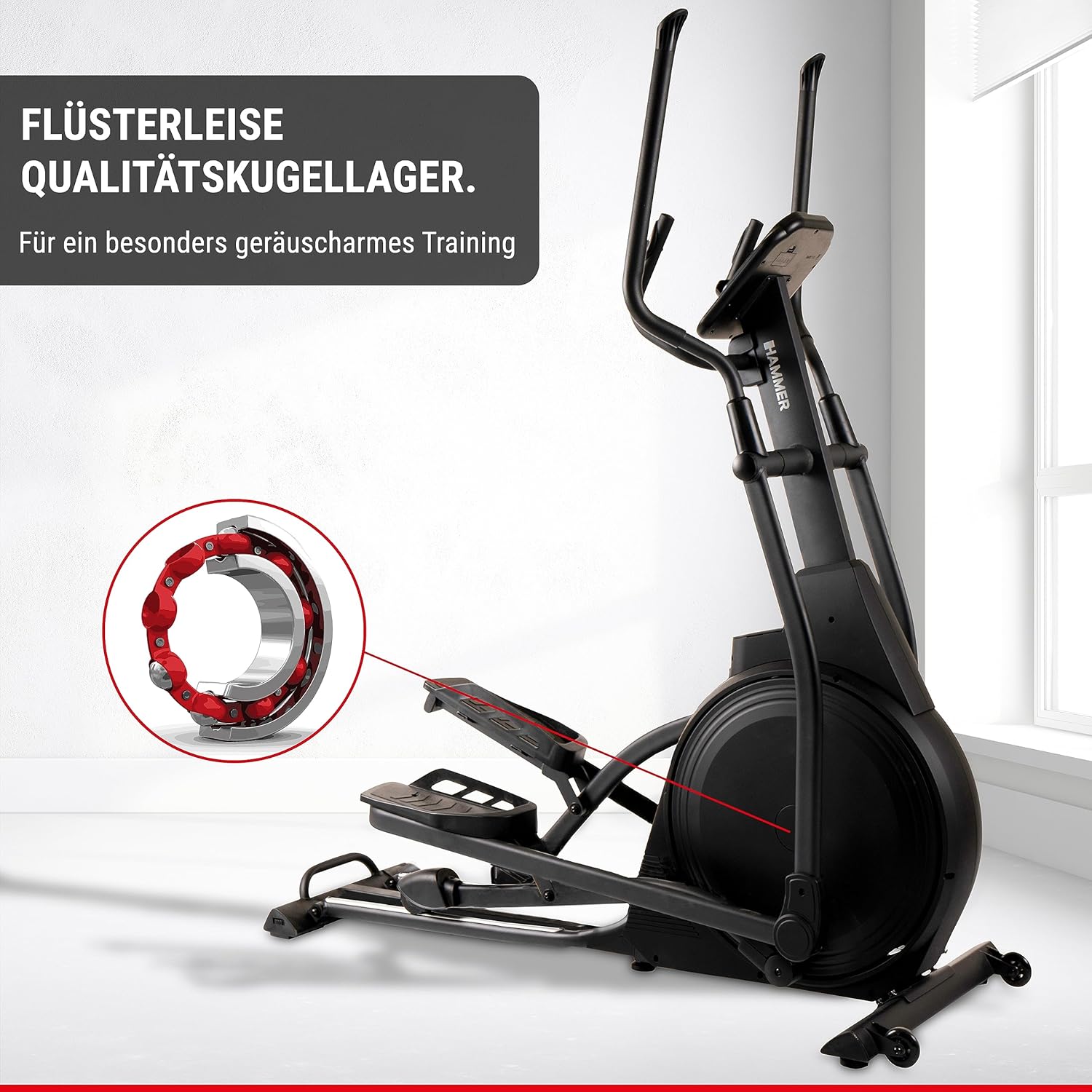
รูปที่ 5: ภาพประกอบแสดงให้เห็นถึงตลับลูกปืนคุณภาพสูงภายในเครื่องออกกำลังกายแบบวงรี ซึ่งออกแบบมาเพื่อการฝึกซ้อมที่เงียบเป็นพิเศษ
7 การแก้ไขปัญหา
หากคุณพบปัญหาใดๆ กับเครื่องออกกำลังกายแบบวงรี โปรดดูตารางด้านล่างสำหรับปัญหาที่พบบ่อยและวิธีแก้ไข
| ปัญหา | สาเหตุที่เป็นไปได้ | สารละลาย |
|---|---|---|
| ไม่มีไฟเลี้ยงเครื่องเกม | ไม่ได้เสียบอะแดปเตอร์ไฟ; มีปัญหาที่ปลั๊กไฟ; สายไฟชำรุด | ตรวจสอบให้แน่ใจว่าเสียบอะแดปเตอร์แปลงไฟเข้ากับเครื่องและเต้ารับที่ใช้งานได้สนิทดีแล้ว ตรวจสอบสายไฟว่าไม่มีความเสียหาย |
| มีเสียงดังผิดปกติขณะใช้งาน | น็อตหลวม; ขาดการหล่อลื่น; ชิ้นส่วนสึกหรอ | ตรวจสอบและขันน็อตประกอบทั้งหมดให้แน่น หล่อลื่นชิ้นส่วนที่เคลื่อนไหวตามคำแนะนำในการบำรุงรักษา หากยังมีเสียงดังอยู่ โปรดติดต่อฝ่ายบริการลูกค้า |
| การอ่านอัตราการเต้นของหัวใจที่ไม่แม่นยำ | มือวางไม่แน่นบนเซ็นเซอร์; มือแห้ง; มีสิ่งรบกวน | จับเซ็นเซอร์ให้แน่นและสม่ำเสมอ หากมือแห้งเกินไป ให้ใช้มือชุบน้ำหมาดๆ เช็ดเบาๆ หลีกเลี่ยงการรบกวนทางอิเล็กทรอนิกส์ |
| ความต้านทานไม่เปลี่ยนแปลง | ปัญหาการเชื่อมต่อคอนโซล; ระบบเบรกแม่เหล็กทำงานผิดปกติ | ตรวจสอบการเชื่อมต่อสายเคเบิลของคอนโซล รีสตาร์ทเครื่อง หากปัญหายังคงอยู่ โปรดติดต่อฝ่ายบริการลูกค้า |
8. ข้อมูลจำเพาะ
| คุณสมบัติ | รายละเอียด |
|---|---|
| ชื่อรุ่น | อิลิปซิส E3500 |
| หมายเลขรุ่น | 11001 |
| ยี่ห้อ | ค้อน |
| สี | สีดำ |
| ขนาด (กว้าง x ยาว x สูง) | 158 x 65 x 185 ซม. (62.2 x 25.6 x 72.8 นิ้ว) |
| น้ำหนักสินค้า | 66 กก. (145.5 ปอนด์) |
| มวลของล้อช่วยแรง | 20 กก. |
| กลไกต้านทาน Resistance | แม่เหล็ก |
| จำนวนระดับแนวต้าน | 20 |
| ความยาวก้าวสูงสุด | 52 ซม. |
| ระยะห่างของแป้นเหยียบ | 13 ซม. |
| น้ำหนักผู้ใช้สูงสุด | 150 กก. |
| โปรแกรมการฝึกอบรม | 11 (รวมถึงโปรแกรมวัดอัตราการเต้นของหัวใจ 4 โปรแกรม) |
| ผู้ใช้มืออาชีพfiles | 4 |
| การเชื่อมต่อ | ใช้งานร่วมกับ Zwift และ Kinomap ได้ |
| แหล่งพลังงาน | ต้องใช้แบตเตอรี่ AA (สำหรับตัวเครื่อง) |
9. การรับประกันและการสนับสนุน
หากต้องการข้อมูลการรับประกัน การสนับสนุนทางเทคนิค หรือสั่งซื้ออะไหล่ โปรดติดต่อฝ่ายบริการลูกค้าของ HAMMER
- บริการลูกค้า: โปรดดูข้อมูลการติดต่อที่ระบุไว้ใน HAMMER webไซต์หรือใบเสร็จรับเงินการซื้อของคุณ
- แหล่งข้อมูลออนไลน์: เยี่ยมชมเว็บไซต์อย่างเป็นทางการของ HAMMER webเว็บไซต์นี้รวบรวมคำถามที่พบบ่อย (FAQ) เอกสารสนับสนุนเพิ่มเติม และการลงทะเบียนผลิตภัณฑ์


