1. บทนำ
This manual provides detailed instructions for the installation, operation, and maintenance of your Anpviz 4K PoE IP Camera Outdoor, Model IPC-D3083WD-S. Please read this manual thoroughly before using the product to ensure proper setup and functionality. This camera is designed for both indoor and outdoor surveillance, offering high-resolution video and advanced detection features.
2. เนื้อหาบรรจุภัณฑ์
ตรวจสอบว่ารายการทั้งหมดที่ระบุไว้ด้านล่างนี้รวมอยู่ในแพ็คเกจของคุณ:
- 1x Anpviz 4K PoE Security Camera
- 1x Screws kits
- 1x คู่มือการใช้งาน (เอกสารนี้)
- 1x Drill Template
- 1x After-sales Card
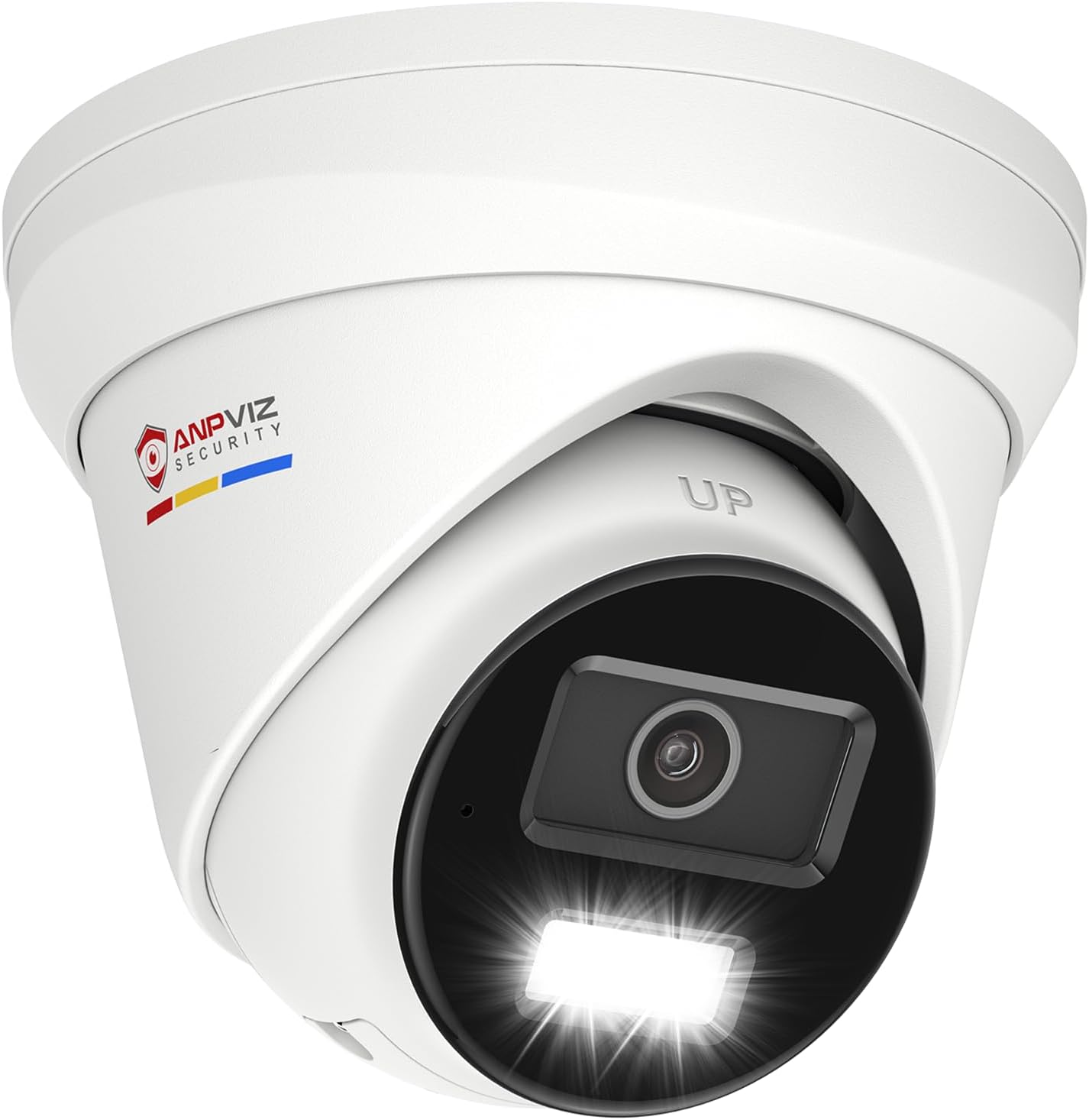
Image: The Anpviz 4K PoE IP Camera Outdoor, a white turret-style camera with a black lens housing and integrated light, shown from a slightly elevated angle.
3. สินค้าหมดview
The Anpviz IPC-D3083WD-S is an 8MP 4K PoE IP turret camera featuring smart dual light technology, human/vehicle detection, and a built-in microphone. Its robust metal housing ensures durability for outdoor use.
คุณสมบัติหลัก:
- ความละเอียด 4K Ultra HD: Provides crisp 3840x2160 video at 15fps.
- Smart Dual Light Night Vision: Combines infrared and warm light for clear night imaging. Switches to color when human/vehicle is detected, otherwise infrared for black and white.
- Human/Vehicle Detection: Advanced AI minimizes false alarms by distinguishing people and vehicles from other motion.
- ไมโครโฟนในตัว: Captures audio from the surveillance area.
- การบีบอัด H.265+: Efficient video encoding for reduced bandwidth and storage requirements.
- กันฝนระดับ IP67: Full metal housing designed for outdoor use in various weather conditions (-30°C to 60°C / -4°F to 140°F).
- ช่วงไดนามิกกว้าง (WDR): 120dB WDR for clear images in challenging lighting conditions.
4. การตั้งค่าและการติดตั้ง
4.1 การติดตั้งกล้อง
The camera supports both ceiling and wall mounting. Use the provided drill template to mark the screw holes. Ensure the mounting surface is strong enough to support the camera's weight.
- Select a suitable mounting location, considering the desired viewing angle and network cable access.
- Use the drill template to mark the positions for drilling.
- เจาะรูนำร่องและติดตั้งพุกยึดผนังที่ให้มาหากจำเป็น
- Secure the camera base to the mounting surface using the included screws.
- ปรับมุมกล้องเพื่อให้ได้ภาพที่ครอบคลุมดีที่สุด

Image: Illustration showing various mounting scenarios for the Anpviz camera, including wall mount with a bracket and ceiling mount.
4.2 การเชื่อมต่อไฟฟ้าและเครือข่าย
This camera supports Power over Ethernet (PoE) or a DC 12V power adapter (not included).
- การเชื่อมต่อ PoE: Connect an Ethernet cable from a PoE switch or PoE NVR to the camera's RJ45 port. This provides both power and data.
- การเชื่อมต่อ DC 12V: If not using PoE, connect a DC 12V power adapter (sold separately) to the camera's power input, and an Ethernet cable to a router or network switch for data.
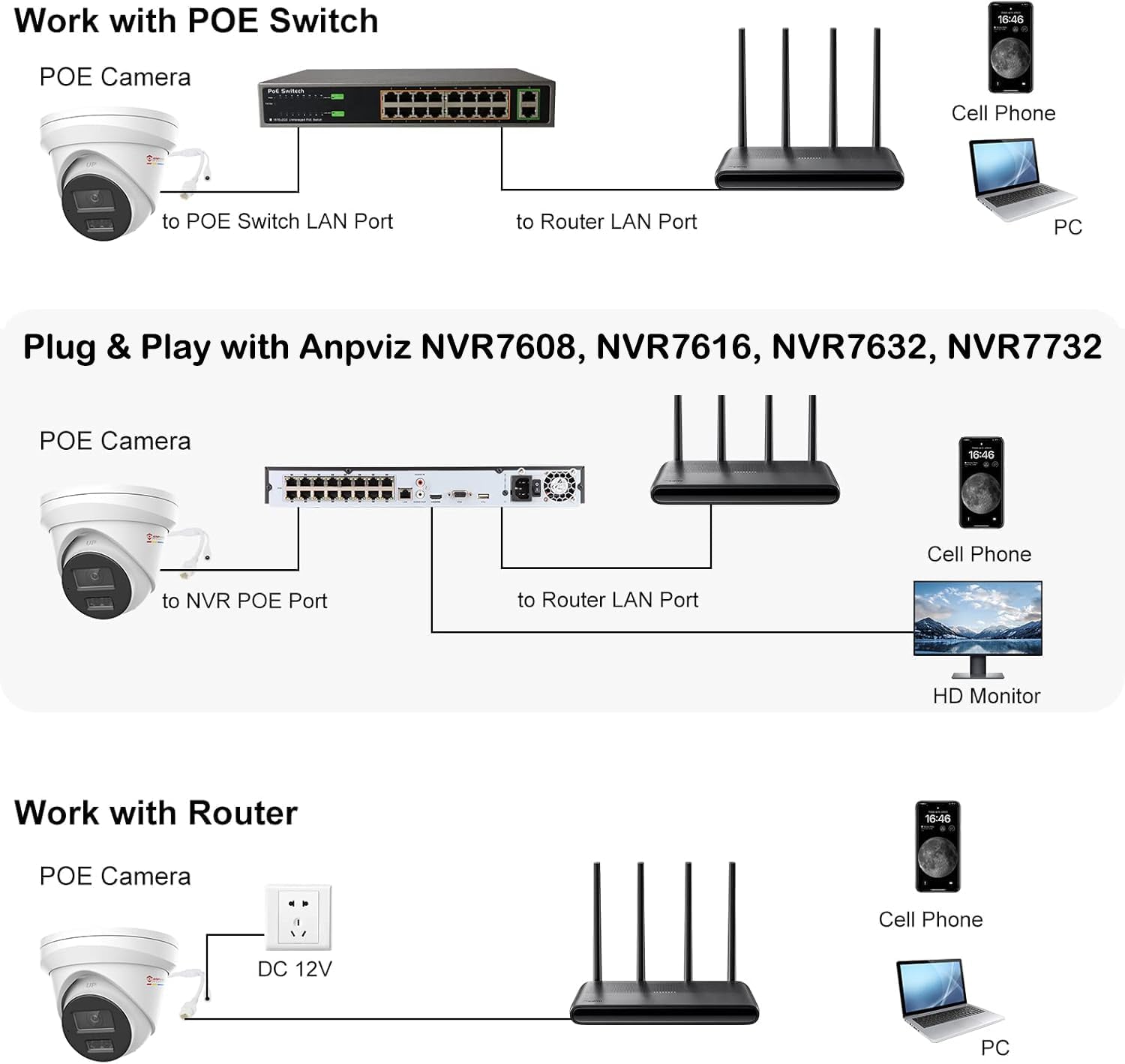
Image: Diagrams illustrating different connection methods: with a PoE switch, directly to an Anpviz NVR, and with a DC 12V adapter connected to a router.
For optimal performance, plug & play with Anpviz NVRs (NVR7608, NVR7616, NVR7632, NVR7732). Compatibility with 3rd-party ONVIF NVRs and software like ISpy, Synology, and Blue Iris is also supported. Note that the camera may need to be activated first for some NVRs.
4.3 การเข้าถึงและการกำหนดค่าเบื้องต้น
Access the camera via the Anpviz Viewer app or a web เบราว์เซอร์
- แอปมือถือ: Download the "Anpviz Viewer" app from the App Store or Google Play. Follow the in-app instructions to add your camera.
- Web เบราว์เซอร์: For Windows users, access the camera's web interface using Edge, Chrome, or Firefox. A plug-in may be required for live video viewing. (Mac OS is not supported for direct web browser access requiring a plug-in).

Image: Screenshot showing the Anpviz Viewer app interface on a smartphone and a laptop displaying camera footage, indicating remote access capabilities.
5. การใช้งานกล้อง
5.1 สด View และการบันทึก
เมื่อเชื่อมต่อแล้ว คุณสามารถ view อยู่ footage through the Anpviz Viewer app or NVR. The camera supports up to 512GB Micro SD card storage (not included) for local recording. Recordings can be continuous or motion-triggered. When the SD card is full, older videos will be overwritten automatically.

ภาพ: บุคคล viewอิงกล้องฟูtage on a smartphone, with icons indicating SD card storage and overwrite function, demonstrating local video saving.
5.2 Smart Dual Light Night Vision
กล้องมีคุณสมบัติการมองเห็นตอนกลางคืนขั้นสูง:
- โหมดอินฟราเรด: By default, infrared light is active at night, providing clear black and white images.
- ระบบมองเห็นสีในเวลากลางคืนอัจฉริยะ: When a person or vehicle is detected in the monitoring area, the warm lights activate, providing a full-color image. The camera reverts to infrared mode when no objects are detected.

Image: An illustration demonstrating the Smart Dual Light feature, showing the camera switching from infrared (black and white) to warm light (color) upon detecting a person.

Image: A split image comparing the clear 4K daytime view with the detailed infrared night vision of the camera, showing a house and backyard.
5.3 Human/Vehicle Detection and Smart Alerts
The camera utilizes advanced AI to accurately detect human and vehicle shapes, reducing false alarms from animals or shadows. Configure smart alerts to receive notifications on your phone, specifying the type of detection.

Image: An illustration showing the camera detecting both a human and a vehicle, highlighting the areas of detection with red boxes, demonstrating the smart motion capture feature.

Image: A smartphone displaying a motion detection alert from the Anpviz Viewer app, showing a person near a garage, illustrating the smart alert system.
5.4 ไมโครโฟนในตัว
The integrated microphone allows for unidirectional audio capture, enabling you to hear sounds from the camera's vicinity through the app or NVR.

Image: A close-up of the Anpviz camera mounted on a wall, with sound waves emanating from it, indicating the built-in microphone feature.

Image: A scene showing a delivery person at a door, with a speech bubble indicating audio capture ("Hi, your package delivered."), demonstrating the built-in microphone's function.
6. การบำรุงรักษา
6.1 การทำความสะอาด
ทำความสะอาดเลนส์และตัวกล้องเป็นประจำเพื่อให้ได้ประสิทธิภาพสูงสุด ใช้ผ้าเนื้อนุ่มและแห้งamp ผ้า หลีกเลี่ยงน้ำยาทำความสะอาดที่มีฤทธิ์กัดกร่อนหรือตัวทำละลายที่อาจทำลายพื้นผิว
6.2 ข้อพิจารณาด้านสิ่งแวดล้อม
The camera is IP67 weatherproof, designed to withstand dust and water immersion. Its metal housing provides corrosion resistance and allows operation in temperatures from -30°C to 60°C (-4°F to 140°F).

Image: The Anpviz camera shown outdoors with rain falling, illustrating its IP67 waterproof rating and ability to operate in extreme temperatures.
7 การแก้ไขปัญหา
- ไม่มีไฟฟ้า:
- Ensure the PoE switch/NVR is powered on and the Ethernet cable is securely connected.
- If using a DC 12V adapter, verify it is properly connected and the power outlet is functional.
- ไม่มีภาพวิดีโอ:
- Check network connectivity. Ensure the camera and viewing device are on the same network or properly configured for remote access.
- สำหรับ web browser access on Windows, ensure the necessary plug-in is installed and enabled.
- Verify the camera is activated if using a new NVR.
- คุณภาพของภาพต่ำ:
- ทำความสะอาดเลนส์กล้อง
- Check network bandwidth. H.265+ compression helps, but a congested network can affect streaming quality.
- ตรวจสอบให้แน่ใจว่ามีแสงสว่างเพียงพอสำหรับการมองเห็นในเวลากลางคืน
- การแจ้งเตือนการเคลื่อนไหวที่ผิดพลาด:
- Adjust motion detection sensitivity settings in the app or NVR.
- Utilize human/vehicle detection features to filter out irrelevant motion.
8. ข้อมูลจำเพาะ
| คุณสมบัติ | รายละเอียด |
|---|---|
| ชื่อรุ่น | ไอพีซี-D3083WD-S |
| ปณิธาน | 8MP (3840x2160) |
| อัตราเฟรม | 15 เฟรมต่อวินาที |
| เลนส์ | 2.8mm (Wide Angle) |
| การมองเห็นตอนกลางคืน | Smart Dual Light (IR & Warm Light), 130 Feet Range |
| การตรวจจับ | Human/Vehicle Detection (AI-powered) |
| เสียง | Built-in Microphone (Unidirectional) |
| การบีบอัดวิดีโอ | H.265 + |
| พื้นที่จัดเก็บ | การ์ด Micro SD (สูงสุด 512GB ไม่รวม) |
| การเชื่อมต่อ | PoE (Power over Ethernet), Wired Ethernet |
| แหล่งพลังงาน | PoE or DC 12V (adapter not included) |
| ทนทานต่อสภาพอากาศ | กันน้ำระดับ IP67 |
| อุณหภูมิในการทำงาน | -30°C ถึง 60°C (-4°F ถึง 140°F) |
| วัสดุ | ตัวเรือนโลหะทั้งหมด |
| ขนาด (กว้าง x ยาว x สูง) | 6.02 x 5.98 x 5.63 นิ้ว |
| น้ำหนัก | 1.76 ปอนด์ (0.8 กก.) |
| ดับเบิ้ลยูดีอาร์ | 120เดซิเบล |
9. การรับประกันและการสนับสนุน
Anpviz provides a 2-year warranty for this product. For technical assistance or warranty claims, please contact Anpviz customer support:
- อีเมล: support@anpviz.com
- เวลาทำการ : Monday - Friday, 9:00 AM - 6:00 PM (Time Zone not specified, assume PST/EST based on typical US support)
Please have your model number (IPC-D3083WD-S) and purchase information ready when contacting support.

Image: A group of customer service representatives wearing headsets, indicating available support for Anpviz products.


