1. สินค้าหมดview
The TECLAST T40Air is a high-performance tablet designed for various tasks, from entertainment to productivity. It features a 10.4-inch display, 16GB RAM, 256GB ROM, and runs on Android 13, powered by an octa-core processor. Its lightweight design and robust battery ensure portability and extended usage.

ภาพที่ 1.1: ด้านหน้าและด้านหลัง view of the TECLAST T40Air Tablet, showcasing its sleek design and dual rear cameras.
วิดีโอ 1.1: การประชุมอย่างเป็นทางการview of the TECLAST T40Air Android Tablet, highlighting its key features and design.
2. การตั้งค่าเริ่มต้น
2.1 การแกะกล่องและการใช้งานครั้งแรก
Carefully remove the tablet and all accessories from the packaging. Inspect the device for any physical damage. Before first use, it is recommended to fully charge the tablet.
2.2 การชาร์จแท็บเล็ต
Connect the provided USB-C cable to the tablet's charging port and the other end to the 18W PD fast charging adapter. Plug the adapter into a power outlet. The battery indicator on the screen will show the charging status. A full charge typically takes approximately 2-3 hours.
2.3 การเปิด/ปิดเครื่อง
- การเปิดเครื่อง: Press and hold the Power button located on the side of the tablet until the TECLAST logo appears on the screen.
- วิธีปิดเครื่อง: กดปุ่มเปิด/ปิดค้างไว้จนกว่าเมนูเปิด/ปิดจะปรากฏขึ้น เลือก 'ปิดเครื่อง' และยืนยัน
- ในการรีสตาร์ท: จากเมนูเปิด/ปิด ให้เลือก 'รีสตาร์ท'
2.4 การกำหนดค่าเริ่มต้น
เมื่อเปิดเครื่องครั้งแรก แท็บเล็ตจะแนะนำคุณตลอดกระบวนการตั้งค่าเริ่มต้น:
- เลือกภาษา: เลือกภาษาที่คุณต้องการ
- การเชื่อมต่อ Wi-Fi: เลือกเครือข่าย Wi-Fi ของคุณและป้อนรหัสผ่านเพื่อเชื่อมต่ออินเทอร์เน็ต
- บัญชี Google: ลงชื่อเข้าใช้ด้วยบัญชี Google ของคุณหรือสร้างบัญชีใหม่ บัญชีนี้จำเป็นสำหรับการดาวน์โหลดแอปจาก Google Play Store และการซิงค์ข้อมูล
- วันที่และเวลา: ตั้งค่าวันที่และเวลาที่ถูกต้องหรืออนุญาตให้เครือข่ายตั้งค่าโดยอัตโนมัติ
- ความปลอดภัย: Set up a screen lock (PIN, pattern, password, or Face Unlock).
2.5 การติดตั้งซิมการ์ด (ไม่บังคับ)
The T40Air supports 4G LTE connectivity. To install a SIM card:
- หาช่องใส่ซิมการ์ดที่ด้านข้างของแท็บเล็ต
- ใช้เครื่องมือถอดซิมที่ให้มาเพื่อเปิดถาด
- Place the Nano-SIM card(s) into the designated slots, ensuring correct orientation.
- ค่อยๆ ดันถาดกลับเข้าไปในแท็บเล็ตจนกระทั่งล็อคเข้าที่

Image 2.1: The TECLAST T40Air Tablet highlighting its 4G LTE support and SIM card tray location.
3. คู่มือการใช้งาน
3.1 การใช้งาน Android 13
The TECLAST T40Air runs on Android 13, offering an intuitive user experience. Use touch gestures to navigate:
- แตะ: เลือกสินค้า.
- ปัด: เลื่อนดูหน้าจอหรือรายการ
- บีบเพื่อซูม: ซูมเข้าหรือออกจากรูปภาพและ web หน้า
- กดยาว: เข้าถึงเมนูบริบทหรือย้ายไอคอน
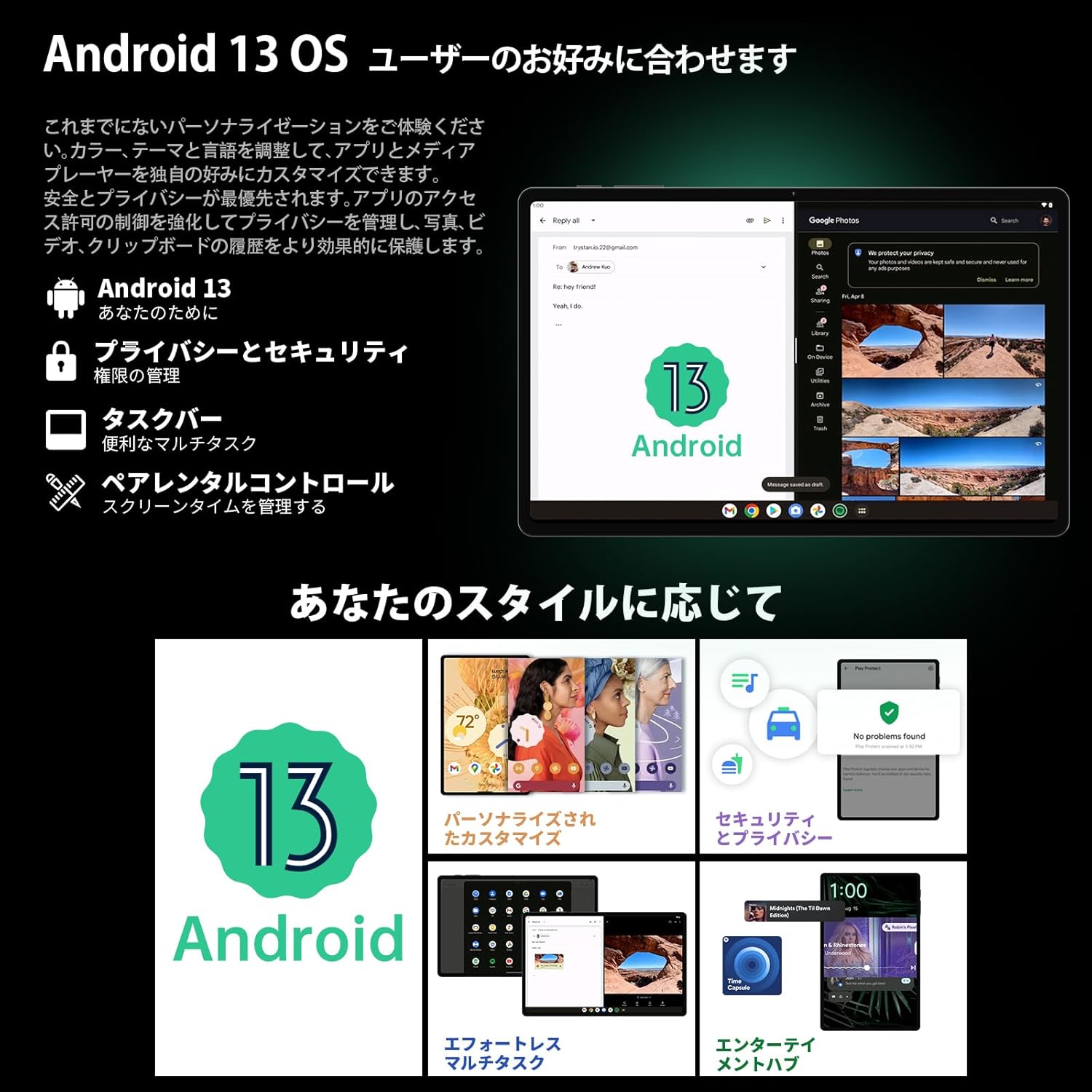
Image 3.1: The Android 13 interface on the TECLAST T40Air Tablet, showing personalization and security features.
3.2 คุณสมบัติการแสดงผล
The 10.4-inch 2K FHD IPS display provides vibrant colors and sharp details. It features:
- TDDI Fully Laminated: Enhances touch responsiveness and visual clarity.
- โหมดป้องกันดวงตา: ลดแสงสีฟ้าเพื่อป้องกันอาการปวดตา
- โหมดการอ่าน: Optimizes the screen for comfortable reading.
- Dark Mode & Dim Mode: Adjusts screen brightness and color for different lighting conditions.

Image 3.2: Visual representation of the TECLAST T40Air Tablet's display features, including eye protection and reading modes.
3.3 การใช้งานกล้อง
The tablet is equipped with a 13MP rear dual camera and an 8MP front camera.
- ถ่ายรูป: เปิดแอปกล้อง จัดองค์ประกอบภาพ และแตะปุ่มชัตเตอร์
- การบันทึกวิดีโอ: เปลี่ยนไปใช้โหมดวิดีโอในแอปกล้อง แล้วแตะปุ่มบันทึก
- กล้องหน้า: Use for video calls and selfies.

Image 3.3: The TECLAST T40Air Tablet showcasing its camera capabilities and 3.5mm headphone jack.
3.4 เสียงและการเชื่อมต่อ
- SWEET 4 Speakers: Enjoy immersive audio with the tablet's quad-speaker system and Smart K Digital Ampชีวิต.
- แจ็คหูฟัง 3.5 มม.: เชื่อมต่อหูฟังแบบมีสายเพื่อการฟังส่วนตัว
- ไวไฟ : Supports 2.4GHz and 5GHz dual-band Wi-Fi (802.11ac) for stable and fast internet.
- Bluetooth 5.0: Connect wireless accessories like headphones, keyboards, and mice.
- VoLTE: Enables high-quality voice calls over 4G LTE networks.
3.5 การปลดล็อคด้วยใบหน้า
The tablet supports Face Unlock for convenient and secure access. Set it up in the Security settings. Ensure good lighting conditions for optimal performance.
4. การบำรุงรักษา
4.1 การทำความสะอาดแท็บเล็ต
ในการทำความสะอาดแท็บเล็ต ให้ใช้ผ้านุ่มที่ไม่เป็นขุย สำหรับคราบฝังแน่น ให้เช็ดเบาๆampชุบผ้าด้วยน้ำหรือน้ำยาทำความสะอาดหน้าจอ หลีกเลี่ยงการใช้สารเคมีรุนแรง วัสดุที่มีฤทธิ์กัดกร่อน หรือความชื้นมากเกินไป
4.2 การดูแลแบตเตอรี่
- หลีกเลี่ยงการให้แท็บเล็ตสัมผัสกับอุณหภูมิที่สูงหรือต่ำเกินไป
- อย่าปล่อยให้แบตเตอรี่หมดจนหมดบ่อยๆ
- Use the original charger or a certified 18W PD charger for optimal charging.
4.3 การอัปเดตซอฟต์แวร์
ตรวจสอบและติดตั้งการอัปเดตซอฟต์แวร์เป็นประจำเพื่อให้แน่ใจว่าแท็บเล็ตของคุณมีฟีเจอร์ แพตช์ความปลอดภัย และการปรับปรุงประสิทธิภาพล่าสุด ไปที่ การตั้งค่า > ระบบ > อัปเดตระบบ.
4.4 การจัดการการจัดเก็บข้อมูล
The tablet comes with 256GB of internal storage, expandable via microSD card up to 1TB. Regularly manage your storage by:
- การลบที่ไม่จำเป็น fileเอสและแอพ
- การเคลื่อนย้ายสิ่งของขนาดใหญ่ fileไปยังการ์ด microSD
- การใช้บริการจัดเก็บข้อมูลบนคลาวด์

Image 4.1: The TECLAST T40Air Tablet highlighting its 16GB RAM, 256GB ROM, and support for microSD card expansion.
5 การแก้ไขปัญหา
This section addresses common issues you might encounter with your TECLAST T40Air Tablet.
5.1 อุปกรณ์ไม่เปิดเครื่อง
- ตรวจสอบให้แน่ใจว่าแบตเตอรี่มีประจุเพียงพอ เสียบที่ชาร์จและรอสักครู่ก่อนที่จะลองเปิดเครื่อง
- กดปุ่มเปิด/ปิดค้างไว้อย่างน้อย 10-15 วินาทีเพื่อบังคับให้รีสตาร์ท
5.2 ปัญหาการเชื่อมต่อ Wi-Fi
- ตรวจสอบว่าเปิดใช้งาน Wi-Fi แล้วหรือไม่ การตั้งค่า > เครือข่ายและอินเทอร์เน็ต > Wi-Fi.
- ตรวจสอบให้แน่ใจว่าคุณได้ป้อนรหัสผ่าน Wi-Fi ที่ถูกต้อง
- รีสตาร์ทเราเตอร์ Wi-Fi และแท็บเล็ตของคุณ
- ลองเชื่อมต่อกับเครือข่าย Wi-Fi อื่นเพื่อแยกแ1ยะปัญหา
5.3 ประสิทธิภาพช้า
- ปิดแอพพลิเคชันพื้นหลังที่ไม่ได้ใช้งาน
- Clear cache data for apps that are running slowly (การตั้งค่า > แอป > [ชื่อแอป] > ที่เก็บข้อมูลและแคช > ล้างแคช).
- ตรวจสอบให้แน่ใจว่าคุณมีพื้นที่จัดเก็บว่างเพียงพอ
- รีสตาร์ทแท็บเล็ต
5.4 หน้าจอไม่ตอบสนอง
- รีสตาร์ทแท็บเล็ตโดยกดปุ่มเปิด/ปิดค้างไว้
- ตรวจสอบให้แน่ใจว่าหน้าจอสะอาด ปราศจากความชื้นหรือฝุ่นละออง
5.5 การรีเซ็ตเป็นค่าโรงงาน (ทางเลือกสุดท้าย)
หากปัญหายังคงมีอยู่ คุณอาจพิจารณาทำการรีเซ็ตเป็นค่าจากโรงงาน คำเตือน: การดำเนินการนี้จะลบข้อมูลทั้งหมดบนแท็บเล็ตของคุณ โปรดสำรองข้อมูลสำคัญก่อนดำเนินการต่อ
ไปที่ การตั้งค่า > ระบบ > ตัวเลือกการรีเซ็ต > ลบข้อมูลทั้งหมด (รีเซ็ตเป็นค่าโรงงาน) และทำตามคำแนะนำบนหน้าจอ
6. ข้อมูลจำเพาะ
Below are the technical specifications for the TECLAST T40Air Tablet:
| คุณสมบัติ | ข้อมูลจำเพาะ |
|---|---|
| หมายเลขรุ่น | T40Air |
| ขนาดจอแสดงผล | 10.4 นิ้ว |
| ความละเอียดหน้าจอ | 1920 x 1080 พิกเซล (2K FHD IPS) |
| แรม | 16GB |
| ขนาดหน่วยความจำแฟลช (ROM) | 256GB |
| ยี่ห้อโปรเซสเซอร์ | Rockchip or Unisoc (Octa-core) |
| ระบบปฏิบัติการ | แอนดรอยด์ 13 |
| ประเภทไร้สาย | 5 GHz Radio Frequency, 802.11a/b/g/n/ac |
| บลูทูธ | บลูทูธ 5.0 |
| อายุการใช้งานแบตเตอรี่โดยเฉลี่ย | 5 ชั่วโมง (7200mAh) |
| น้ำหนักสินค้า | 1.01 ปอนด์ (ประมาณ 460 กรัม) |
| ขนาดสินค้า | 9.6 x 6.1 x 0.3 นิ้ว |
| คุณสมบัติพิเศษ | น้ำหนักเบา |
7. การรับประกันและการสนับสนุน
7.1 การรับประกันสินค้า
The TECLAST T40Air Tablet comes with a standard manufacturer's warranty. Please refer to the warranty card included in your product packaging for specific terms, conditions, and duration. Keep your proof of purchase for warranty claims.
7.2 การสนับสนุนลูกค้า
If you encounter any issues not covered in this manual or require further assistance, please contact TECLAST customer support. You can typically find contact information on the official TECLAST webไซต์หรือผ่านช่องทางการสนับสนุนของผู้ค้าปลีกของคุณ
- Visit the official TECLAST webไซต์สำหรับคำถามที่พบบ่อยและทรัพยากรสนับสนุน
- Contact the seller or retailer for product-specific support and return policies.