การแนะนำ
This manual provides essential information for the safe and efficient use of your SANSUI JSW50GSUHD 50-inch 4K Ultra HD Smart Google LED TV. Please read these instructions thoroughly before operating the television and retain them for future reference.

ภาพ: ด้านหน้า view of the SANSUI JSW50GSUHD 50-inch 4K Ultra HD Smart Google LED TV.
ข้อมูลด้านความปลอดภัย
Always follow basic safety precautions when using this television to reduce the risk of fire, electric shock, and injury. Keep the TV away from water and moisture. Do not block ventilation openings. Use only attachments/accessories specified by the manufacturer. Refer all servicing to qualified service personnel.
มีอะไรอยู่ในกล่อง
แกะกล่องอย่างระมัดระวังและตรวจสอบให้แน่ใจว่าสิ่งของทั้งหมดอยู่ในกล่อง:
- 1 x SANSUI JSW50GSUHD 50-inch TV
- 1 x รีโมทคอนโทรล
- 1 pair x AAA Batteries (for remote)
- 1 set x Base Stand
- 2 pairs x Screws (for stand)
- 1 set x Wall Mounting Kit (if included)
- 1 x คู่มือผู้ใช้และบัตรรับประกัน
- สายไฟ 1 เส้น
- 1 x Mini AV cable
การตั้งค่า
1. ตำแหน่งทีวี
Place the TV on a stable, flat surface using the provided base stand, or mount it on a wall using a compatible VESA 100 x 100 mm wall mount (sold separately). Ensure adequate ventilation around the TV.

Image: The SANSUI JSW50GSUHD TV placed on a media console with its stand.
2. การเชื่อมต่ออุปกรณ์ภายนอก
ทีวี SANSUI ของคุณมีตัวเลือกการเชื่อมต่อที่หลากหลาย:
- พอร์ต HDMI (3): เชื่อมต่อเครื่องเล่นบลูเรย์ เครื่องเล่นเกม กล่องรับสัญญาณทีวี ฯลฯ
- พอร์ต USB (2): เชื่อมต่อไดรฟ์ USB สำหรับการเล่นสื่อ
- AV (Mini) Port: สำหรับอุปกรณ์รุ่นเก่าที่ใช้คอมโพสิตวิดีโอและเสียงสเตอริโอ
- พอร์ตอีเทอร์เน็ต (LAN): สำหรับการเชื่อมต่ออินเตอร์เน็ตแบบใช้สาย
- Antenna/RF Input: สำหรับเชื่อมต่อเสาอากาศหรือเคเบิลทีวี
- เอาต์พุตเสียงออปติคัล: สำหรับเชื่อมต่อกับระบบเสียงภายนอก
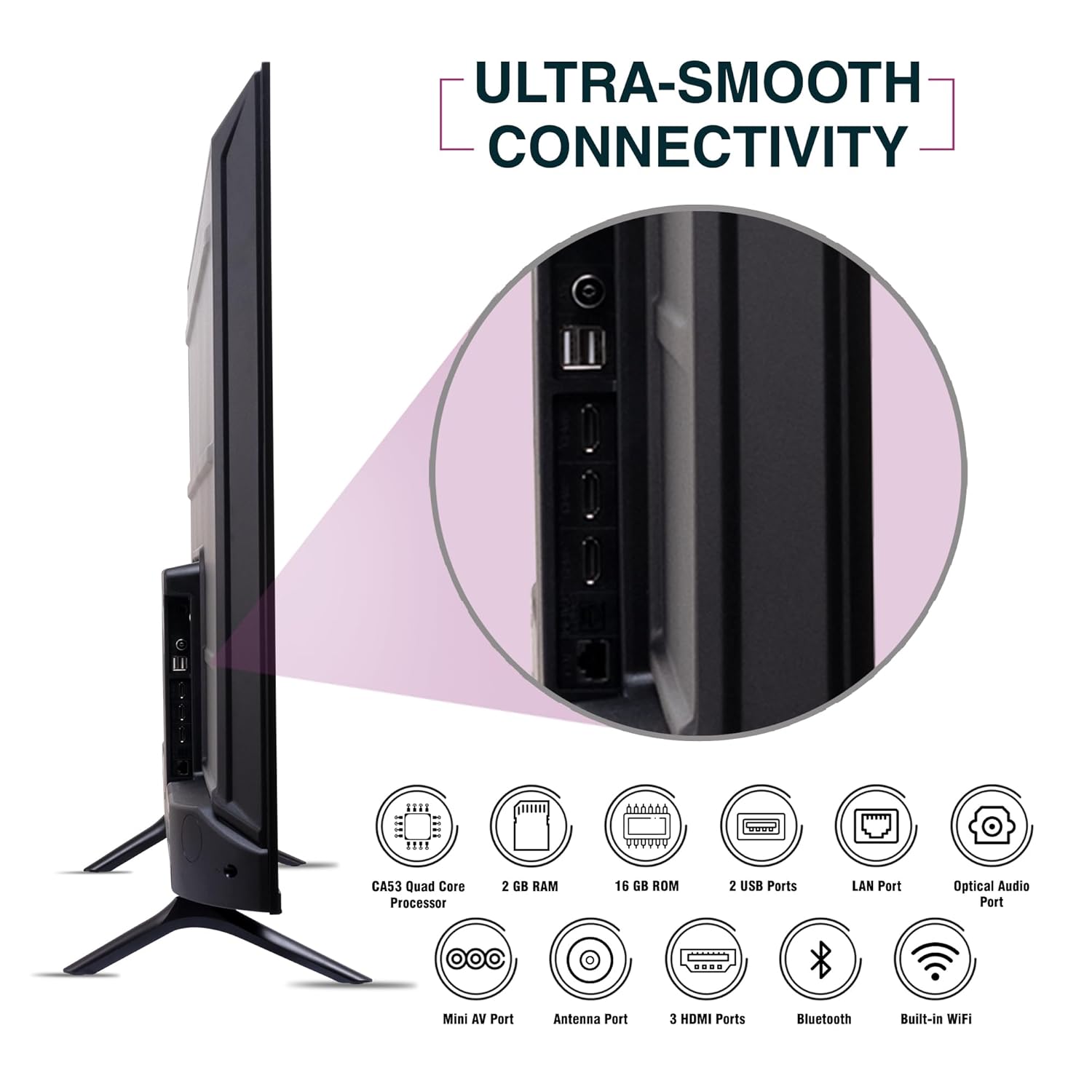
ภาพ: ด้านข้าง view of the SANSUI JSW50GSUHD TV highlighting the various input and output ports.
3. การเชื่อมต่อไฟฟ้า
Connect the power cable to the TV's power input and then to a wall outlet. The TV supports 100-240 VAC, 50-60 Hz.
4. การตั้งค่าการควบคุมระยะไกล
ใส่แบตเตอรี่ AAA สองก้อนลงในรีโมทคอนโทรล ตรวจสอบให้แน่ใจว่าขั้วถูกต้อง
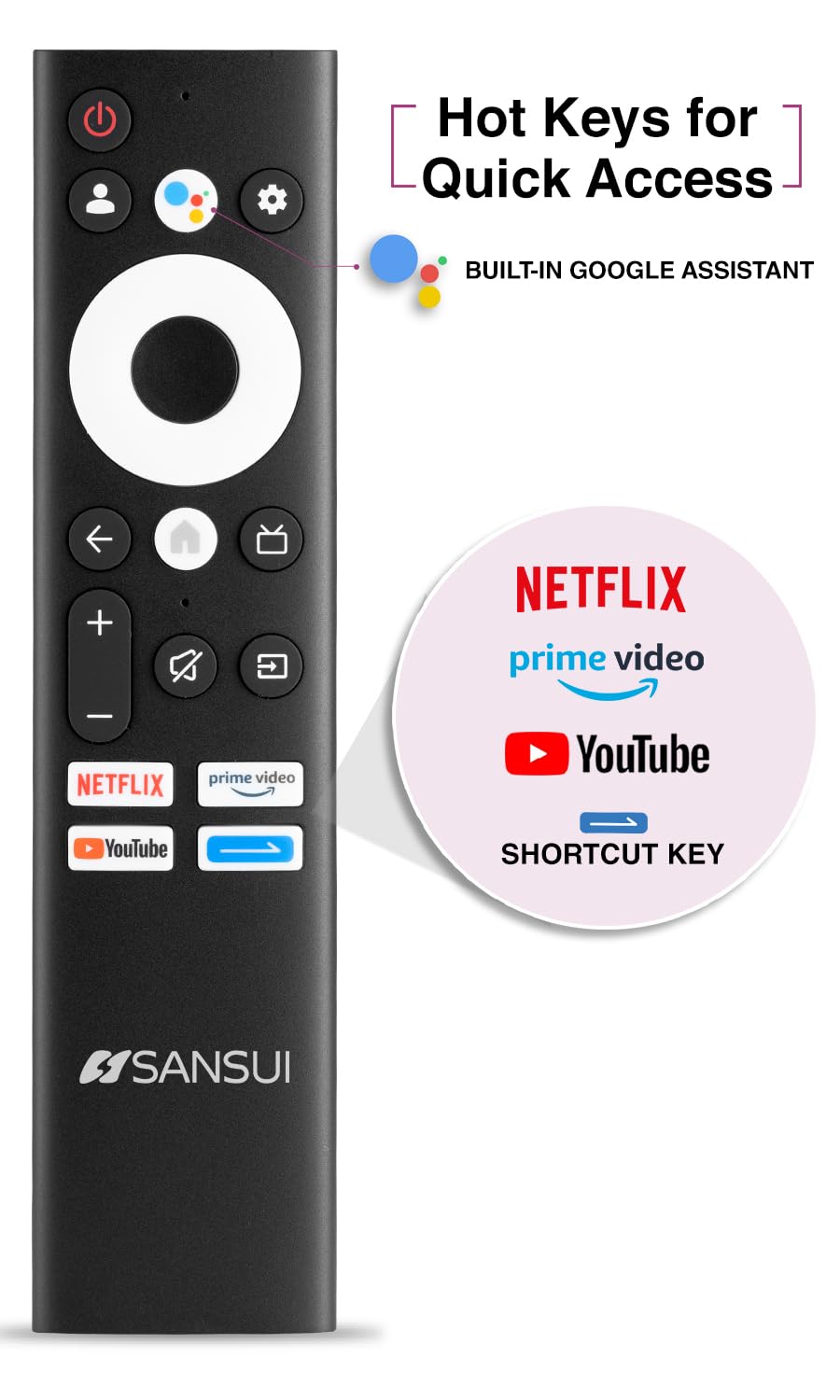
Image: The SANSUI JSW50GSUHD remote control, showing button layout and hot keys.
5. การตั้งค่าเริ่มต้น (Google TV)
Upon first power-on, the TV will guide you through the initial setup process. This includes selecting your language, connecting to Wi-Fi, signing in with your Google account, and configuring Google TV settings. Follow the on-screen prompts.
การใช้งานทีวีของคุณ
1. ฟังก์ชั่นพื้นฐาน
- พลัง: กดปุ่มเปิด/ปิดบนรีโมทเพื่อเปิดหรือปิดทีวี
- ปริมาณ: ใช้ปุ่มเพิ่ม/ลดระดับเสียงเพื่อปรับระดับเสียง
- แหล่งสัญญาณเข้า: Press the Source button to select between HDMI, AV, TV, and other inputs.
- การนำทาง: ใช้ปุ่มควบคุมทิศทางและปุ่ม OK เพื่อเลื่อนดูเมนูต่างๆ
2. คุณสมบัติของสมาร์ททีวี (Google TV)
Your TV runs on Google TV, providing access to a wide range of streaming services and smart features.
- ผู้ช่วย Google: Use the dedicated button on your remote for voice commands to search for content, control smart home devices, and get information.
- Chromecast ในตัว: ส่งเนื้อหาจากสมาร์ทโฟน แท็บเล็ต หรือคอมพิวเตอร์ที่รองรับไปยังทีวีของคุณได้โดยตรง
- แอป: Access popular streaming apps like Netflix, Prime Video, Disney+ Hotstar, and YouTube directly from the Google TV interface. Download more apps from the Google Play Store.
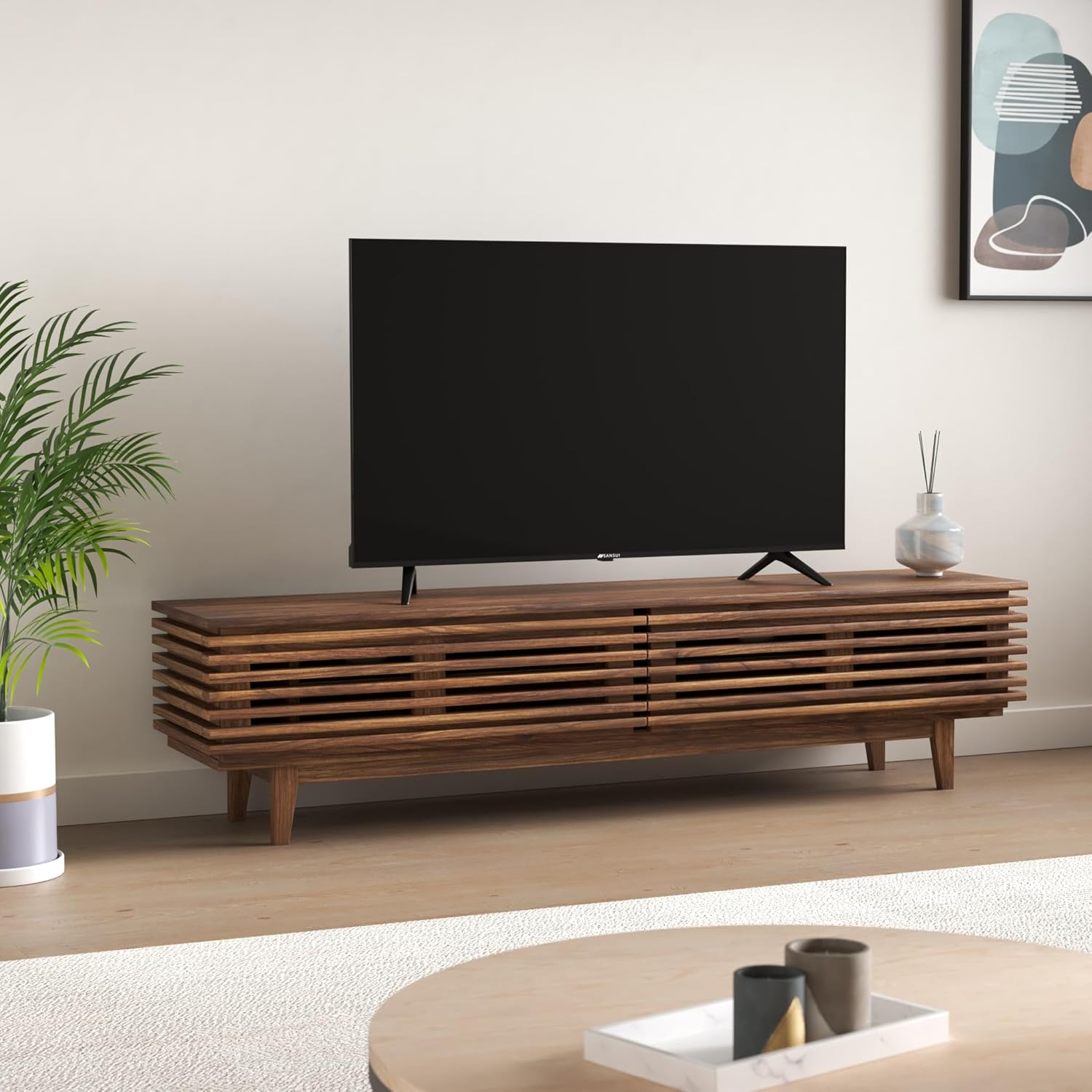
Image: The Google TV home screen displaying various streaming applications and content suggestions.
3. Display and Audio Enhancements
- 4K อุลตราเอชดี: Enjoy stunning clarity and detail with 3840x2160 resolution.
- HDR10: Experience enhanced contrast and a wider range of colors with HDR10 content.
- Zen Panel: The A+ Zen panel dynamically enhances visual content with uniform light dispersal for improved picture quality.
- ดีไซน์ไร้ขอบ: เพิ่มพื้นที่หน้าจอให้มากที่สุดเพื่อประสบการณ์การรับชมที่สมจริง viewการสร้างประสบการณ์
- ระบบเสียง Dolby Audio และ DTS Studio Sound: Delivers rich, clear, and immersive audio with 20W output.

ภาพ: ระยะใกล้ view of the SANSUI JSW50GSUHD TV showcasing its bezel-less design with a vibrant nature scene.

Image: An illustration demonstrating the advanced light dispersal technology of the Zen Panel for enhanced hues.
การซ่อมบำรุง
1. การทำความสะอาด
ในการทำความสะอาดหน้าจอ ให้เช็ดเบาๆ ด้วยผ้านุ่มที่ไม่เป็นขุย สำหรับรอยฝังแน่น ให้เช็ดเบาๆampen the cloth with water or a screen cleaner specifically designed for TVs. Do not spray liquid directly onto the screen. Clean the TV body with a soft, dry cloth.
2. การอัปเดตซอฟต์แวร์
Google TV ของคุณอาจได้รับการอัปเดตซอฟต์แวร์โดยอัตโนมัติ โปรดตรวจสอบให้แน่ใจว่าทีวีของคุณเชื่อมต่อกับอินเทอร์เน็ตเพื่อรับการอัปเดตเหล่านี้ ซึ่งสามารถปรับปรุงประสิทธิภาพและเพิ่มคุณสมบัติใหม่ๆ ได้
การแก้ไขปัญหา
หากคุณประสบปัญหาเกี่ยวกับทีวี โปรดดูวิธีแก้ไขทั่วไปต่อไปนี้:
| ปัญหา | วิธีแก้ปัญหาที่เป็นไปได้ |
|---|---|
| ไม่มีไฟฟ้า | ตรวจสอบว่าสายไฟเชื่อมต่อกับทีวีและเต้ารับที่ผนังอย่างแน่นหนาหรือไม่ ตรวจสอบให้แน่ใจว่าเต้ารับใช้งานได้ |
| ไม่มีภาพ/เสียง | Verify the correct input source is selected. Check cable connections to external devices. Try a different HDMI port. |
| รีโมตคอนโทรลไม่ทำงาน | ตรวจสอบและเปลี่ยนแบตเตอรี่ ตรวจสอบให้แน่ใจว่าไม่มีสิ่งกีดขวางระหว่างรีโมทและเซ็นเซอร์อินฟราเรดของทีวี |
| ปัญหาการเชื่อมต่อ Wi-Fi | Restart your router and modem. Reconnect the TV to the Wi-Fi network in the settings. Ensure the TV is within range of your router. |
| ปัญหาคุณภาพของภาพ | ปรับการตั้งค่าภาพ (ความสว่าง ความคมชัด สี) ในเมนูทีวี ตรวจสอบให้แน่ใจว่าแหล่งที่มาของเนื้อหามีคุณภาพสูง |
If problems persist, perform a factory reset via the TV settings menu (Settings > System > About > Reset). Note that a factory reset will erase all personal data and settings.
ข้อมูลจำเพาะ
Detailed technical specifications for the SANSUI JSW50GSUHD TV:
- ขนาดหน้าจอ: 127 Centimetres (50 Inches)
- เทคโนโลยีการแสดงผล: นำ
- ปณิธาน: 4K อัลตร้า HD (3840x2160)
- อัตราการรีเฟรช: 60 เฮิรตซ์
- คุณสมบัติพิเศษ: Bezel-Less Design, Browser, Chromecast, Parental Controls, Sleep Timer, Google TV, Google Assistant, Voice Search Smart Remote
- การเชื่อมต่อ: 3 HDMI ports, 2 USB ports, 1 AV (mini), Bluetooth, Wi-Fi, Ethernet (LAN), Optical Audio
- เอาต์พุตเสียง: 20W with Dolby Audio and DTS Studio Sound
- โปรเซสเซอร์: CA53 Quad core Processor
- หน่วยความจำ: RAM 2GB, ROM 16GB (FLASH)
- ระบบปฏิบัติการ: กูเกิลทีวี
- ขนาดสินค้า (ลึก x กว้าง x สูง): 9D x 111W x 71.7H เซนติเมตร
- น้ำหนักสินค้า: 9300 กรัม
- การใช้พลังงาน: 130 วัตต์
- มาตรฐานการยึด VESA: 100 x 100 มม.
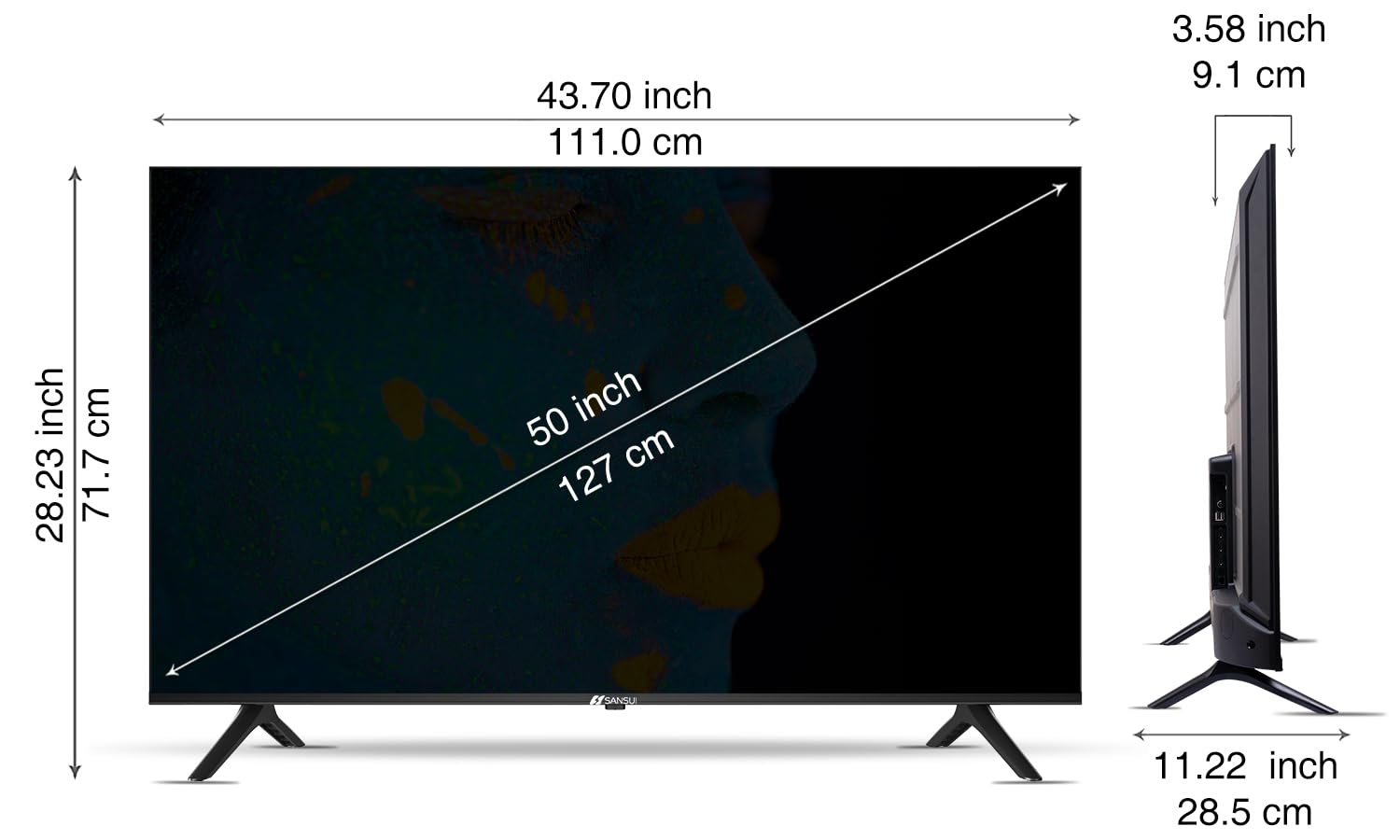
Image: Diagram illustrating the dimensions of the SANSUI JSW50GSUHD 50-inch TV.
การรับประกันและการสนับสนุน
Your SANSUI JSW50GSUHD TV comes with a 1-year comprehensive warranty, plus an additional 1-year warranty on the panel, provided by the brand from the date of purchase.
For warranty support or any technical assistance, please contact SANSUI customer care:
- หมายเลขโทรฟรี: 1800 419 3777
- อีเมล: sansuicare@jainaindia.com
Manufacturer: PG Electroplast Limited
Importer: Jaina India Pvt Ltd.


