1. บทนำ
This manual provides detailed instructions for the safe and effective operation of your Wouxun KG-UVD1P FM Transceiver. Please read this manual thoroughly before using the device to ensure proper functionality and to prevent damage.
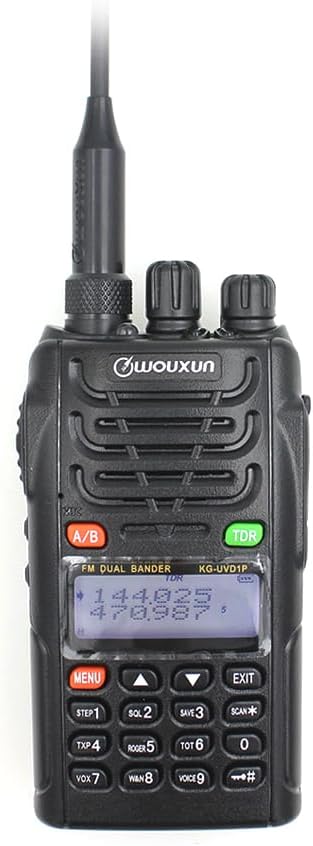
คำอธิบายภาพ: ด้านหน้า view of the Wouxun KG-UVD1P FM Transceiver, showcasinจี มันเป็นสีดำซีasing, antenna, LCD display, keypad, and control knobs. The display shows frequency information.
2. เนื้อหาบรรจุภัณฑ์
ตรวจสอบว่ารายการทั้งหมดที่ระบุไว้ด้านล่างนี้รวมอยู่ในแพ็คเกจของคุณ:
- วิทยุร่างกาย
- แบตเตอรี่
- เสาอากาศ
- คลิปหนีบเข็มขัด
- Charger (Desktop Charger and Power Adaptor)
- คู่มือการใช้งาน
- สายคล้องมือ
- สายชาร์จรถยนต์

คำอธิบายภาพ: ค่าใช้จ่ายทางอ้อม view displaying all components included in the standard Wouxun KG-UVD1P package. Items are numbered and include the radio, battery, antenna, belt clip, desktop charger, power adaptor, hand strap, and car charger cable.
3. สินค้าหมดview
3.1. ส่วนประกอบวิทยุ
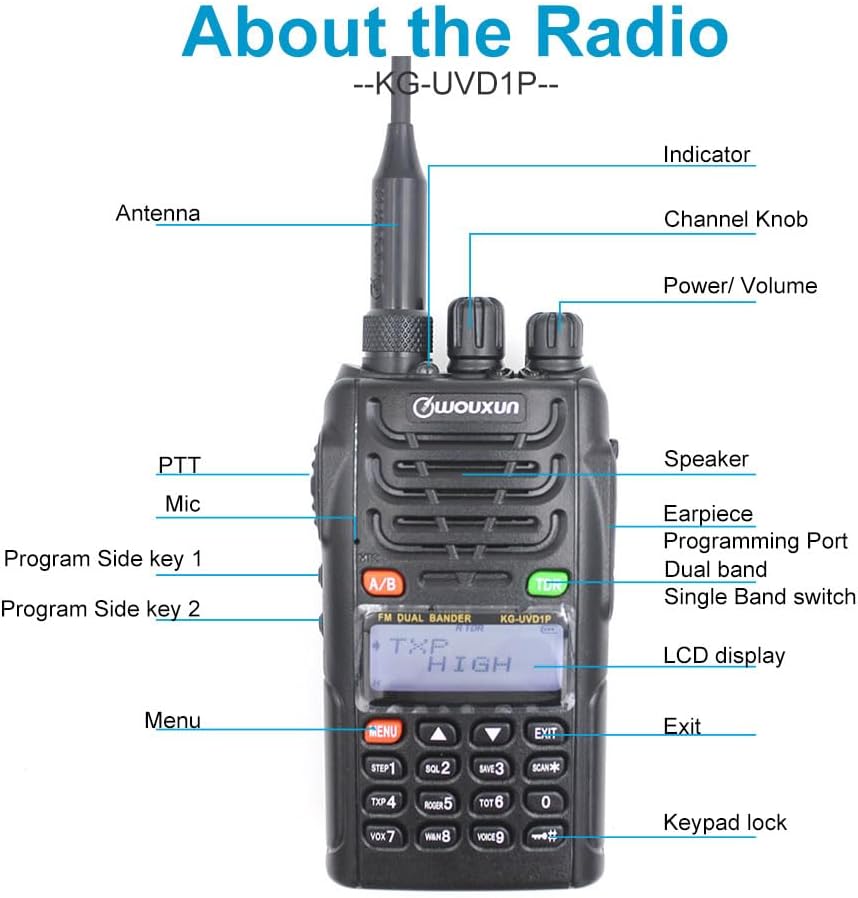
คำอธิบายภาพ: A detailed diagram of the Wouxun KG-UVD1P radio with various parts labeled, including the antenna, indicator light, channel knob, power/volume knob, speaker, earpiece, programming port, dual band switch, LCD display, PTT button, microphone, program side keys, Menu button, Exit button, and keypad lock.
- เสาอากาศ: สำหรับการส่งและรับสัญญาณวิทยุ
- ตัวบ่งชี้ : LED light indicating transmission (red) or reception (green).
- ปุ่มปรับช่องสัญญาณ: Used to select channels or adjust settings.
- กำลัง/ระดับเสียง: หมุนเพื่อเปิด/ปิดวิทยุและปรับระดับเสียง
- ผู้บรรยาย: เอาต์พุตเสียง
- Earpiece/Programming Port: Connects accessories or programming cable.
- Dual Band Switch (A/B): Toggles between VHF and UHF bands or display modes.
- จอแสดงผล LCD: แสดงข้อมูลความถี่ ช่องสัญญาณ และสถานะ
- PTT (ปุ่มกดเพื่อพูด): กดค้างเพื่อส่งสัญญาณ
- ไมค์: ไมโครโฟนสำหรับการอินพุตเสียง
- Program Side Keys: ปุ่มฟังก์ชันที่สามารถปรับแต่งได้
- ปุ่มกด: For entering frequencies, channels, and accessing menu functions.
3.2. มิติทางกายภาพ

คำอธิบายภาพ: หลายรายการ views of the Wouxun KG-UVD1P radio, including front, left side, right side, and back, illustrating its compact design and the placement of the belt clip and battery pack.
4. การตั้งค่า
4.1. การติดตั้งแบตเตอรี่
- จัดชุดแบตเตอรี่ให้ตรงกับร่องที่ด้านหลังวิทยุ
- เลื่อนชุดแบตเตอรี่ขึ้นจนกระทั่งล็อคเข้าที่
- ในการถอดออก ให้กดสลักปลดแบตเตอรี่ (ถ้ามี) แล้วเลื่อนแบตเตอรี่ลง
4.2. การติดเสาอากาศ
- หมุนเสาอากาศตามเข็มนาฬิกาเข้ากับขั้วต่อด้านบนของวิทยุจนแน่นพอดีมือ
- อย่าขันแน่นจนเกินไป
4.3. การชาร์จแบตเตอรี่

คำอธิบายภาพ: The Wouxun smart charger in use, showing the radio docked for charging and a separate battery pack being charged simultaneously. The image highlights the 7.4V 1700mAh Lithium-ion battery.
- เชื่อมต่ออะแดปเตอร์แปลงไฟเข้ากับแท่นชาร์จแบบตั้งโต๊ะ แล้วเสียบเข้ากับเต้ารับไฟฟ้า
- Place the radio with the battery installed, or the battery alone, into the charging slot.
- โดยปกติไฟแสดงสถานะการชาร์จจะแสดงเป็นสีแดงขณะกำลังชาร์จ และจะเปลี่ยนเป็นสีเขียวเมื่อชาร์จเต็มแล้ว
- การชาร์จเต็มโดยปกติจะใช้เวลาหลายชั่วโมง
5. คู่มือการใช้งาน
5.1. เปิด/ปิดเครื่องและควบคุมระดับเสียง
- เปิดเครื่อง: หมุนปุ่มเปิด/ปิด/ปรับระดับเสียงตามเข็มนาฬิกาจนกว่าจะได้ยินเสียงคลิกและหน้าจอแสดงผลจะสว่างขึ้น
- หมดแรง: หมุนปุ่มเปิด/ปิด/ปรับระดับเสียงทวนเข็มนาฬิกาจนกว่าจะได้ยินเสียงคลิกและหน้าจอจะดับลง
- การปรับระดับเสียง: Rotate the Power/Volume knob to increase (clockwise) or decrease (counter-clockwise) the audio output.
5.2 การเลือกช่องสัญญาณและความถี่
- โหมดความถี่: ป้อนความถี่โดยตรงโดยใช้แป้นพิมพ์
- โหมดช่อง: Use the Channel knob or keypad to select pre-programmed channels.
- Multi-step Frequency: Supports 5K/6.25K/10K/12.5K/25K/50K/100K steps for precise frequency tuning.
5.3. Transmit and Receive (PTT)
- ในการส่งสัญญาณ ให้กดปุ่ม PTT ด้านข้างของวิทยุค้างไว้ แล้วพูดให้ชัดเจนใส่ไมโครโฟน
- ปล่อยปุ่ม PTT เพื่อรับ
- The indicator light will be red during transmission and green during reception.
5.4. Dual Band, Dual Frequency, Dual Display, and Dual Standby
- The radio supports simultaneous monitoring of two different frequencies (VHF&UHF, UHF&UHF, or VHF&VHF).
- Use the A/B button to switch between the primary and secondary display frequencies.
- The radio will automatically switch to the active frequency when a signal is detected.
5.5. VOX Transmission
- VOX (Voice Operated Transmit) allows hands-free transmission.
- Activate VOX through the menu. The radio will transmit automatically when it detects your voice.
- Adjust VOX sensitivity in the menu to prevent accidental transmissions or missed voice activation.
5.6. Digital FM Radio
- The radio includes a digital FM radio function.
- Access the FM radio through the menu. It supports automatic tuning and storing of radio frequencies.
5.7. ฟังก์ชั่นอื่นๆ
- การเลือกกำลังไฟสูง/ต่ำ: Adjust transmit power via the menu for battery conservation or extended range.
- แบนด์วิดท์กว้าง/แคบ: Select 25KHz (wide) or 12.5KHz (narrow) bandwidth based on channel requirements.
- แก้ไขชื่อช่อง: ปรับแต่งชื่อช่องเพื่อให้ระบุได้ง่ายขึ้น
- D.C.S/CTCSS: Utilize 105 groups of D.C.S (Digital Coded Squelch) and 50 groups of CTCSS (Continuous Tone-Coded Squelch) for selective calling.
- ฟังก์ชั่นนาฬิกาจับเวลา: Integrated stopwatch utility.
- ปริมาณต่ำtage Voice Prompt: Alerts the user when the battery level is low.
- การล็อกช่องทางไม่ว่าง (BCL): ป้องกันการส่งสัญญาณในช่องสัญญาณที่กำลังถูกใช้งานอยู่
- Transmit Over Timer (TOT): Limits continuous transmission time to prevent channel hogging and overheating.
- ล็อคแป้นพิมพ์: Prevents accidental key presses (Auto/Manual options).
- Multiple Scan Modes: Scan channels or frequencies for activity.
- Wire Clone Function: Allows copying settings from one radio to another using a cloning cable.
- Bright Flashlight Illumination: มีไฟฉาย LED ในตัวเพื่อความสะดวก
- ฟังก์ชั่น SOS: Activates an emergency signal.
- เสียงความถี่ 1750 เฮิรตซ์: Used for repeater access.
- DTMF Encoding Function: For sending Dual-Tone Multi-Frequency signals.
- English Voice Guide: Provides audible prompts for menu navigation and settings.
6. การบำรุงรักษา
6.1. การทำความสะอาด
- ทำความสะอาดพื้นผิววิทยุด้วยผ้านุ่มๆamp ผ้า.
- อย่าใช้สารเคมีรุนแรงหรือน้ำยาทำความสะอาดที่มีฤทธิ์กัดกร่อน
- โปรดตรวจสอบให้แน่ใจว่าวิทยุปิดอยู่และถอดแบตเตอรี่ออกก่อนทำความสะอาด
6.2. การดูแลแบตเตอรี่
- หลีกเลี่ยงการชาร์จแบตเตอรี่มากเกินไปหรือปล่อยประจุจนหมด
- เก็บแบตเตอรี่ไว้ในที่เย็นและแห้งเมื่อไม่ได้ใช้งาน
- หากจัดเก็บเป็นเวลานาน ควรชาร์จแบตเตอรี่ให้เหลือประมาณ 50%
6.3. การจัดเก็บ
- ควรเก็บวิทยุไว้ในที่แห้งและปราศจากฝุ่น
- หลีกเลี่ยงแสงแดดโดยตรงและอุณหภูมิที่สูงหรือต่ำเกินไป
- Remove the battery if the radio will not be used for an extended period.
7 การแก้ไขปัญหา
| ปัญหา | สาเหตุที่เป็นไปได้ | สารละลาย |
|---|---|---|
| วิทยุไม่เปิด | Battery discharged or improperly installed | Charge the battery; ensure battery is correctly seated. |
| ไม่สามารถส่งหรือรับได้ | Incorrect frequency/channel; antenna not attached; low battery; Busy Channel Lockout active | Verify frequency/channel; attach antenna securely; charge battery; disable BCL. |
| คุณภาพเสียงไม่ดี | Weak signal; incorrect squelch level; antenna issue | Move to an area with better signal; adjust squelch; check antenna connection. |
| ปุ่มกดไม่ตอบสนอง | ล็อคแป้นพิมพ์เปิดใช้งานอยู่ | Unlock the keypad (refer to operating instructions). |
8. ข้อมูลจำเพาะ
| คุณสมบัติ | รายละเอียด |
|---|---|
| หมายเลขรุ่น | KG UVD1P |
| ช่วงความถี่ | 30-300 เมกะเฮิรตซ์ |
| จำนวนช่องสัญญาณ | 40 |
| ประเภทแบตเตอรี่ | 1700mAh Lithium-ion (1 A battery required, included) |
| เล่มที่tage | 1.2 โวลต์ (กระแสตรง) |
| ระดับความต้านทานต่อน้ำ | กันน้ำ |
| น้ำหนักสินค้า | 1.65 ปอนด์ |
| ขนาดแพ็คเกจ | 10.12 x 9.53 x 4.53 นิ้ว |
| ผู้ผลิต | WOUXUN |
| ยูพีซี | 781912417284 |
| อุปกรณ์ที่รองรับ | Two-way radios with compatible frequencies and bandwidths, external antennas |
9. การรับประกันและการสนับสนุน
9.1. ข้อมูลการรับประกัน
The Wouxun KG-UVD1P FM Transceiver comes with a รับประกัน 1 ปี นับจากวันที่ซื้อ การรับประกันนี้ครอบคลุมข้อบกพร่องจากการผลิตภายใต้การใช้งานปกติ โปรดเก็บหลักฐานการซื้อไว้เพื่อขอรับสิทธิ์การรับประกัน
9.2. การสนับสนุนลูกค้า
For technical assistance, troubleshooting beyond this manual, or warranty inquiries, please contact your authorized Wouxun dealer or visit the official Wouxun webเว็บไซต์สำหรับทรัพยากรสนับสนุน


