1. บทนำ
คู่มือนี้ให้คำแนะนำโดยละเอียดเกี่ยวกับการติดตั้ง การใช้งาน การบำรุงรักษา และการแก้ไขปัญหาของอุปกรณ์ของคุณ truke Buds Clarity 5 True Wireless Earbuds. Please read this manual thoroughly before using the product to ensure optimal performance and longevity.

Image 1.1: truke Buds Clarity 5 True Wireless Earbuds and Charging Case in Blue.
2. เนื้อหาบรรจุภัณฑ์
ตรวจสอบว่ามีรายการทั้งหมดอยู่ในแพ็คเกจของคุณ:
- truke Buds Clarity 5 True Wireless Earbuds (Left and Right)
- เคสชาร์จแบบไร้สาย
- สายชาร์จ USB
- คู่มือการใช้งาน
3. สินค้าหมดview
The truke Buds Clarity 5 earbuds feature a compact design with 13mm Titanium Speaker Drivers for rich audio. The accompanying charging case provides extended battery life and secure storage. The earbuds are equipped with 6-Mics ENC for clear calls and support Bluetooth 5.3 for stable connectivity.

ภาพที่ 3.1: จบแล้วview of truke Buds Clarity 5 features, including elegant design, IPX5 water resistance, voice assistant compatibility, and Bluetooth 5.3.
4. การเริ่มต้น
4.1. การชาร์จหูฟังและเคส
Before first use, fully charge the earbuds and the charging case. Connect the provided USB charging cable to the charging case and a power source. The indicator light on the case will show charging status. The earbuds charge automatically when placed inside the case.
- การชาร์จเต็มหนึ่งครั้งจะให้พลังงานสูงสุดถึง 10 ชั่วโมง of playtime for the earbuds.
- The charging case extends total playtime up to 80 ชั่วโมง.
- The earbuds support fast charging.

Image 4.1: Visual representation of the truke Buds Clarity 5's extended playtime, offering up to 80 hours with the charging case.
4.2. การจับคู่กับอุปกรณ์ของคุณ
The earbuds feature one-step pairing for quick connection to your device.
- เปิดกล่องชาร์จ หูฟังจะเข้าสู่โหมดจับคู่โดยอัตโนมัติ
- บนสมาร์ทโฟนหรืออุปกรณ์ที่รองรับ Bluetooth ของคุณ ให้ไปที่การตั้งค่า Bluetooth
- เลือก "truke Buds Clarity 5" จากรายการอุปกรณ์ที่มีอยู่
- เมื่อเชื่อมต่อเสร็จแล้ว คุณจะได้ยินเสียงแจ้งเตือนยืนยัน
The earbuds utilize เทคโนโลยีบลูทูธ 5.3 for stable and efficient connections.
5. คู่มือการใช้งาน
5.1. การควบคุมแบบสัมผัส
The truke Buds Clarity 5 earbuds feature intuitive touch controls for managing audio playback, calls, and other functions. Specific touch gestures control various features, including volume control.
- การสลับโหมด EQ: กดปุ่มค้างไว้ หูฟังข้างขวา สำหรับ 3 วินาที to cycle through the available EQ modes.
5.2. โหมด EQ
Enhance your listening experience with three preset Equalizer (EQ) modes:
- โหมดไดนามิก: For balanced audio.
- โหมดภาพยนตร์: ปรับแต่งมาเพื่อคุณภาพเสียงระดับภาพยนตร์
- โหมดเพิ่มเบส: For enhanced low-frequency audio.

Image 5.1: Illustration of the three preset EQ modes available on the truke Buds Clarity 5 earbuds.
5.3. Dual Connectivity
The earbuds support dual connectivity, allowing you to seamlessly switch between two paired devices, such as a smartphone and a laptop. This enables you to answer calls on your phone while watching videos on another device without manually disconnecting and reconnecting.
- If the second device is not connected within 3 minutes, the dual-pairing feature will automatically close.
- To resume dual-pairing, tap either earbud four times, or place both earbuds back into the charging case and then take them out again.
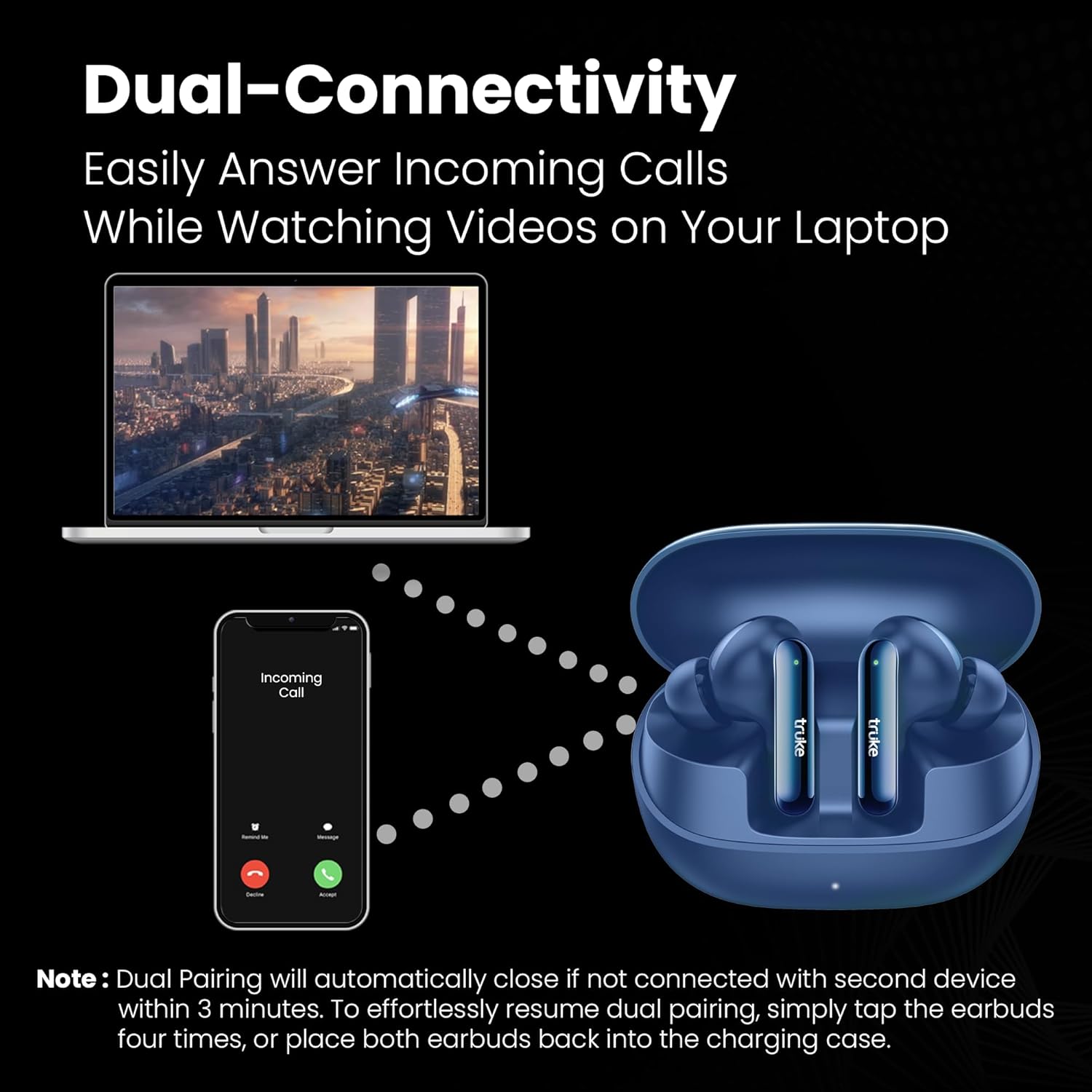
Image 5.2: Depiction of the dual-connectivity feature, showing earbuds connected to both a smartphone and a laptop.
5.4. โหมดการเล่นเกม
For an optimized gaming experience, the earbuds offer an Ultra-Low Latency of 35ms. This ensures audio synchronization with on-screen action, providing a competitive edge in gaming.

Image 5.3: Earbuds shown in a gaming context, highlighting the 35ms ultra-low latency feature.
5.5. การจัดการการโทร
The earbuds are equipped with Six-Mics ENC (Environmental Noise Cancellation) technology. This technology reduces background noise and enhances your voice, ensuring crystal-clear conversations even in noisy environments.

Image 5.4: An earbud illustrating the 6-Mics Advanced ENC technology, designed for clear conversations in various noisy settings.
6. การบำรุงรักษา
To ensure the longevity and optimal performance of your truke Buds Clarity 5 earbuds, follow these maintenance guidelines:
- การทำความสะอาด: ทำความสะอาดหูฟังและกล่องชาร์จเป็นประจำด้วยผ้านุ่ม แห้ง และไม่เป็นขุย หลีกเลี่ยงการใช้วัสดุที่มีฤทธิ์กัดกร่อนหรือสารเคมีรุนแรง
- ความต้านทานน้ำ: หูฟังแบบเอียร์บัดเป็น ทนน้ำระดับ IPX5, meaning they can withstand splashes and sweat. They are not designed for submersion in water. Avoid exposing them to heavy rain or showering.
- พื้นที่จัดเก็บ: เมื่อไม่ได้ใช้งาน ให้เก็บหูฟังไว้ในกล่องชาร์จเพื่อป้องกันฝุ่นและความเสียหาย
- อุณหภูมิ: หลีกเลี่ยงการวางหูฟังไว้ในอุณหภูมิที่สูงหรือต่ำเกินไป (ร้อนหรือเย็นเกินไป) เพราะอาจส่งผลต่ออายุการใช้งานและประสิทธิภาพของแบตเตอรี่ได้
7 การแก้ไขปัญหา
If you encounter issues with your truke Buds Clarity 5 earbuds, refer to the following common solutions:
| ปัญหา | วิธีแก้ปัญหาที่เป็นไปได้ |
|---|---|
| หูฟังไม่จับคู่หรือเชื่อมต่อ |
|
| มีหูฟังใช้งานได้แค่ข้างเดียว |
|
| ระดับเสียงต่ำหรือคุณภาพเสียงไม่ดี |
|
| ปัญหาการชาร์จ |
|
8. ข้อมูลจำเพาะ
| คุณสมบัติ | รายละเอียด |
|---|---|
| ชื่อรุ่น | Clarity 5 (S222) |
| การเชื่อมต่อ | บลูทูธ 5.3 |
| ไดร์เวอร์เสียง | 13mm Titanium Speaker Drivers |
| ไมโครโฟน | Built-In (6-Mics ENC) |
| อายุการใช้งานแบตเตอรี่ (หูฟัง) | นานถึง 10 ชั่วโมง |
| เวลาเล่นทั้งหมด (รวมเคส) | นานถึง 80 ชั่วโมง |
| ความหน่วงเวลา | 35ms เวลาแฝงต่ำเป็นพิเศษ |
| ความต้านทานต่อน้ำ | IPX5 (ทนน้ำ) |
| วิธีการควบคุม | สัมผัส |
| น้ำหนักสินค้า | 38 กรัม |
| ขนาดสินค้า | 6.5 x 5.1 x 2.6 ซม. |
| อุปกรณ์ที่รองรับ | สมาร์ทโฟน แท็บเล็ต แล็ปท็อป เดสก์ท็อป |
9. การรับประกันและการสนับสนุน
Your truke Buds Clarity 5 earbuds come with a รับประกัน 12 เดือน, ensuring quality and customer satisfaction. truke maintains a vast service network with 350+ Active Service Centers for convenient and accessible support.
For any queries, technical assistance, or warranty claims, please contact truke customer support:
- เบอร์ติดต่อ : +91 9354170767
- อีเมลไอดี: support@eccentricindia.com

Image 9.1: Information regarding truke's 12-month warranty, extensive service center network, and customer support contact details.


