1. คำแนะนำด้านความปลอดภัยที่สำคัญ
โปรดอ่านคำแนะนำทั้งหมดอย่างละเอียดก่อนใช้งานอุปกรณ์นี้ เก็บคู่มือนี้ไว้เพื่อใช้อ้างอิงในอนาคต
- เครื่องใช้ไฟฟ้าชิ้นนี้มีไว้สำหรับใช้ในครัวเรือนเท่านั้น
- ห้ามจุ่มเครื่องลงในน้ำหรือของเหลวอื่นๆ
- Keep the appliance away from water sources, especially when charging.
- Do not use the appliance if the cord or plug is damaged. Contact customer support for repair.
- Always ensure the appliance is switched off before cleaning or performing maintenance.
- เก็บให้พ้นมือเด็ก เครื่องใช้ไฟฟ้านี้ไม่ใช่ของเล่น
- หลีกเลี่ยงการสัมผัสชิ้นส่วนที่เคลื่อนไหว
- Do not use the trimmer on irritated skin or open wounds.
- Only use the charging adapter supplied with the appliance.
2. สินค้าหมดview
The HTC AT-206A is a rechargeable hair trimmer designed for precise grooming tasks such as edging, outlining, dry shaving, and light shaping around areas like the neck, ears, and sideburns.

Image 2.1: HTC AT-206A Trimmer and its retail packaging, showing the device and included accessories.
ส่วนประกอบ:
- Trimmer Unit (HTC AT-206A)
- สายชาร์จ
- แปรงทำความสะอาด
- ขวดน้ำมันหล่อลื่น
- หวีสิ่งที่แนบมา
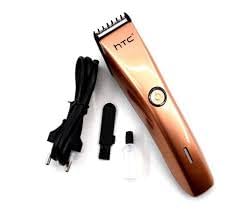
Image 2.2: The HTC AT-206A trimmer displayed with its charging cable, cleaning brush, oil bottle, and comb attachment.
3. การตั้งค่าและการชาร์จ
3.1 การชาร์จเริ่มต้น
- Before first use, fully charge the trimmer for approximately 8-10 hours.
- ตรวจสอบให้แน่ใจว่าได้ปิดทริมเมอร์แล้ว
- เสียบสายชาร์จเข้ากับพอร์ตชาร์จของเครื่องตัดแต่งขน
- เสียบอะแดปเตอร์เข้ากับเต้ารับไฟฟ้าที่เหมาะสม
- ไฟแสดงสถานะการชาร์จ (ถ้ามี) จะสว่างขึ้นเพื่อแสดงว่ากำลังชาร์จอยู่
- Once fully charged, disconnect the charger from the outlet and the trimmer.
3.2 Attaching the Comb Attachment
- ตรวจสอบให้แน่ใจว่าได้ปิดทริมเมอร์แล้ว
- จัดตำแหน่งหวีให้ตรงกับใบมีดของเครื่องตัดแต่งทรงผม
- Gently push the comb attachment onto the blade until it clicks into place.
- To remove, gently pull the comb attachment away from the blade.
4. คู่มือการใช้งาน
4.1 การทำงานพื้นฐาน
- ตรวจสอบให้แน่ใจว่าเครื่องตัดเล็มมีการชาร์จประจุแล้ว
- กดปุ่มเปิด/ปิดเพื่อเปิดใช้งานเครื่องตัดแต่งขน
- กดปุ่มเปิด/ปิดอีกครั้งเพื่อปิดเครื่องตัดแต่งขน
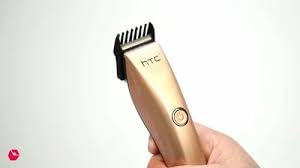
Image 4.1: The HTC AT-206A trimmer held in hand, demonstrating its ergonomic design for ease of use.
4.2 เทคนิคการตัดแต่ง
- เพื่อให้ได้ผลลัพธ์ที่ดีที่สุด ควรใช้เครื่องตัดแต่งทรงผมกับผมที่สะอาดและแห้ง
- จับเครื่องตัดแต่งขนให้เอียงเล็กน้อยแนบกับผิวหนัง
- ขยับเครื่องตัดขนอย่างช้าๆ และสม่ำเสมอในทิศทางทวนทิศทางการเจริญเติบโตของเส้นขน
- Use the comb attachment for longer hair lengths (0.5mm-13mm).
- For edging and outlining, use the trimmer without the comb attachment for a closer trim.
- Stretch the skin taut with your free hand to ensure a smooth surface for trimming.
5. การบำรุงรักษาและการทำความสะอาด
การทำความสะอาดและบำรุงรักษาอย่างสม่ำเสมอจะช่วยให้เครื่องตัดแต่งทรงผมทำงานได้อย่างมีประสิทธิภาพสูงสุดและยืดอายุการใช้งานได้
5.1 การทำความสะอาดใบมีด
- Ensure the trimmer is switched off and disconnected from the charger.
- Use the provided cleaning brush to remove any loose hairs from the blades.
- For a more thorough clean, you may carefully detach the blade head (refer to specific instructions if provided with your model for blade removal).
- ห้ามล้างเครื่องตัดแต่งขนทั้งหมดใต้น้ำ เว้นแต่จะระบุไว้อย่างชัดเจนว่ากันน้ำได้
5.2 การหล่อลื่นใบมีด
- After cleaning, apply 1-2 drops of the provided lubricating oil onto the blades.
- เปิดเครื่องตัดหญ้าไว้สักสองสามวินาทีเพื่อให้Zน้ำมันกระจายตัวอย่างทั่วถึง
- เช็ดน้ำมันส่วนเกินออกด้วยผ้านุ่ม
- Oiling the blades regularly (e.g., after every few uses) helps maintain cutting efficiency and prevents rust.
5.3 พื้นที่จัดเก็บ
Store the trimmer in a cool, dry place, away from direct sunlight and moisture. Ensure it is fully charged before storing for extended periods.
6 การแก้ไขปัญหา
If you encounter any issues with your trimmer, refer to the following common problems and solutions:
- เครื่องตัดหญ้าไม่เปิดใช้งาน:
Ensure the trimmer is fully charged. Check if the charging cable is properly connected and the power outlet is functional. - ประสิทธิภาพการตัดแต่งที่ไม่ดี / การดึงขน:
The blades may be dull or clogged with hair. Clean and oil the blades as described in the Maintenance section. Ensure the trimmer is adequately charged. - แบตเตอรี่ไม่สามารถเก็บประจุได้:
Ensure the trimmer is charged for the recommended duration. If the issue persists, the battery may need replacement. Contact customer support. - เสียงรบกวนหรือการสั่นสะเทือนมากเกินไป:
The blades might be misaligned or require oiling. Clean and oil the blades. If the problem continues, discontinue use and contact customer support.
7. ข้อมูลจำเพาะ
| คุณสมบัติ | ข้อมูลจำเพาะ |
|---|---|
| หมายเลขรุ่น | AT-206A (SA-144) |
| แหล่งพลังงาน | แบตเตอรี่แบบชาร์จไฟได้ |
| วัสดุใบมีด | Stainless Steel (Metal) |
| Cutting Length Range | 0.5mm - 13mm (with comb attachment) |
| ขนาด (กว้าง x ยาว x สูง) | 18.7 x 4.9 x 11.2 ซม. |
| การใช้ที่แนะนำ | Dry Shaving, Edging, Light Shaping, Outlining (Neck, Ears, Sideburns, Face) |
| สี | สีดำ |
| ผู้ผลิต | จีน |
8. การรับประกันและการสนับสนุน
This product is covered by a standard manufacturer's warranty. Please refer to the product packaging or contact your retailer for specific warranty terms and conditions.
For technical support, troubleshooting assistance, or warranty claims, please contact the retailer or manufacturer directly. Keep your proof of purchase for any warranty-related inquiries.


