1. สินค้าหมดview
The Phillips MX7067 PMD-140 is a digital furniture lock designed for securing drawers, filing cabinets, lockers, and other furniture. It features a high-sensitivity biometric fingerprint sensor, supports up to 100 fingerprints, operates on three 1.5V AAA alkaline batteries, and includes a micro USB interface for emergency power supply. This lock is intended for indoor use.
คุณสมบัติหลัก:
- Ideal for use in drawers, filing cabinets, cabinets, lockers, and wardrobes.
- Micro USB interface for emergency power supply.
- Operates on three 1.5V AAA alkaline batteries (not included).
- High-sensitivity and fast-response biometric fingerprint sensor.
- Equipped with a bright light for visual operation assistance.
- Supports up to 100 fingerprints for multiple users.
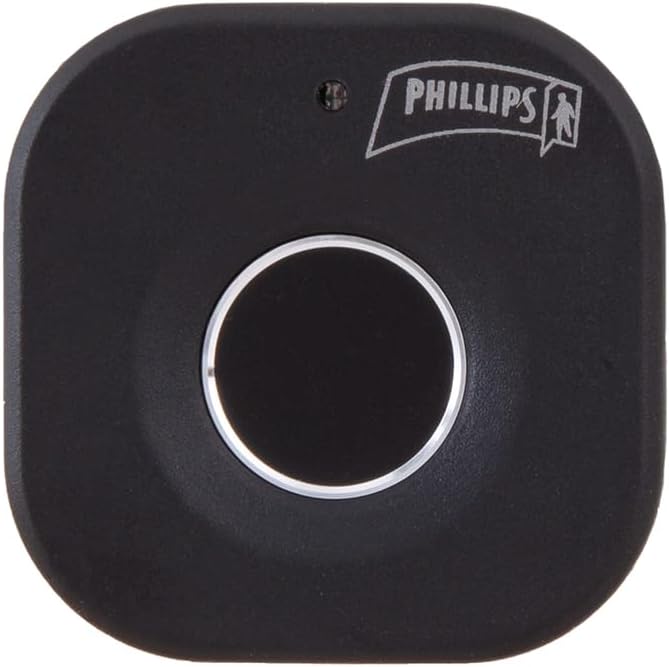
รูปที่ 1: ด้านหน้า view of the Phillips MX7067 Digital Furniture Lock. This image shows the main fingerprint sensor and the Phillips logo on the black, square-shaped lock unit.
2. ข้อมูลด้านความปลอดภัย
โปรดอ่านและทำความเข้าใจคำแนะนำด้านความปลอดภัยทั้งหมดก่อนติดตั้งและใช้งานผลิตภัณฑ์นี้ การไม่ปฏิบัติตามคำแนะนำเหล่านี้อาจส่งผลให้ผลิตภัณฑ์ทำงานผิดปกติหรือเสียหายได้
- This device is designed for indoor use only. Do not expose to water, moisture, or extreme temperatures.
- Use only 1.5V AAA alkaline batteries. Do not mix old and new batteries, or different types of batteries.
- รักษาเซ็นเซอร์สแกนลายนิ้วมือให้สะอาดและแห้งเพื่อประสิทธิภาพสูงสุด
- Do not attempt to disassemble or modify the lock. This will void the warranty.
- Ensure proper installation to prevent unauthorized removal or damage.
3. เนื้อหาบรรจุภัณฑ์
ตรวจสอบว่ามีรายการทั้งหมดอยู่ในแพ็คเกจ:
- Phillips MX7067 Digital Furniture Lock Unit
- Mounting Hardware (screws, adhesive, etc. - specific items may vary)
- คู่มือการใช้งาน (เอกสารนี้)

รูปที่ 2: Product packaging of the Phillips MX7067 Digital Furniture Lock. The box displays product features and branding, indicating a single unit is included.
4. การตั้งค่า
4.1 การติดตั้งแบตเตอรี่
- Locate the battery compartment on the back or side of the lock unit.
- เปิดฝาช่องใส่แบตเตอรี่
- Insert three (3) 1.5V AAA alkaline batteries, ensuring correct polarity (+/-).
- ปิดฝาช่องใส่แบตเตอรี่ให้แน่น
4.2 Installation on Furniture
The lock can be installed on various types of furniture such as drawers, cabinets, or lockers. Specific installation steps may vary based on your furniture type. Generally, the lock unit is mounted on the inside of the furniture, with the fingerprint sensor accessible from the outside.
- Determine the optimal placement for the lock unit and the strike plate on your furniture. Ensure the fingerprint sensor is easily accessible.
- Mark the drilling points for the lock unit and strike plate.
- Drill pilot holes as needed, taking care not to damage the furniture.
- Secure the main lock unit to the furniture using the provided screws or adhesive.
- Install the strike plate on the corresponding surface, ensuring proper alignment for secure locking.
- Test the mechanical function of the lock before proceeding to fingerprint registration.

รูปที่ 3: ด้านข้าง view of the Phillips MX7067 Digital Furniture Lock. This angle provides a perspective on the lock's depth and mounting mechanism.
4.3 Initial Fingerprint Registration (Administrator)
The first fingerprint registered will automatically be set as the administrator fingerprint. This fingerprint is required to add or delete other user fingerprints.
- With the lock powered on, press and hold the registration button (usually located on the back or inside the lock unit) until the indicator light turns blue.
- วางนิ้วของคุณลงบนเซ็นเซอร์สแกนลายนิ้วมือ ไฟแสดงสถานะจะกะพริบ
- Lift your finger and place it again, repeating this process approximately 5-10 times from different angles until the indicator light turns green, indicating successful registration.
- The first registered fingerprint is now the administrator.
5. คู่มือการใช้งาน
5.1 Adding User Fingerprints
Up to 100 fingerprints can be stored in total (including the administrator).
- Wake up the lock by touching the sensor or pressing a button (if available).
- วาง administrator's finger on the sensor. Once recognized, the indicator light will turn blue.
- Immediately after, place the new user's finger on the sensor. The indicator light will flash.
- Lift the new user's finger and place it again, repeating this process approximately 5-10 times from different angles until the indicator light turns green, indicating successful registration.
- To add more fingerprints, repeat steps 2-4. If no further fingerprints are added, the lock will exit registration mode after a short period.
5.2 Deleting All Fingerprints
This action will delete all registered fingerprints, including the administrator's. The lock will revert to factory settings, requiring a new administrator fingerprint registration.
- ปลุกล็อคให้ตื่น
- วาง administrator's finger on the sensor. Once recognized, the indicator light will turn blue.
- While the light is blue, press and hold the registration button (or specific reset button) for approximately 5-10 seconds until the indicator light flashes red, then turns green. This confirms all fingerprints have been deleted.
- You must now register a new administrator fingerprint as per Section 4.3.
5.3 การล็อคและปลดล็อค
- ล็อค: The lock automatically locks when the furniture is closed. Some models may require a brief touch on the sensor to engage the lock.
- การปลดล็อค: Place a registered finger on the fingerprint sensor. If the fingerprint is recognized, the indicator light will turn green, and the lock will disengage. If the fingerprint is not recognized, the light will flash red.
แหล่งจ่ายไฟฉุกเฉิน 5.4
If the batteries are depleted, the lock can be temporarily powered using a micro USB cable connected to an external power source (e.g., power bank, USB charger).
- Locate the micro USB port on the lock unit.
- Connect a micro USB cable from an external power source to the lock's micro USB port.
- Once powered, you can use a registered fingerprint to unlock the furniture.
- After unlocking, replace the internal AAA batteries as soon as possible.

รูปที่ 4: มุม view of the Phillips MX7067 Digital Furniture Lock. This view may show the location of the battery compartment or micro USB port, crucial for setup and emergency power.
6. การบำรุงรักษา
6.1 การทำความสะอาด
To maintain optimal performance, regularly clean the fingerprint sensor and the lock's exterior.
- Use a soft, dry, lint-free cloth to wipe the sensor and lock surface.
- ห้ามใช้สารทำความสะอาดที่มีฤทธิ์กัดกร่อน ตัวทำละลาย หรือสารเคมีรุนแรง เนื่องจากอาจทำให้พื้นผิวหรือชิ้นส่วนอิเล็กทรอนิกส์เสียหายได้
6.2 การเปลี่ยนแบตเตอรี่
When the battery level is low, the indicator light may flash red or emit an audible warning during operation. Replace the batteries promptly to ensure continuous functionality.
- เปิดฝาช่องใส่แบตเตอรี่
- ถอดแบตเตอรี่ AAA เก่าออก
- Insert three (3) new 1.5V AAA alkaline batteries, observing correct polarity.
- ปิดฝาช่องใส่แบตเตอรี่
7 การแก้ไขปัญหา
| ปัญหา | สาเหตุที่เป็นไปได้ | สารละลาย |
|---|---|---|
| ล็อคไม่ตอบสนอง | แบตเตอรี่หมด | Replace batteries or use emergency micro USB power. |
| ไม่พบลายนิ้วมือ | Finger is wet, dirty, or improperly placed. Fingerprint not registered. | ตรวจสอบให้แน่ใจว่านิ้วสะอาดและแห้ง วางนิ้วลงบนเซ็นเซอร์ให้แน่นและสนิท หากจำเป็น ให้ลงทะเบียนลายนิ้วมือใหม่ |
| Cannot register new fingerprint. | Not using administrator fingerprint. Maximum fingerprints reached. | Ensure administrator fingerprint is used to initiate registration. Delete existing fingerprints if capacity is full. |
| Lock is loose after installation. | สกรูยึดหลวม | Tighten mounting screws. Ensure proper installation. |
8. ข้อมูลจำเพาะ
- หมายเลขรุ่น: MX7067 PMD-140
- ยี่ห้อ: ฟิลลิปส์
- สี: สีดำ
- ขนาด (ยาว x กว้าง x สูง): 8.99 ซม. x 5.31 ซม. x 7.49 ซม. (3.54 นิ้ว x 2.09 นิ้ว x 2.95 นิ้ว)
- น้ำหนัก: 160 กรัม
- แหล่งจ่ายไฟ: แบตเตอรี่อัลคาไลน์ AAA 3 x 1.5V (ไม่รวม)
- ไฟฉุกเฉิน: อินเทอร์เฟซ Micro USB
- ความจุลายนิ้วมือ: มากถึง 100 ลายนิ้วมือ
- สภาพแวดล้อมการทำงาน: ใช้ภายในอาคารเท่านั้น
9. การรับประกันและการสนับสนุน
This Phillips MX7067 Digital Furniture Lock PMD-140 comes with a รับประกัน 1 ปี นับจากวันที่ซื้อ โปรดเก็บหลักฐานการซื้อไว้เพื่อใช้ในการเคลมประกัน
For technical support or warranty inquiries, please contact Phillips customer service through their official webไซต์หรือผู้ค้าปลีกที่ซื้อผลิตภัณฑ์


