1. สินค้าหมดview
The ION Audio Highlander is a high-powered, all-weather portable Bluetooth speaker designed to deliver rich sound and deep bass even at high volumes. Its durable construction makes it suitable for various environments, ensuring your music can accompany you wherever you go.
คุณสมบัติหลัก:
- High-Power Audio: Delivers 120 Watts of speaker maximum output power for impactful sound.
- เพิ่มเสียงเบส: Enhances low frequencies for maximum impact.
- Bluetooth 5.0 Enabled: Allows wireless streaming and control of your music from compatible devices.
- ระดับกันน้ำ IPX5: Designed to withstand splashes and rain, making it safe for outdoor use.
- Rechargeable 50-Hour Battery: ให้เวลาเล่นที่ยาวนานขึ้นต่อการชาร์จหนึ่งครั้ง
- มีมือจับและล้อในตัว: Facilitates easy transportation.
2. เนื้อหาบรรจุภัณฑ์
ตรวจสอบให้แน่ใจว่ามีสินค้าทั้งหมดที่ระบุไว้ด้านล่างนี้อยู่ในแพ็คเกจของคุณ:
- ION Audio Highlander Portable Speaker
- สายไฟ
3. คู่มือการติดตั้ง
3.1 การชาร์จแบตเตอรี่
Before first use, fully charge the Highlander speaker. The battery life is approximately 50 hours, but initial charging may take several hours.
- Connect the included power cable to the power input on the back of the Highlander speaker.
- Plug the other end of the power cable into a standard wall outlet.
- The charging indicator light will illuminate. The light will change or turn off once charging is complete.
3.2 การเปิด/ปิดเครื่อง
To power the speaker on or off, locate the power button on the control panel.
- การเปิดเครื่อง: Press and hold the Power button for a few seconds until the display illuminates.
- วิธีปิดเครื่อง: Press and hold the Power button again for a few seconds until the display turns off.
3.3 การจับคู่บลูทูธ
Follow these steps to connect your Bluetooth device to the Highlander speaker:
- Ensure the Highlander speaker is powered on and in Bluetooth mode. The Bluetooth indicator on the display will flash, indicating it's ready to pair.
- On your Bluetooth device (smartphone, tablet, laptop), go to its Bluetooth settings.
- ค้นหา available devices. Select "ION Highlander" from the list.
- Once paired, the Bluetooth indicator on the speaker will stop flashing and remain solid. You can now play audio through the speaker.
- To disconnect, turn off Bluetooth on your device or select "Forget This Device" in your device's Bluetooth settings.
4. คู่มือการใช้งาน
4.1 แผงควบคุมโอเวอร์view
The top panel of the Highlander speaker features various controls for managing audio playback and settings.

- ปุ่มเปิด/ปิด: เปิดหรือปิดลำโพง
- ปุ่มปรับระดับเสียง: ปรับระดับเสียงโดยรวม
- ปุ่มบลูทูธ: เริ่มโหมดการจับคู่บลูทูธ
- ปุ่มเพิ่มเสียงเบส: Activates or deactivates the bass boost feature.
- หน้าจอแสดงผล: Shows current mode, battery status, and other information.
4.2 Adjusting Volume and Bass Boost
- ปริมาณ: Rotate the main volume knob clockwise to increase volume and counter-clockwise to decrease it.
- เพิ่มเสียงเบส: Press the "Bass Boost" button to enhance the bass output. Press it again to return to normal audio.
4.3 คุณสมบัติการพกพา
The Highlander is designed for easy transport:
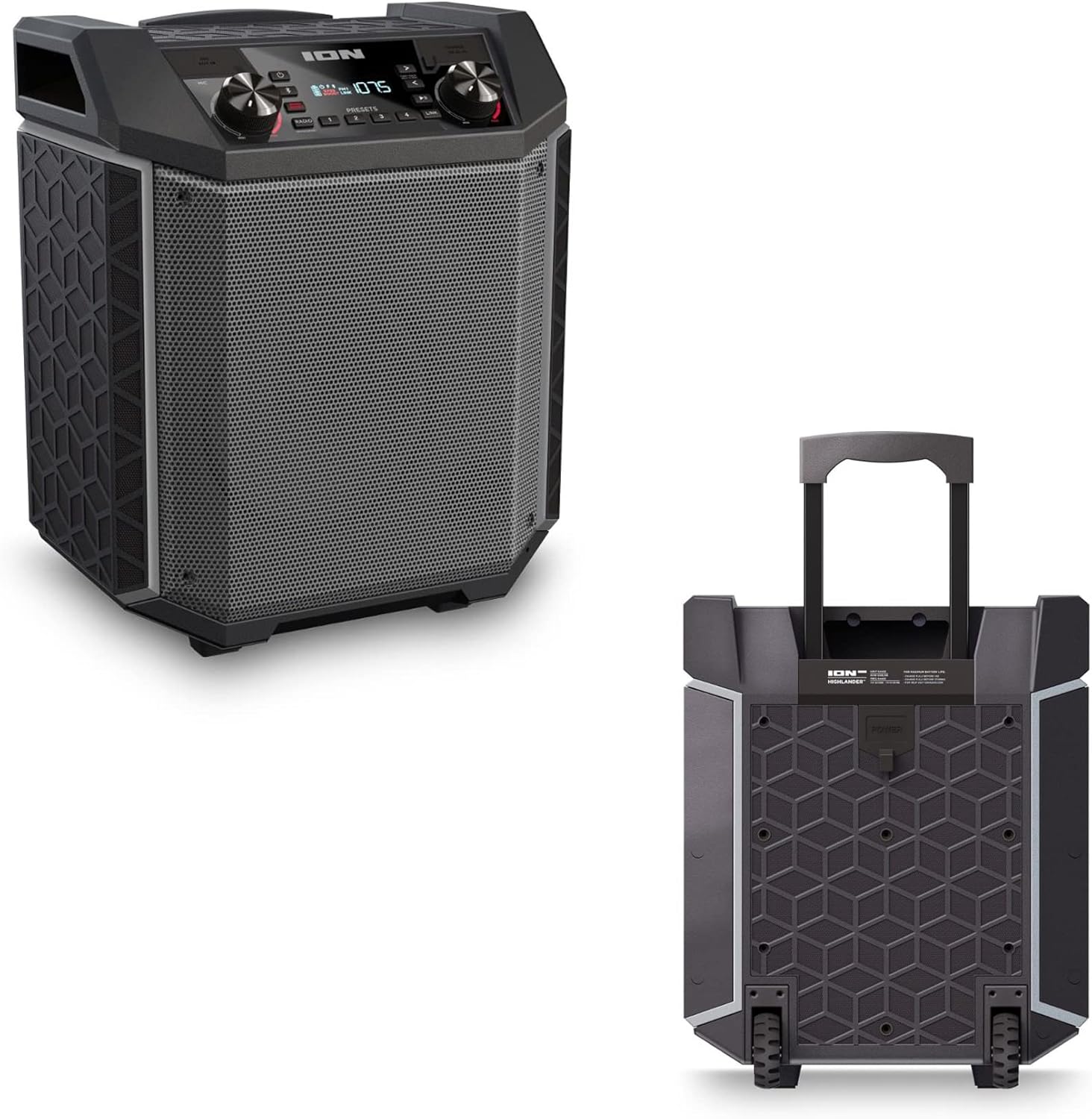

- ด้ามจับพับเก็บได้: Pull up the integrated handle to roll the speaker like luggage.
- ล้อ: Use the built-in wheels for smooth movement across various surfaces.
4.4 ความต้านทานน้ำ (IPX5)
The Highlander speaker is IPX5 water-resistant, meaning it can withstand splashes of water from any direction. It is suitable for use by the pool or in light rain.

สำคัญ: Do not submerge the speaker in water. Ensure all port covers are securely closed when exposed to water.
5. การบำรุงรักษา
5.1 การทำความสะอาด
- ควรปิดลำโพงและถอดปลั๊กออกจากแหล่งจ่ายไฟก่อนทำความสะอาดทุกครั้ง
- ใช้ผ้าแห้งนุ่มเช็ดพื้นผิวภายนอก
- สำหรับสิ่งสกปรกที่ฝังแน่น ง. เบา ๆampชุบผ้าด้วยน้ำ หลีกเลี่ยงการใช้สารเคมีรุนแรง ตัวทำละลาย หรือน้ำยาทำความสะอาดที่มีฤทธิ์กัดกร่อน
- Do not spray cleaning liquids directly onto the speaker.
5.2 พื้นที่จัดเก็บ
- เก็บลำโพงไว้ในที่แห้งและเย็น หลีกเลี่ยงแสงแดดโดยตรงและอุณหภูมิที่สูงหรือต่ำเกินไป
- If storing for an extended period, ensure the battery is partially charged (around 50%) to maintain battery health. Recharge every few months if not in use.
5.3 การดูแลแบตเตอรี่
- หลีกเลี่ยงการระบายแบตเตอรี่จนหมดบ่อยครั้ง
- อย่าให้แบตเตอรี่โดนความร้อนหรือความเย็นมากเกินไป
- If the battery performance significantly degrades, contact customer support for assistance.
6 การแก้ไขปัญหา
If you encounter issues with your Highlander speaker, refer to the table below for common problems and solutions.
| ปัญหา | วิธีแก้ปัญหาที่เป็นไปได้ |
|---|---|
| ลำโพงไม่เปิดเครื่อง |
|
| ไม่สามารถจับคู่กับอุปกรณ์บลูทูธได้ |
|
| ไม่มีเสียงหรือเสียงเบา |
|
| ความผิดเพี้ยนของเสียง |
|
7. ข้อมูลจำเพาะ
| คุณสมบัติ | รายละเอียด |
|---|---|
| ชื่อรุ่น | ไฮแลนเดอร์ |
| ยี่ห้อ | ไอออน |
| ประเภทลำโพง | กลางแจ้ง |
| เทคโนโลยีการเชื่อมต่อ | บลูทูธ 5.0 |
| แหล่งพลังงาน | ใช้พลังงานจากแบตเตอรี่ |
| อายุการใช้งานแบตเตอรี่ | 50 ชั่วโมง |
| ระดับความต้านทานต่อน้ำ | IPX5 (ทนน้ำ) |
| กำลังขับสูงสุดของลำโพง | 120 วัตต์ |
| ขนาดสินค้า | ลึก 19.5 นิ้ว x กว้าง 19.5 นิ้ว x สูง 14 นิ้ว |
| น้ำหนักสินค้า | 23.2 ปอนด์ |
| วัสดุ | Water-resistant plastic or rubber, with a black coating |
| ส่วนประกอบที่รวมอยู่ | สายไฟ |
| ยูพีซี | 657768542732 |
8. การรับประกันและการสนับสนุน
The ION Audio Highlander speaker comes with a Limited Warranty. For specific details regarding warranty coverage, duration, and terms, please refer to the warranty information provided with your purchase or visit the official ION Audio webเว็บไซต์.
For technical support, troubleshooting assistance beyond this manual, or warranty claims, please contact ION Audio customer support through their official channels. Keep your proof of purchase handy when contacting support.


