การแนะนำ
The Altec Lansing Kid Safe 2-in-1 Wireless Bluetooth Headphones (Model MZX4410) are designed to provide a safe and enjoyable audio experience for children. These headphones feature volume-limiting technology to protect delicate hearing, comfortable ear cushions, and versatile connectivity options. This manual provides instructions for setup, operation, and maintenance to ensure optimal performance and longevity of your headphones.
มีอะไรอยู่ในกล่อง
- Altec Lansing Kid Safe 2-in-1 Wireless Bluetooth Headphones
- สายชาร์จ USB-C
- สายสัญญาณเสียงขนาด 3.5 มม.
- เคสป้องกัน
- คู่มือการใช้งาน (เอกสารนี้)
คุณสมบัติผลิตภัณฑ์
- เสียงใสดุจคริสตัล: High-quality audio with enhanced bass for an immersive listening experience.
- Safe Volume Limiting: Integrated technology limits maximum volume to 85dB to protect children's hearing.
- การเชื่อมต่อ 2-in-1: รองรับทั้งการเชื่อมต่อเสียงแบบไร้สาย Bluetooth และแบบมีสาย 3.5 มม.
- ระยะสัญญาณไร้สาย: Up to 30 feet of Bluetooth wireless range for unrestricted movement.
- การออกแบบที่สะดวกสบาย: Soft ear cushions and an adjustable, cushioned headband ensure a comfortable fit for extended wear.
- พับได้และพกพาสะดวก: Convenient foldable design for easy storage and transport.
- โครงสร้างทนทาน: Built to withstand active use.
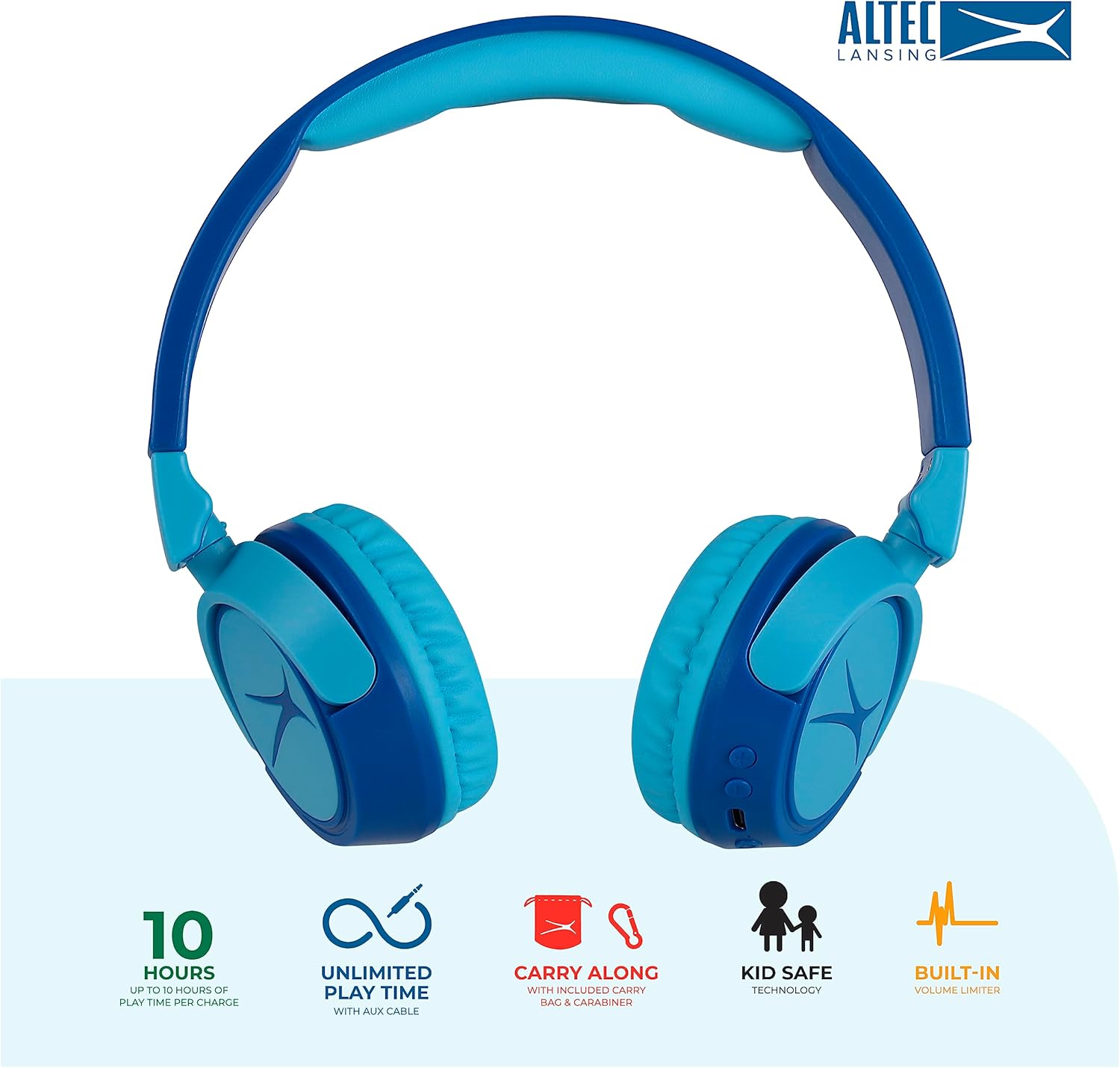
Image: Key features of the Altec Lansing Kid Safe Headphones, including battery life, wired option, portability, and safety features.

Image: Visual representation of the 85dB volume limiting technology for safe listening.
คำแนะนำการตั้งค่า
1. การชาร์จหูฟัง
- ค้นหาพอร์ตชาร์จ USB-C บนตัวหูฟัง
- Connect the provided USB-C charging cable to the port on the headphones.
- Plug the other end of the USB-C cable into a compatible USB power source (e.g., computer, wall adapter).
- ไฟแสดงสถานะ LED จะสว่างขึ้นในระหว่างการชาร์จ และจะเปลี่ยนสีหรือดับลงเมื่อชาร์จเต็มแล้ว
- การชาร์จเต็มสามารถเล่นได้ประมาณ 10 ชั่วโมง
2. การจับคู่บลูทู ธ
- ตรวจสอบให้แน่ใจว่าได้ชาร์จหูฟังแล้ว
- Press and hold the Power button on the headphone earcup until the LED indicator flashes blue and red, indicating pairing mode.
- บนอุปกรณ์ของคุณ (สมาร์ทโฟน แท็บเล็ต คอมพิวเตอร์) ไปที่การตั้งค่าบลูทูธ แล้วเปิดใช้งานบลูทูธ
- Select "Altec Lansing MZX4410" from the list of available devices.
- เมื่อเชื่อมต่อแล้ว ไฟ LED จะแสดงแสงสีน้ำเงินสว่างคงที่
- หูฟังจะเชื่อมต่อกับอุปกรณ์ที่จับคู่ล่าสุดโดยอัตโนมัติเมื่อเปิดเครื่อง หากอยู่ในระยะที่กำหนด
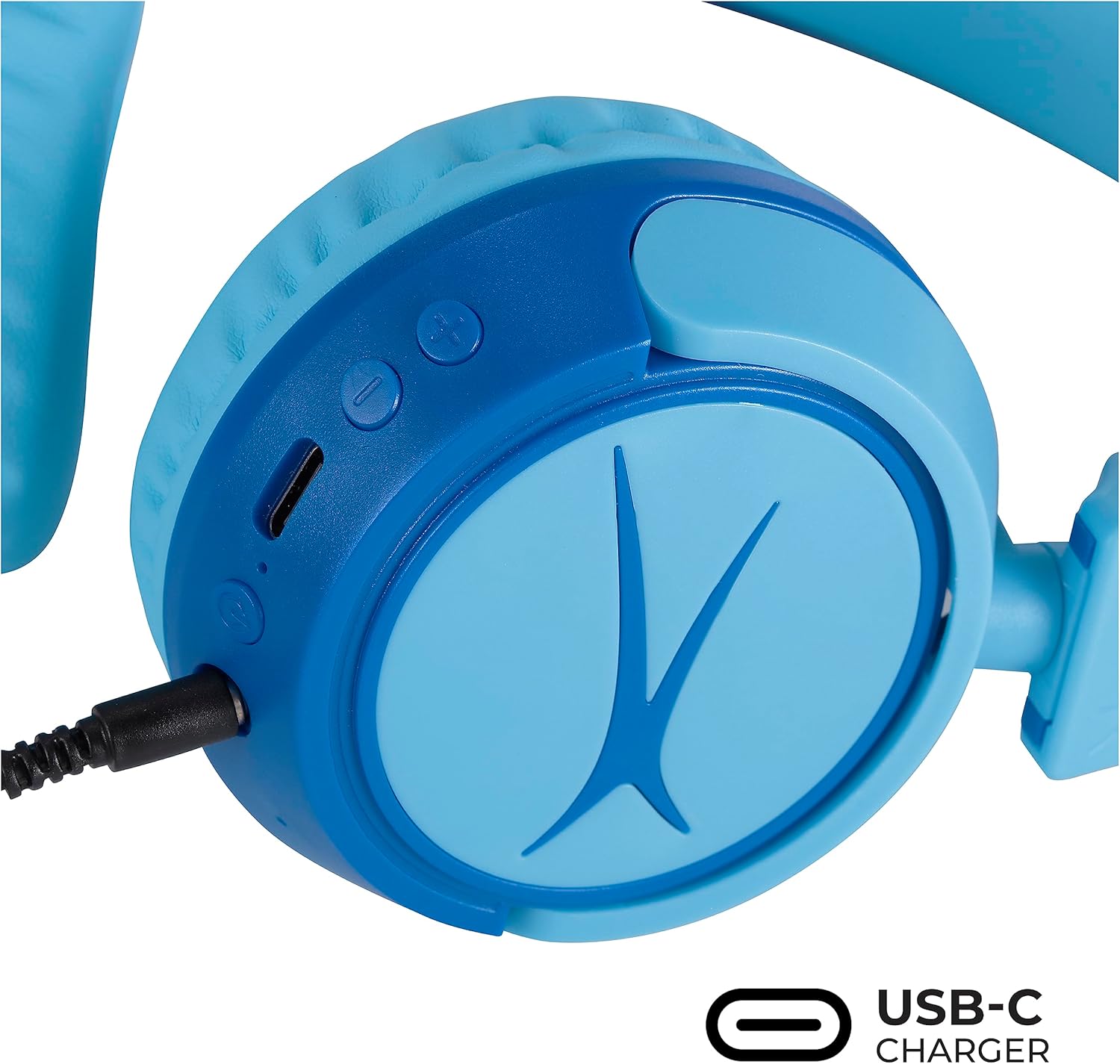
Image: Detail of the headphone controls and ports for charging and wired connection.
คำแนะนำการใช้งาน
เปิด/ปิดเครื่อง
- หากต้องการเปิดเครื่อง ให้กดปุ่มเปิด/ปิดค้างไว้จนกว่าไฟแสดงสถานะ LED จะสว่างขึ้น
- หากต้องการปิดเครื่อง ให้กดปุ่มเปิด/ปิดค้างไว้จนกว่าไฟ LED จะดับ
การควบคุมระดับเสียง
- Use the '+' button to increase volume.
- Use the '-' button to decrease volume.
- The volume is limited to 85dB for hearing protection.
การควบคุมสื่อ
- กดปุ่มเล่น/หยุดชั่วคราวหนึ่งครั้งเพื่อเล่นหรือหยุดเสียงชั่วคราว
- Press and hold the '+' button to skip to the next track.
- Press and hold the '-' button to go to the previous track.
Wired Connection (Optional)
For unlimited playtime or when Bluetooth is not available, use the provided 3.5mm audio cable:
- Plug one end of the 3.5mm audio cable into the audio jack on the headphone earcup.
- เสียบปลายอีกด้านเข้ากับเอาต์พุตเสียงขนาด 3.5 มม. ของอุปกรณ์ของคุณ
- หูฟังจะเปลี่ยนเป็นโหมดสายโดยอัตโนมัติ

Image: The headphones are compatible with multiple devices via Bluetooth or wired connection.
Video: An official product video demonstrating the Altec Lansing Kid Safe Bluetooth Headphones.
การซ่อมบำรุง
การทำความสะอาด
- เช็ดหูฟังด้วยผ้าแห้งและนุ่ม
- อย่าใช้สารเคมีที่รุนแรงหรือวัสดุที่มีฤทธิ์กัดกร่อน
- Ensure no moisture enters the ports.
พื้นที่จัดเก็บ
- Fold the headphones for compact storage.
- Store them in the provided protective case when not in use to prevent damage.
- เก็บไว้ในที่แห้งและเย็น ห่างจากอุณหภูมิที่สูงหรือต่ำเกินไป

Image: Features highlighting the adjustable and cushioned design for comfort.
การแก้ไขปัญหา
- ไม่มีไฟฟ้า: ตรวจสอบให้แน่ใจว่าหูฟังชาร์จเต็มแล้ว เชื่อมต่อกับแหล่งจ่ายไฟโดยใช้สาย USB-C
- ไม่สามารถจับคู่ผ่านบลูทูธ: Make sure the headphones are in pairing mode (flashing blue/red LED). Check that Bluetooth is enabled on your device and that the headphones are within the 30-foot range. Try restarting both the headphones and your device.
- ไม่มีเสียงในโหมดไร้สาย: ตรวจสอบให้แน่ใจว่าหูฟังจับคู่และเชื่อมต่อกับอุปกรณ์ของคุณเรียบร้อยแล้ว ตรวจสอบระดับเสียงทั้งในหูฟังและอุปกรณ์ของคุณ
- ไม่มีเสียงในโหมดใช้สาย: Ensure the 3.5mm audio cable is securely plugged into both the headphones and your device. Check the volume levels on your device.
- Sound is Too Low: The headphones feature a built-in volume limiter at 85dB for safety. This is a design feature and not a malfunction.
ข้อมูลจำเพาะ
| คุณสมบัติ | รายละเอียด |
|---|---|
| ชื่อรุ่น | MZX4410 |
| เทคโนโลยีการเชื่อมต่อ | แบบไร้สาย (บลูทูธ), แบบมีสาย (แจ็ค 3.5 มม.) |
| เทคโนโลยีการสื่อสารไร้สาย | บลูทูธ |
| ช่วงบลูทูธ | 30 ฟุต |
| อายุการใช้งานแบตเตอรี่ | 10 ชั่วโมง |
| ปริมาณ จำกัด | 85dB (Kid Safe) |
| ประเภทการควบคุม | การควบคุมสื่อ สัมผัส |
| คุณสมบัติพิเศษ | Adjustable Headband, Detachable Cable, Foldable, Lightweight, Wireless |
| วัสดุ | พลาสติก |
| น้ำหนักสินค้า | 8.8 ออนซ์ (0.25 กิโลกรัม) |
| ผู้ผลิต | Altec Lansing Technologies |
| ยูพีซี | 021331082107 |
การรับประกันและการสนับสนุน
For warranty information and customer support, please refer to the official Altec Lansing website or contact their customer service directly. Details can typically be found on the product packaging or the Altec Lansing support portal.


