1. บทนำ
Thank you for choosing the iFFALCON 43-inch 4K Ultra HD Smart QLED Google TV, model iFF43Q73. This manual provides essential information for the safe and efficient use of your television. Please read it thoroughly before operating the device and retain it for future reference.
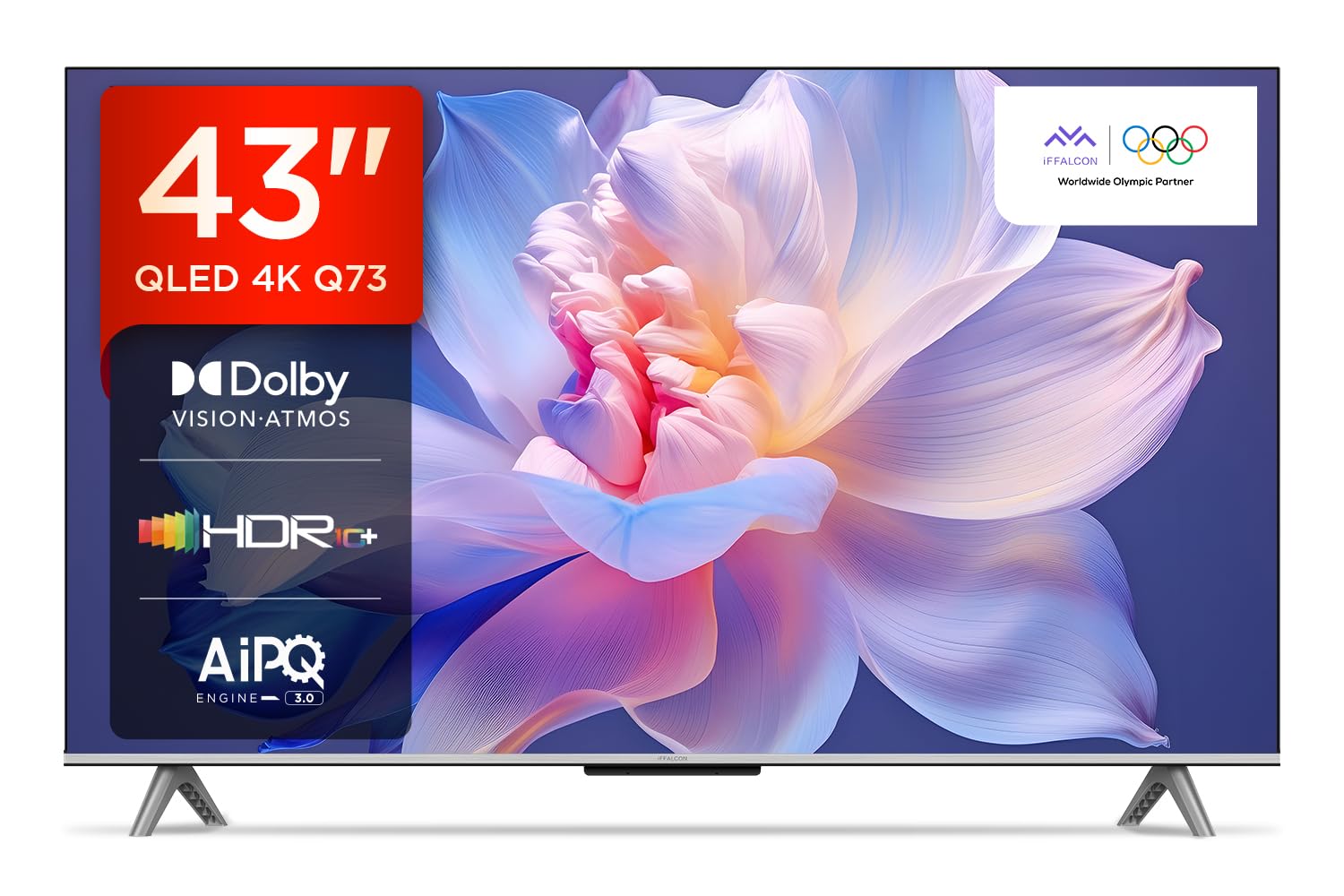
ภาพ: ด้านหน้า view of the iFFALCON 43-inch 4K Ultra HD Smart QLED Google TV.
2. ข้อมูลด้านความปลอดภัย
Always adhere to the following safety guidelines to prevent electric shock, fire, or damage to the television:
- อย่าให้ทีวีโดนฝนหรือความชื้น
- ตรวจสอบให้แน่ใจว่ามีการระบายอากาศที่เหมาะสม อย่าปิดกั้นช่องระบายอากาศ
- ใช้เฉพาะอุปกรณ์เสริม/สิ่งที่แนบที่ผู้ผลิตกำหนดเท่านั้น
- ถอดปลั๊กทีวีในระหว่างที่มีพายุฝนฟ้าคะนองหรือเมื่อไม่ได้ใช้งานเป็นเวลานาน
- ส่งต่อการบริการทั้งหมดไปยังบุคลากรบริการที่มีคุณสมบัติเหมาะสม
3. อะไรอยู่ในกล่อง
Upon unpacking, verify that all items are present:
- ทีวี LED 1N
- สายสัญญาณเสียง 1N
- ขาตั้ง 1N (สำหรับติดตั้งบนโต๊ะ)
- คู่มือการใช้งาน 1N
- รีโมทคอนโทรล 1N
- ใบรับประกัน 1N
- แบตเตอรี่ AAA 2 ก้อน (สำหรับรีโมทคอนโทรล)
4. การตั้งค่า
4.1 การติดตั้งทางกายภาพ
Your iFFALCON TV can be installed on a table stand or wall-mounted. Ensure the installation surface is stable and can support the TV's weight.

Image: The iFFALCON TV placed on a media console, illustrating a typical table-top setup.
การติดตั้งโต๊ะ:
- Carefully place the TV face down on a soft, flat surface.
- Attach the provided stand legs to the designated slots on the bottom of the TV using the screws included.
- Ensure the stand is securely fastened before carefully lifting the TV to its upright position.
การติดตั้งบนผนัง:
For wall mounting, a compatible VESA wall mount kit (not included) is required. Follow the instructions provided with your wall mount kit. Professional installation is recommended.

Image: The iFFALCON TV displayed as wall-mounted in a modern living room setting.
4.2 การเปิดเครื่องครั้งแรกและการกำหนดค่า
- เชื่อมต่อสายไฟเข้ากับทีวีแล้วจึงเสียบเข้ากับเต้ารับไฟฟ้า
- ใส่แบตเตอรี่ AAA ที่ให้มาลงในรีโมทคอนโทรล
- กดปุ่มเปิด/ปิดบนรีโมทคอนโทรลหรือทีวีเพื่อเปิดเครื่อง
- ปฏิบัติตามคำแนะนำบนหน้าจอเพื่อทำการตั้งค่าเบื้องต้นให้เสร็จสมบูรณ์ รวมถึงการเลือกภาษา การเชื่อมต่อเครือข่าย (Wi-Fi หรืออีเทอร์เน็ต) และการลงชื่อเข้าใช้บัญชี Google
5. การใช้งานทีวีของคุณ
5.1 การควบคุมระยะไกล
The smart remote control provides quick access to various functions and streaming services.

Image: The iFFALCON smart remote control, highlighting dedicated buttons for Netflix, Prime Video, YouTube, and TCL Channel, along with Google Assistant functionality.
5.2 อินเทอร์เฟซ Google TV
Your TV runs on Google TV, offering a personalized experience with content recommendations and easy access to apps.

Image: The Google TV home screen displaying various streaming apps and content recommendations.

Image: A visual representation of the Google TV platform, emphasizing its user-friendly interface.
คุณสมบัติหลัก:
- การควบคุมด้วยเสียงแบบแฮนด์ฟรี: Use "Ok Google" to search for content, control smart home devices, and get information.
- Google Watchlist: Add movies and TV shows to a unified watchlist from various services.
- Google Kids: Access curated content suitable for children.
- การประชุมทาง Google: Conduct video calls directly from your TV (requires compatible camera, not included).

Image: A user interacting with the TV using the "Ok Google" voice command to check the weather.

Image: The Google Watchlist feature shown across both a mobile device and the TV screen.

Image: The Google Kids interface, displaying child-friendly content and shows.

Image: A video call in progress using Google Meet on the iFFALCON TV.
6. การเชื่อมต่อ
The iFFALCON iFF43Q73 offers multiple connectivity options for external devices and networks.

ภาพ: รายละเอียด view of the TV's side panel, illustrating the various input and output ports.
- พอร์ต HDMI (3): Connect set-top boxes, Blu-ray players, and gaming consoles. HDMI 3 supports eARC/ARC for enhanced audio return.
- พอร์ต USB (1): สำหรับเชื่อมต่ออุปกรณ์จัดเก็บข้อมูล USB เพื่อเล่นสื่อ
- แลน (อีเธอร์เน็ต): สำหรับการเชื่อมต่ออินเตอร์เน็ตแบบใช้สาย
- เอาท์พุตหูฟัง: สำหรับการเชื่อมต่อหูฟังหรือลำโพงภายนอก
- เอาต์พุตเสียงดิจิตอล (ออปติคัล): สำหรับเชื่อมต่อกับซาวด์บาร์หรือระบบโฮมเธียเตอร์
- เสาอากาศ/สายเคเบิลเข้า: สำหรับเชื่อมต่อสัญญาณเสาอากาศหรือเคเบิลทีวี
- AV In Adapter: สำหรับเชื่อมต่ออุปกรณ์รุ่นเก่าที่ใช้ระบบวิดีโอคอมโพสิตและเสียงสเตอริโอ
- ไวไฟ : Built-in for wireless internet access.
- บลูทูธ: สำหรับเชื่อมต่ออุปกรณ์เสริมไร้สาย เช่น หูฟัง หรือ คอนโทรลเลอร์เกม

Image: An illustration of an HDMI 2.1 cable connecting to the TV, highlighting its advanced capabilities.

Image: A laptop screen being cast to the iFFALCON TV, demonstrating low latency casting functionality.
7. คุณสมบัติการแสดงผล
Experience stunning visuals with advanced display technologies.

ภาพ: โอเวอร์view of the iFFALCON TV's key display and audio features, including QLED, Dolby Vision Atmos, HDR10+, MEMC, High Brightness, DTS:X, Gaming in Dolby Vision, Game Master, and Edgeless Design.
- จอแสดงผล QLED: Quantum Dot technology delivers vibrant colors and improved brightness.
- 4K Ultra HD (3840 x 2160): Provides four times the resolution of Full HD for incredible detail.
- Dolby Vision และ HDR10+: Advanced HDR formats for enhanced contrast, brightness, and color accuracy.
- 4K HDR Pro: Optimizes HDR content for a superior viewการสร้างประสบการณ์
- AIPQ 3.0 Engine: AI-powered picture quality engine for intelligent optimization of color, contrast, and clarity.
- MEMC (การประมาณการเคลื่อนไหว, การชดเชยการเคลื่อนไหว): Reduces motion blur and makes fast-moving scenes smoother.
- High Brightness (300 nits): Ensures clear visibility even in well-lit rooms.
- กว้าง 178 องศา Viewอิงมุม: Consistent picture quality from various viewตำแหน่งการจัดงาน

Image: An illustration demonstrating the layers and technology behind a QLED display.

Image: The Dolby Vision logo displayed over a vibrant, colorful abstract image, representing enhanced visual quality.

Image: The HDR10+ logo positioned next to an image of a colorful, explosive visual effect, symbolizing dynamic range.

Image: A split image demonstrating the difference between standard and high brightness, showing a more vivid landscape on the right.

Image: A comparison showing a skier with motion blur (Without MEMC) versus a clear image (With MEMC), illustrating the motion compensation technology.
8. คุณสมบัติด้านเสียง
Immersive sound experience with integrated speaker boxes.
- เอาต์พุต 30 วัตต์: Powerful audio for clear sound.
- MS12Z with Dolby Atmos: Delivers multi-dimensional sound that moves around you.
- DTS เสมือน:X: Creates an immersive audio experience without the need for additional speakers.
- Integrated Speaker Boxes (Bottom Side): Optimized speaker placement for enhanced sound delivery.

Image: An illustration of the Dolby Atmos sound experience, showing sound waves emanating from the TV and surrounding the viewเอ่อ.

Image: A visual representation of Dolby Atmos audio filling a living room, with sound waves surrounding the TV.

Image: The DTS:X logo with an illustration of dolphins jumping out of water, depicting immersive sound.

Image: A visual representation of DTS:X audio, showing sound waves emanating from the TV and surrounding a viewer on a couch.
9. คุณสมบัติการเล่นเกม
เพิ่มประสบการณ์การเล่นเกมของคุณด้วยฟีเจอร์เฉพาะ
- เกมมาสเตอร์: A suite of features designed for gamers.
- Gaming in Dolby Vision: Experience games with enhanced visuals and dynamic range.
- ALLM (โหมดเวลาแฝงต่ำอัตโนมัติ): เมื่อตรวจพบเครื่องเล่นเกม ทีวีจะเปลี่ยนไปใช้โหมดความหน่วงต่ำโดยอัตโนมัติ ช่วยลดอาการหน่วงในการรับสัญญาณ
- เกมบาร์: Quick access to game-related settings and information during gameplay.

Image: The Game Master feature displayed on the TV screen, showing icons for Game Bar, ALLM, and Aiming Aid.

Image: A gaming scene displayed on the TV with the 'Gaming in Dolby Vision' logo, indicating enhanced visual quality for games.

Image: The Game Master logo with icons for Game Bar, ALLM, and Aiming Aid, illustrating the gaming optimization features.

Image: The Game Bar interface displayed at the bottom of the TV screen during gameplay, showing options like HGIG, StatsBar, Boost, and Toolbox.

Image: A split screen comparison of a racing game with ALLM Mode OFF (left) and ALLM Mode ON (right), demonstrating reduced input lag.
10. การบำรุงรักษา
Proper care ensures the longevity and performance of your TV.
- การทำความสะอาดหน้าจอ: Use a soft, lint-free cloth specifically designed for electronics. Do not use abrasive cleaners or solvents.
- การทำความสะอาดกรอบ: Wipe with a soft, dry cloth. For stubborn marks, a slightly damp สามารถใช้ผ้าแล้วตามด้วยผ้าแห้ง
- การระบายอากาศ : Ensure the TV's ventilation openings are clear of dust and obstructions.
- สายไฟ: ตรวจสอบสายไฟเป็นประจำเพื่อดูว่ามีการชำรุดเสียหายหรือไม่
11 การแก้ไขปัญหา
โปรดดูหัวข้อนี้เพื่อดูปัญหาทั่วไปและวิธีแก้ไข
| ปัญหา | สาเหตุที่เป็นไปได้ | สารละลาย |
|---|---|---|
| ไม่มีไฟฟ้า | Power cord disconnected, no power from outlet. | ตรวจสอบการเชื่อมต่อสายไฟ ทดสอบเต้ารับกับอุปกรณ์อื่น |
| ไม่มีภาพแต่มีเสียง | Incorrect input source, faulty cable. | Verify correct input source. Check HDMI/AV cable connections. |
| ไม่มีเสียงแต่มีภาพ | Volume muted, external audio device issue. | Unmute volume. Check audio settings. Ensure external audio devices are connected correctly. |
| รีโมตคอนโทรลไม่ทำงาน | Dead batteries, obstruction, remote not paired. | เปลี่ยนแบตเตอรี่ นำสิ่งกีดขวางออก เชื่อมต่อรีโมทบลูทูธอีกครั้งหากทำได้ |
| ปัญหาการเชื่อมต่อ Wi-Fi | Incorrect password, router issue, signal interference. | Re-enter Wi-Fi password. Restart router. Move TV closer to router or reduce interference. |
12. ข้อมูลจำเพาะ
Detailed technical specifications for the iFFALCON 43-inch 4K Ultra HD Smart QLED Google TV.

Image: A diagram illustrating the dimensions and weight of the iFFALCON 43-inch TV, both with and without the stand.
| คุณสมบัติ | รายละเอียด |
|---|---|
| แบบอย่าง | iFF43Q73 |
| ขนาดหน้าจอ | 43 นิ้ว (108 ซม.) |
| เทคโนโลยีการแสดงผล | คิวแอลอีดี |
| ปณิธาน | 4K Ultra HD (3840 x 2160) |
| อัตราการรีเฟรช | 60 เฮิรตซ์ |
| ระบบปฏิบัติการ | กูเกิลทีวี |
| โปรเซสเซอร์ | โปรเซสเซอร์ควอดคอร์ 64 บิต |
| แรม | 2GB |
| พื้นที่จัดเก็บ | 16GB |
| เอาท์พุตเสียง | 30 วัตต์ |
| เทคโนโลยีเสียง | ระบบเสียง Dolby Atmos, DTS Virtual:X |
| การเชื่อมต่อ | 3 HDMI Ports, 1 USB Port, Wi-Fi, Bluetooth, Ethernet |
| การใช้พลังงาน (โหมดเปิด) | 130 วัตต์ |
| ขนาดสินค้า (รวมขาตั้ง) | 8 x 95.7 x 60.3 ซม. |
| น้ำหนักสินค้า (รวมขาตั้ง) | 6.7 กก. |
13. การรับประกันและการสนับสนุน
Your iFFALCON TV comes with a รับประกัน 2 ปี provided by the manufacturer from the date of purchase. For warranty claims, please use your Amazon e-invoice as proof of purchase.
For technical support or service inquiries, please refer to the contact information provided on the warranty card or visit the official iFFALCON support webเว็บไซต์.


