1. บทนำ
Thank you for choosing the Black Shark T6 Wireless Earbuds. These earbuds are designed to provide a high-quality audio experience with features tailored for both gaming and music, including ultra-low latency, environmental noise-cancelling microphones, and a comfortable, durable design. This manual provides detailed instructions for setup, operation, maintenance, and troubleshooting to ensure optimal performance and longevity of your device.
2. เนื้อหาบรรจุภัณฑ์
โปรดตรวจสอบว่าสินค้าทั้งหมดมีอยู่ในแพ็คเกจของคุณ:
- Black Shark T6 Wireless Earbuds (1 pair)
- เคสชาร์จ (1 ชิ้น)
- สายชาร์จ USB (1 ชิ้น)
- Replacement Earplugs (2 pairs, various sizes)
- คู่มือการใช้งาน (เอกสารนี้)
- บัตรบำรุงรักษา

Image: Contents of the Black Shark T6 Earbuds package, including earbuds, charging case, USB cable, and extra ear tips.
3. สินค้าหมดview
The Black Shark T6 Wireless Earbuds feature advanced technology for an enhanced audio experience:
- เวลาแฝงต่ำมาก: Experience a 35ms ultra-low latency in Gaming Mode for synchronized audio and video, crucial for competitive gaming.
- Dual Environmental Noise Cancelling (ENC) Microphones: Equipped with smart microphones that detect, identify, and reduce background noise for clear voice communication.
- คุณภาพเสียงสูง: 10mm high-sensitivity diaphragm drivers deliver vibrant sound, detailed audio, and a wide sound field in Music Mode.
- การเชื่อมต่อบลูทูธ 5.3: Utilizes an upgraded Bluetooth 5.3 chip for faster transmission, lower latency, and reduced power consumption, ensuring a stable connection up to 10 meters.
- อายุการใช้งานแบตเตอรี่ที่ยาวนานขึ้น: Up to 7 hours of listening time on a single charge, with the charging case providing an additional 21 hours, totaling 28 hours of playback.
- ความต้านทานน้ำ IPX5: Designed to withstand sweat and light splashes, making them suitable for sports and outdoor activities.
- สวมใส่สบาย: Ergonomically designed for a secure in-ear fit, with multiple earplug sizes for personalized comfort and noise isolation.
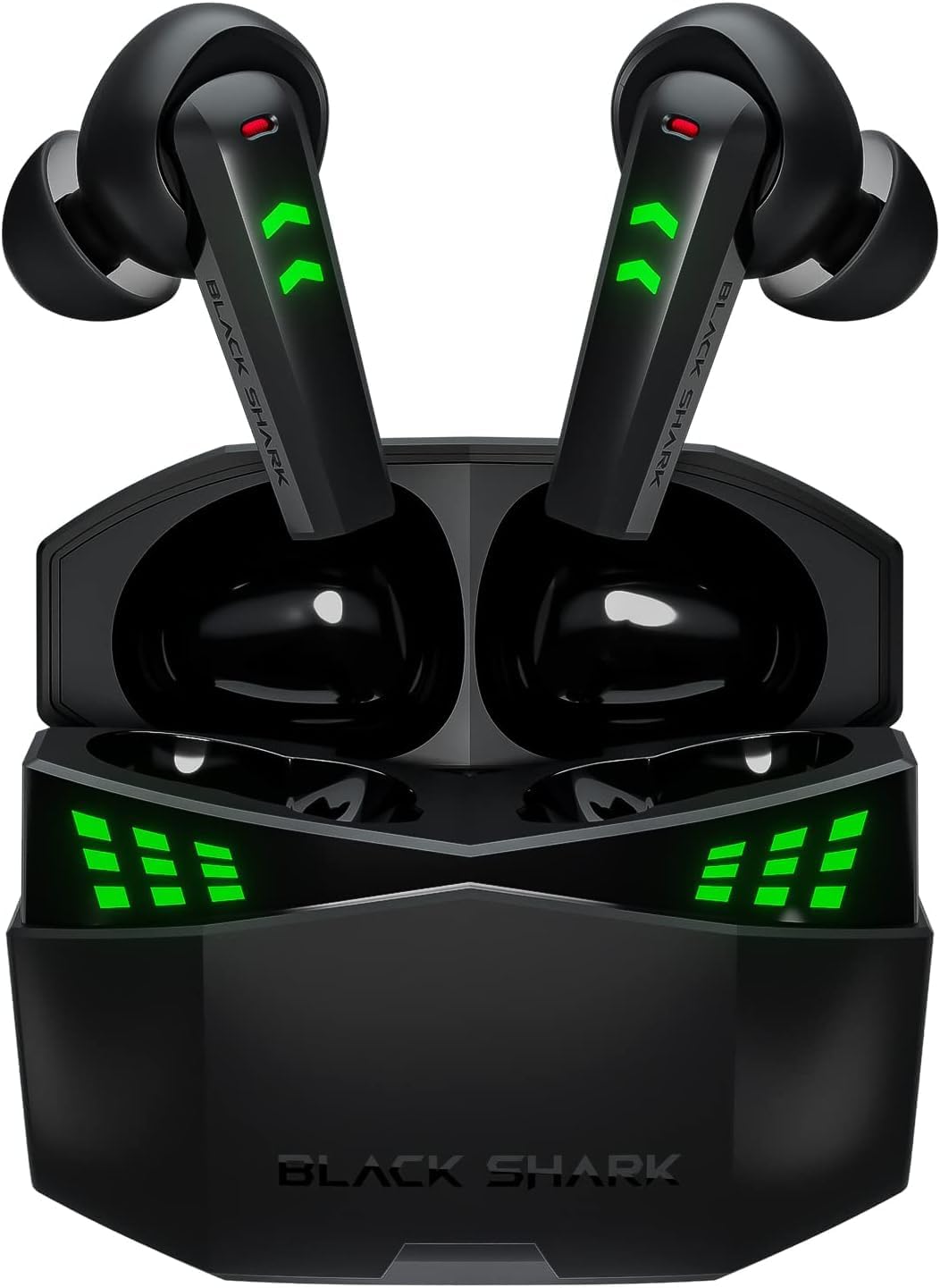
Image: The Black Shark T6 Wireless Earbuds resting in their open charging case, displaying green LED indicators.

Image: A woman wearing the Black Shark T6 Earbuds during a workout, illustrating their IPX5 sweatproof design.
4. การตั้งค่า
4.1 การชาร์จหูฟังและเคส
Before first use, fully charge the earbuds and the charging case. Connect the provided USB charging cable to the charging case and a power source. The LED indicators on the case will show the charging status. A full charge for the case takes approximately 1.5 hours.
- Earbuds Battery Life: Up to 6.5 hours (single charge)
- Total Playtime with Charging Case: Up to 26 hours
- Fast Charging: 1.5 hours for a full charge of the case.

Image: Graphic illustrating the battery life of the Black Shark T6 Earbuds: 6.5 hours for earbuds, 26 hours with charging case, and 1.5 hours for fast charging.
4.2 การจับคู่กับอุปกรณ์
The Black Shark T6 Earbuds feature simple one-touch pairing:
- ตรวจสอบให้แน่ใจว่าเคสชาร์จได้รับการชาร์จแล้วและมีหูฟังอยู่ข้างใน
- Open the lid of the charging case. The earbuds will automatically enter pairing mode, indicated by flashing LED lights.
- บนอุปกรณ์ของคุณ (สมาร์ทโฟน แท็บเล็ต คอมพิวเตอร์) ไปที่การตั้งค่าบลูทูธ
- ค้นหา available devices and select "Black Shark T6" from the list.
- เมื่อเชื่อมต่อแล้ว ไฟ LED บนหูฟังจะหยุดกะพริบ

Image: Illustration of the simple one-touch pairing process for Black Shark T6 Earbuds, showing the open charging case near various smart devices.
5. คู่มือการใช้งาน
5.1 ระบบควบคุมแบบสัมผัส
The Black Shark T6 Earbuds utilize touch controls for various functions. Specific touch gestures may vary; refer to the quick start guide included in your package for detailed control mapping.
5.2 Switching Between Game Mode and Music Mode
The earbuds feature a dual-mode switch to optimize performance for either gaming or music listening.
- โหมดเกม: Activates ultra-low latency (35ms) for synchronized audio and video, providing a competitive edge in gaming. Positional clarity through gaming spatial audio helps identify in-game sounds.
- โหมดเพลง: Enhances sound vibrancy, restores sound details, and provides a wide sound field for an immersive music experience.
To switch modes, typically a specific touch gesture on one of the earbuds is required. Consult your quick start guide for the exact command.

Image: Graphic highlighting the 35ms ultra-low latency feature and the seamless switch between Music Mode and Game Mode for the Black Shark T6 Earbuds.

Image: Visual representation of the Game/Music Dual Mode Switch feature, showing different scenarios for each mode.
6. การบำรุงรักษา
6.1 การทำความสะอาด
การทำความสะอาดเป็นประจำช่วยรักษาคุณภาพเสียงและสุขอนามัย:
- เช็ดหูฟังและกล่องชาร์จเบาๆ ด้วยผ้าแห้งนุ่มที่ไม่เป็นขุย
- ถอดปลายหูออกแล้วทำความสะอาดด้วยสบู่ชนิดอ่อนและน้ำ จากนั้นเช็ดให้แห้งสนิทก่อนใส่กลับเข้าไปอีกครั้ง
- Use a dry cotton swab to carefully clean the mesh and charging contacts, avoiding excessive pressure.
6.2 ความต้านทานต่อน้ำ
The Black Shark T6 Earbuds are IPX5 water-resistant, meaning they are protected against low-pressure water jets from any direction. This makes them suitable for workouts and light rain. However, they are not designed for submersion in water. Avoid exposing them to strong water streams, swimming, or showering with the earbuds.
6.3 พื้นที่จัดเก็บ
เมื่อไม่ใช้งาน ควรเก็บหูฟังไว้ในกล่องชาร์จเพื่อป้องกันฝุ่นละออง ความเสียหาย และเพื่อให้หูฟังมีประจุไฟอยู่เสมอ
7 การแก้ไขปัญหา
If you encounter issues with your Black Shark T6 Earbuds, refer to the following common solutions:
- Earbuds not pairing or only one earbud connecting:
- Ensure both earbuds are charged and placed correctly in the charging case.
- Close the case, wait a few seconds, then open it again to re-initiate pairing mode.
- On your device, forget or unpair the "Black Shark T6" from your Bluetooth settings.
- Restart your device and attempt the pairing process again.
- หากปัญหายังคงอยู่ ให้ลองรีเซ็ตหูฟัง (โปรดดูคำแนะนำการรีเซ็ตโดยละเอียดในคู่มือเริ่มต้นใช้งานฉบับย่อ)
- ไม่มีเสียงหรือระดับเสียงต่ำ:
- ตรวจสอบระดับเสียงทั้งบนหูฟังและอุปกรณ์ที่เชื่อมต่อของคุณ
- ตรวจสอบให้แน่ใจว่าหูฟังอยู่ในหูของคุณอย่างถูกต้อง
- ทำความสะอาดเศษสิ่งสกปรกออกจากตาข่ายของหูฟัง
- เชื่อมต่อหูฟังเอียร์บัดเข้ากับอุปกรณ์ของคุณอีกครั้ง
- ปัญหาการชาร์จ:
- ตรวจสอบให้แน่ใจว่าสายชาร์จเชื่อมต่อกับเคสและแหล่งจ่ายไฟอย่างแน่นหนา
- Verify that the charging contacts on the earbuds and inside the case are clean and free of obstruction.
- ลองใช้สายชาร์จ USB หรืออะแดปเตอร์แปลงไฟอันอื่นดู
- คุณภาพการโทรไม่ดี:
- ตรวจสอบให้แน่ใจว่าไมโครโฟนไม่ได้ถูกกีดขวาง
- Move to a quieter environment to reduce background noise interference.
- ตรวจสอบให้แน่ใจว่าหูฟังชาร์จจนเต็มแล้ว
8. ข้อมูลจำเพาะ
| คุณสมบัติ | ข้อมูลจำเพาะ |
|---|---|
| ชื่อรุ่น | Black Shark T6 |
| เทคโนโลยีการเชื่อมต่อ | ไร้สาย (Bluetooth) |
| เทคโนโลยีการสื่อสารไร้สาย | บลูทูธ 5.3 |
| เวลาแฝงของเสียง | 35 มิลลิวินาที (โหมดเกม) |
| อายุการใช้งานแบตเตอรี่ของหูฟัง | นานถึง 6.5 ชั่วโมง |
| เวลาเล่นทั้งหมด (รวมเคสชาร์จ) | นานถึง 26 ชั่วโมง |
| ความจุแบตเตอรี่ของเคสชาร์จ | Provides 21 additional hours |
| ชาร์จเร็ว | 1.5 Hours for full case charge |
| ระดับการต้านทานน้ำ | IPX5 |
| วิธีการควบคุม | สัมผัส |
| ช่วงความถี่ | 20 เฮิรตซ์ - 20,000 เฮิรตซ์ |
| ขนาดไดร์เวอร์ | 10mm (high-sensitivity diaphragm) |
| ไมโครโฟน | Dual Environmental Noise Cancelling (ENC) |
| น้ำหนักสินค้า | 0.12 กิโลกรัม (4.2 ออนซ์) |
| วัสดุ | อะคริโลไนไตรล์ บิวทาไดอีน สไตรีน (ABS) |
| สี | สีดำ |
| ความเข้ากันได้ | Android, Windows, Mac iOS, Switch, etc. |
9. การรับประกันและการสนับสนุน
Black Shark products are manufactured to high-quality standards. For warranty information and customer support, please refer to the warranty card included in your package or visit the official Black Shark webเว็บไซต์นี้ คุณยังสามารถติดต่อผู้ขายโดยตรงเพื่อขอความช่วยเหลือได้อีกด้วย
สำหรับข้อมูลเพิ่มเติมและการลงทะเบียนผลิตภัณฑ์ โปรดเยี่ยมชม [ลิงก์เว็บไซต์] ร้าน Black Shark บน Amazon.


