HOWWOO 4K Projector User Manual (Model F5)
This manual provides detailed instructions for setting up, operating, maintaining, and troubleshooting your HOWWOO 4K Projector.
สินค้าเกินview

The HOWWOO 4K Projector (Model F5) offers a native 1080P Full HD resolution with 12000Lux brightness and a 12000:1 contrast ratio.
The HOWWOO 4K Projector (Model F5) is designed to deliver a superior viewing experience with its crystal-clear native 1080P Full HD resolution, astonishing 12000Lux brightness, and a dynamic 12000:1 contrast ratio. It supports 4K content and features 2.4+5G dual-band WiFi and Bluetooth 5.1 for seamless connectivity, making it ideal for both indoor and outdoor entertainment.

Experience superior clarity with 12000 Lux brightness.
เนื้อหาแพ็คเกจ
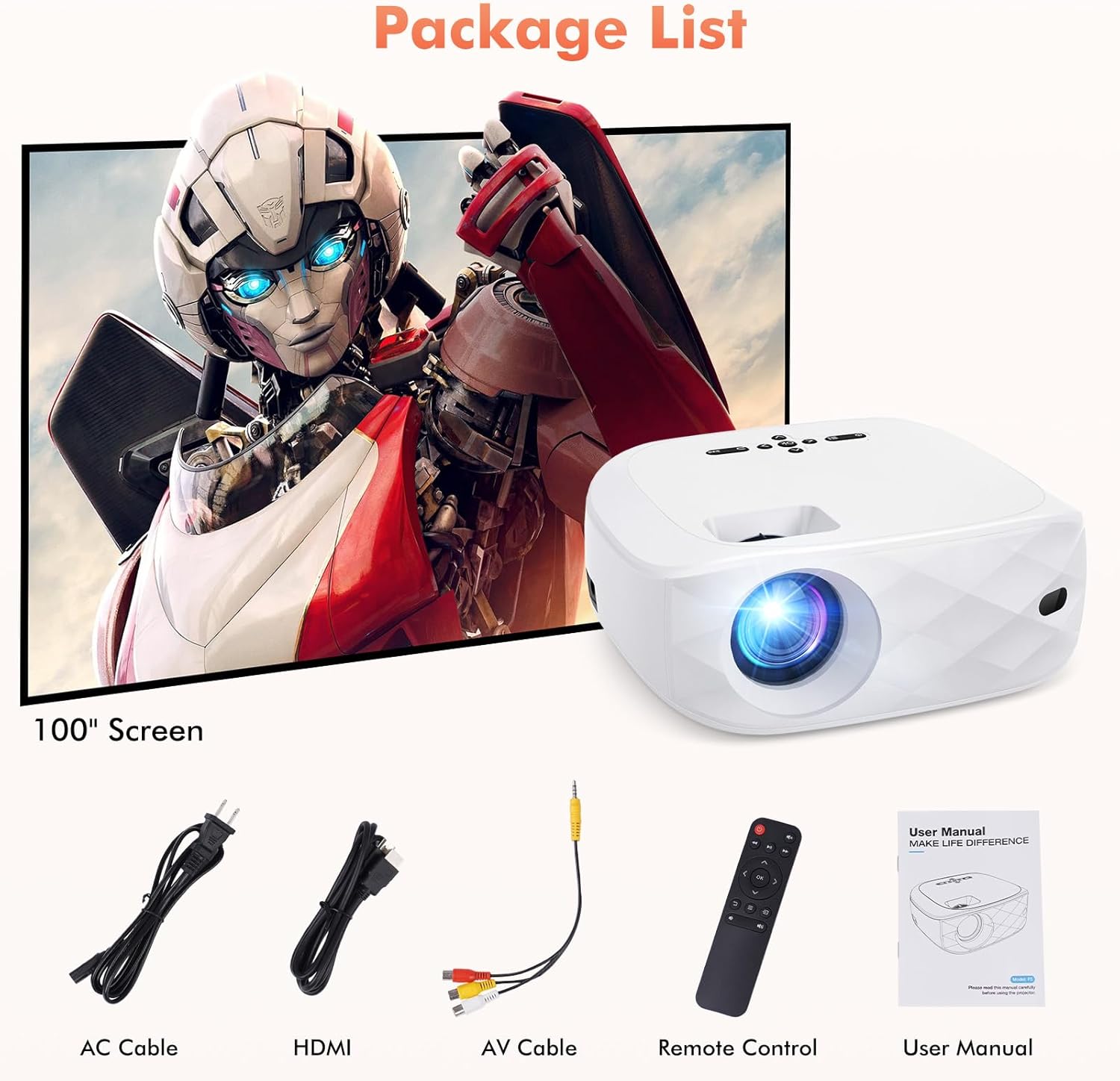
All items included in your HOWWOO Projector package.
- สายไฟ
- จอโปรเจคเตอร์ 100 นิ้ว
- สาย HDMI
- สาย AV 3-in-1
- รีโมทคอนโทรล
- Portable Projector Lens Cover
- คู่มือการใช้งาน
ข้อมูลจำเพาะทางเทคนิค
| คุณสมบัติ | ข้อมูลจำเพาะ |
|---|---|
| ยี่ห้อ | ฮาววู |
| หมายเลขรุ่น | F5 |
| ความละเอียดการแสดงผล | 1920 x 1080 (ความละเอียดดั้งเดิม 1080P) |
| ความสว่าง | 12000ลักซ์ |
| อัตราส่วนคอนทราสต์ | สูงสุด 12000:1 |
| เทคโนโลยีการเชื่อมต่อ | Wireless (2.4+5G WiFi, Bluetooth 5.1) |
| คุณสมบัติพิเศษ | One-step Screen Mirroring, 4K Supported, Diffused Reflection |
| ขนาดสินค้า | 9.45 x 7.8 x 3.7 นิ้ว |
| น้ำหนักสินค้า | 0.634 ออนซ์ |
| เส้นทแยงมุมของหน้าจอที่มองเห็นได้ | 100" / 254 cm (included screen) |
การเริ่มต้น
การตั้งค่าทางกายภาพ
Place the projector on a stable, flat surface. Adjust the distance from the projection surface to achieve your desired screen size (40 to 200 inches). The projector includes a screw part at the bottom to adjust the projection angle.

Recommended projection distances and corresponding screen sizes.
การเปิดเครื่อง
Connect the power cable to the projector's power input and plug it into a wall outlet. Press the power button on the projector or the remote control to turn it on.
การสะท้อนหน้าจอ (การเชื่อมต่อไร้สาย)
The HOWWOO F5 projector supports one-step screen mirroring for iOS and Android phones, as well as Windows and MacBook laptops.
iOS & Android Phone Mirroring

Seamless one-step screen mirroring from your mobile device.

Detailed steps for connecting iOS and Android devices.
Official HOWWOO F5 projector connection guide for mobile devices.
Laptop (Windows & MacBook) Mirroring

Guide for connecting Windows and MacBook devices wirelessly.
การเชื่อมต่อบลูทูธ
Connect your projector to external Bluetooth speakers or headphones for an enhanced audio experience. The integrated 5W dual stereo speakers and SRS sound system also provide powerful, clear sound directly from the projector.

Connect to Bluetooth audio devices for a cordless experience.

Hassle-free Bluetooth connectivity for immersive audio.
การใช้งานโปรเจคเตอร์ของคุณ
การควบคุมพื้นฐาน
Use the control panel on top of the projector or the included remote control to navigate menus, adjust settings, and control playback. The remote allows for power on/off, volume control, input source selection, and menu navigation.
การปรับการแสดงผล
ปรับแต่งของคุณ viewing experience with the 50% zoom function and the freedom to choose screen sizes from 40 to 200 inches. Adjust the focus ring on the projector lens for a clear image.

Enjoy a grand cinematic display beyond your TV.

Adjust screen size effortlessly with seamless zoom (50%-100%).
ความเข้ากันได้ของมัลติมีเดีย
The HOWWOO projector supports various devices for versatile entertainment. Connect streaming channels, TV sticks, laptops, game consoles, smartphones, tablets, and USB sticks.

Wide compatibility with various multimedia devices.

Note: Due to HDCP, copyrighted videos from services like Netflix, Amazon Prime Video, and Hulu must be played through a Fire/Roku Stick, computer, or laptop.
การดูแลรักษา
- การทำความสะอาดเลนส์: ใช้ผ้านุ่มไม่เป็นขุยที่ออกแบบมาสำหรับเลนส์สายตาโดยเฉพาะ หลีกเลี่ยงวัสดุที่มีฤทธิ์กัดกร่อนหรือสารเคมีรุนแรง
- การทำความสะอาดตัวเครื่องโปรเจคเตอร์: เช็ดทำความสะอาดภายนอกด้วยผ้าแห้งนุ่มๆ สำหรับคราบฝังแน่น ให้ใช้ผ้าชุบน้ำหมาดๆ เช็ดเบาๆamp สามารถใช้ผ้าชุบน้ำเช็ดได้ ตามด้วยผ้าแห้งอีกผืนหนึ่ง
- การระบายอากาศ : ตรวจสอบให้แน่ใจว่าช่องระบายอากาศของโปรเจ็กเตอร์สะอาดและไม่มีสิ่งกีดขวางเพื่อป้องกันความร้อนสูงเกินไป อย่าวางโปรเจ็กเตอร์บนพื้นผิวที่อ่อนนุ่มซึ่งอาจขัดขวางการไหลเวียนของอากาศ
- พื้นที่จัดเก็บ: When not in use, store the projector in a cool, dry place, away from direct sunlight and extreme temperatures. Use the provided lens cover to protect the lens from dust.
การแก้ไขปัญหาทั่วไป
| ปัญหา | วิธีแก้ปัญหาที่เป็นไปได้ |
|---|---|
| No picture/blurry image | Adjust the focus ring on the lens. Ensure the projector is within the recommended projection distance. Check input source selection. |
| ไม่มีเสียง | Check volume settings on both the projector and the connected device. Ensure external speakers are properly connected or Bluetooth is paired correctly. Some streaming services may block audio due to copyright (HDCP). |
| ปัญหาการสะท้อนหน้าจอ | Ensure both devices are on the same WiFi network (if applicable). Re-enter the PIN code. For streaming services, use a TV stick or connect via HDMI. |
| รีโมตคอนโทรลไม่ทำงาน | Check and replace batteries (requires 2 AAA batteries, not included). Ensure no obstructions between the remote and the projector's IR receiver. |
| ความร้อนสูงเกินไป | Ensure ventilation vents are clear. Do not operate in enclosed spaces. Allow adequate space around the projector for airflow. |
การรับประกันและการสนับสนุนลูกค้า

HOWWOO's commitment to customer satisfaction.
HOWWOO is committed to providing a sharper focus on a bigger picture. We offer a 2-year customer service and free replacement policy for your peace of mind. Our dedicated support team provides quick responses within 24 hours, a 30-day return policy with no reason required, 12-month exchange, and lifetime technical customer support.
For any inquiries or support needs, please refer to the contact information provided in your product's service card or visit the official HOWWOO store online.


