การแนะนำ
Thank you for choosing the XtremeMac Wireless 5000 mAh Power Bank. This compact and powerful portable charger is designed to provide convenient wireless and wired charging for your compatible devices, especially optimized for iPhone models with MagSafe technology. Please read this manual thoroughly before using the product to ensure safe and optimal performance.
เนื้อหาแพ็คเกจ
- XtremeMac Wireless 5000 mAh Power Bank (Model: XWH-PMS2-13)
- สายชาร์จ USB-C
- คู่มือการใช้งาน (เอกสารนี้)
สินค้าเกินview
Familiarize yourself with the components of your XtremeMac Wireless Power Bank.

รูปที่ 1: XtremeMac Wireless Power Bank - Front, Back, and Side Views. This image illustrates the device's compact design, the magnetic charging area on the front, the USB-C port, and the power button on the side.
- พื้นผิวการชาร์จแม่เหล็ก: For wireless charging of compatible devices.
- พอร์ต USB-C: For charging the power bank and for wired output charging.
- ปุ่มเปิด/ปิด: เปิดใช้งานการชาร์จแบบไร้สายและตรวจสอบระดับแบตเตอรี่
- ไฟ LED แสดงสถานะ: แสดงระดับแบตเตอรี่และสถานะการชาร์จ
การตั้งค่า
1. การชาร์จ Power Bank ครั้งแรก
Before first use, fully charge your XtremeMac Wireless Power Bank.
- Connect the provided USB-C cable to the USB-C port on the power bank.
- เชื่อมต่อปลายอีกด้านหนึ่งของสาย USB-C เข้ากับอะแดปเตอร์ไฟ USB ที่ใช้งานร่วมกันได้ (ไม่รวมอยู่ด้วย)
- ไฟ LED จะสว่างขึ้นเพื่อแสดงความคืบหน้าในการชาร์จ ไฟ LED ทุกดวงจะสว่างคงที่เมื่อชาร์จเต็ม
2. Attaching to Your iPhone (MagSafe)
The power bank is designed for seamless magnetic attachment to MagSafe-compatible iPhones (iPhone 12, 13, 14, and 15 series).

รูปที่ 2: Magnetic Attachment for iPhone. This image demonstrates how the power bank securely clicks onto the back of a compatible iPhone for wireless charging.
- Align the power bank with the back of your MagSafe-compatible iPhone.
- The magnets will automatically snap the power bank into place, ensuring proper alignment for wireless charging.
คำแนะนำการใช้งาน
1. Wireless Charging (MagSafe)
To charge your iPhone wirelessly:

รูปที่ 3: Wireless Charging in Progress. This image shows an iPhone receiving a wireless charge from the power bank, indicated by the charging animation on the phone screen.
- Attach the power bank to the back of your MagSafe-compatible iPhone.
- Press the power button on the side of the power bank. Wireless charging will begin within 5 seconds.
- The LED indicators on the power bank will show its remaining charge. Your iPhone screen will also indicate charging.
- To stop charging, simply detach the power bank or press the power button again.
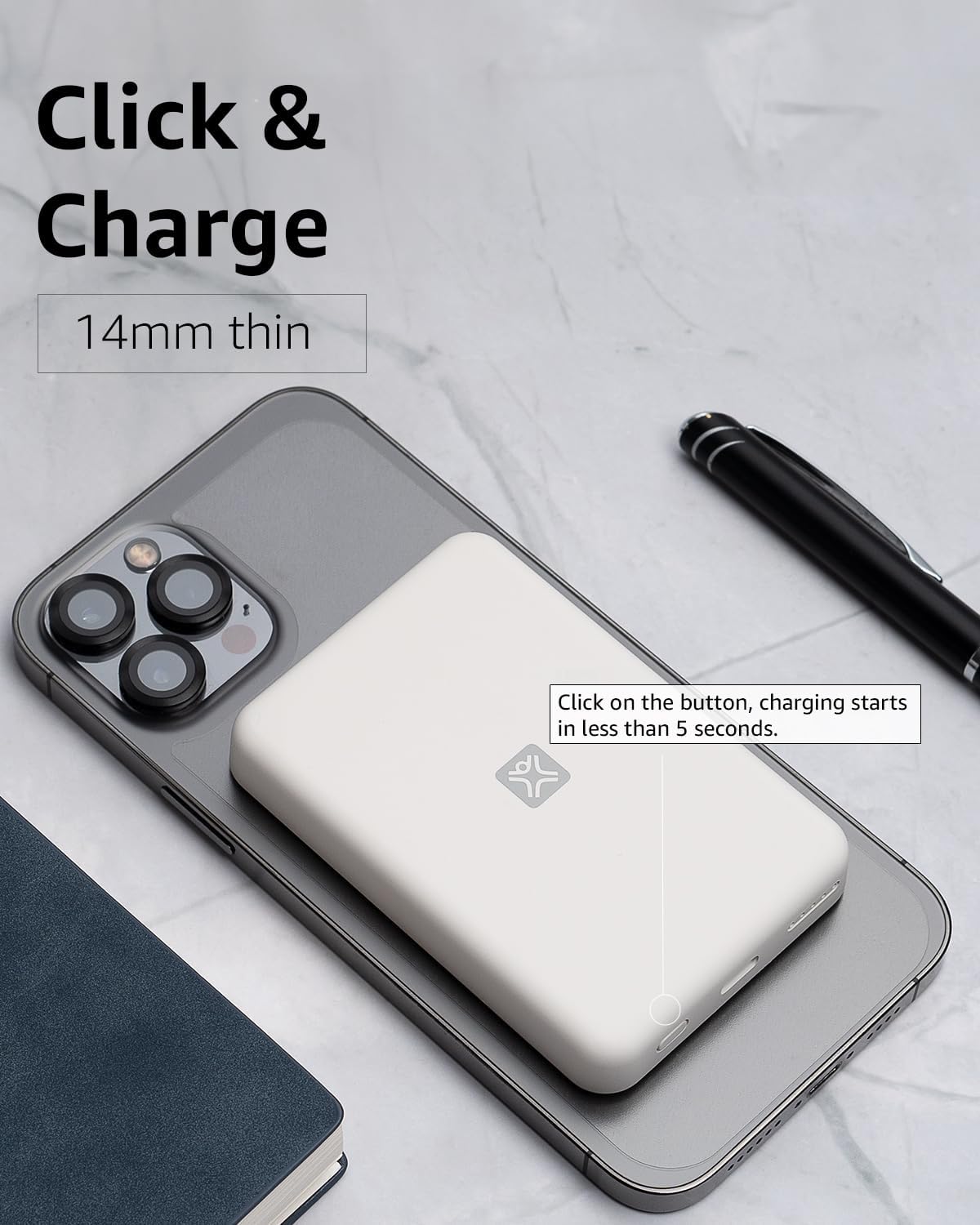
รูปที่ 4: Activating Wireless Charge. This image highlights the power button and the quick activation of wireless charging.
2. Wired Charging (USB-C PD)
For faster charging or to charge non-wireless devices, use the USB-C port.

รูปที่ 5: Wired Charging via USB-C. This image shows the power bank connected to a phone using a USB-C cable, demonstrating its faster wired charging capability.
- Connect one end of a USB-C cable (or a compatible cable for your device) to the USB-C port on the power bank.
- Connect the other end to your device's charging port.
- Charging will typically begin automatically. If not, press the power button on the power bank.
3. การตรวจสอบระดับแบตเตอรี่
กดปุ่มเปิด/ปิดหนึ่งครั้งเพื่อตรวจสอบระดับแบตเตอรี่ที่เหลืออยู่ซึ่งระบุโดยไฟ LED
การซ่อมบำรุง
- การทำความสะอาด: ใช้ผ้าแห้งนุ่มๆ เช็ดทำความสะอาดพื้นผิวของพาวเวอร์แบงค์ ห้ามใช้น้ำยาทำความสะอาดหรือสเปรย์กระป๋อง
- พื้นที่จัดเก็บ: เก็บพาวเวอร์แบงค์ไว้ในที่แห้งและเย็น หลีกเลี่ยงแสงแดดโดยตรงและอุณหภูมิที่สูงหรือต่ำเกินไป
- การดูแลแบตเตอรี่ เพื่อยืดอายุการใช้งานแบตเตอรี่ ควรชาร์จพาวเวอร์แบงค์ให้เต็มอย่างน้อยทุกๆ สามเดือน หากไม่ได้ใช้งานเป็นประจำ
การแก้ไขปัญหา
| ปัญหา | สาเหตุที่เป็นไปได้ | สารละลาย |
|---|---|---|
| พาวเวอร์แบงค์ไม่ชาร์จ | สายเคเบิลไม่ได้เชื่อมต่ออย่างถูกต้อง; สายเคเบิล/อะแดปเตอร์ชำรุด; พาวเวอร์แบงค์ชาร์จเต็มแล้ว | Ensure cable is securely connected. Try a different USB-C cable and power adapter. Check LED indicators; if all are solid, it's fully charged. |
| อุปกรณ์ไม่ชาร์จแบบไร้สาย | Device not MagSafe compatible; misaligned; power bank low on charge; power button not pressed. | Ensure your device is MagSafe compatible (iPhone 12/13/14/15 series). Realign the power bank. Recharge the power bank. Press the power button to activate. |
| Device not charging via cable. | Cable not connected properly; faulty cable/device; power bank low on charge. | Ensure cable is securely connected. Try a different cable. Recharge the power bank. |
| ชาร์จช้า | Using a non-PD charger/cable; device case interfering with wireless charging. | For wired charging, ensure you are using a USB-C PD compatible charger and cable. For wireless, remove thick or metallic phone cases. |
ข้อมูลจำเพาะ
| คุณสมบัติ | รายละเอียด |
|---|---|
| หมายเลขรุ่น | XWH-PMS2-13 |
| ความจุของแบตเตอรี่ | 5000 มิลลิแอมป์ |
| เอาท์พุตแบบไร้สาย | Up to 7.5W (MagSafe compatible) |
| Wired Output/Input | USB-C (Power Delivery compatible) |
| ขนาด | ประมาณ 17.1 x 8.9 x 2.2 ซม. (6.7 x 3.5 x 0.9 นิ้ว) |
| น้ำหนัก | ประมาณ 85 ก. (3 ออนซ์) |
| ประเภทแบตเตอรี่ | ลิเธียมไอออน |
| ความเข้ากันได้ | MagSafe compatible iPhones (12, 13, 14, 15 series) for wireless charging; USB-C devices for wired charging. |

รูปที่ 6: 5000 mAh Capacity and Charge Estimates. This image provides an overview of the power bank's capacity and estimated number of full charges for various iPhone models.
ข้อมูลด้านความปลอดภัย
- อย่าวางพาวเวอร์แบงค์ไว้ในที่ที่มีอุณหภูมิสูงหรือต่ำเกินไป แสงแดดโดยตรง หรือความชื้นสูง
- ห้ามถอดประกอบ ดัดแปลง หรือพยายามซ่อมแซมอุปกรณ์
- เก็บให้พ้นจากมือเด็ก
- หลีกเลี่ยงการทำพาวเวอร์แบงค์ตกหรือกระแทกแรงๆ
- ห้ามใช้หากพาวเวอร์แบงค์ชำรุดหรือบวม
- กำจัดผลิตภัณฑ์ด้วยความรับผิดชอบตามข้อบังคับท้องถิ่น
การรับประกันและการสนับสนุน
For warranty information, technical support, or customer service inquiries, please refer to the official XtremeMac webหรือติดต่อฝ่ายสนับสนุนลูกค้าโดยตรง โปรดเก็บใบเสร็จรับเงินไว้เป็นหลักฐานการซื้อ


