การแนะนำ
This manual provides instructions for the Alienware AW520H Wired Gaming Headset. It covers setup, operation, maintenance, and troubleshooting to ensure optimal performance and longevity of your device.
The Alienware AW520H headset is designed to deliver precision audio with Hi-Res certified drivers and Dolby Atmos spatial audio support, integrated into a comfortable and adjustable design.
มีอะไรอยู่ในกล่อง
ตรวจสอบว่ามีส่วนประกอบทั้งหมดอยู่ในแพ็คเกจ:
- Alienware AW520H Wired Gaming Headset
- เอกสารประกอบ (คู่มือผู้ใช้, ข้อมูลการรับประกัน)
สินค้าเกินview
Familiarize yourself with the key components and features of your Alienware AW520H headset.
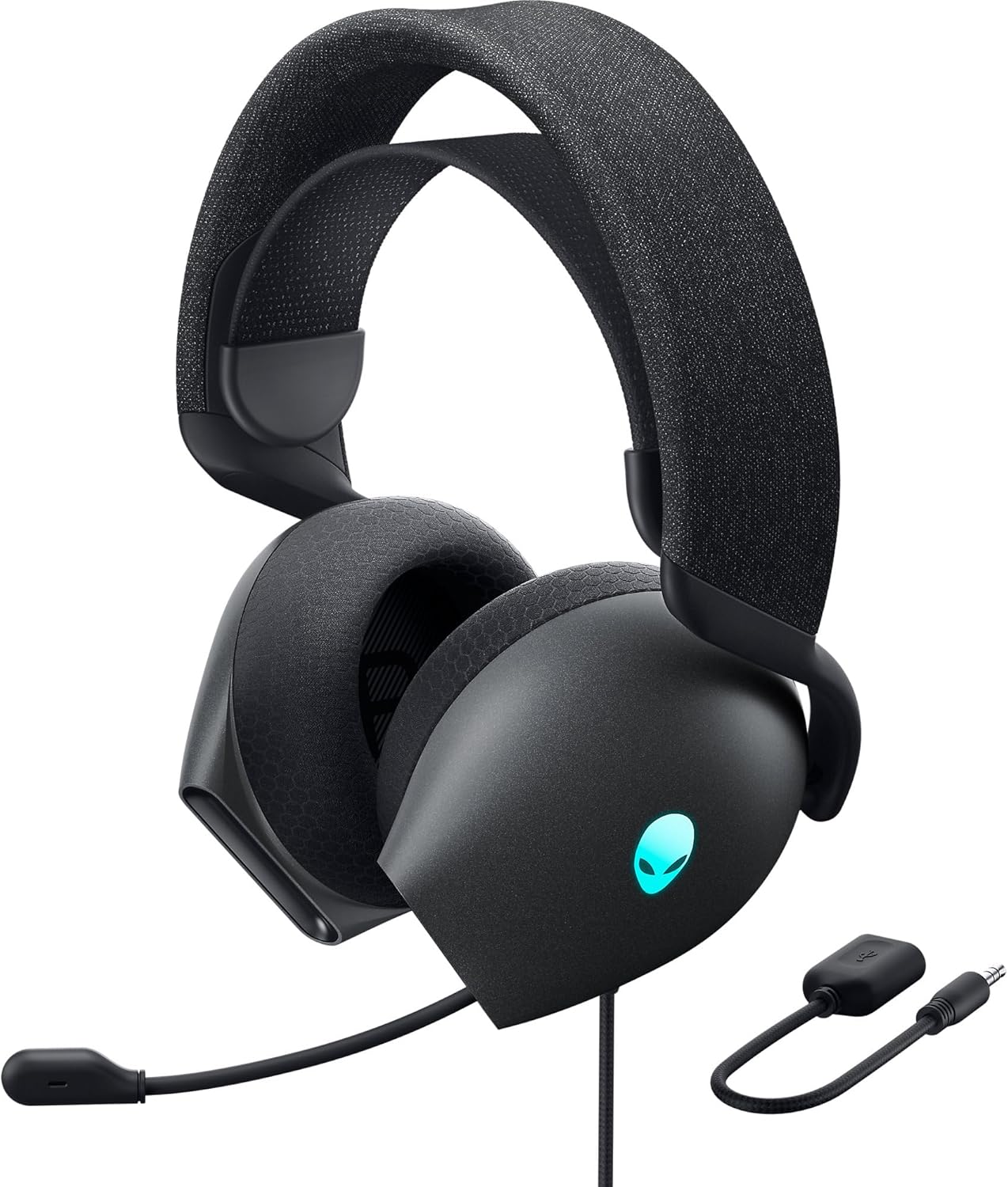

คุณสมบัติหลัก:
- Hi-Res Certified Drivers: Delivers clear and rich sound across a wide frequency range.
- Dolby Atmos Spatial Audio: Provides precise positional audio for an immersive experience.
- AI-Driven Noise Cancellation Microphone: Retractable boom mic focuses on your voice, reducing ambient noise.
- การออกแบบที่สะดวกสบาย: Features soft memory foam ear pads with breathable fabric and an adjustable suspension headband for extended wear.
- AlienFX RGB Lighting: Customizable RGB lighting on the earcups, controllable via Alienware Command Center.
- การเชื่อมต่อที่หลากหลาย: Supports both USB and 3.5mm connections for broad compatibility.
การตั้งค่า
Follow these steps to set up your Alienware AW520H headset.
1. การเชื่อมต่อชุดหูฟัง
The AW520H offers flexible connectivity options:
- แจ็คเสียงขนาด 3.5 มม.: Connect the 3.5mm cable directly to your PC, gaming console controller, or any other compatible device with a 3.5mm audio port. This provides basic audio and microphone functionality.
- การเชื่อมต่อ USB: For full functionality, including Dolby Atmos spatial audio and AlienFX RGB lighting customization, connect the headset via USB to your PC. This typically involves using a 3.5mm to USB adapter if your PC does not have a combined audio jack.


2. Software Installation (Optional, for full features)
To unlock the full potential of your headset, including Dolby Atmos and AlienFX RGB lighting customization, install the Alienware Command Center software on your PC. This software allows for personalized audio profileและเอฟเฟกต์แสง
- ดาวน์โหลด Alienware Command Center เวอร์ชันล่าสุดจากเว็บไซต์สนับสนุนอย่างเป็นทางการของ Alienware webเว็บไซต์.
- ปฏิบัติตามคำแนะนำบนหน้าจอเพื่อทำการติดตั้งให้เสร็จสมบูรณ์
- Connect your headset via USB to ensure it is recognized by the software.
คำแนะนำการใช้งาน
การควบคุมเสียง
The headset features integrated controls for convenient audio management:
- ล้อระดับเสียง: Located on the earcup, rotate the wheel to increase or decrease the audio volume.
- ปุ่มปิดเสียงไมโครโฟน: Press the button on the earcup to mute or unmute the microphone.

การใช้งานไมโครโฟน
The AW520H features an AI-driven noise-canceling retractable boom microphone:
- ยืด/หด: Gently pull the microphone boom out from the earcup to extend it for use. Push it back into the earcup to retract it when not needed.
- การวางตำแหน่ง: เพื่อให้ได้เสียงที่ชัดเจนที่สุด ควรวางไมโครโฟนห่างจากปากประมาณ 1-2 นิ้ว
- ตัดเสียงรบกวน: The AI-driven noise cancellation automatically works to filter out ambient sounds, focusing on your voice.

ปรับให้สบาย
The headset is designed for comfort during long gaming sessions:
- Suspension Headband: Slide the suspension headband up or down to find the ideal fit for your head size.
- Earcup Rotation: The earcups can slightly pivot to conform to the shape of your ears.
- Memory Foam Ear Pads: The soft memory foam ear pads with breathable fabric provide cushioning and ventilation.

AlienFX RGB Lighting
Customize the RGB lighting on your headset using the Alienware Command Center software:
- เปิด Alienware Command Center
- Navigate to the lighting settings for your AW520H headset.
- Select desired colors, effects, and brightness levels.
- Ensure the headset is connected via USB for lighting customization.
การซ่อมบำรุง
การบำรุงรักษาอย่างถูกวิธีจะช่วยให้หูฟังของคุณใช้งานได้ยาวนานและมีประสิทธิภาพสูงสุด
- การทำความสะอาด: ใช้ผ้าแห้งนุ่มเช็ดทำความสะอาดที่ครอบหูและแถบคาดศีรษะ สำหรับคราบสกปรกที่ติดแน่น ให้ใช้ผ้าชุบน้ำหมาดๆ เช็ดทำความสะอาดamp สามารถใช้ผ้าได้ แต่ควรหลีกเลี่ยงความชื้นที่มากเกินไป ห้ามใช้สารเคมีรุนแรงหรือน้ำยาทำความสะอาดที่มีฤทธิ์กัดกร่อน
- พื้นที่จัดเก็บ: Store the headset in a clean, dry place away from extreme temperatures and direct sunlight. Retract the microphone when not in use to protect it.
- การดูแลสายเคเบิล: Avoid sharp bends or kinks in the audio cable. Do not pull on the cable to disconnect the headset.
- แผ่นรองหู: The ear pads are made of breathable fabric and memory foam. While durable, they are not designed for frequent removal. If replacement is needed, consult Alienware support.
การแก้ไขปัญหา
If you encounter issues with your Alienware AW520H headset, refer to the following common solutions:
ไม่มีเสียงหรือระดับเสียงต่ำ
- ตรวจสอบการเชื่อมต่อ: Ensure the 3.5mm cable or USB connection is securely plugged into both the headset and your device.
- ระดับเสียง: Verify that the volume wheel on the headset is turned up. Check the audio output settings on your PC or console to ensure the headset is selected as the default output device and volume is not muted.
- ซอฟต์แวร์/ไดรเวอร์: If connected via USB, ensure Alienware Command Center is installed and updated. Check your operating system's sound settings for driver issues.
- ทดสอบบนอุปกรณ์อื่น: Connect the headset to a different device (e.g., smartphone, another PC) to determine if the issue is with the headset or the original device.
ไมโครโฟนไม่ทำงาน
- Check Mute Button: ตรวจสอบให้แน่ใจว่าปุ่มปิดเสียงไมโครโฟนบนชุดหูฟังไม่ได้เปิดใช้งาน
- ตำแหน่งไมโครโฟน: Verify the microphone boom is fully extended and positioned correctly.
- การตั้งค่าอินพุต: Check your PC or console's sound input settings to ensure the headset microphone is selected as the default input device. Adjust microphone volume levels.
- การตั้งค่าแอปพลิเคชั่น: Some applications (e.g., Discord, Zoom) have their own microphone settings. Verify the correct microphone is selected within these applications.
- ซอฟต์แวร์/ไดรเวอร์: If connected via USB, ensure Alienware Command Center is installed and updated.
AlienFX RGB Lighting Not Working
- การเชื่อมต่อ USB: Ensure the headset is connected via USB to your PC. RGB lighting functionality requires a USB connection.
- ศูนย์บัญชาการเอเลี่ยนแวร์: Verify that Alienware Command Center is installed and running. Check the lighting settings within the software for the headset.
- อัพเดตซอฟต์แวร์: Ensure Alienware Command Center and headset firmware are up to date.
ข้อมูลจำเพาะ
| คุณสมบัติ | รายละเอียด |
|---|---|
| ชื่อรุ่น | AW520H |
| เทคโนโลยีการเชื่อมต่อ | Wired (USB, 3.5 mm Jack) |
| ประเภทไดร์เวอร์เสียง | ไดร์เวอร์แบบไดนามิก |
| การตอบสนองความถี่ | 40 KHz (40,000 Hz) |
| อิมพีแดนซ์ | 32 โอห์ม |
| การควบคุมเสียงรบกวน | Active Noise Cancellation (AI-driven for mic) |
| ไมโครโฟน | Retractable, Unidirectional |
| การควบคุม | Volume Control, Microphone Mute (On-headset) |
| การวางตำแหน่งหู | ครอบหู |
| ฟอร์มแฟกเตอร์ | บนหู |
| วัสดุ | Memory foam, breathable fabric |
| สี | Dark Side of the Moon |
| ขนาดสินค้า | 7.28 x 4.35 x 8.46 นิ้ว |
| น้ำหนักสินค้า | 11.8 ออนซ์ |
| ผู้ผลิต | เดลล์ |
| อุปกรณ์ที่รองรับ | Windows, wired devices |
การรับประกันและการสนับสนุน
For warranty information and technical support, please refer to the documentation included with your product or visit the official Alienware support webเว็บไซต์.
ผู้ผลิต: เดลล์
หมายเลขรุ่น: AW520H
วันที่เข้าใช้งานครั้งแรก: วันที่ 30 มิถุนายน 2023
For further assistance, please contact Alienware customer support through their official channels.


