1. ข้อมูลด้านความปลอดภัยที่สำคัญ
โปรดอ่านและทำความเข้าใจข้อมูลด้านความปลอดภัยทั้งหมดก่อนใช้ผลิตภัณฑ์นี้ การไม่ปฏิบัติตามคำแนะนำเหล่านี้อาจส่งผลให้เกิดไฟฟ้าช็อต ไฟไหม้ หรือการบาดเจ็บร้ายแรงได้
- เก็บให้พ้นจากมือเด็ก
- ห้ามใช้งานเครื่องหากได้รับความเสียหาย
- ห้ามนำอุปกรณ์ไปสัมผัสกับน้ำหรืออุณหภูมิที่สูงหรือต่ำเกินไป
- ตรวจสอบให้แน่ใจว่ามีการระบายอากาศที่เหมาะสมในระหว่างการใช้งานและการชาร์จ
- เชื่อมต่อสมาร์ทคลาวด์เสมอamps correctly to the battery terminals (red to positive, black to negative).
- Avoid short-circuiting the smart clamps.
- อย่าพยายามจั๊มสตาร์ทแบตเตอรี่ที่แช่แข็ง
- โปรดดูคู่มือเจ้าของรถของคุณสำหรับขั้นตอนการสตาร์ทรถแบบพ่วงแบตเตอรี่โดยเฉพาะ
Integrated Safety Protection System
The DBPOWER G60 is equipped with a comprehensive safety protection system to ensure safe operation:
- การป้องกันขั้วย้อนกลับ: ป้องกันความเสียหายหาก clampเชื่อมต่อไม่ถูกต้อง
- ระบบป้องกันประกายไฟ: ช่วยขจัดประกายไฟขณะเชื่อมต่อ
- Zero-Damage Protection: Protects the device and vehicle from damage.
- การป้องกันอุณหภูมิเกิน: เครื่องจะปิดตัวเองหากอุณหภูมิภายในสูงเกินขีดจำกัดที่ปลอดภัย
- Auto Shutoff Protection: Automatically turns off after a period of inactivity.
- ปริมาณต่ำtagการป้องกันอี: Prevents over-discharge of the internal battery.
- ระบบป้องกันการชาร์จย้อนกลับ: Prevents current flow back into the jump starter from the vehicle battery.
- การป้องกันกระแสเกิน: ป้องกันการดึงกระแสไฟเกิน
- มากกว่าVoltagการป้องกันอี: มาตรการป้องกันการระเบิดtagอีแหลม
- การป้องกันการลัดวงจร: ป้องกันความเสียหายจากการลัดวงจร
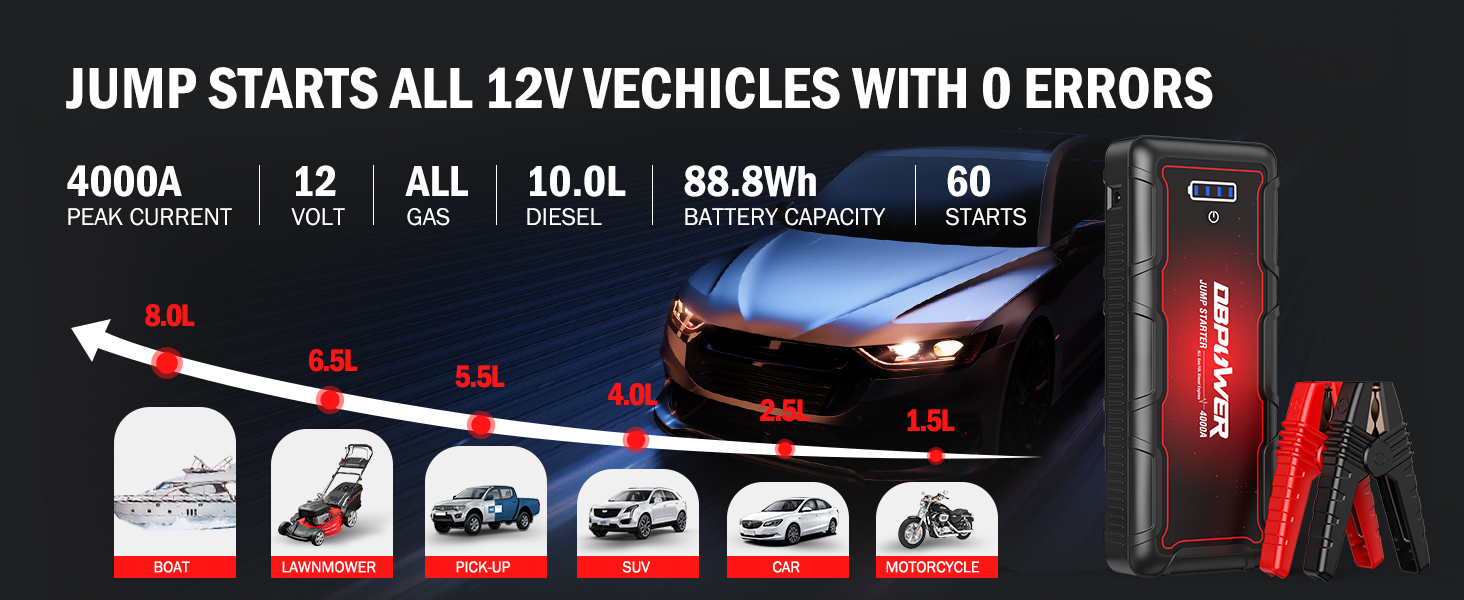
ภาพ: เหนือview of the DBPOWER G60's integrated safety protection systems.
2. สินค้าหมดview
เนื้อหาแพ็คเกจ
The DBPOWER G60 package includes the following items:
- ดีบีพาวเวอร์ G60 จั๊มสตาร์ท
- Smart Jump Cable (with clamps)
- สายชาร์จแบบ USB Type-C
- กระเป๋าเก็บของ
- คู่มือการใช้งาน (เอกสารนี้)

Image: Contents of the DBPOWER G60 Jump Starter package.
คุณสมบัติของอุปกรณ์
The DBPOWER G60 is a versatile device designed for vehicle jump-starting and portable power needs.
- จั๊มพ์สตาร์ท: 4000A peak current, capable of starting all gasoline engines and up to 10.0L diesel engines. Provides up to 60 jump starts on a single charge.
- พาวเวอร์แบงค์: 88.8Wh capacity with multiple output ports:
- 2 USB outputs (5V/9V/12V and 5V/2.1A)
- 1 DC output (12-16.8V/10A)
- 1 Type-C in/out port (5V/3A)
- ไฟฉาย LED: Super bright LED light with 3 modes: lighting, flash, and SOS.
- ความทนทาน: Rugged ABS material, waterproof, dustproof, and drop-proof design.

Image: Multifunctionality and port layout of the DBPOWER G60.
3. การตั้งค่าและการชาร์จ
การชาร์จเบื้องต้น
Before first use, fully charge the DBPOWER G60. It is recommended to charge the unit every 3-6 months to maintain battery health, even if not in use.
- Connect the included USB Type-C charging cable to the Type-C input port on the jump starter.
- Connect the other end of the USB Type-C cable to a compatible USB wall adapter (not included) or a car charger.
- The LED indicator lights on the jump starter will illuminate to show the charging progress. All lights will be solid when fully charged.

Image: Charging the DBPOWER G60 with a wall charger (not included).

Image: Recharging the DBPOWER G60 while driving using a car's USB port.
4. คู่มือการใช้งาน
4.1 การสตาร์ทรถแบบจั๊มสตาร์ท
The DBPOWER G60 can jump start 12V vehicles with all gasoline engines and up to 10.0L diesel engines.
- เตรียมยานพาหนะ: Ensure the vehicle's ignition is off and all accessories (lights, radio, A/C) are turned off. Place the vehicle in park (automatic) or neutral (manual) and engage the parking brake.
- เชื่อมต่อ Smart Clamps: Insert the blue plug of the smart jump cable into the jump start output port on the DBPOWER G60. Ensure a secure connection.
- ต่อเข้ากับแบตเตอรี่:
- เชื่อมต่อ สีแดง (+) clamp ต่อเข้ากับขั้วบวก (+) ของแบตเตอรี่รถยนต์
- เชื่อมต่อ สีดำ (-) clamp ต่อเข้ากับขั้วลบ (-) ของแบตเตอรี่รถยนต์
ไฟแสดงสถานะบนสมาร์ทคล้องamp will show the connection status. A solid green light indicates a correct and ready connection.
- สตาร์ทรถ: เมื่อสมาร์ทคลัตช์amp indicator is green, start your vehicle's engine. If the vehicle does not start immediately, wait 20-30 seconds and try again. Do not crank for more than 3 seconds per attempt.
- ลบ Clamps: หลังจากสตาร์ทรถแล้ว ให้ถอดสมาร์ทคีย์ออกทันทีampถอดสายไฟออกจากแบตเตอรี่รถยนต์ จากนั้นถอดสายเคเบิลอัจฉริยะออกจากเครื่องสตาร์ทฉุกเฉิน
Force Start Function (for 0V Dead Batteries)
If your vehicle's battery is completely dead (0V) and the smart clamp indicator does not turn green, you can use the force start function. Ensure the jump starter is fully charged or above 12V before attempting this.
- เชื่อมต่อสมาร์ท clamps to the vehicle battery as described above.
- Press and hold the "Force Start" button on the smart clamp (refer to the smart clamp for button location). The indicator light will change to a solid green.
- สตาร์ทรถยนต์ภายใน 30 วินาที
- ถอด cl ออกทันทีamps after the vehicle starts.
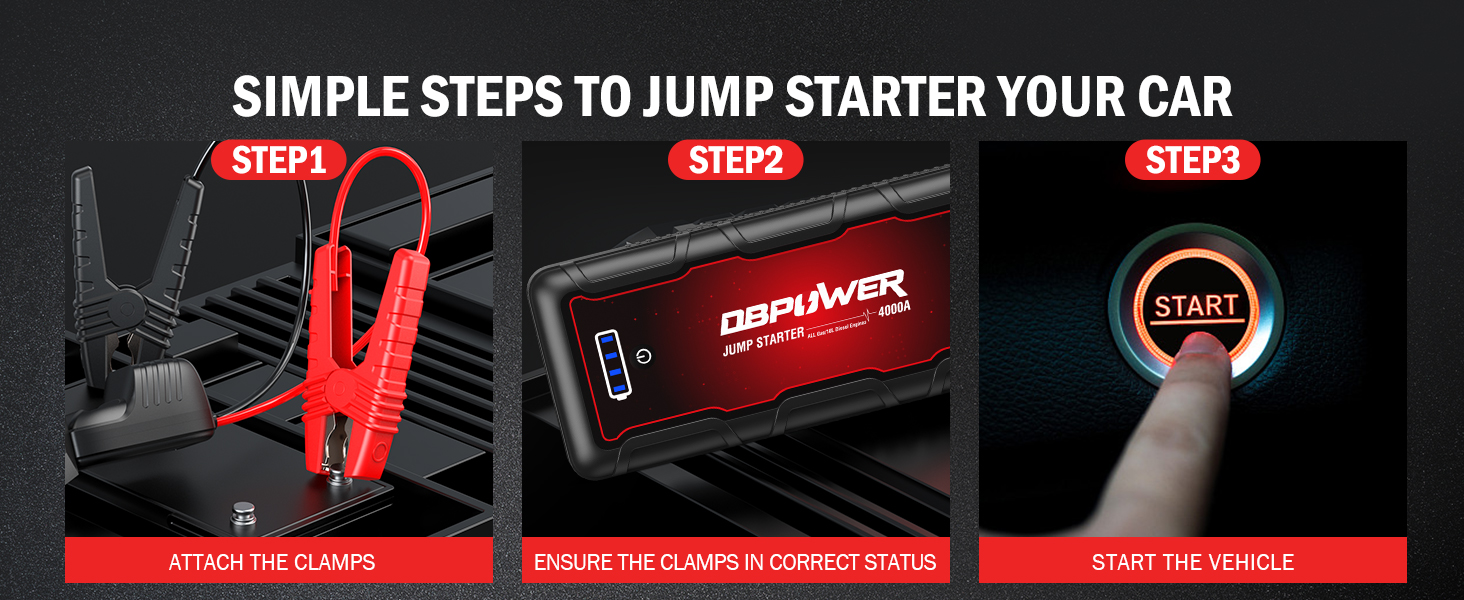
Image: Simple steps for jump starting your car with the DBPOWER G60.

Image: Vehicle compatibility and jump-starting capacity of the DBPOWER G60.
4.2 ใช้เป็นพาวเวอร์แบงค์
The DBPOWER G60 can charge various electronic devices and power 12V accessories.
- เอาต์พุต USB: Connect your smartphone, tablet, camera, or other USB-powered devices to the 5V/9V/12V or 5V/2.1A USB output ports using an appropriate charging cable.
- พอร์ต Type-C: Use the 5V/3A Type-C port for charging compatible devices or for recharging the jump starter itself.
- เอาต์พุต DC: The 12-16.8V/10A DC output can power 12V car accessories such as tire inflators, car vacuum cleaners, or car refrigerators.
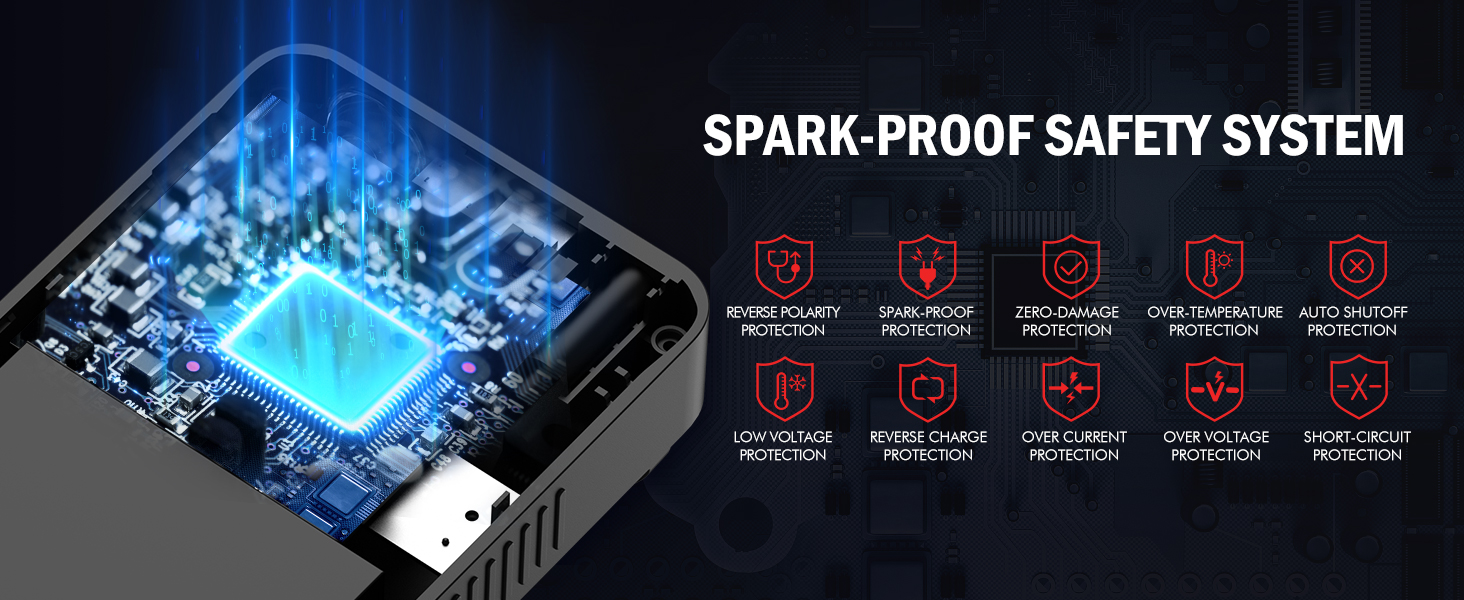
Image: The DBPOWER G60 functioning as an 88.8Wh power bank for various devices.

Image: Using the 16V DC output to power a tire inflator.
4.3 การใช้ไฟฉาย LED
The integrated LED flashlight offers three modes for various situations:
- โหมดแสงสว่าง: Press the power button once to turn on the flashlight for general illumination.
- โหมดแฟลช: Press the power button again to activate the strobe light, useful for signaling or attracting attention.
- โหมด SOS: Press the power button a third time to activate the SOS signal, which flashes in a standard Morse code pattern for emergency situations.
- กดปุ่มเปิด/ปิดครั้งที่สี่เพื่อปิดไฟฉาย

Image: The DBPOWER G60's LED flashlight with three modes: Light, Strobe, and SOS.
5. การบำรุงรักษาและการจัดเก็บ
- การชาร์จไฟ: For optimal performance and battery longevity, recharge the jump starter at least once every 3-6 months, even if it has not been used.
- การทำความสะอาด: เช็ดทำความสะอาดตัวเครื่องด้วยผ้าแห้งเนื้อนุ่ม ห้ามใช้สารเคมีรุนแรงหรือวัสดุที่มีฤทธิ์กัดกร่อน
- พื้นที่จัดเก็บ: Store the jump starter in a cool, dry place away from direct sunlight and extreme temperatures. The unit is designed to withstand temperatures from -4°F to 140°F (-20°C to 60°C).
- ความทนทาน: The rugged ABS material provides waterproof, dustproof, and drop-proof protection, making it suitable for various environments.

Image: The DBPOWER G60 is built to withstand extreme weather conditions.
6 การแก้ไขปัญหา
If you encounter issues with your DBPOWER G60, refer to the following common problems and solutions:
| ปัญหา | สาเหตุที่เป็นไปได้ | สารละลาย |
|---|---|---|
| รถสตาร์ทไม่ติด | แบตเตอรี่จั๊มสตาร์ทเหลือน้อย Clamps ไม่ได้เชื่อมต่ออย่างถูกต้อง Vehicle battery is completely dead (0V). Vehicle issue unrelated to battery. | Ensure jump starter is fully charged. ตรวจสอบ clamp connections (red to +, black to -). Ensure smart clamp indicator is solid green. Use the Force Start function (see section 4.1). ปรึกษาช่าง. |
| สมาร์ท clamp indicator is not green. | การเชื่อมต่อไม่ถูกต้อง ปริมาณแบตเตอรี่รถยนต์tagอีต่ำเกินไป | Recheck connections. Use the Force Start function. |
| เครื่องสตาร์ทรถฉุกเฉินไม่ชาร์จไฟ | ปัญหาเกี่ยวกับสายชาร์จหรืออะแดปเตอร์ Port damage. | ลองใช้สาย USB Type-C และอะแดปเตอร์ติดผนังแบบอื่น ติดต่อฝ่ายสนับสนุนลูกค้า |
| ไฟฉาย LED ไม่ทำงาน | แบตเตอรี่จั๊มสตาร์ทเหลือน้อย อุปกรณ์ทำงานผิดปกติ | ชาร์จเครื่องจั๊มสตาร์ท ติดต่อฝ่ายสนับสนุนลูกค้า |
7. ข้อมูลจำเพาะทางเทคนิค
| คุณสมบัติ | ข้อมูลจำเพาะ |
|---|---|
| แบบอย่าง | จี60 |
| กระแสสูงสุด | 4000เอ |
| ความจุของแบตเตอรี่ | 88.8Wh (Lithium Ion) |
| เริ่มฉบับtage | 12โวลต์ |
| การจัดอันดับเครื่องยนต์เบนซิน | All Gas Engines |
| การจัดอันดับเครื่องยนต์ดีเซล | Up to 10.0L Diesel Engines |
| เอาท์พุท USB 1 | 5โวลต์/9โวลต์/12โวลต์ |
| เอาท์พุท USB 2 | 5V/2.1A |
| เอาท์พุท DC | 12-16.8V/10A |
| อินพุต/เอาต์พุต Type-C | 5V/3A |
| อุณหภูมิในการทำงาน | -4°F ถึง 140°F (-20°C ถึง 60°C) |
| ขนาด (กว้าง x ยาว x สูง) | ขนาดโดยประมาณ 8.7" x 3.5" x 1.6" |
| น้ำหนัก | 1.56 ปอนด์ (0.7 กก.) |
8. การรับประกันและการสนับสนุน
DBPOWER products are designed for reliability and performance. For specific warranty details, please refer to the warranty card included with your product or visit the official DBPOWER webเว็บไซต์.
If you have any questions, concerns, or require technical assistance, please contact DBPOWER customer support. Our team is available to assist you and aims to reply within 24 hours.
สำหรับการสนับสนุนโปรดไปที่: DBPOWER Official Store on Amazon