1. บทนำ
This user manual provides comprehensive instructions for the installation, operation, and maintenance of the Turing TP-MFD8M28 Smart 8MP IR Dome IP Camera. This advanced surveillance camera features 8MP resolution, a 2.8mm lens, and integrates with Turing SMART Series NVR, Bridge, and Cloud for advanced AI capabilities including Face, Human, and Vehicle detection. Designed for both indoor and outdoor use, it boasts IP67 weather resistance and IK10 vandal resistance, ensuring reliable performance in various environments.
2. สินค้าหมดview
The Turing TP-MFD8M28 is a high-performance dome IP camera engineered for superior surveillance. Its robust design and intelligent features make it suitable for a wide range of security applications.
2.1 คุณสมบัติหลัก
- Face/Human/Vehicle AI: Advanced detection capabilities when integrated with Turing SMART Series NVR, Bridge, and Cloud.
- ความละเอียดสูง: Max. 8MP (3840x2160) at 20fps resolution for clear imaging.
- TwilightVision: Ensures optimal image clarity even in low-light conditions.
- การออกแบบที่ทนทาน: IP67 rated for weather resistance and IK10 rated for vandal resistance.
- จ่ายไฟผ่านอีเทอร์เน็ต (PoE): ช่วยให้การติดตั้งง่ายขึ้นด้วยการจ่ายไฟและส่งข้อมูลผ่านสายเคเบิลเพียงเส้นเดียว
- ช่วงไดนามิกกว้าง (WDR): 120 dB WDR for balanced images in challenging lighting.
- ที่เก็บข้อมูลออนบอร์ด: Supports up to 256GB microSD card (not included) for local recording.
2.2 ส่วนประกอบของกล้อง
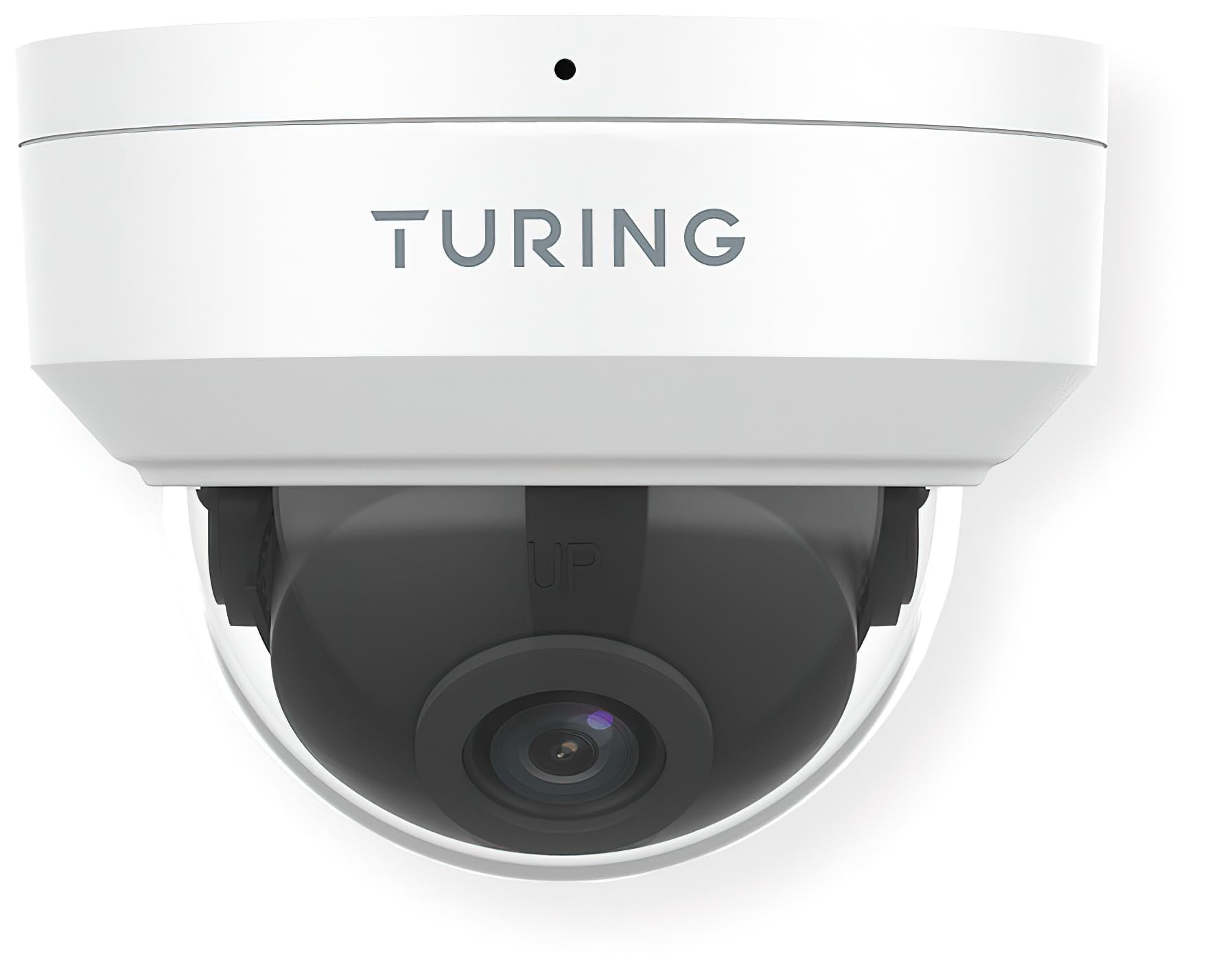
รูปที่ 1: ด้านหน้า view of the Turing TP-MFD8M28 Smart 8MP IR Dome IP Camera. The image displays the white dome camera with the Turing logo on the top housing and the dark lens assembly visible through the clear dome cover. A small black dot, likely an indicator light or microphone, is visible at the top center.
The camera consists of a main housing, a clear dome cover, and an internal camera module with the lens. The housing is designed for secure mounting, and the dome protects the sensitive camera components while allowing for a wide field of view.
3. การตั้งค่าและการติดตั้ง
Proper installation is crucial for optimal performance and longevity of your camera.
3.1 เนื้อหาบรรจุภัณฑ์
- Turing TP-MFD8M28 IP Camera
- สกรูยึดและปลั๊กผนัง
- Waterproof Connector (for Ethernet cable)
- คู่มือเริ่มต้นอย่างรวดเร็ว
3.2 คำแนะนำในการติดตั้ง
- เลือกสถานที่: Select a suitable indoor or outdoor location, ensuring a clear field of view and access to network cabling. Consider the camera's 2.8mm fixed lens angle of view (H: 112.4°, V: 60.1°, D: 146.1°).
- เตรียมพื้นผิว: Mark drilling points using the provided mounting template (if applicable). Drill holes for the wall plugs.
- ฐานที่ปลอดภัย: Attach the camera's mounting base securely to the surface using the provided screws.
- เชื่อมต่อสายเคเบิล: Connect the Ethernet cable to the camera's PoE port. Use the waterproof connector for outdoor installations to protect the connection.
- ปรับมุม: Once mounted, adjust the camera's lens angle to cover the desired surveillance area.
- Secure Dome: Reattach the clear dome cover, ensuring it is properly sealed.
3.3 การเชื่อมต่อเครือข่าย
The TP-MFD8M28 supports Power over Ethernet (PoE). Connect the camera to a PoE-enabled switch or NVR using a standard Ethernet cable. The camera will power on automatically. For initial setup and configuration, refer to the Turing Vision software or your NVR's user manual.
4. การใช้งานกล้อง
The camera's primary functions are managed through the Turing Vision software or a compatible Turing SMART Series NVR/Bridge.
4.1 สด View และการบันทึก
- Access the live feed through the Turing Vision application or connected NVR.
- Configure recording schedules (continuous, motion-triggered, event-based) via the software interface.
- การเล่นที่บันทึกไว้ฟูtage from the NVR or the camera's microSD card (if installed).
4.2 AI Features (with Turing SMART Series NVR/Bridge)
- การจดจำใบหน้า: Set up and manage known faces for alerts or access control.
- การตรวจจับบุคคล: Receive alerts when human figures are detected in specified zones.
- การตรวจจับยานพาหนะ: Get notifications for vehicle presence or movement.
- Configure detection zones and sensitivity settings within the Turing Vision software.
ไม่เคยตั้งค่าขั้นสูง
- การตั้งค่าภาพ: Adjust brightness, contrast, saturation, and WDR settings.
- การตั้งค่าเครือข่าย: Configure IP address, port forwarding, and other network parameters.
- อัพเดตเฟิร์มแวร์: ตรวจสอบและใช้การอัพเดตเฟิร์มแวร์เป็นประจำเพื่อให้มั่นใจถึงประสิทธิภาพและความปลอดภัยที่เหมาะสมที่สุด
5. การบำรุงรักษา
Regular maintenance helps ensure the longevity and optimal performance of your camera.
- การทำความสะอาดเลนส์: Gently wipe the clear dome and lens with a soft, lint-free cloth. For stubborn dirt, use a mild lens cleaning solution. Avoid abrasive materials.
- การตรวจสอบที่อยู่อาศัย: ตรวจสอบตัวกล้องเป็นระยะๆ เพื่อดูว่ามีร่องรอยความเสียหาย รอยแตก หรือชิ้นส่วนหลวมหรือไม่
- การเชื่อมต่อสายเคเบิล: Ensure all cable connections are secure and free from corrosion, especially for outdoor installations.
- การอัปเดตซอฟต์แวร์: Keep the camera's firmware and associated Turing Vision software updated to the latest versions.
6 การแก้ไขปัญหา
หากคุณพบปัญหาเกี่ยวกับกล้อง โปรดดูปัญหาทั่วไปและวิธีแก้ไขต่อไปนี้
| ปัญหา | สาเหตุที่เป็นไปได้ | สารละลาย |
|---|---|---|
| ไม่มีไฟ/กล้องออฟไลน์ | No PoE power; faulty Ethernet cable; network issue. | Check PoE switch/NVR status. Verify Ethernet cable connection. Ensure network is operational. |
| ไม่มีภาพ/วิดีโอ | Network connectivity issue; incorrect IP settings; camera malfunction. | Verify network connection. Check camera's IP address. Restart camera/NVR. |
| คุณภาพของภาพไม่ดี | Dirty lens/dome; low light conditions; incorrect image settings. | Clean lens/dome. Ensure sufficient lighting or check TwilightVision settings. Adjust image parameters (WDR, brightness). |
| AI Features Not Working | Not connected to Turing SMART Series NVR/Bridge; incorrect AI settings; outdated firmware. | Confirm connection to compatible Turing hardware. Review AI detection zone and sensitivity settings. Update firmware. |
If the problem persists after attempting these solutions, please contact Turing technical support.
7. ข้อมูลจำเพาะ
Detailed technical specifications for the Turing TP-MFD8M28 Smart 8MP IR Dome IP Camera.
| แบบอย่าง | TP-MFD8M28 |
| เซ็นเซอร์ | 1/2.7-in 8MP 16:9 Progressive Scan CMOS |
| เลนส์ | 2.8mm เลนส์คงที่ |
| มุมของ View | H: 112.4 degrees; V: 60.1 degrees; D: 146.1 degrees |
| ความละเอียดสูงสุด | 8MP (3840x2160) at 20fps |
| แสงสว่างขั้นต่ำ | สี: 0.0025 ลักซ์ (F1.6, เปิด AGC); 0 ลักซ์ เมื่อเปิด IR |
| การเข้ารหัสวิดีโอ | อัลตร้า 265, H.265, H.264, MJPEG |
| การประมวลผลดิจิทัล | 120 dB WDR; 2D/3D DNR; Defog |
| คุณสมบัติ AI | Face Recognition, People and Car Detection (with SMART series NVR/Bridge) |
| การป้องกันการไหลเข้า | IP67 (ทนฝุ่นและน้ำ) |
| การต่อต้านการก่อวินาศกรรม | ไอเค10 |
| พลัง | DC 12V, PoE (IEEE 802.3af); up to 6.0W |
| ระบบป้องกันไฟกระชาก | 4KV |
| ระบบจัดเก็บข้อมูลบนเครื่อง | microSD (up to 256 GB, not included) |
| Smart IR Range | สูงถึง 30 ม. (98.43 ฟุต) |
| ขนาด (เส้นผ่านศูนย์กลาง x ความสูง) | ขนาด 4.3 x 3.2 นิ้ว |
| น้ำหนัก | 0.93 ปอนด์ (14.9 ออนซ์) |
| โปรโตคอลการเชื่อมต่อ | อีเธอร์เน็ต |
| ประเภทการติดตั้ง | การติดตั้งบนเพดาน |
| การใช้งานภายใน/ภายนอกอาคาร | กลางแจ้ง, ในร่ม |
8. การรับประกันและการสนับสนุน
Turing products are designed for reliability and performance.
8.1 ข้อมูลการรับประกัน
This product comes with a standard manufacturer's warranty. Please refer to the warranty card included in your product packaging or visit the official Turing webดูรายละเอียดข้อกำหนดและเงื่อนไขการรับประกันได้ที่เว็บไซต์ เก็บหลักฐานการซื้อไว้เพื่อใช้ในการเรียกร้องการรับประกัน
8.2 การสนับสนุนด้านเทคนิค
For technical assistance, troubleshooting, or any product-related inquiries, please contact Turing technical support.
- การสนับสนุนทางออนไลน์: Visit the official Turing website for FAQs, knowledge base articles, and support resources.
- ข้อมูลติดต่อ: Refer to the contact section on the Turing website for phone numbers or email addresses for direct support.
When contacting support, please have your product model number (TP-MFD8M28) and serial number ready.


