1. บทนำ
This manual provides essential instructions for the safe and efficient use of your SONY VAIO Pro PK VJPK11 laptop. Please read this manual thoroughly before operating your device and retain it for future reference. It covers setup, operation, maintenance, and troubleshooting to ensure optimal performance and longevity of your laptop.
2. สินค้าหมดview
The SONY VAIO Pro PK VJPK11 is a portable computing device designed for productivity and multimedia. Familiarize yourself with its components and features.

รูปที่ 2.1: ด้านหน้า view of the SONY VAIO Pro PK VJPK11 laptop. This image displays the laptop open, revealing the screen, keyboard, and touchpad. The VAIO logo is visible on the screen, and an Intel Core i5 sticker is on the palm rest.
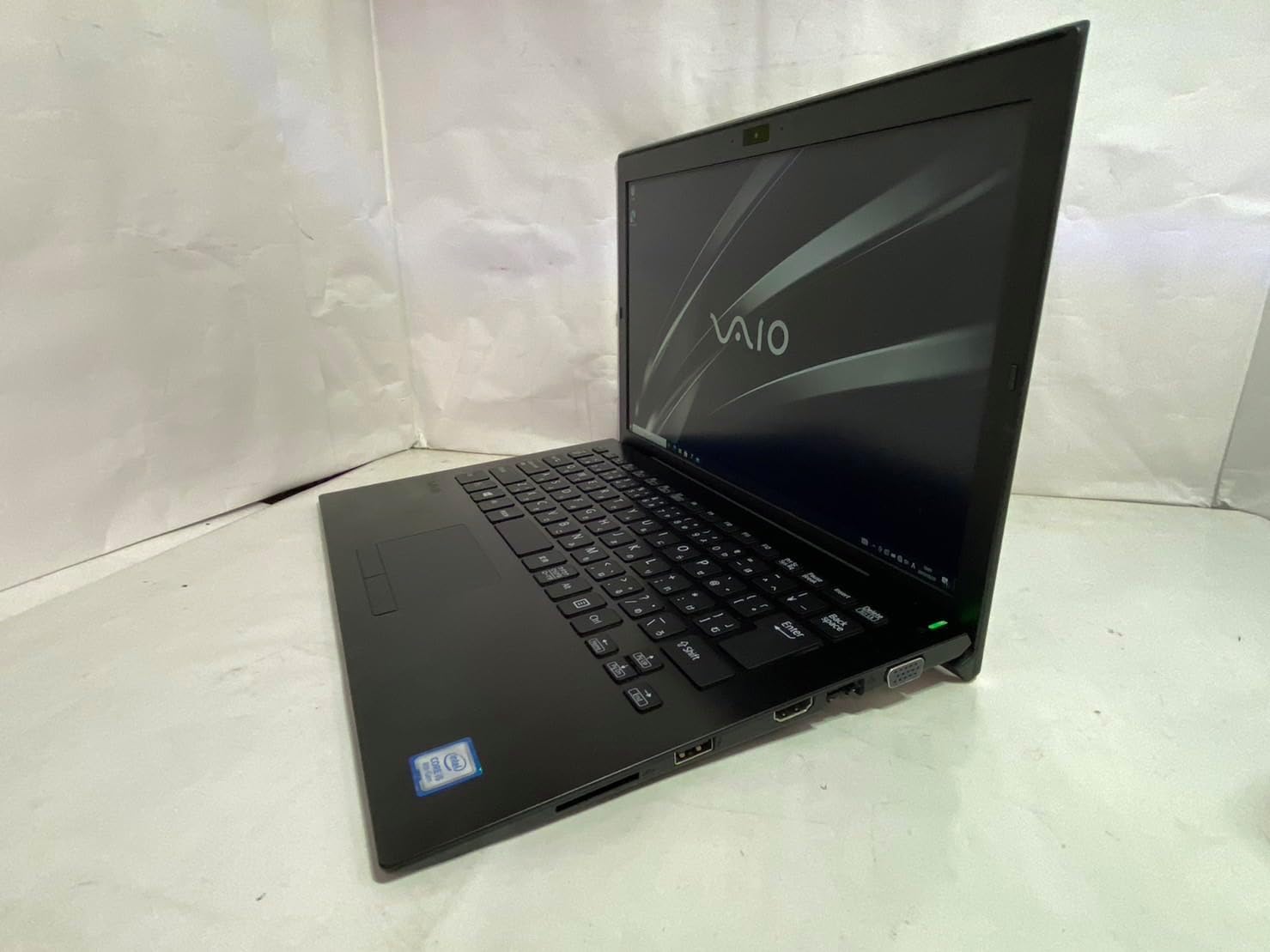
รูปที่ 2.2: ด้านซ้าย view of the SONY VAIO Pro PK VJPK11 laptop. This image shows the left side of the laptop, highlighting various ports such as USB, HDMI, and a VGA port, along with a ventilation grille.

รูปที่ 2.3: สูงสุด view of the SONY VAIO Pro PK VJPK11 laptop with the lid closed. This image displays the sleek black finish of the laptop's lid, featuring the prominent silver VAIO logo in the center.
3. การตั้งค่า
3.1 การแกะกล่อง
Carefully remove the laptop and all accessories from the packaging. Ensure all components are present:
- SONY VAIO Pro PK VJPK11 Laptop
- อะแดปเตอร์ AC และสายไฟ
- เอกสารประกอบ (คู่มือนี้, ข้อมูลการรับประกัน)
3.2 การเชื่อมต่อกับแหล่งจ่ายไฟ
- เชื่อมต่ออะแดปเตอร์ AC เข้ากับพอร์ตอินพุตไฟฟ้าบนแล็ปท็อปของคุณ
- เสียบสายไฟเข้ากับอะแดปเตอร์ AC
- เสียบสายไฟเข้ากับเต้ารับไฟฟ้าที่มีสายดิน
- Allow the battery to charge fully before initial use, or use the laptop while connected to power.
3.3 การบูตเครื่องครั้งแรกและการตั้งค่า Windows
Press the power button to turn on the laptop. Follow the on-screen instructions to complete the Windows 10 Pro setup process. This typically involves selecting your region, language, accepting license agreements, and creating a user account.
4. คู่มือการใช้งาน
4.1 เปิด/ปิดเครื่อง
- การเปิดเครื่อง: กดปุ่มเปิด/ปิดที่อยู่บนตัวแล็ปท็อป
- วิธีปิดเครื่อง: Click the Start button, then Power, and select 'Shut down'.
- ในการรีสตาร์ท: Click the Start button, then Power, and select 'Restart'.
- การนอนหลับ: Click the Start button, then Power, and select 'Sleep', or close the laptop lid.
4.2 คีย์บอร์ดและทัชแพด
The laptop features a standard QWERTY keyboard and a multi-touch touchpad. Use the touchpad for cursor control and gestures. Refer to Windows settings for customizing touchpad sensitivity and gestures.
4.3 การเชื่อมต่ออุปกรณ์ต่อพ่วง
- อุปกรณ์ยูเอสบี: Connect USB devices (e.g., mouse, external drive) to the available USB 3.0 ports.
- จอแสดงผลภายนอก: Use the HDMI or VGA port to connect an external monitor or projector. Press ปุ่ม Windows + P to manage display modes.
- เครือข่ายแบบมีสาย (LAN): เชื่อมต่อสายอีเธอร์เน็ตเข้ากับพอร์ต LAN เพื่อเชื่อมต่ออินเทอร์เน็ตแบบใช้สาย
- การ์ด SD: Insert an SD card into the dedicated SD card slot for data transfer.
4.4 การใช้ Webcam and Bluetooth
- Webลูกเบี้ยว: การบูรณาการ webcam can be used for video calls and conferencing. Access it through applications like Camera or communication software.
- บลูทูธ: Enable Bluetooth in Windows settings to connect wireless devices such as headphones, speakers, or mice.
5. การบำรุงรักษา
5.1 การทำความสะอาดแล็ปท็อป
ใช้ผ้านุ่มไม่เป็นขุยเช็ดเล็กน้อยampened with water or a screen cleaner to clean the display and exterior surfaces. Avoid harsh chemicals or abrasive materials. Ensure the laptop is powered off and unplugged before cleaning.
5.2 การดูแลแบตเตอรี่
To prolong battery life, avoid extreme temperatures. If storing the laptop for an extended period, ensure the battery is charged to approximately 50%.
5.3 การอัปเดตซอฟต์แวร์
Regularly check for and install Windows updates and driver updates from the SONY support webเว็บไซต์เพื่อให้มั่นใจถึงเสถียรภาพและความปลอดภัยของระบบ
5.4 การสำรองข้อมูล
สำรองข้อมูลสำคัญของคุณเป็นระยะ ๆ ไปยังไดรฟ์ภายนอกหรือที่เก็บข้อมูลบนคลาวด์เพื่อป้องกันการสูญหายของข้อมูล
6 การแก้ไขปัญหา
This section addresses common issues you might encounter with your SONY VAIO Pro PK VJPK11.
6.1 ไม่มีไฟฟ้า
- Ensure the AC adapter is securely connected to the laptop and a working power outlet.
- ตรวจสอบว่าเต้ารับไฟฟ้าใช้งานได้โดยเสียบอุปกรณ์อื่น
- หากแบตเตอรี่หมด ให้ชาร์จทิ้งไว้สักสองสามนาทีก่อนที่จะลองเปิดเครื่อง
6.2 ปัญหาการแสดงผล
- If the screen is blank, try adjusting the display brightness using the function keys.
- If an external monitor is connected, ensure the correct display output mode is selected (Windows key + P).
- รีสตาร์ทแล็ปท็อป
6.3 ปัญหาการเชื่อมต่อ Wi-Fi
- ตรวจสอบให้แน่ใจว่าได้เปิดใช้งาน Wi-Fi ในการตั้งค่า Windows
- รีสตาร์ทเราเตอร์และโมเด็มของคุณ
- ตรวจสอบว่าอุปกรณ์อื่นๆ สามารถเชื่อมต่อกับเครือข่าย Wi-Fi เดียวกันได้หรือไม่
- อัปเดตไดรเวอร์เครือข่ายไร้สายของคุณ
6.4 Laptop Running Slow
- ปิดแอปพลิเคชันที่ไม่จำเป็นซึ่งทำงานอยู่เบื้องหลัง
- ตรวจสอบ Task Manager เพื่อดูว่ามีกระบวนการใดใช้ CPU หรือ RAM สูงเป็นพิเศษ
- รันการล้างข้อมูลบนดิสก์และดีแฟร็กเมนต์ (สำหรับ HDD ไม่จำเป็นสำหรับ SSD)
- ตรวจสอบให้แน่ใจว่า Windows และไดรเวอร์ได้รับการอัปเดตแล้ว
7. ข้อมูลจำเพาะ
Key technical specifications for the SONY VAIO Pro PK VJPK11 laptop:
| คุณสมบัติ | ข้อมูลจำเพาะ |
|---|---|
| แบบอย่าง | SONY VAIO Pro PK VJPK11 (VJPK11C11N) |
| โปรเซสเซอร์ | Intel Core i5-8250U (1.60GHz) |
| แรม | แรม 8.00GB DDR3 |
| พื้นที่จัดเก็บ | 256GB SSD (SATA) |
| แสดง | 14.0-inch Wide (1920x1080 pixels) |
| กราฟฟิก | กราฟิกอินทิเกรตของ Intel |
| ระบบปฏิบัติการ | ของ Windows Pro 10 64bit |
| พอร์ต | VGA, HDMI, USB 3.0, LAN, SD Card Slot |
| การเชื่อมต่อ | แลน, บลูทูธ |
| Webลูกเบี้ยว | บูรณาการ Webลูกเบี้ยว |
8. การรับประกันและการสนับสนุน
For information regarding your product's warranty, please refer to the warranty card included with your purchase or visit the official SONY support website. For technical assistance, contact SONY customer support or your authorized dealer.
การสนับสนุนทางออนไลน์: https://www.sony.com/electronics/support


