1. บทนำ
This manual provides essential information for the proper setup, operation, and maintenance of your YUBWVO W50 Laptop Stand. Please read these instructions carefully before using the product to ensure optimal performance and longevity.

Figure 1: YUBWVO W50 Laptop Stand with a laptop.
2. คุณสมบัติของผลิตภัณฑ์
- ฐานหมุนได้ 360°: The stand features a 360° rotatable axis, allowing for easy screen sharing and collaborative work.
- การปรับตามหลักสรีรศาสตร์: Easily lifts your laptop to an ergonomic eye level, promoting better posture and reducing neck and back strain.
- การออกแบบแบบพับได้และพกพาสะดวก: Designed for convenience, the stand can be fully folded for easy storage and transport.
- การกระจายความร้อนที่ดีขึ้น: An X-shape design combined with a 100% aluminum alloy body ensures optimal ventilation and airflow, preventing laptop overheating.
- ความเข้ากันได้กว้าง: Compatible with most laptops and portable monitors ranging from 11 to 16 inches, including various MacBook, Dell, HP, and Chromebook models.
3. เนื้อหาบรรจุภัณฑ์
- 1 x YUBWVO W50 Laptop Stand
- 1 x คู่มือผู้ใช้
4. คำแนะนำในการตั้งค่า
Follow these steps to set up your YUBWVO W50 Laptop Stand:
- Carefully remove the laptop stand from its packaging.
- Place the folded stand on a stable, flat surface.
- Unfold the base legs to form a stable support structure.
- Extend the main arm of the stand to your desired height and angle. The joints are designed to hold their position firmly.
- Adjust the laptop holding arms to securely cradle your device. Ensure the anti-slip pads are in contact with your laptop.
- Place your laptop or portable monitor onto the stand.
Video: Setup and Adjustment Demonstration
This video demonstrates the unfolding, adjustment, and placement of a laptop and portable monitor on the YUBWVO W50 Laptop Stand, highlighting its versatility and ease of use.
5. คู่มือการใช้งาน
5.1 การปรับความสูงและมุม
The YUBWVO W50 Laptop Stand offers multiple points of articulation for customized height and angle adjustments. To adjust:
- Gently hold your device with one hand.
- With the other hand, carefully move the stand's arms to achieve your desired viewing height and angle. The joints are designed to be firm to maintain stability.
- Ensure the stand is stable before releasing your device.

Figure 2: Multi-angle adjustment points.
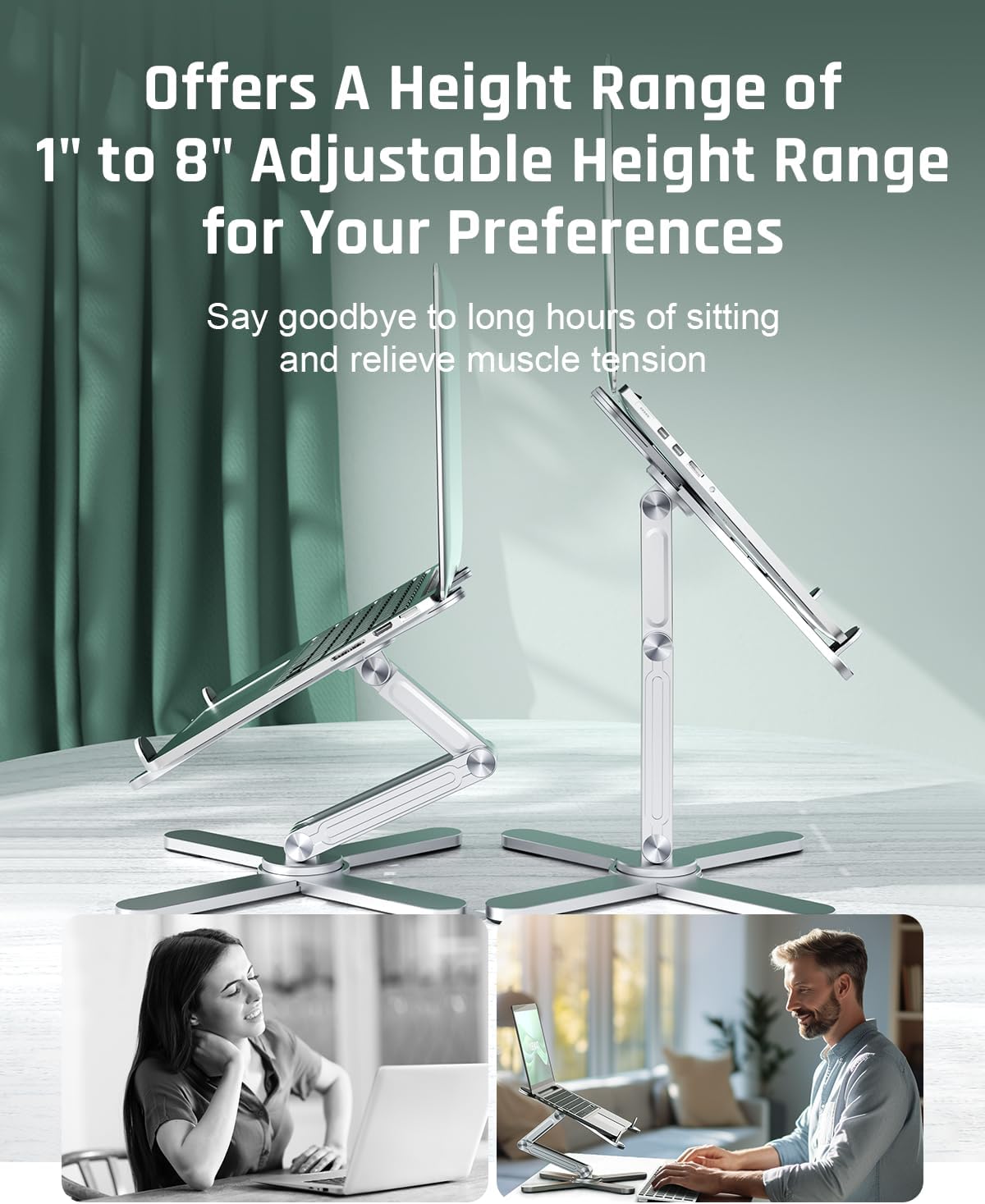
Figure 3: Adjustable height for ergonomic comfort.
5.2 Using the 360° Swivel Base
The base of the stand can rotate 360 degrees, facilitating easy screen sharing and collaborative work environments.
- With your device securely on the stand, gently rotate the base to face the desired direction.
- The smooth rotation allows for quick adjustments without needing to lift or reposition the entire stand.

Figure 4: 360-degree swivel functionality.
5.3 การพับเพื่อจัดเก็บ
To fold the stand for storage or transport:
- Remove your device from the stand.
- Gently collapse the main arm and then fold the base legs inward until the stand is in its compact form.

Figure 5: Folded dimensions for portability.
6. การบำรุงรักษา
To ensure the longevity and proper functioning of your YUBWVO W50 Laptop Stand:
- การทำความสะอาด: เช็ดขาตั้งด้วยผ้านุ่มๆamp ผ้า. หลีกเลี่ยงการใช้น้ำยาทำความสะอาดที่มีฤทธิ์กัดกร่อนหรือตัวทำละลายที่อาจสร้างความเสียหายให้กับพื้นผิว
- พื้นที่จัดเก็บ: When not in use, fold the stand to its compact size and store it in a dry, cool place away from direct sunlight.
- การตรวจสอบ: Periodically check all joints and connections to ensure they are secure. Do not attempt to over-tighten or disassemble the joints.
7 การแก้ไขปัญหา
- ยืนรู้สึกไม่มั่นคง: Ensure all base legs are fully extended and placed on a flat, stable surface. Verify that your device is centered on the stand.
- Difficulty adjusting joints: The joints are designed to be firm to support your device. Apply steady, even pressure when adjusting. Do not force the joints.
- Laptop sliding: Ensure the anti-slip silicone pads on the holding arms are clean and free of debris. Verify your laptop's size is within the compatible range (11-16 inches).
8. ข้อมูลจำเพาะ
| คุณสมบัติ | ข้อมูลจำเพาะ |
|---|---|
| ขนาดสินค้า | 1.5 x 15 x 12 นิ้ว (พับ) |
| น้ำหนักสินค้า | 2.75 ปอนด์ |
| หมายเลขรุ่นสินค้า | W50-STAND |
| วัสดุ | โลหะผสมอลูมิเนียม |
| อุปกรณ์ที่รองรับ | Laptops and portable monitors from 11 to 16 inches (e.g., MacBook, Dell, HP, Chromebook) |
| การหมุน | ฐานหมุนได้ 360° |
9. การรับประกันและการสนับสนุน
YUBWVO products are manufactured with quality and reliability in mind. For warranty information or technical support, please refer to the contact details provided with your purchase documentation or visit the official YUBWVO webเว็บไซต์.
โปรดเก็บหลักฐานการซื้อไว้เพื่อใช้ในกรณีเรียกร้องการรับประกัน


