การแนะนำ
This manual provides detailed instructions for the setup, operation, and maintenance of your TONOR TW630 UHF Dual Wireless Microphone System. Please read this manual thoroughly before using the product to ensure proper function and longevity.
มีอะไรอยู่ในกล่อง
ตรวจสอบว่ารายการทั้งหมดที่ระบุไว้ด้านล่างนี้รวมอยู่ในแพ็คเกจของคุณ:
- ไมโครโฟนพกพา 2 ตัว
- ตัวรับสัญญาณ 1 ตัว พร้อมปลั๊กขนาด 6.35 มม.
- แหวนกันลื่น 2 ชิ้น
- 2 x Mic Covers (Foam Windscreens)
- สายชาร์จ USB 1 เส้น
- 1 x คู่มือผู้ใช้

ภาพ: ส่วนประกอบทั้งหมดที่มีอยู่ในแพ็คเกจ TONOR TW630
สินค้าเกินview
The TONOR TW630 system features two durable metal handheld microphones and a compact plug-in receiver, designed for clear audio transmission over a UHF frequency band.

ภาพ: รายละเอียด view of the microphone, showing its display, power button, and channel switch button.
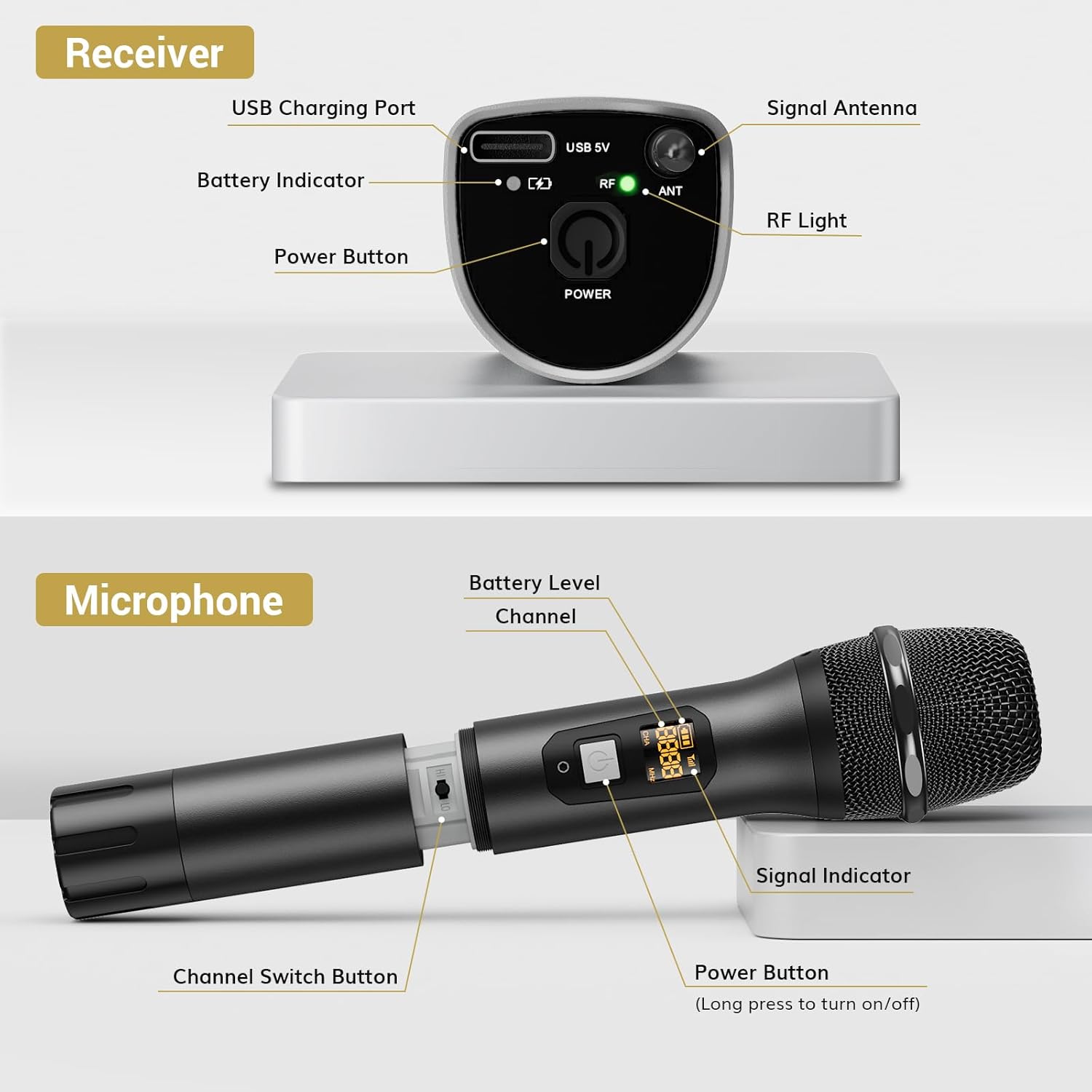
ภาพ: รายละเอียด view of the receiver, highlighting its charging port, antenna, and indicator lights.
คุณสมบัติหลัก:
- เสรีภาพไร้สาย: Up to 200ft (60m) operating range (line of sight).
- สัญญาณเสถียร: 15 adjustable channels to minimize interference.
- โครงสร้างทนทาน: Microphones and receiver are made of rugged metal.
- อายุการใช้งานแบตเตอรี่ที่ยาวนานขึ้น: Receiver provides up to 6 hours of use on a 2-3 hour charge.
คู่มือการติดตั้ง
1. แหล่งจ่ายไฟ
- ไมโครโฟน: Each microphone requires 2 x AA batteries (not included). Open the battery compartment at the bottom of the microphone and insert the batteries, observing polarity.
- ผู้รับ: The receiver has a built-in rechargeable battery. Charge it using the provided USB cable and a 5V adapter (not included). A full charge takes approximately 2-3 hours and provides up to 6 hours of operation.

Image: Instructions for powering the microphone with AA batteries and charging the receiver via USB.
2. Pairing the Microphones and Receiver
The system is designed for automatic pairing:
- เปิดใช้งานทั้งไมโครโฟนและเครื่องรับสัญญาณ
- The receiver will automatically sync its frequency with the microphone(s). The RF light on the receiver will illuminate when a stable connection is established.
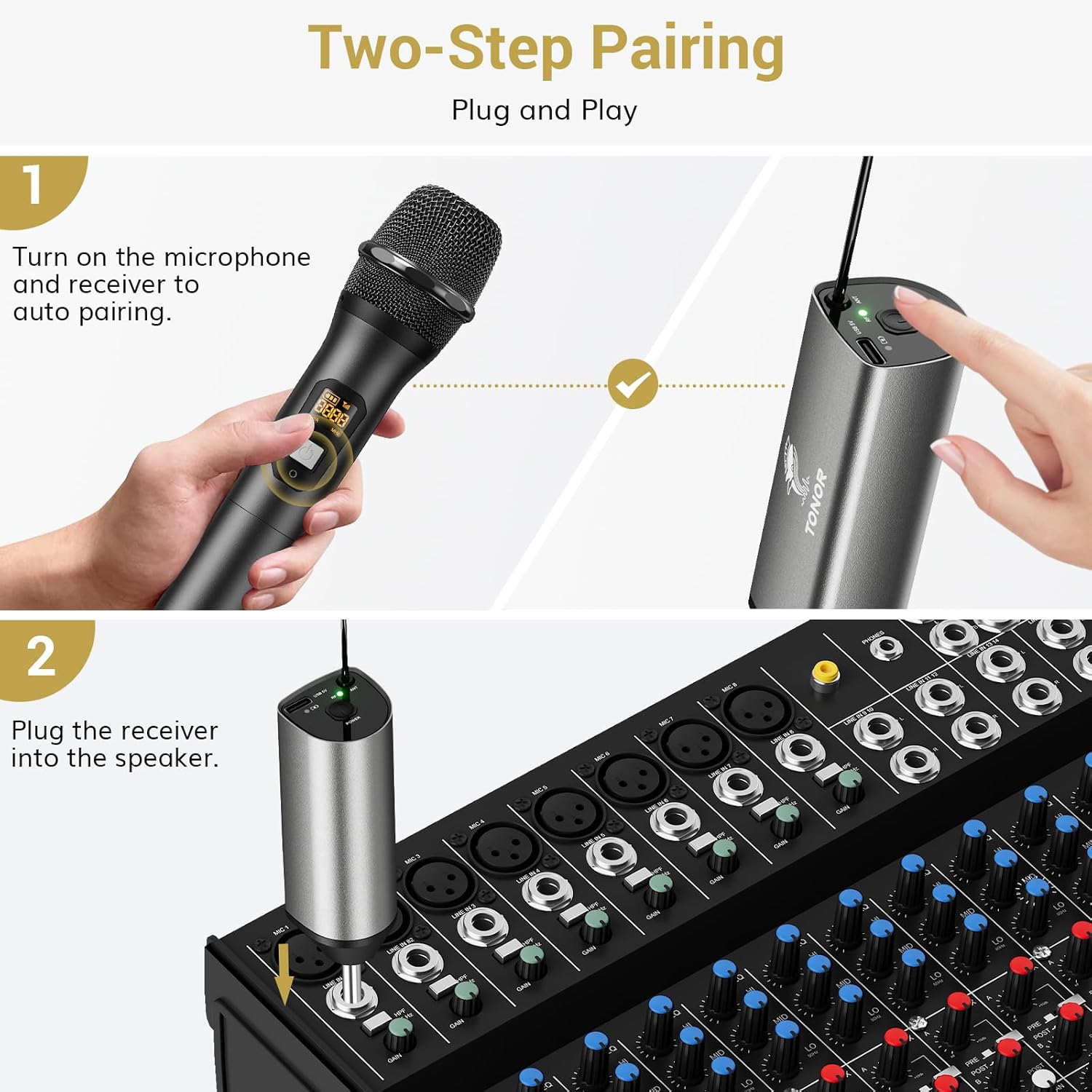
Image: Visual guide for the two-step pairing process and connecting the receiver.
3. การเชื่อมต่อกับอุปกรณ์เสียง
Plug the 6.35mm receiver directly into the "MIC IN" input of compatible audio equipment.
- อุปกรณ์ที่รองรับ: Powered speakers, karaoke machines, amplifiers, mixers, and audio interfaces.
- อุปกรณ์ที่ไม่เข้ากัน: This system is not compatible with phones, computers, or tablets directly. An additional 3.5mm (1/8") adapter is required for these devices (not included).

ภาพ: อดีตamples of compatible audio devices and correct input connection.
คำแนะนำการใช้งาน
การสลับช่อง
The TW630 system offers 15 adjustable channels to avoid interference. If you experience signal issues or are using multiple sets simultaneously, you can change the microphone's channel:
- To switch channels, briefly press the "Channel Switch Button" located inside the microphone's battery compartment (after unscrewing the bottom part).
- The display on the microphone will show the current channel (CHA) and frequency (MHz).
- The receiver will automatically adjust to the new channel.

Image: Guide to changing microphone channels.
Using Multiple Microphone Sets
Up to 15 sets of TONOR TW630 systems can be used simultaneously without interference. Ensure each set operates on a different channel to prevent signal conflicts.
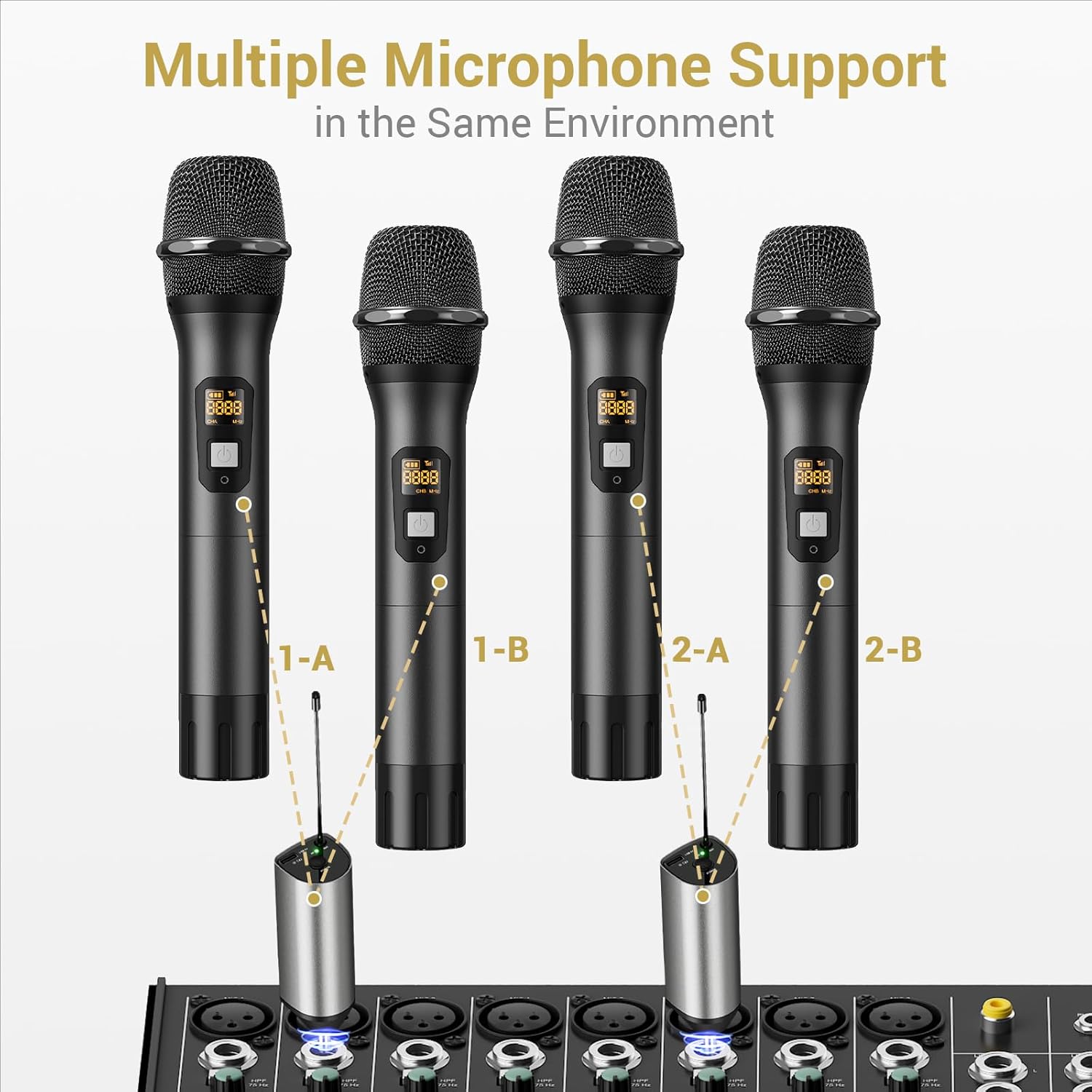
Image: Setup for using multiple microphone systems in the same environment.
การซ่อมบำรุง
- การทำความสะอาด: Wipe the microphones and receiver with a soft, dry cloth. Do not use liquid cleaners or solvents.
- การดูแลแบตเตอรี่ Remove AA batteries from microphones if not in use for extended periods to prevent leakage. Recharge the receiver regularly to maintain battery health.
- พื้นที่จัดเก็บ: เก็บระบบไว้ในที่แห้งและเย็น หลีกเลี่ยงแสงแดดโดยตรงและอุณหภูมิที่สูงหรือต่ำเกินไป
- ฝาครอบไมโครโฟน: Use the provided foam mic covers to protect against wind noise and moisture.
การแก้ไขปัญหา
| ปัญหา | สาเหตุที่เป็นไปได้ | สารละลาย |
|---|---|---|
| ไม่มีเสียงออกจากไมโครโฟน |
|
|
| เสียงรบกวนหรือคุณภาพเสียงไม่ดี |
|
|
| เครื่องรับสัญญาณไม่ชาร์จไฟ |
|
|
ข้อมูลจำเพาะ
| คุณสมบัติ | รายละเอียด |
|---|---|
| ยี่ห้อ | โทเนอร์ |
| ชื่อรุ่น | ทีดับบลิว630 |
| หมายเลขรุ่นสินค้า | ทีเอ็น120106 |
| เทคโนโลยีการเชื่อมต่อ | ยูเอชเอฟ |
| ประเภทขั้วต่อ | แจ็ค 6.35 มม. |
| ปัจจัยรูปแบบไมโครโฟน | แบบถือด้วยมือ |
| วัสดุ | โลหะ |
| จำนวนช่องสัญญาณ | 15 |
| ความไวเสียง | 52 เดซิเบล |
| อัตราส่วนสัญญาณต่อเสียงรบกวน | 70 เดซิเบล |
| รูปแบบขั้ว | ทิศทางเดียว |
| แหล่งพลังงาน | Battery Powered (Microphones: 2x AA each; Receiver: Rechargeable Lithium Ion) |
| เวลาในการชาร์จตัวรับ | 2-3 ชั่วโมง |
| เวลาการทำงานของเครื่องรับ | นานถึง 6 ชั่วโมง |
| ระยะการทำงาน | 200ft / 60m (line of sight) |
| น้ำหนักสินค้า | 1.32 ปอนด์ (600 กรัม) |
| ขนาดแพ็คเกจ | 11.18 x 6.42 x 2.99 นิ้ว |
ข้อมูลด้านความปลอดภัย
- อย่าให้ผลิตภัณฑ์โดนน้ำหรือความชื้นมากเกินไป
- หลีกเลี่ยงการทำผลิตภัณฑ์หล่นหรือกระแทกอย่างรุนแรง
- Use only a 5V adapter for charging the receiver to prevent damage.
- เก็บให้พ้นจากมือเด็ก
- อย่าพยายามถอดประกอบหรือซ่อมแซมเครื่องด้วยตนเอง โปรดติดต่อช่างผู้ชำนาญการ
การรับประกันและการสนับสนุน
สำหรับข้อมูลการรับประกันและการสนับสนุนทางเทคนิค โปรดดูที่เว็บไซต์อย่างเป็นทางการของ TONOR website or contact TONOR customer service directly. Keep your purchase receipt for warranty claims.
You can visit the TONOR store on Amazon for more information: TONOR Store


