1. สินค้าหมดview
The ENEGON 26800 mAh USB-C PD 85W Portable Power Bank is a high-capacity external battery designed to provide fast and efficient charging for a wide range of devices, including laptops, smartphones, and tablets. It features multiple output ports, including USB-C PD, USB-A, and a DC output with various adapters, ensuring broad compatibility.

ภาพ: ด้านหน้าและด้านหลัง view of the ENEGON Portable Power Bank, showcasing its sleek design and the included DC converters and cables.
เนื้อหาแพ็คเกจ:
- 1 x ENEGON PD 85W Power Bank
- 1 x USB-C to USB-C E-Cable
- 1 x สายไฟ DC
- 10 x DC Converters
- 1 x กระเป๋าเดินทาง
- 1 x Welcome Guide (User Manual)

Image: Visual representation of the power bank's dimensions and all items included in the package, such as cables and DC converters.
Product Ports and Display:
- เอาต์พุต USB-A: Standard USB port for charging various devices.
- เอาต์พุต USB-C2: USB-C port with 20W maximum output.
- อินพุต/เอาต์พุต USB-C1: USB-C port for both charging the power bank and outputting up to 60W.
- เอาต์พุต DC: Dedicated DC port for laptop charging with included converters, up to 65W.
- หน้าจอแสดงผล LCD: แสดงเปอร์เซ็นต์แบตเตอรี่tage and current voltagการตั้งค่าอี
- ปุ่มเปิด/ปิด: Activates the display and controls voltagอี การปรับ

ภาพ: ระยะใกล้ view of the power bank's top edge, highlighting the USB-A, USB-C, and DC ports, along with the LCD display and power button.
2. การตั้งค่าและการใช้งานเบื้องต้น
การชาร์จแบตสำรอง:
Before first use, fully charge the power bank. It can be fully recharged in approximately 2.5 hours using a 60W PD charger (not included). Connect a USB-C charger to the USB-C1 (Input/Output) port. The LCD display will show the charging progress.

Image: Diagram illustrating the fast charging capability of the power bank, showing it can be fully recharged in 2.5 hours with a 60W PD charger.
3. คู่มือการใช้งาน
อุปกรณ์ชาร์จ:
The power bank offers 3-in-1 fast charging with a total output of 85W, allowing you to charge multiple devices simultaneously.
- USB-C1: Max 60W output.
- USB-C2: Max 20W output.
- เอาต์พุต DC: Max 65W output.
- ยูเอสบี-เอ: Max 18W output.
For optimal charging, use the appropriate cable for your device and connect it to the corresponding port on the power bank. The power bank automatically detects and delivers the optimal charging current for most devices.

Image: Diagram illustrating the simultaneous charging of a laptop, smartphone, and another device using the USB-C1, USB-C2, and DC ports, highlighting their respective maximum power outputs.
Adjusting DC Output Voltage:
The DC output port supports multiple voltage settings (5V, 9V, 12V, 15V, 20V) to accommodate various laptops and devices. Follow these steps to adjust the voltage:
- ตรวจสอบระดับพลังงาน: Short press the power button to display the current power level.
- ใส่ฉบับที่tage Adjustment Mode: Long press the power button for 3-5 seconds. The display will light up and show the current voltagเช่น (เช่น DC 9V)
- ปรับระดับเสียงtage: While the indicator is blinking, short press the power button once (1-2 seconds) to cycle through the available voltages (9V, 12V, 15V, 20V).
- ยืนยันฉบับที่tage: Stop pressing the button when the desired voltage is displayed. The setting will be confirmed automatically after a few seconds of inactivity.
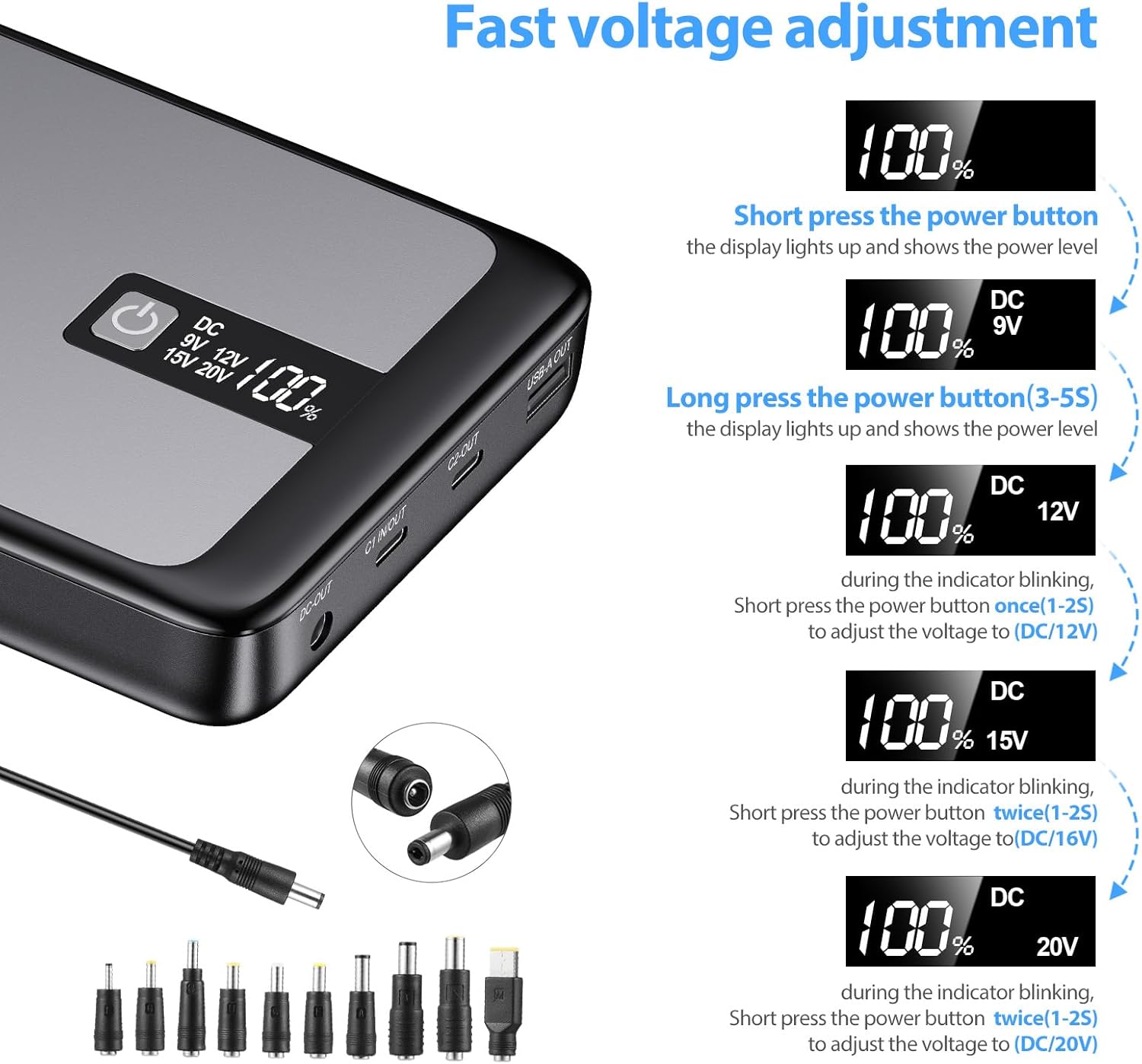
Image: Step-by-step visual guide on how to adjust the DC output voltage using the power button and LCD display, showing the different voltagตัวเลือกอี
Using DC Converters:
The power bank comes with 10 different DC converters to ensure compatibility with various laptop models. Select the appropriate converter for your laptop's DC input port and connect it to the DC cable, then plug into the power bank's DC output.
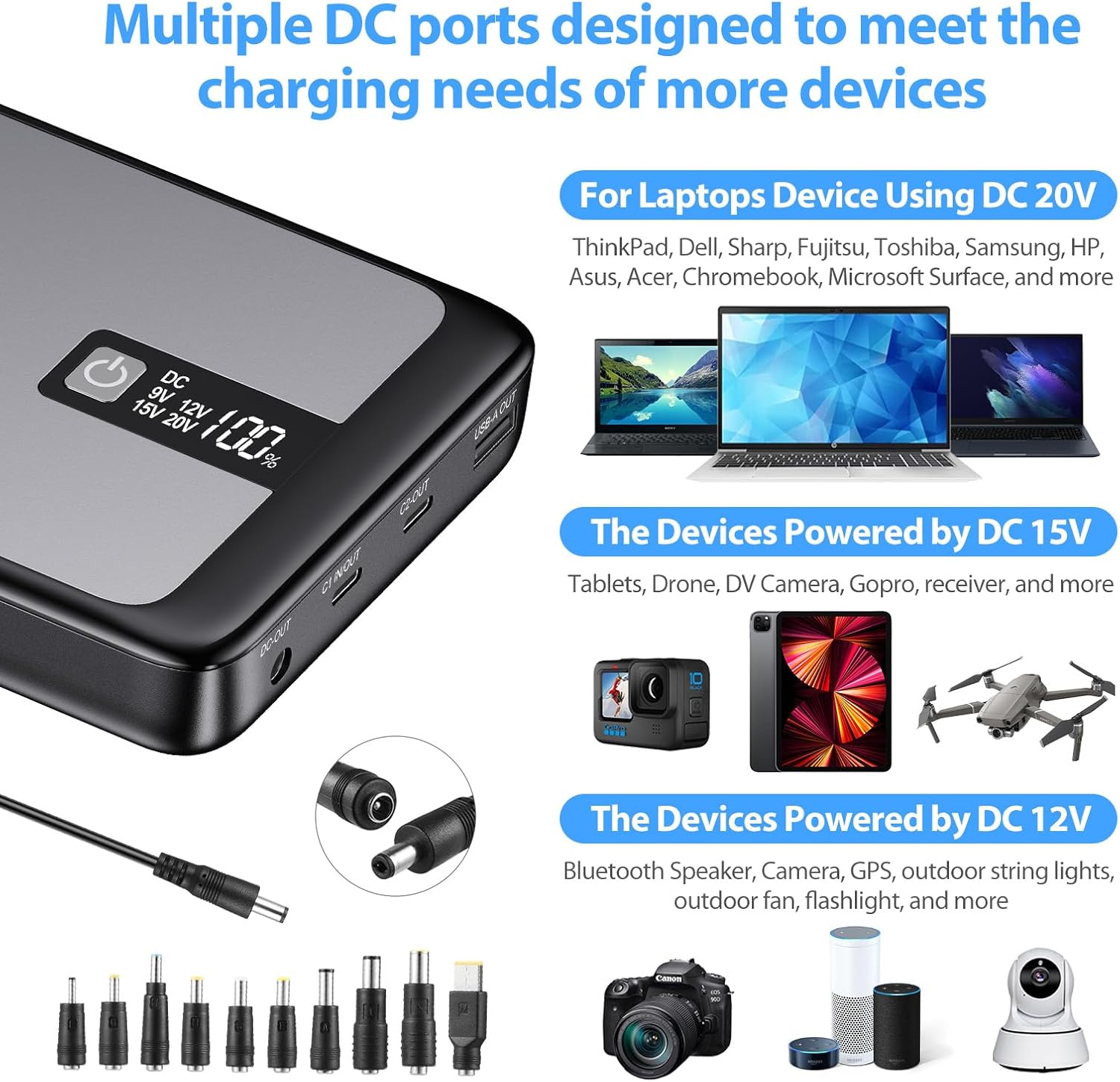
Image: Illustration of the various DC converters and examples of devices they can power, categorized by voltage (20V for laptops, 15V for tablets/drones, 12V for speakers/cameras).

Image: A circular diagram showing various laptop brands (Asus, Acer, HP, Samsung, Toshiba, Sony) and the corresponding DC converters, indicating broad compatibility.
4. ความเข้ากันได้สากล
The ENEGON Power Bank is designed for wide compatibility with a variety of electronic devices:
- โน๊ตบุ๊ค: MacBook Pro/Air 13"/15"/16", Dell XPS, ThinkPad, Surface Book 2, Lenovo YOGA, Google Pixel Acer Series, HP Series, Samsung Series, Toshiba Series, iPad Pro.
- โทรศัพท์: iPhone 13 series, 12 series, 11 Pro/Pro Max/XS/XS Max/XR/X, 8 Plus/8, 7/7 Plus, SE2, Samsung Galaxy S22/S21 Ultra/S21/S20/S10/S9/S8 series, Note 20/10/9/8/7, OnePlus 6T/7T/8T/7 Pro, Nord N100.
- Tablets & Other Devices: iPad Pro 10.5/12.9, iPad Air 3/10.5, iPad Mini 5/7.9, AirPods, Nintendo Switch, Bluetooth speakers, digital cameras, and more.
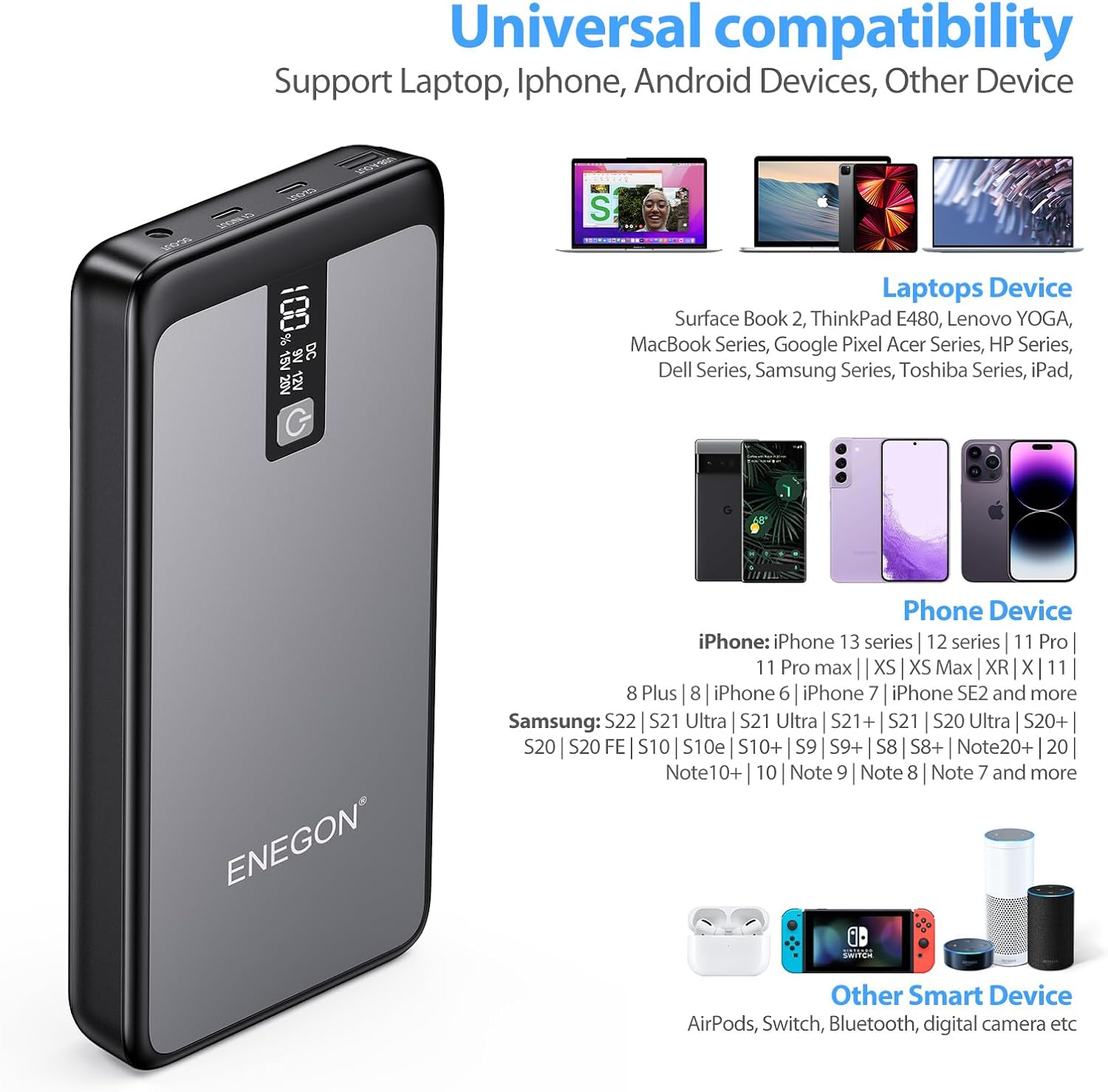
Image: Visual representation of the power bank's universal compatibility, showing it can charge various laptops, iPhones, Android phones, and other smart devices like AirPods and Nintendo Switch.
5. การบำรุงรักษาและการดูแล
- เก็บพาวเวอร์แบงค์ไว้ในที่แห้งและเย็น หลีกเลี่ยงแสงแดดโดยตรงและอุณหภูมิที่สูงหรือต่ำเกินไป
- หลีกเลี่ยงการทำพาวเวอร์แบงค์ตกหรือกระแทกแรงๆ
- อย่าให้พาวเวอร์แบงค์โดนน้ำหรือของเหลวอื่นๆ
- ทำความสะอาดพื้นผิวด้วยผ้านุ่มและแห้ง ห้ามใช้สารเคมีรุนแรงหรือวัสดุขัดถู
- For long-term storage, charge the power bank to about 50-70% every 3 months to maintain battery health.
6 การแก้ไขปัญหา
ปัญหาทั่วไปและวิธีแก้ไข:
- พาวเวอร์แบงค์ไม่ชาร์จ:
- ตรวจสอบให้แน่ใจว่าสายชาร์จและอะแดปเตอร์ทำงานได้อย่างถูกต้อง
- Check if the USB-C1 port is used for input.
- ลองใช้สายชาร์จหรืออะแดปเตอร์อื่นดู
- อุปกรณ์ไม่ชาร์จจากพาวเวอร์แบงค์:
- ตรวจสอบให้แน่ใจว่าพาวเวอร์แบงค์มีประจุไฟเพียงพอ
- ตรวจสอบว่าสายชาร์จเชื่อมต่อกับพาวเวอร์แบงค์และอุปกรณ์อย่างแน่นหนาแล้วหรือไม่
- Verify that the correct DC voltage is selected for laptops.
- ลองเสียบเข้ากับพอร์ตอื่นของพาวเวอร์แบงค์ หรือใช้สายชาร์จอื่นดู
- หน้าจอ LCD ไม่ทำงาน:
- กดปุ่มเปิด/ปิดเพื่อเปิดใช้งานจอแสดงผล
- หากปัญหายังคงอยู่ โปรดติดต่อฝ่ายสนับสนุนลูกค้า
7. ข้อมูลจำเพาะ
| คุณสมบัติ | รายละเอียด |
|---|---|
| แบบอย่าง | พาวเวอร์แบงค์ PD 85W |
| ความจุของแบตเตอรี่ | 26800 มิลลิแอมป์ |
| เอาต์พุต USB-C1 | สูงสุด 60W |
| เอาต์พุต USB-C2 | สูงสุด 20W |
| เอาท์พุท DC | Max 65W (Adjustable: 5V, 9V, 12V, 15V, 20V) |
| เอาต์พุต USB-A | สูงสุด 18W |
| ผลผลิตรวม | 85W (DC+USB-C2) |
| Recharge Time (60W PD) | ประมาณ 2.5 ชั่วโมง |
| ขนาดสินค้า | 23.2 x 12.9 x 5 ซม. |
| น้ำหนัก | 880 กรัม |
| ประเภทแบตเตอรี่ | ลิเธียมโพลิเมอร์ |
8. การรับประกันและการสนับสนุน
ENEGON provides an 18-month worry-free warranty for this product. If you have any questions or require assistance, please do not hesitate to contact our friendly customer service team. We are committed to ensuring your satisfaction.
For support, please refer to the contact information provided in your Welcome Guide or visit the official ENEGON webเว็บไซต์.


