1. บทนำ
This manual provides detailed instructions for the installation, operation, and maintenance of your YuanLey 8 Port 2.5G Unmanaged Desktop Ethernet Switch with 10G SFP. Please read this manual thoroughly before using the device to ensure proper functionality and to prevent damage.
2. เนื้อหาบรรจุภัณฑ์
ตรวจสอบว่าแพ็คเกจของคุณมีรายการต่อไปนี้:
- 1 x YuanLey 8 Port 2.5G Ethernet Switch
- 1 x สายไฟ
- 1 x คู่มือผู้ใช้
3. คุณสมบัติของผลิตภัณฑ์
- 9 Port Configuration: Includes 8 x 2.5 Gigabit Ethernet ports and 1 x 10G SFP+ Port.
- ประสิทธิภาพความเร็วสูง: Delivers 2.5 times faster network performance than traditional Gigabit switches, with a switching capacity of up to 60Gbps.
- ปลั๊กแอนด์เพลย์: Unmanaged design requires no configuration for immediate use.
- Durable and Quiet: Features a metal case with 6KV lightning protection and a fanless design for silent operation.
- อุณหภูมิการทำงานกว้าง: ทำงานได้อย่างน่าเชื่อถือในช่วงอุณหภูมิตั้งแต่ -10°C ถึง 50°C
- ตำแหน่งที่หลากหลาย: Supports both wall mount and desktop placement.
4. สินค้าหมดview

Figure 4.1: YuanLey 8 Port 2.5G Unmanaged Desktop Ethernet Switch

รูปที่ 4.2: แผงด้านหน้าด้านบนview with Ports and Indicators
The switch features 8 RJ45 ports supporting 10/100/1000Mbps/2.5G adaptive speeds and 1 SFP+ port for 1G/2.5G/10G fiber connections. LED indicators provide status for power and link activity.
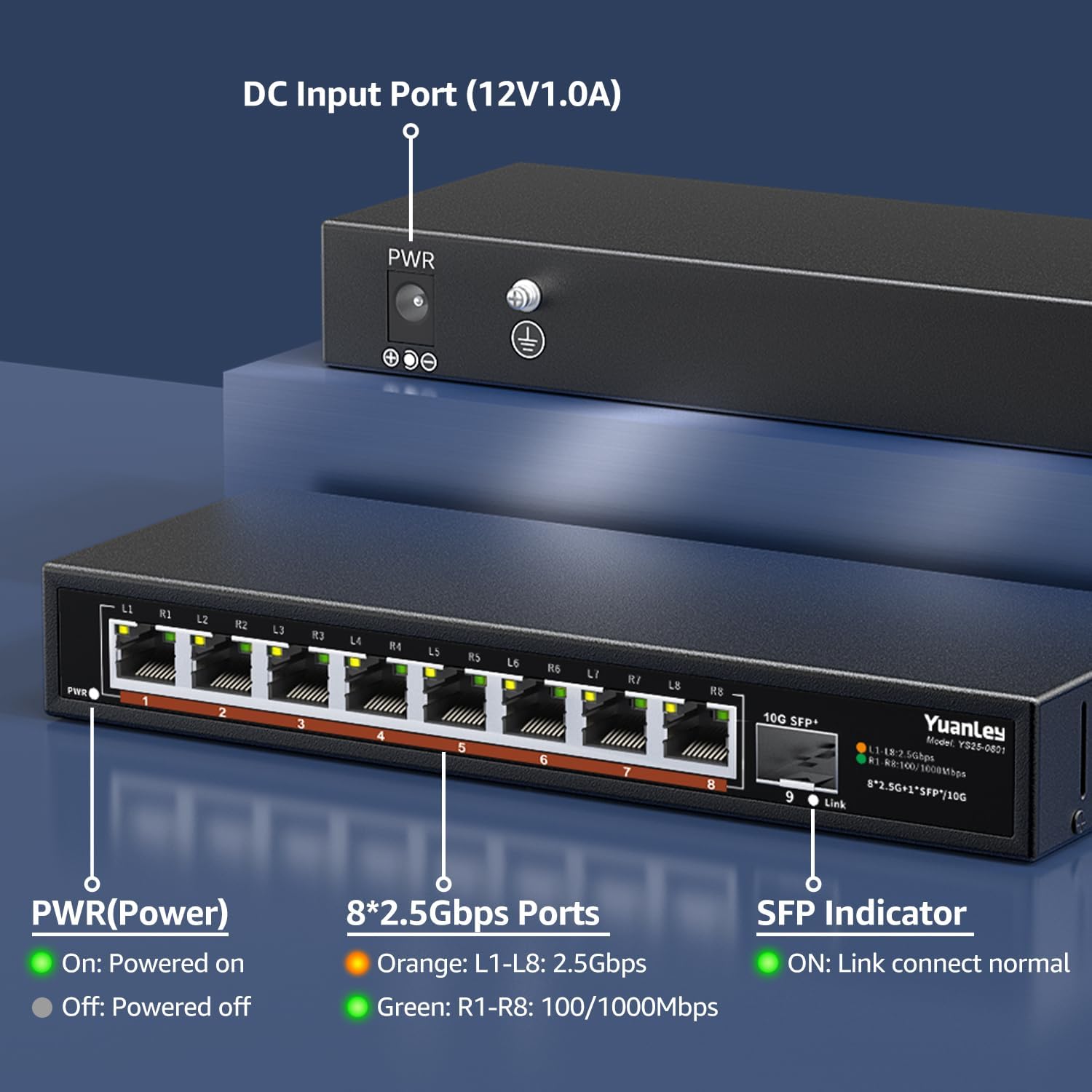
รูปที่ 4.3: แผงด้านหลังด้านบนview พร้อมอินพุตพลังงาน

รูปที่ 4.4: รายละเอียด View of Ports and Indicators
The rear panel includes the DC 12V/1.0A power input port and a grounding screw for electrical safety. The front panel LEDs indicate power status, 2.5Gbps link speed (orange), and 100/1000Mbps link speed (green) for RJ45 ports, and link status for the SFP+ port.
5. การตั้งค่า
Follow these steps to set up your YuanLey Ethernet Switch:
- เชื่อมต่อพลังงาน: Plug the provided power adapter into the DC 12V/1.0A input port on the rear of the switch, then plug the adapter into a power outlet. The PWR LED on the front panel will illuminate green.
- เชื่อมต่ออุปกรณ์อีเธอร์เน็ต: Connect your network devices (e.g., computers, NAS, WiFi 6 APs, gaming PCs) to the 2.5G Base-T ports (1-8) using standard Ethernet cables (Cat5e or higher recommended for 2.5G speeds). The corresponding port LEDs will light up to indicate a successful connection and speed.
- Connect SFP+ Module (Optional): If using the 10G SFP+ port, insert a compatible 1G/2.5G/10G SFP/SFP+ module (not included) into the SFP+ slot. Then, connect a fiber optic cable or DAC cable to the module. The SFP indicator LED will light up when a link is established.

Figure 5.1: Typical Network Setup with the YuanLey Switch
คู่มือวิดีโอการตั้งค่า
Video 5.1: An official YuanLey video demonstrating the setup and features of the 8 Port 2.5Gbps Switch.
6. การใช้งานสวิตช์
The YuanLey 2.5G Unmanaged Ethernet Switch is designed for simple plug-and-play operation. Once powered on and connected to your network devices, it will automatically detect the link speed and establish connections without any further configuration.
- ไฟ LED แสดงสถานะ: Observe the PWR, L1-L8, and SFP+ Link LEDs to monitor the switch's status and network activity.
- ระบบ MDI/MDIX อัตโนมัติ: The switch supports Auto MDI/MDIX, eliminating the need for crossover cables.
- Adaptive Speed: RJ45 ports automatically adapt to 10/100/1000Mbps or 2.5Gbps.
7. การบำรุงรักษา
To ensure optimal performance and longevity of your switch, consider the following maintenance guidelines:
- การจัดวาง: Place the switch in a well-ventilated area, away from direct sunlight, heat sources, and excessive moisture. The fanless design relies on natural convection for cooling.
- การทำความสะอาด: Periodically clean the exterior of the switch with a soft, dry cloth. Avoid using liquid or aerosol cleaners.
- การจัดการสายเคเบิล: Ensure network cables are neatly organized and not excessively bent or strained.
- แหล่งจ่ายไฟ: ใช้เฉพาะอะแดปเตอร์แปลงไฟที่ให้มาพร้อมกับสวิตช์เท่านั้น

Figure 7.1: Fanless Design and Environmental Considerations
8 การแก้ไขปัญหา
If you encounter issues with your switch, refer to the following common problems and solutions:
- ไม่มีไฟฟ้า:
- ตรวจสอบให้แน่ใจว่าอะแดปเตอร์ไฟฟ้าเชื่อมต่อกับสวิตช์และเต้ารับไฟฟ้าที่ใช้งานได้แน่นหนา
- Check if the PWR LED is illuminated. If not, try a different power outlet.
- ไม่มีลิงค์/กิจกรรมบนพอร์ต:
- ตรวจสอบให้แน่ใจว่าสายอีเธอร์เน็ตเชื่อมต่อกับพอร์ตของสวิตช์และอุปกรณ์เครือข่ายอย่างแน่นหนาแล้ว
- ลองใช้สายเคเบิลอีเทอร์เน็ตอื่น
- ตรวจสอบให้แน่ใจว่าอุปกรณ์ที่เชื่อมต่อเปิดอยู่และทำงานอย่างถูกต้อง
- Check the LED indicator for the specific port. If it's off, there might be no link.
- ความเร็วเครือข่ายช้า:
- Ensure all devices in the network path (NICs, cables, routers) support 2.5G speeds to achieve maximum performance.
- Use Cat5e or higher-rated Ethernet cables for 2.5G connections.
- Check the color of the port LED: Orange indicates 2.5Gbps, Green indicates 100/1000Mbps.
- SFP+ Port Issues:
- Ensure the SFP/SFP+ module is correctly inserted and compatible with the switch.
- Verify the fiber optic or DAC cable is properly connected and undamaged.
- Check the SFP indicator LED for link status.
9. ข้อมูลจำเพาะ
| คุณสมบัติ | ข้อมูลจำเพาะ |
|---|---|
| หมายเลขรุ่น | 9 Port | 8x2500Mbps+1x10G SFP |
| ขนาดสินค้า | ขนาด 7.76 นิ้ว (ยาว) x 2.87 นิ้ว (กว้าง) x 1.14 นิ้ว (สูง) (19.7 ซม. x 7.3 ซม. x 2.9 ซม.) |
| น้ำหนักสินค้า | 1.36 ปอนด์ (0.62 กิโลกรัม) |
| จำนวนพอร์ต | 8 x 2.5G Base-T, 1 x 10G SFP+ |
| อัตราการถ่ายโอนข้อมูล | 60 กิกะบิตต่อวินาที (ความสามารถในการสลับ) |
| เล่มที่tage | 230 Volts (AC) input to adapter, 12V DC output |
| วัสดุตัวเรือน | โลหะ |
| อุณหภูมิในการทำงาน | -10°C ถึง 50°C |
| ระบบป้องกันฟ้าผ่า | 6KV |
| ยูพีซี | 790885573743 |
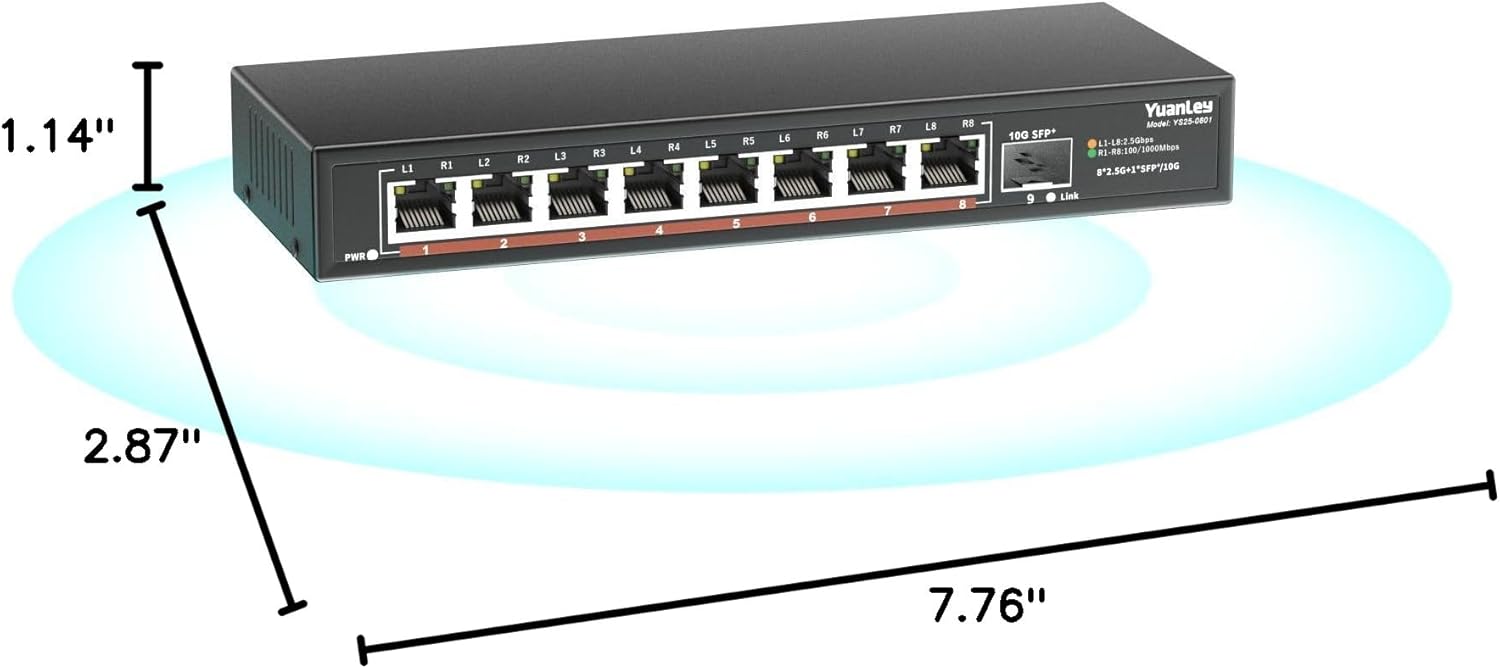
รูปที่ 9.1: ขนาดผลิตภัณฑ์
10. การรับประกันและการสนับสนุน
YuanLey products are designed for reliability and performance. For warranty information and technical support, please refer to the official YuanLey webหรือติดต่อฝ่ายบริการลูกค้าโดยตรง เก็บใบเสร็จรับเงินไว้เพื่อใช้ในการเคลมประกัน
หากต้องการความช่วยเหลือเพิ่มเติม คุณสามารถไปที่ YuanLey Store on Amazon.


