1. บทนำ
Welcome to the Titan Evoke Smart Watch user manual. This guide provides essential information for setting up, operating, maintaining, and troubleshooting your new smart watch. The Titan Evoke combines advanced technology with elegant design, featuring a vibrant AMOLED display, Bluetooth calling, and comprehensive health tracking capabilities.
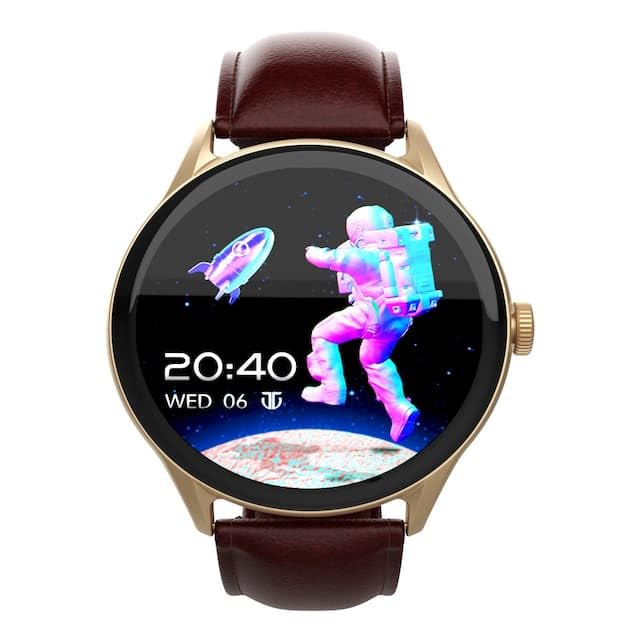
ภาพ: ด้านหน้า view of the Titan Evoke Smart Watch displaying a digital clock and an astronaut graphic.

Image: A Titan Evoke Smart Watch with a colorful watch face, accompanied by the text 'Titan Evoke: Function Meets Fashion'.
2. อะไรอยู่ในกล่อง
กรุณาตรวจสอบเนื้อหาในแพ็คเกจเพื่อให้แน่ใจว่ามีสินค้าครบทั้งหมด:
- Titan Evoke Smart Watch
- สายชาร์จแม่เหล็ก
- คู่มือเริ่มต้นอย่างรวดเร็ว
- บัตรรับประกัน
3. การตั้งค่า
3.1. การชาร์จอุปกรณ์
Before initial use, fully charge your Titan Evoke Smart Watch. Connect the magnetic charging cable to the charging points on the back of the watch and plug the USB end into a compatible power adapter (not included) or a computer's USB port. The watch display will indicate charging status.
3.2. เปิด/ปิดเครื่อง
- เปิดเครื่อง: Press and hold the functional crown (side button) for a few seconds until the Titan logo appears.
- หมดแรง: From the watch face, swipe down to access quick settings, or navigate to 'Settings' > 'System' > 'Power Off'. Alternatively, press and hold the functional crown and select 'Power Off'.
3.3. การจับคู่กับสมาร์ทโฟนของคุณ
To unlock the full functionality of your Titan Evoke Smart Watch, pair it with your smartphone via Bluetooth.
- Download and install the companion app (e.g., 'Titan Smart' app) from your smartphone's app store (Google Play Store for Android, Apple App Store for iOS).
- ตรวจสอบให้แน่ใจว่าได้เปิดใช้งาน Bluetooth บนสมาร์ทโฟนของคุณแล้ว
- เปิดแอปพลิเคชันคู่หูและทำตามคำแนะนำบนหน้าจอเพื่อสร้างบัญชีหรือเข้าสู่ระบบ
- เลือก 'เพิ่มอุปกรณ์' หรือ 'จับคู่อุปกรณ์ใหม่' ภายในแอป
- The app will search for available devices. Select 'Titan Evoke' from the list.
- ยืนยันคำขอจับคู่บนนาฬิกาและสมาร์ทโฟนของคุณทั้งสอง
4. การใช้งานสมาร์ทวอทช์ของคุณ
4.1. การนำทาง
- หน้าจอสัมผัส: ปัดไปทางซ้าย ขวา ขึ้น หรือลง เพื่อเลื่อนดูเมนู การแจ้งเตือน และวิดเจ็ต แตะเพื่อเลือกรายการ
- Functional Crown: หมุนเม็ดมะยมเพื่อเลื่อนดูรายการหรือปรับการตั้งค่า กดเม็ดมะยมเพื่อกลับไปยังหน้าปัดนาฬิกาหรือยืนยันการเลือก
4.2. SingleSync Bluetooth Calling
The Titan Evoke supports direct Bluetooth calling, allowing you to make and receive calls directly from your wrist.
- การโทร: Access the 'Phone' or 'Dialer' app on your watch. You can dial numbers directly or select contacts synced from your smartphone.
- รับสาย: เมื่อมีสายเรียกเข้า นาฬิกาจะแสดงหมายเลขผู้โทร แตะไอคอนสีเขียวเพื่อรับสาย หรือไอคอนสีแดงเพื่อปฏิเสธสาย
- Ensure your watch is connected to your smartphone via Bluetooth for calling functionality.

Image: Two Titan Evoke Smart Watches, one displaying an incoming call and the other a dial pad, illustrating the SingleSync BT Calling feature.
4.3. หน้าปัดนาฬิกา
Personalize your watch with over 100 available watch faces. To change the watch face, press and hold the current watch face, then swipe left or right to browse and tap to select your preferred design.
4.4. Health Suite
The Titan Evoke monitors various health metrics:
- เครื่องวัดอัตราการเต้นของหัวใจ: ให้การวัดอัตราการเต้นของหัวใจอย่างต่อเนื่องหรือตามต้องการ
- ตัวติดตามกิจกรรม: บันทึกจำนวนก้าว ระยะทาง และปริมาณแคลอรี่ที่เผาผลาญตลอดทั้งวัน
- การติดตามความเครียด: Monitors stress levels based on heart rate variability.
- การติดตามการนอนหลับ: ติดตามรูปแบบและคุณภาพการนอนหลับ
Access these features by swiping on the watch face or through the main menu. For detailed analysis, refer to the companion app.
4.5. Multisport Modes
Engage in your favorite activities with dedicated multisport modes. The watch offers over 60 sports modes to accurately track your workouts.
- To start a workout, navigate to the 'Workout' or 'Sports' app on your watch.
- Select your desired activity (e.g., running, cycling, basketball).
- Tap to begin tracking. The watch will display real-time metrics such as duration, heart rate, and calories.

Image: A Titan Evoke Smart Watch with a basketball player on its screen, surrounded by icons representing various sports modes, illustrating the 'Aspire to Excel' feature.
4.6. คุณสมบัติเพิ่มเติม
- การป้องกันด้วยรหัสผ่าน: ตั้งรหัสผ่านเพื่อรักษาความปลอดภัยให้กับนาฬิกาของคุณ
- SOS Emergency Dial: Configure emergency contacts for quick access in critical situations.
- In-Built Calculator and Games: Access these utilities from the main menu.
5. คุณสมบัติหลักview
5.1. 1.43" AMOLED Display
Experience clear visuals on the 1.43-inch AMOLED display with a resolution of 466 x 466 pixels and up to 1000 Nits brightness, ensuring readability even in bright sunlight.

Image: A close-up of the Titan Evoke Smart Watch screen, highlighting its 1000 Nits Brightness and 466x466 pixel resolution, with the text 'A Screen Made For Greatness'.
5.2. Functional Crown
The integrated functional crown provides an intuitive way to navigate menus, scroll through content, and interact with your watch, complementing the touchscreen interface.

Image: A close-up of the Titan Evoke Smart Watch, emphasizing its functional crown and a vibrant watch face displaying health metrics, with the text 'Dial Up The Function & Style'.
5.3. 24x7 Health Suite
The watch continuously monitors your heart rate, tracks your activity, and assesses stress levels, providing a comprehensive overview ของความเป็นอยู่ที่ดีของคุณ
6. การบำรุงรักษา
6.1. การทำความสะอาดนาฬิกาของคุณ
Regularly clean your watch to maintain its appearance and functionality. Use a soft, lint-free cloth to wipe the screen and watch body. For stubborn dirt, slightly dampชุบผ้าด้วยน้ำ หลีกเลี่ยงการใช้สารเคมีรุนแรงหรือวัสดุที่มีฤทธิ์กัดกร่อน
6.2. การดูแลรักษาสายนาฬิกา
If your watch has a leather strap, avoid prolonged exposure to water or direct sunlight to prevent damage. Clean with a dry, soft cloth. For silicone or metal straps, a damp ผ้าชนิดนี้เหมาะสม
7 การแก้ไขปัญหา
If you encounter issues with your Titan Evoke Smart Watch, refer to the following common solutions:
- นาฬิกาไม่เปิด: Ensure the watch is fully charged. Connect it to the magnetic charging cable and allow it to charge for at least 30 minutes before attempting to power on again.
- ไม่สามารถจับคู่กับสมาร์ทโฟนได้:
- ตรวจสอบให้แน่ใจว่าได้เปิดใช้งาน Bluetooth บนนาฬิกาและสมาร์ทโฟนของคุณแล้ว
- ตรวจสอบให้แน่ใจว่านาฬิกาอยู่ในระยะบลูทูธของโทรศัพท์ของคุณ
- รีสตาร์ททั้งนาฬิกาและสมาร์ทโฟนของคุณ
- ล้างแคชบลูทูธในโทรศัพท์ของคุณ (ถ้ามี) แล้วลองจับคู่ใหม่อีกครั้ง
- ข้อมูลสุขภาพที่ไม่ถูกต้อง: ตรวจสอบให้แน่ใจว่านาฬิกากระชับพอดีกับข้อมือ โดยอยู่เหนือกระดูกข้อมือประมาณหนึ่งนิ้ว ทำความสะอาดเซ็นเซอร์ด้านหลังนาฬิกา
- อายุการใช้งานแบตเตอรี่สั้น: Reduce screen brightness, disable unnecessary notifications, and limit continuous heart rate monitoring if not required. Ensure background app usage is optimized on your phone.
- หน้าจอสัมผัสไม่ตอบสนอง: Restart the watch. If the issue persists, contact customer support.
8. ข้อมูลจำเพาะ
| คุณสมบัติ | รายละเอียด |
|---|---|
| ยี่ห้อ | ไททัน |
| ชื่อรุ่น | Titan Evoke |
| หมายเลขรุ่น | 90172AL01 |
| ประเภทจอภาพ | อโมเลด |
| ขนาดหน้าจอ | 1.43 นิ้ว |
| ปณิธาน | 466 x 466 พิกเซล |
| ความสว่าง | ความสว่างสูงสุด 1000 นิต |
| การเชื่อมต่อ | บลูทูธ |
| ประเภทแบตเตอรี่ | ลิเธียมโพลีเมอร์ |
| ความจุของแบตเตอรี่ | 300 มิลลิแอมป์ |
| อายุการใช้งานแบตเตอรี่โดยเฉลี่ย | 5 วัน |
| คุณสมบัติพิเศษ | Activity Tracker, Heart Rate Monitor, Multisport Tracker, Phone Call, Stress Tracking, Password Protection, SOS Emergency Dial |
| อุปกรณ์ที่รองรับ | สมาร์ทโฟน |
| ขนาดสินค้า | 9.4 x 5.9 x 9.5 ซม. |
| น้ำหนักสินค้า | 48.5 กรัม |
9. การรับประกันและการสนับสนุน
9.1. ข้อมูลการรับประกัน
The Titan Evoke Smart Watch comes with a รับประกัน 1 ปี from the date of purchase. Please retain your purchase receipt and the warranty card for any warranty claims. The warranty covers manufacturing defects but does not cover damage caused by misuse, accidents, or unauthorized repairs.
9.2. การสนับสนุนลูกค้า
For any queries, technical assistance, or warranty claims, please contact Titan customer care:
- โทรศัพท์: 1800-266-0123
- อีเมล: ฝ่ายบริการลูกค้า@titan.co.in
- ผู้ผลิต / ผู้นำเข้า: บริษัท ไททัน จำกัด เลขที่ 3 นิคมอุตสาหกรรมซิปคอต โฮซูร์- 635126


