1. บทนำ
ขอบคุณสำหรับการซื้อasing the AceGamer Wireless Switch Controller. This manual provides instructions for setting up, operating, and maintaining your controller. Please read this manual thoroughly before use to ensure proper functionality and a satisfying gaming experience.
This controller is compatible with all Nintendo Switch systems, including Switch, Switch OLED, and Switch Lite. It also supports PC (Windows 7+), Android, Stadia, Luna, and Steam PC gaming platforms.
2. คุณสมบัติของผลิตภัณฑ์
- เข้ากันได้สากล: Supports Nintendo Switch (all models), PC (Windows 7+), Android, Stadia, Luna, and Steam.
- การเชื่อมต่อไร้สาย: Enjoy gaming without cables.
- การเขียนโปรแกรมมาโคร: Customize back buttons to execute complex command sequences with a single press.
- เซ็นเซอร์ไจโร 6 แกน: Provides precise motion control for immersive gameplay.
- HD Vibration: Built-in dual vibration motors with 4 adjustable levels for realistic feedback.
- TURBO Continuous Fire: Adjustable auto-fire function with speeds up to 20 shots/second.
- One-Key Wake-up: Quickly wake up your Switch console from sleep mode.
- การออกแบบตามหลักสรีรศาสตร์: Lightweight and grip-friendly with anti-slip treatment for comfortable extended play.
- High-Precision Buttons: Enhanced D-pad recognition chip for faster and more accurate input.
- อายุการใช้งานแบตเตอรี่ยาวนาน: Equipped with a 1000mAh battery for extended gaming sessions.

ภาพ: เหนือview of the AceGamer Wireless Switch Controller and its main features.
3. คำแนะนำในการตั้งค่า
3.1 การเชื่อมต่อกับ Nintendo Switch
- จากเมนู HOME เลือก ตัวควบคุม.
- เลือก เปลี่ยนกริป/สั่งซื้อ.
- บนตัวควบคุม ให้กด . ค้างไว้ ปุ่ม HOME (house icon) for more than 2 seconds until the LED indicators start flashing.
- Once connected successfully, the LED indicators on the controller will stop flashing and remain lit, indicating the player number.

Image: Visual guide for connecting the controller to a Nintendo Switch console.
3.2 Connecting to PC/Android
Refer to the specific connection instructions provided with your PC or Android device for Bluetooth pairing. The controller will appear as a standard Bluetooth gamepad.
4. คู่มือการใช้งาน
4.1 Macro Programming Function
The controller features programmable back buttons for macro functions. You can record a sequence of button presses and assign them to a single back button.
- วิธีการตั้งค่า: กดปุ่มค้างไว้ เอ็มคีย์ และ + คีย์ simultaneously. The controller's light will flash rapidly, indicating that action memory recording has started.
- Perform the desired sequence of button presses (single keys, combination keys, or directional keys).
- กดปุ่ม เอ็มคีย์ again to save the macro. The light will stop flashing.
- To use the macro, simply press the assigned back button.
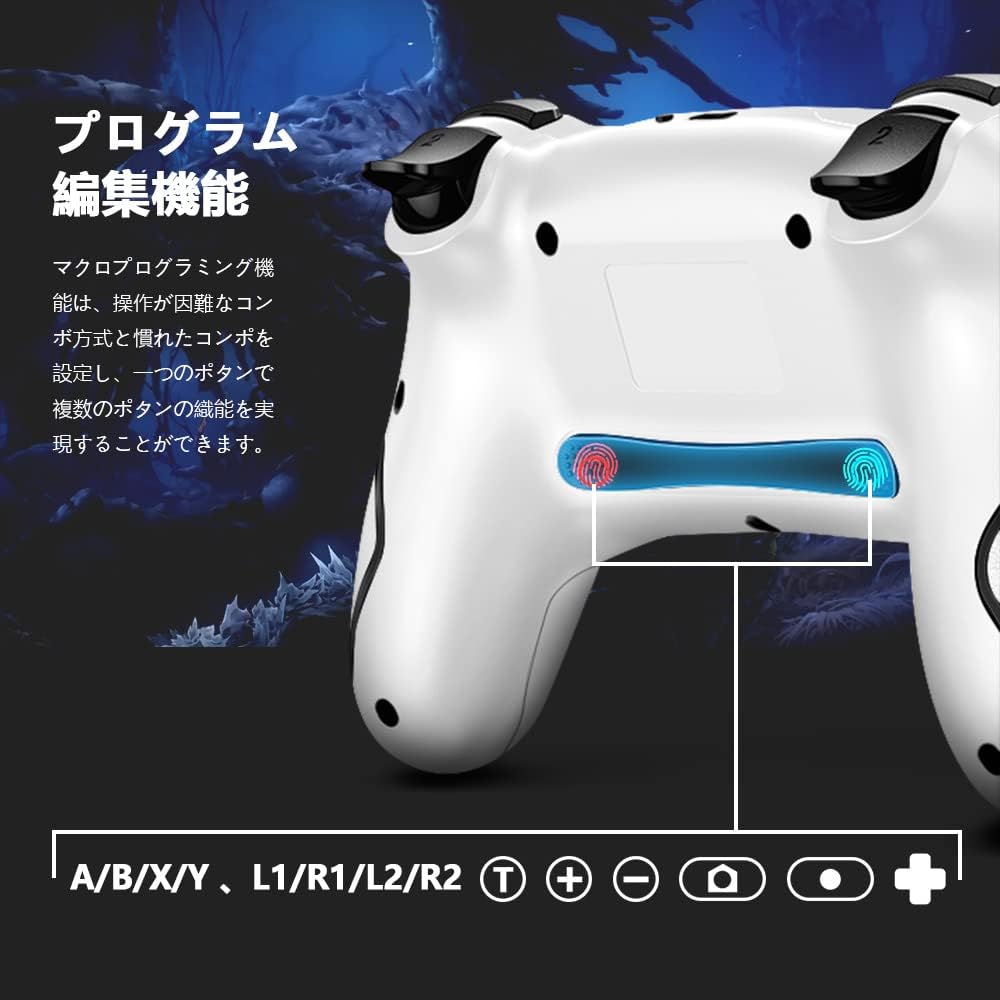
Image: Illustration of the back buttons and macro programming setup.
4.2 TURBO Continuous Fire Function
The TURBO function allows for automatic rapid firing of buttons, reducing hand fatigue during intense gameplay.
- การเปิดใช้งาน TURBO: กดปุ่มค้างไว้ ปุ่ม T and then press the desired action button (A/B/X/Y/L/R/ZL/ZR) to enable TURBO for that button.
- การปรับความเร็วเทอร์โบ: ขณะที่ถือ ปุ่ม T, กดปุ่ม ปุ่มทิศทางขึ้น to increase speed or the Down directional button to decrease speed. There are 3 speed levels (5 shots/sec, 12 shots/sec, 20 shots/sec).
- การปิดใช้งาน TURBO: Repeat the activation step (hold ปุ่ม T and press the action button) to turn off TURBO for that specific button.

Image: The Turbo button and speed adjustment indicators on the controller.
4.3 HD Vibration Adjustment
The controller features 4 levels of HD vibration feedback.
- To adjust vibration intensity, press and hold the ปุ่มสั่น (usually located near the HOME button) and use the Up/Down directional buttons to cycle through the vibration levels.
4.4 เซ็นเซอร์ไจโร 6 แกน
The built-in 6-axis gyro sensor allows for precise motion control in compatible games. The controller detects tilt and movement, enabling intuitive control for an enhanced gaming experience.

Image: The controller with an overlay indicating 6-axis gyro sensor functionality.
4.5 One-Key Wake-up Function
กดปุ่ม ปุ่ม HOME on the controller to wake up your Nintendo Switch console from sleep mode.

Image: The controller with a visual representation of the one-key wake-up function.
5. การบำรุงรักษา
- รักษาตัวควบคุมให้สะอาดด้วยการเช็ดด้วยผ้าแห้งและนุ่ม
- หลีกเลี่ยงการให้ตัวควบคุมสัมผัสกับอุณหภูมิที่สูงหรือความชื้นสูงหรือแสงแดดโดยตรง
- ห้ามถอดแยกชิ้นส่วนตัวควบคุม เพราะจะทำให้การรับประกันเป็นโมฆะ
- เก็บตัวควบคุมไว้ในสถานที่ปลอดภัยเมื่อไม่ได้ใช้งานเพื่อป้องกันความเสียหาย

Image: The controller highlighting its wireless connection and anti-slip grip for comfortable use.
6 การแก้ไขปัญหา
- ตัวควบคุมไม่ได้เชื่อมต่อ: Ensure the controller is charged. Re-attempt the pairing process as described in Section 3.1. Make sure no other Bluetooth devices are interfering.
- ความล่าช้าของอินพุตหรือการตัดการเชื่อมต่อ: Ensure the controller is within range of the console/device. Check for potential wireless interference.
- ปุ่มไม่ตอบสนอง: Check if the controller is properly connected. If the issue persists, try resetting the controller (refer to the manufacturer's web(หากไม่พบคำแนะนำการรีเซ็ตโดยละเอียดในคู่มือนี้ โปรดเข้าชมเว็บไซต์)
- การสั่นสะเทือนไม่ทำงาน: Ensure vibration is enabled in your game settings and on the console. Check the vibration intensity level.
7. ข้อมูลจำเพาะ
| ยี่ห้อ | เอซเกมเมอร์ |
| หมายเลขรุ่น | สว001 |
| เทคโนโลยีการเชื่อมต่อ | ไร้สาย |
| อุปกรณ์ที่รองรับ | Nintendo Switch, Android, iOS |
| ประเภทตัวควบคุม | แป้นเกม |
| คุณสมบัติพิเศษ | Motion Sensor, Ergonomic |
| ขนาดแพ็คเกจ | 17.4 x 11.5 x 7.2 ซม. |
| น้ำหนักสินค้า | 280 กรัม |
8. การรับประกันและการสนับสนุน
AceGamer provides a รับประกัน 1 ปี for this product. If any defects occur with eligible products purchased from our store within this period, we will replace the defective parts or exchange the product for a new one free of charge.
For technical support or warranty claims, please contact AceGamer customer service through the retailer where you purchased the product or visit our official webเว็บไซต์.


