การแนะนำ
This manual provides essential information for the setup, operation, and maintenance of your Focusrite Scarlett 4i4 4th Gen USB Audio Interface. Designed for musicians, songwriters, guitarists, and content creators, the Scarlett 4i4 offers high-fidelity, studio-quality recording capabilities. Please read this manual thoroughly to ensure optimal performance and longevity of your device.

ภาพ: ด้านหน้า view of the Focusrite Scarlett 4i4 4th Gen USB Audio Interface, showcasing its inputs and controls.
การตั้งค่า
To begin using your Scarlett 4i4 4th Gen, follow these steps:
- แกะกล่อง: Carefully remove the Scarlett 4i4, USB C-C cable, USB C-A adaptor, and USB-C 5V 3A power supply from the packaging.
- การติดตั้งซอฟต์แวร์: Visit the Focusrite website and follow the 'Easy Start' guide to download and install the necessary drivers and included software bundle. This process typically involves registering your device.
- เชื่อมต่อกับคอมพิวเตอร์: Connect the Scarlett 4i4 to your computer using the provided USB C-C cable. If your computer only has USB-A ports, use the included USB C-A adaptor.
- การเชื่อมต่อไฟฟ้า: Connect the USB-C 5V 3A power supply to the Scarlett 4i4 and a power outlet. While the device can draw power from USB, the dedicated power supply ensures stable operation, especially when using phantom power or multiple inputs.
- การเชื่อมต่อเสียง: Connect your microphones, instruments, or line-level devices to the appropriate inputs on the Scarlett 4i4. Connect your headphones to the headphone output and studio monitors to the line outputs.

Image: A user connecting cables to the rear of the Scarlett 4i4, which is placed on a desk next to a laptop.
Operating Your Scarlett 4i4
The Scarlett 4i4 features intuitive controls for managing your audio inputs and outputs.
การควบคุมอินพุต
- Gain Knobs (1 & 2): Adjust the input level for microphones or instruments connected to inputs 1 and 2. The gain halos around the knobs indicate signal level (green for good, amber for approaching clip, red for clipping).
- 48V (Phantom Power): Activates +48V phantom power for condenser microphones connected to inputs 1 and 2. Ensure your microphone requires phantom power before enabling.
- Inst (Instrument Mode): Engages high-impedance mode for direct connection of guitars or basses to inputs 1 and 2.
- โหมดอากาศ: Enhances vocals and guitars by adding a musical presence and rich harmonic drive, emulating classic Focusrite transformer-based preamps.
- ปรับระดับเสียงอัตโนมัติ: Automatically sets the optimal input level for your microphone or instrument, preventing clipping and ensuring a clean recording.
- Clip Safe: A safety feature that automatically reduces gain if the input signal approaches clipping, preserving your take.
การควบคุมเอาท์พุต
- Monitor Output Knob: Controls the overall volume of your main studio monitor outputs (outputs 1-2).
- Headphone Output Knob: Adjusts the volume for the dedicated headphone output.
MIDI I / O
The Scarlett 4i4 includes MIDI In and Out ports, allowing you to connect MIDI keyboards, controllers, and other MIDI-compatible devices for sequencing and control within your digital audio workstation (DAW).
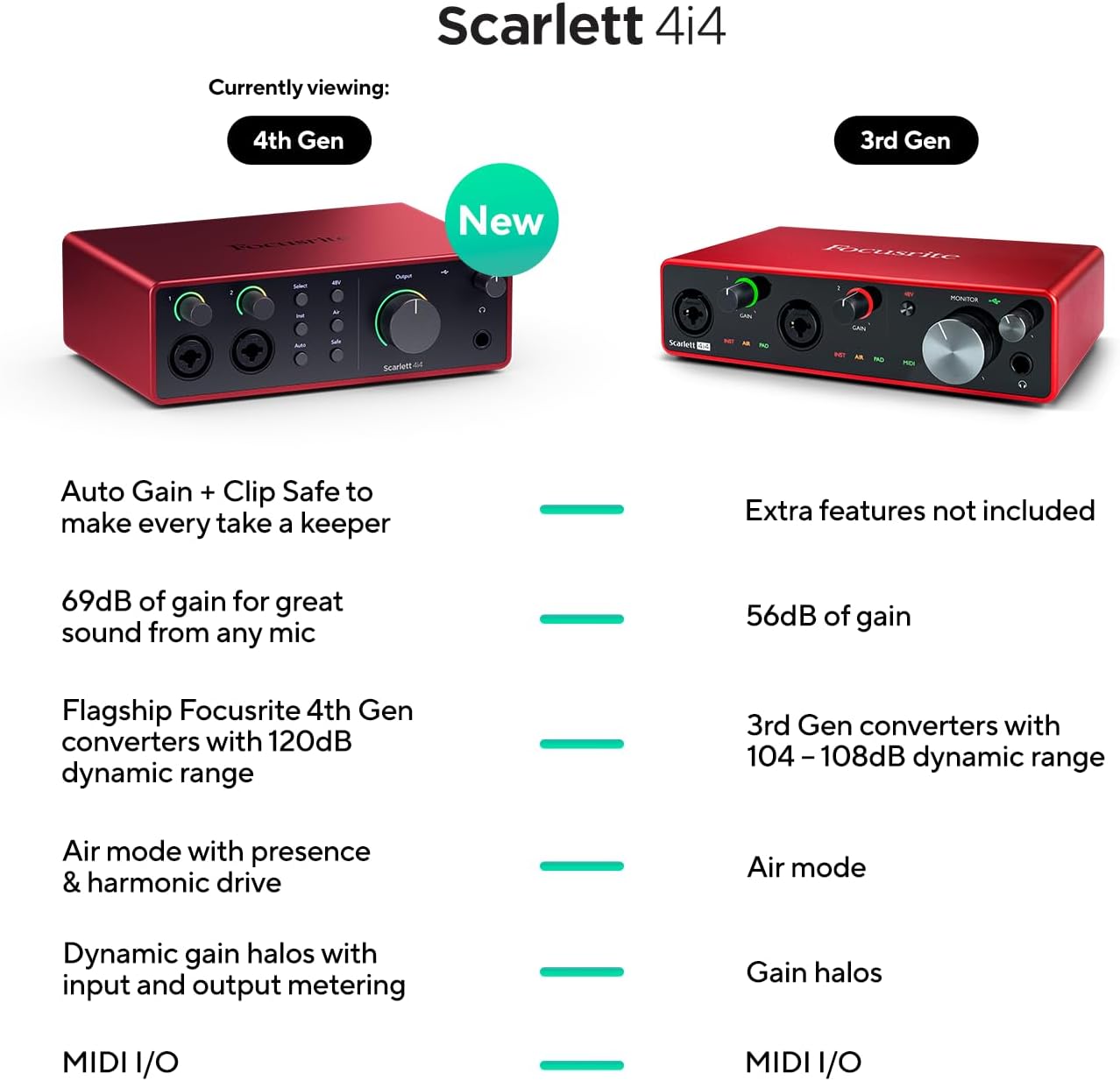
Image: A visual comparison highlighting new features of the Scarlett 4i4 4th Gen, including Auto Gain, Clip Safe, increased gain, improved converters, enhanced Air mode, and dynamic gain halos.
การซ่อมบำรุง
Proper care ensures the longevity and performance of your Scarlett 4i4:
- การทำความสะอาด: ใช้ผ้าแห้งเนื้อนุ่มเช็ดทำความสะอาดภายนอก หลีกเลี่ยงน้ำยาทำความสะอาดที่มีฤทธิ์กัดกร่อนหรือตัวทำละลาย
- พื้นที่จัดเก็บ: เก็บอุปกรณ์ไว้ในที่แห้งและเย็น หลีกเลี่ยงแสงแดดโดยตรงและอุณหภูมิที่สูงหรือต่ำเกินไป
- การจัดการ: หลีกเลี่ยงการทำตกหรือให้เครื่องได้รับแรงกระแทกรุนแรง
- การระบายอากาศ : ตรวจสอบให้แน่ใจว่ามีการระบายอากาศที่เพียงพอรอบๆ ตัวเครื่องเพื่อป้องกันความร้อนสูงเกินไป
การแก้ไขปัญหา
If you encounter issues with your Scarlett 4i4, consider the following common solutions:
- ไม่มีเสียง: Check all cable connections (USB, power, audio inputs/outputs). Verify that the correct audio device is selected in your computer's sound settings and your DAW. Ensure gain levels are appropriately set and not muted.
- Distorted Audio/Clipping: Reduce the input gain using the gain knobs. Utilize the Auto Gain and Clip Safe features to prevent clipping. Check for proper impedance matching for instruments (Inst mode).
- ปัญหาไดร์เวอร์: Reinstall the latest drivers from the Focusrite webตรวจสอบให้แน่ใจว่าระบบปฏิบัติการของคุณเป็นเวอร์ชันล่าสุด
- MIDI Not Working: Verify MIDI connections and ensure MIDI devices are properly configured in your DAW.
- การเชื่อมต่อไม่ต่อเนื่อง: Try a different USB port or cable. Ensure the dedicated power supply is connected and functioning.
For further assistance, refer to the Focusrite support webเว็บไซต์หรือติดต่อฝ่ายบริการลูกค้าของพวกเขา
ข้อมูลจำเพาะ
| คุณสมบัติ | รายละเอียด |
|---|---|
| น้ำหนักสินค้า | 2.23 ปอนด์ |
| ขนาดสินค้า | 7.09 x 5.08 x 2.32 นิ้ว |
| หมายเลขรุ่นสินค้า | AMS-SCARLETT-4I4-4G |
| วัสดุตัวเครื่อง | อลูมิเนียม |
| ชื่อสี | สีแดง |
| อุปกรณ์ที่รองรับ | Microphone, Instrument, Personal Computer, Headphones, Studio Monitors |
| ประเภทขั้วต่อ | ยูเอสบี-ซี |
| ฮาร์ดแวร์อินเตอร์เฟซ | ยูเอสบี 2.0 |
| ซอฟต์แวร์ที่รองรับ | All audio recording software |
| แพลตฟอร์มฮาร์ดแวร์ | อินเทอร์เฟซเสียง |
| ระบบปฏิบัติการ | Mac OS, Windows OS |
| เทคโนโลยีการเชื่อมต่อ | ยูเอสบี |
| จำนวนช่องสัญญาณ | 4 |
| ช่วงไดนามิค | 120เดซิเบล |
มีอะไรอยู่ในกล่อง
Your Focusrite Scarlett 4i4 4th Gen package includes:
- Scarlett 4i4 4th Gen Audio Interface
- สาย USB CC
- USB C-A Adaptor
- USB-C 5V 3A Power Supply
การรับประกันและการสนับสนุน
Focusrite provides a three-year warranty for the Scarlett 4i4 4th Gen, ensuring peace of mind regarding your investment. Additionally, 24/7/365 support is available to assist you with any questions or issues you may encounter.
For detailed warranty information and to access support resources, please visit the official Focusrite webเว็บไซต์: focusrite.com/support


