1. สินค้าหมดview
The ZTUZAUTO Wireless Carplay Android Auto Adapter is a retrofit kit designed to integrate advanced smartphone connectivity into compatible Mercedes Benz vehicles. This module enables wireless Apple Carplay and Android Auto functionality, along with features like Mirrorlink, YouTube support, and reverse camera integration, enhancing the in-car infotainment experience while retaining original vehicle functions.

Image: The ZTUZAUTO Wireless Carplay Android Auto Adapter module shown above a Mercedes Benz dashboard displaying the Carplay interface.
2. เนื้อหาบรรจุภัณฑ์
ตรวจสอบว่ามีรายการทั้งหมดต่อไปนี้รวมอยู่ในแพ็คเกจของคุณ:
- กล่องถอดรหัส CarPlay
- สายรัดสายไฟ
- สายสัญญาณเสียง AMI
- สาย LVDS
- เสาอากาศ WiFi
- สาย USB-AV
- คู่มือการติดตั้ง
- Tool (Plastic wedge)

Image: A visual representation of the adapter module and all included accessories.
3. ความเข้ากันได้
This adapter is compatible with Mercedes Benz C Class W204 vehicles equipped with NTG4.5/4.7 systems, manufactured between 2011 and 2013. It supports 5.8", 7", and 8" screens.
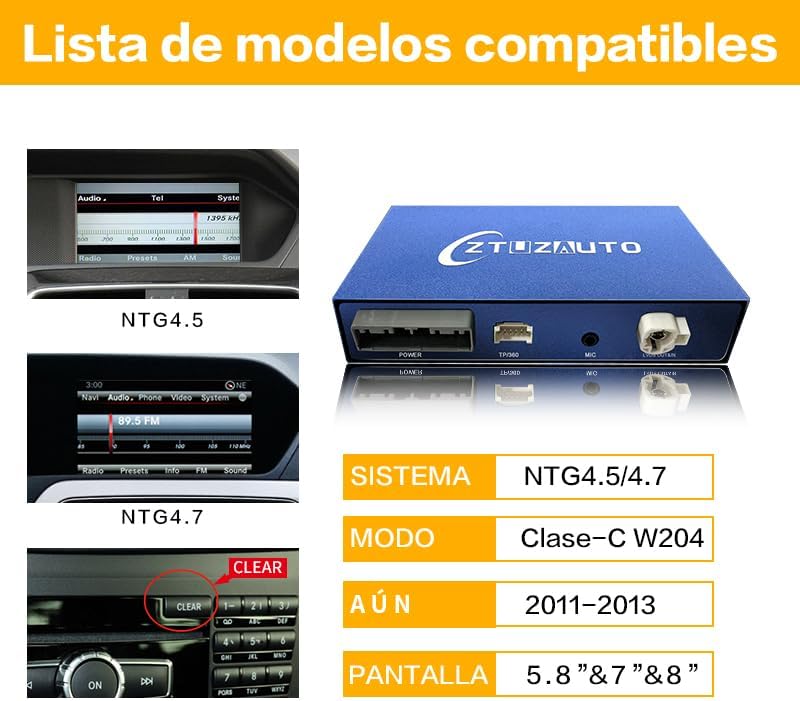
Image: Visual guide to identify compatible NTG4.5 and NTG4.7 systems in Mercedes Benz vehicles.
4. ข้อมูลด้านความปลอดภัย
Always disconnect the vehicle's main battery ground line before beginning installation to prevent electrical damage or injury. Do not attempt installation if you are not confident; seek professional assistance. Test all functions of the module before fully reassembling the dashboard to avoid inconvenience.
5. คู่มือการติดตั้ง
5.1. การเตรียมพร้อม
- ตรวจสอบให้แน่ใจว่ารถดับอยู่และถอดกุญแจสตาร์ทออกแล้ว
- ถอดขั้วลบของแบตเตอรี่รถยนต์ออก
- Gather necessary tools: plastic wedge, Torx T20, Torx T25 screwdrivers.
5.2. Dashboard Disassembly
- Using a pulling hook or plastic wedge, carefully remove the air vent trim above the glove compartment.
- Disconnect any electrical connectors attached to the trim.
- Remove the two Torx T20 screws securing the radio unit.
- Carefully pull out the radio unit.
- Using a plastic wedge, gently pry off the trim around the main display screen.
- Remove the Torx T25 screws securing the display screen.
- Carefully pull out the display screen and disconnect its cables.
Video: Detailed guide on disassembling the Mercedes Benz dashboard for adapter installation.
5.3. การเชื่อมต่อสายไฟ
- Connect the provided LVDS cable to the original LVDS connector from the head unit.
- Connect the power cable harness to the original head unit connector.
- Connect the new LVDS cable from the adapter to the display screen.
- Connect the power cable for the CarPlay decoder to the harness.
- Connect the WiFi antenna to the adapter module.
- If using wired Android Auto, route the USB cable to a convenient location (e.g., glove compartment).

Image: Close-up of the wiring connections for the adapter, showing the integration with the car's existing harness.
5.4. การวางตำแหน่งโมดูล
Carefully place the CarPlay decoder box and all connected cables into the available space behind the dashboard, ensuring no wires are pinched or obstruct reassembly.
5.5. การประกอบกลับ
Reverse the disassembly steps to reassemble the dashboard components. Ensure all screws are tightened and trim pieces snap securely into place.
6. การกำหนดค่าสวิตช์ DIP
The adapter features DIP switches to configure settings based on your car's screen size. Refer to the included manual for the correct DIP switch settings for 5.8" and 7" screens. Incorrect settings may result in a black screen or display issues.

Image: Guide for configuring DIP switches based on the vehicle's screen size.
7. การใช้งานอะแดปเตอร์
7.1. Switching to Carplay/Android Auto
Long press the 'MENU' button on your car's center console knob control for 2 seconds to switch between the original NTG system and the CarPlay/Android Auto interface.
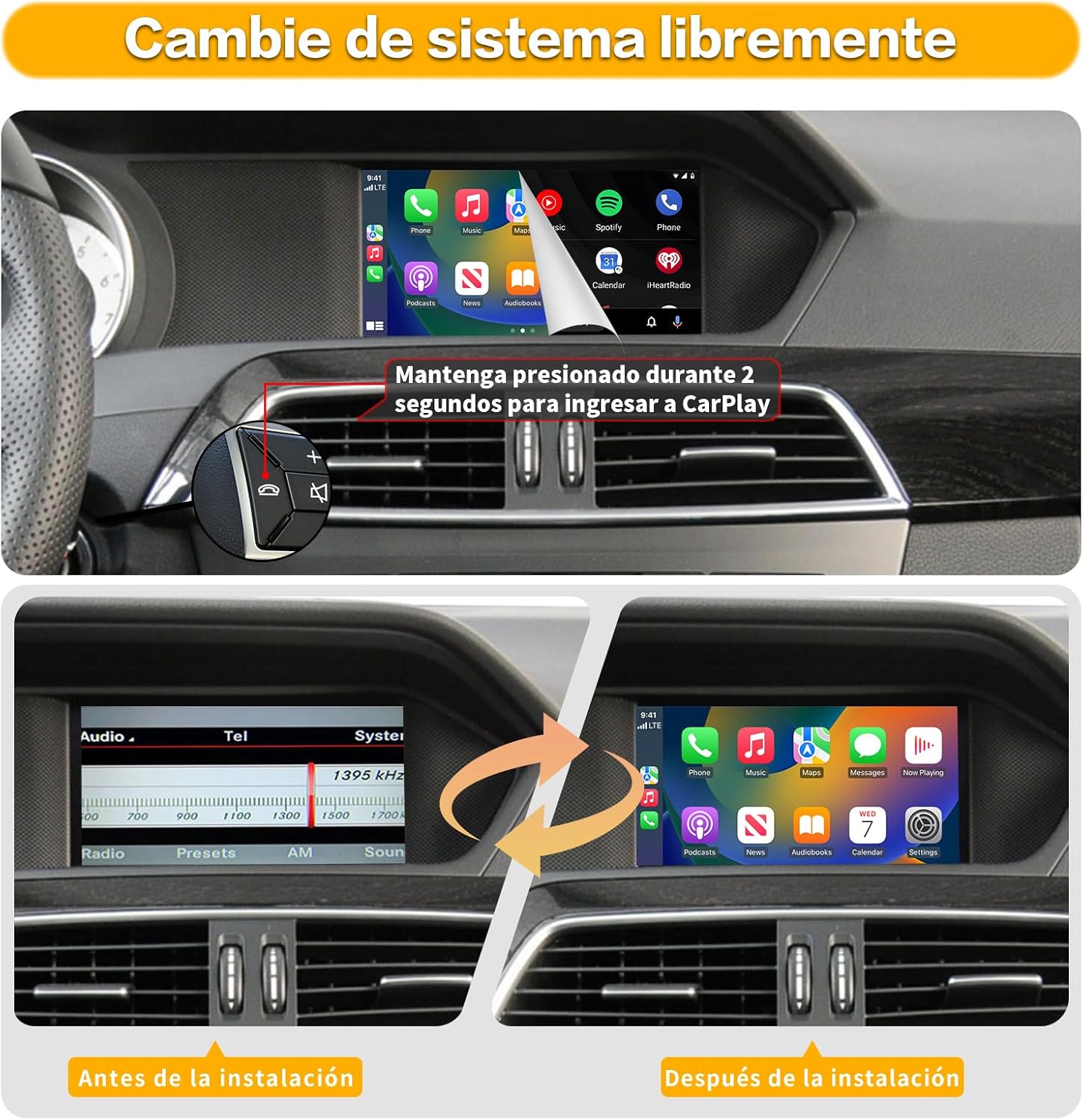
Image: Demonstration of switching between the original car system and the Carplay interface.
7.2. Wireless Connection (Carplay/Android Auto)
- On the adapter's interface, navigate to the Bluetooth settings.
- เปิดใช้งาน Bluetooth บนสมาร์ทโฟนของคุณและค้นหาอุปกรณ์ที่มีอยู่
- Select the adapter's Bluetooth name (e.g., "CAR-BT-xxxx") and pair your device.
- Confirm the pairing code on both your phone and the car's display.
- Once connected, the system will automatically enter the CarPlay/Android Auto interface.
Video: Demonstrates connecting OEM Bluetooth and Carplay features together.
7.3. Bluetooth Audio Setup
To ensure audio output via Bluetooth:
- Access the Settings interface on the adapter.
- Go to "Factory Mode" → "Phone Link setting".
- Turn off the "Disable phone link audio" option and reboot.
- Then pair your smartphone with the original vehicle's Bluetooth.
- Select the original car Bluetooth for both phone and music sound sources in the original car media settings.
Video: Instructions for connecting Linux to OEM Bluetooth for CarPlay audio.
7.4. การคงไว้ซึ่งฟังก์ชันการทำงานดั้งเดิมของรถยนต์
The adapter is designed to retain the functionality of your original car controls, including steering wheel buttons, voice awakening, and the command knob for navigation within the CarPlay/Android Auto interface.

Image: Illustrates how original steering wheel buttons and command knob retain functionality with the adapter.
8. การตั้งค่าระบบ
Access the adapter's system settings to customize various options:
- ภาษา: เลือกภาษาที่คุณต้องการสำหรับอินเทอร์เฟซ
- แสดง: Adjust brightness, saturation, and chromaticity for optimal viewการไอเอ็นจี
- เสียง: Control volume levels for music, speech, and alerts. Adjust EQ settings.
- กล้องมองหลัง: Configure settings for original or aftermarket reverse cameras, including line detection and display tracks.
- CarPlay/Android Auto Optimization: Adjust screen scrap (margins), enable auto dark mode, and configure key controls.
- ช่อง WiFi: Change the WiFi channel if experiencing connectivity issues (reboot required).
วิดีโอ: จบแล้วview of the menu display interface for the Carplay module, showing various settings.
9 การแก้ไขปัญหา
หากคุณพบปัญหาใดๆ โปรดดูวิธีแก้ไขทั่วไปต่อไปนี้:
- ไม่มีเสียง: Ensure the Bluetooth audio is correctly configured as per section 7.3. Check the AUX input settings on your original car system.
- Black Screen/Display Issues: Verify the DIP switch settings match your screen size. Recheck all LVDS cable connections.
- ปัญหาการเชื่อมต่อ: Ensure your phone's Bluetooth and Wi-Fi are enabled. Try rebooting the adapter (via settings) and your phone. Adjust the WiFi channel in system settings if necessary.
- CarPlay/Android Auto ไม่สามารถเปิดได้: Confirm the correct button (MENU) is being long-pressed to switch interfaces.
10. ข้อมูลจำเพาะผลิตภัณฑ์
| ขนาดสินค้า | 3.34 x 5.59 x 0.94 นิ้ว |
| น้ำหนักสินค้า | 2.55 ปอนด์ |
| วัสดุ | โลหะ |
| เทคโนโลยีการเชื่อมต่อ | ยูเอสบี, Wi-Fi, บลูทูธ |
| แหล่งพลังงาน | DC |
11. การรับประกันและการสนับสนุน
This product comes with a 12-month quality warranty. For any issues or support during this period, please contact us. Our support team is available to provide professional assistance. Do not restore panels until all functions have been tested.


