การแนะนำ
This manual provides detailed instructions for the setup, operation, maintenance, and troubleshooting of your DrunkDeer A75 Rapid Trigger Mechanical Keyboard. The A75 features magnetic switches, adjustable actuation, Rapid Trigger technology, and durable PBT keycaps, designed for enhanced gaming and typing performance.
การตั้งค่า
เนื้อหาแพ็คเกจ
- DrunkDeer A75 Mechanical Keyboard
- สาย USB
- คู่มือการใช้งาน (เอกสารนี้)
การเชื่อมต่อคีย์บอร์ด
- เชื่อมต่อสาย USB-C ที่ให้มากับพอร์ต USB-C บนแป้นพิมพ์
- เชื่อมต่อปลายอีกด้านหนึ่งของสาย USB เข้ากับพอร์ต USB ที่ว่างอยู่บนคอมพิวเตอร์ของคุณ
- แป้นพิมพ์จะถูกจดจำโดยระบบปฏิบัติการของคุณโดยอัตโนมัติ
Important Firmware Information
Warning: Ensure you have the A75 ANSI model and download the correct firmware from the official DrunkDeer website. Installing incorrect firmware can cause hardware problems. If you encounter any issues, contact DrunkDeer customer support.
คำแนะนำการใช้งาน
ระยะการทำงานที่ปรับได้
The DrunkDeer A75 features magnetic switches that allow for adjustable actuation distance from 0.2mm to 3.8mm, with a precision of 0.1mm. This allows you to customize how deep a key needs to be pressed before it registers an input.

Figure 1: Adjustable Actuation Distance. This image illustrates the range of adjustable actuation from 0.2mm to 3.8mm, with a sensitivity of 0.1mm.
Rapid Trigger Function
Rapid Trigger allows a key to be triggered once pressed and reset once released. The sensitivity range is 0.1-3.6mm, with an adjustable accuracy of 0.1mm. This feature enables mid-motion repeats without locking in actuation points, providing a competitive edge in fast-paced games like Valorant or osu!.

Figure 2: Release Dual Trigger (RDT) vs. Dynamic Keystrokes (DKS). This diagram explains how RDT offers faster emergency stop speeds and higher precision compared to DKS in games like CS2.
Video 1: Demonstration of RT Plus - Last Win Mode. This video shows how the keyboard prioritizes the last keystroke, allowing for instant changes in direction during intense gaming moments.
Last Win Mode
With Last Win Mode, the keyboard prioritizes your last keystroke. When opposite directions are pressed, it allows you to change directions instantly without stopping, especially during intense moments. This feature, combined with Rapid Trigger, resolves key conflict issues and improves character movement responsiveness.

Figure 3: Last Win Mode. This diagram illustrates the difference between Last Win Mode OFF and ON, showing how the keyboard handles simultaneous opposite key presses.
Web ซอฟต์แวร์ไดรเวอร์
The DrunkDeer A75 utilizes a self-developed web driver for convenient operation and customization. This allows you to adjust actuation points, Rapid Trigger settings, and RGB lighting effects. Settings are saved directly to the keyboard's onboard memory, ensuring your preferences are retained across different devices.

Figure 4: DrunkDeer A75 Web Driver Interface. This image displays the web-based software for customizing keyboard settings, including actuation points and key sensitivity.
เอฟเฟกต์แสง RGB
The keyboard features RGB backlighting with 18 different light effects and 10 levels of adjustable brightness. You can also customize single key RGB lamp effects to personalize your setup.

Figure 5: DrunkDeer A75 with RGB Lighting. The keyboard showcases various colorful RGB lighting effects.
Video 2: A75-RGB Lighting Demonstration. This video highlights the dynamic RGB lighting effects of the DrunkDeer A75 keyboard.
ปุ่มปรับระดับเสียง
The keyboard includes a multi-function aluminum knob located on the top right. This knob can be used to adjust the system volume. Pressing the knob can also serve as a media play/pause or mute function, depending on your system settings.
คุณสมบัติหลัก
สวิตช์แม่เหล็ก (ฮอลล์เอฟเฟกต์)
The A75 uses magnetic switches, also known as Hall effect switches. These switches operate through magnetic flux, eliminating physical contact points found in traditional mechanical switches. This design contributes to a keystriking life of 100 million presses, which is twice as long as conventional switches.

Figure 6: Magnetic Switch Mechanism. This image illustrates the internal workings of a magnetic switch, highlighting the magnetic flux detection.
Video 3: Automatic Calibration Algorithm Function. This video explains how the keyboard's automatic calibration algorithm compensates for magnetic flux decrease and installation tolerances, ensuring consistent performance over time.
คีย์แคป PBT
The keyboard is equipped with thick secondary injection molded PBT keycaps. These keycaps are durable, resistant to dirt, less prone to becoming oily over time, and provide a comfortable tactile feel. They feature an OEM profile, ergonomically designed to reduce hand fatigue during extended typing or gaming sessions.

Figure 7: PBT Keycaps. A close-up view of the durable PBT keycaps, highlighting their texture and legends.
เค้าโครง 75%
The A75 features a compact 75% layout, which includes 82 keys. This layout retains essential keys like the function row and arrow keys while offering a smaller footprint compared to full-size keyboards, optimizing desk space without sacrificing critical functionality.
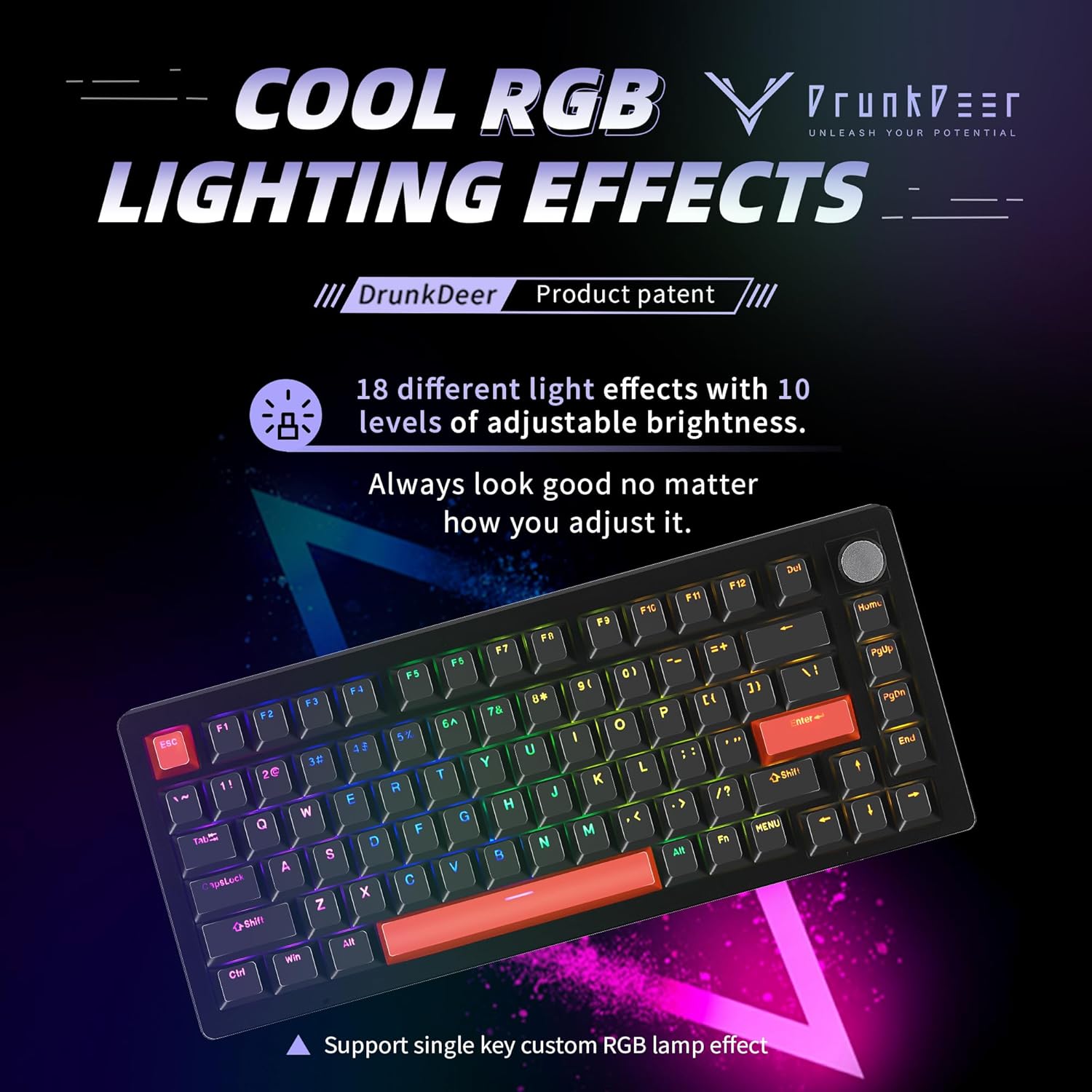
Figure 8: DrunkDeer A75 75% Layout. A full view ของแป้นพิมพ์ที่แสดงasing its compact 75% layout with 82 keys.
การซ่อมบำรุง
ทำความสะอาดคีย์บอร์ด
- ใช้ผ้านุ่มที่ไม่เป็นขุยเช็ดทำความสะอาดปุ่มกดและตัวเครื่อง
- For deeper cleaning, you may carefully remove keycaps using a keycap puller (not included) and use compressed air to clear debris from beneath the keys.
- หลีกเลี่ยงการใช้สารเคมีรุนแรงหรือวัสดุที่มีฤทธิ์กัดกร่อน เนื่องจากอาจทำให้สีหรือสัญลักษณ์ของแป้นพิมพ์เสียหายได้
การบำรุงรักษาสวิตช์
The magnetic switches are designed for longevity. If you have the hot-swappable version, switches can be carefully removed and replaced. Note that only Raesha HE switches manufactured for DrunkDeer are compatible.
การแก้ไขปัญหา
แป้นพิมพ์ไม่ตอบสนอง
- ตรวจสอบให้แน่ใจว่าได้เสียบสาย USB เข้ากับแป้นพิมพ์และคอมพิวเตอร์อย่างแน่นหนาแล้ว
- ลองเชื่อมต่อคีย์บอร์ดกับพอร์ต USB อื่นบนคอมพิวเตอร์ของคุณ
- ลองทดสอบแป้นพิมพ์กับคอมพิวเตอร์เครื่องอื่นเพื่อตรวจสอบว่าปัญหาอยู่ที่แป้นพิมพ์หรือคอมพิวเตอร์
Incorrect Key Actuation or Rapid Trigger Behavior
- Verify that you have installed the correct firmware for your A75 ANSI model.
- เข้าถึง web driver software to check and adjust your actuation and rapid trigger settings. Ensure profileไฟล์ s ถูกโหลดอย่างถูกต้องแล้ว
- If issues persist, perform an automatic calibration through the web ซอฟต์แวร์ไดรเวอร์
ปัญหาเรื่องแสง RGB
- ตรวจสอบการตั้งค่า RGB ใน web ซอฟต์แวร์ไดรเวอร์
- Ensure brightness levels are set appropriately.
- Try cycling through different lighting effects to see if the issue is specific to one mode.
หากต้องการความช่วยเหลือเพิ่มเติม โปรดดูที่ สนับสนุน ส่วน.
ข้อมูลจำเพาะ
| คุณสมบัติ | รายละเอียด |
|---|---|
| หมายเลขรุ่น | A75 ANSI |
| เค้าโครง | 75% (82 คีย์) |
| ประเภทสวิตซ์ | Magnetic (Hall Effect) |
| ระยะการกระตุ้น | Adjustable 0.2mm to 3.8mm (0.1mm precision) |
| ความไวในการกระตุ้นอย่างรวดเร็ว | 0.1mm to 3.6mm (0.1mm accuracy) |
| วัสดุปุ่มกด | PBT Double Shot (OEM Profile) |
| การเชื่อมต่อ | USB-C แบบมีสาย |
| การแบ็คไลท์ | RGB (18 เอฟเฟกต์, 10 ระดับความสว่าง) |
| ขนาด | 5.2 x 2.17 x 0.45 นิ้ว |
| น้ำหนัก | 2.53 ปอนด์ |
| อุปกรณ์ที่รองรับ | PC |
การรับประกันและการสนับสนุน
For warranty information and technical support, please visit the official DrunkDeer website or contact their customer service directly. Ensure you have your product model number (A75 ANSI) and purchase details available when seeking support.
Official DrunkDeer Store: DrunkDeer Amazon Store


