1. บทนำ
This manual provides detailed instructions for the setup, operation, and maintenance of your Creative Sound Blaster Katana SE Multi-Channel Gaming Soundbar. Designed for an immersive audio experience, this soundbar features 180W peak power, a bi-amplified 4-driver design, Super X-Fi technology, and customizable RGB lighting. Please read this manual thoroughly before using your device to ensure optimal performance and safety.

Figure 1: Creative Sound Blaster Katana SE Gaming Soundbar
2. ข้อมูลด้านความปลอดภัยที่สำคัญ
- อ่านคำแนะนำเหล่านี้
- เก็บคำแนะนำเหล่านี้ไว้
- จงใส่ใจคำเตือนทั้งหมด
- ปฏิบัติตามคำแนะนำทั้งหมด
- ห้ามใช้อุปกรณ์นี้ใกล้น้ำ
- ทำความสะอาดด้วยผ้าแห้งเท่านั้น
- อย่าปิดกั้นช่องระบายอากาศใดๆ ติดตั้งตามคำแนะนำของผู้ผลิต
- ห้ามติดตั้งใกล้แหล่งความร้อน เช่น หม้อน้ำ เครื่องทำความร้อน เตา หรืออุปกรณ์อื่น ๆ (รวมถึง ampเครื่องให้ความร้อน) ที่ผลิตความร้อน
- ปกป้องสายไฟไม่ให้ถูกเหยียบหรือถูกหนีบ โดยเฉพาะที่ปลั๊ก เต้ารับไฟฟ้า และจุดที่สายไฟออกจากเครื่อง
- ใช้เฉพาะอุปกรณ์เสริม/สิ่งที่แนบตามที่ผู้ผลิตกำหนดเท่านั้น
- ถอดปลั๊กอุปกรณ์นี้ในระหว่างพายุฝนฟ้าคะนองหรือเมื่อไม่ได้ใช้งานเป็นเวลานาน
3. เนื้อหาบรรจุภัณฑ์
ตรวจสอบว่ามีรายการทั้งหมดอยู่ในแพ็คเกจของคุณ:
- Creative Sound Blaster Katana SE Soundbar
- Subwoofer (wired)
- รีโมทคอนโทรล
- อะแดปเตอร์แปลงไฟ
- สาย USB-C
- สายใยแก้วนำแสง
4. สินค้าหมดview
The Sound Blaster Katana SE is an all-in-one soundbar designed for powerful and immersive audio. It features a sleek design with integrated controls and a front-facing display.
4.1. Soundbar Components
- แผงควบคุมด้านบน: Power, Volume Up/Down, Source, Mode, SXFI.
- จอแสดงผลด้านหน้า: Shows current source (USB, AUX, OPTICAL, BT, TV), volume level, and selected sound mode.
- Front Headphone Jack: For connecting headphones directly.
- ไมโครโฟนในตัว: สำหรับการสื่อสารด้วยเสียง
- RGB Lighting Strip: Customizable lighting effects located at the bottom of the soundbar.
- ไดรเวอร์: สอง -amplified 4-driver design for clear and precise audio.

รูปที่ 2 : ด้านหน้า view of the Sound Blaster Katana SE with RGB lighting
4.2. การเชื่อมต่อแผงด้านหลัง
The rear panel provides various ports for connecting to your devices:
- HDMI Out (ARC): สำหรับเชื่อมต่อกับทีวีที่รองรับ Audio Return Channel
- SXFI Out: Dedicated port for Super X-Fi enabled headphones.
- อินพุตเสียง USB: For digital audio connection to PC/Mac.
- เสริมใน: ช่องรับสัญญาณเสียงอนาล็อก 3.5 มม.
- ออปติคัลใน: อินพุตเสียงออปติคอลดิจิตอล
- ย่อยออก: For connecting the wired subwoofer.
- กำลังไฟเข้า: สำหรับตัวแปลงไฟ.

Figure 3: Rear panel with HDMI ARC, SXFI Out, USB Audio In, Aux In, Optical In, Sub Out, and Power Input.
4.3. ซับวูฟเฟอร์
The included wired subwoofer enhances bass response for a more dynamic audio experience.

รูปที่ 4: ภายใน view showing the soundbar's bi-amplified drivers and the subwoofer's design.
5. การตั้งค่า
Follow these steps to set up your Sound Blaster Katana SE:
- การจัดวาง: Place the soundbar on a stable surface below your TV or monitor. Position the subwoofer on the floor near the soundbar for optimal bass.
- เชื่อมต่อซับวูฟเฟอร์: Connect the wired subwoofer cable to the 'Sub Out' port on the soundbar's rear panel.
- เชื่อมต่อพลังงาน: Connect the power adapter to the soundbar's power input and then plug it into a wall outlet.
- เชื่อมต่อแหล่งเสียง: Choose your preferred audio connection method (HDMI ARC, Optical, USB, Aux, or Bluetooth) and connect the appropriate cable.
Video 1: Official product video demonstrating the Sound Blaster Katana SE's features and connectivity options.
6. ตัวเลือกการเชื่อมต่อ
The Sound Blaster Katana SE offers a wide range of connectivity to suit various devices:
- HDMI Out (ARC): Connect to your TV's HDMI ARC port for high-quality audio and control.
- อินพุตเสียง USB: Ideal for connecting to PCs, Macs, or gaming consoles that support USB audio.
- เสริมใน: Use a 3.5mm audio cable to connect to devices with an analog audio output.
- ออปติคัลใน: For digital audio connection from TVs, game consoles, or other media players.
- Bluetooth 5.0: Pair wirelessly with your mobile devices, tablets, or computers for convenient audio streaming.
- SXFI Out: Connect Super X-Fi certified headphones for a personalized holographic audio experience.

Figure 5: Soundbar showcasing versatile connectivity with gaming consoles and mobile devices.
7. คู่มือการใช้งาน
7.1. เปิด/ปิดเครื่อง
Press the Power button on the soundbar's top panel or the remote control to turn the device on or off.
7.2. การควบคุมระดับเสียง
Use the Volume Up (+) and Volume Down (-) buttons on the soundbar or remote to adjust the audio level. The current volume will be displayed on the front panel.
7.3. การเลือกแหล่งที่มา
Press the 'Source' button on the soundbar or remote to cycle through available input sources (HDMI ARC, USB, Aux, Optical, Bluetooth).
7.4. โหมดเสียง
The soundbar features optimized sound modes for different content types. Press the 'Mode' button on the soundbar or remote to switch between:
- ดนตรี: ปรับปรุงเพื่อการเล่นเพลง
- ภาพยนตร์: ปรับแต่งมาเพื่อคุณภาพเสียงระดับภาพยนตร์
- การเล่นเกม: Tailored for immersive gaming soundscapes.
- Effects Off: Neutral audio profile.
7.5. การใช้รีโมทคอนโทรล
The included remote control provides full functionality for the soundbar, including power, volume, source, mode, SXFI, RGB lighting, and custom buttons.
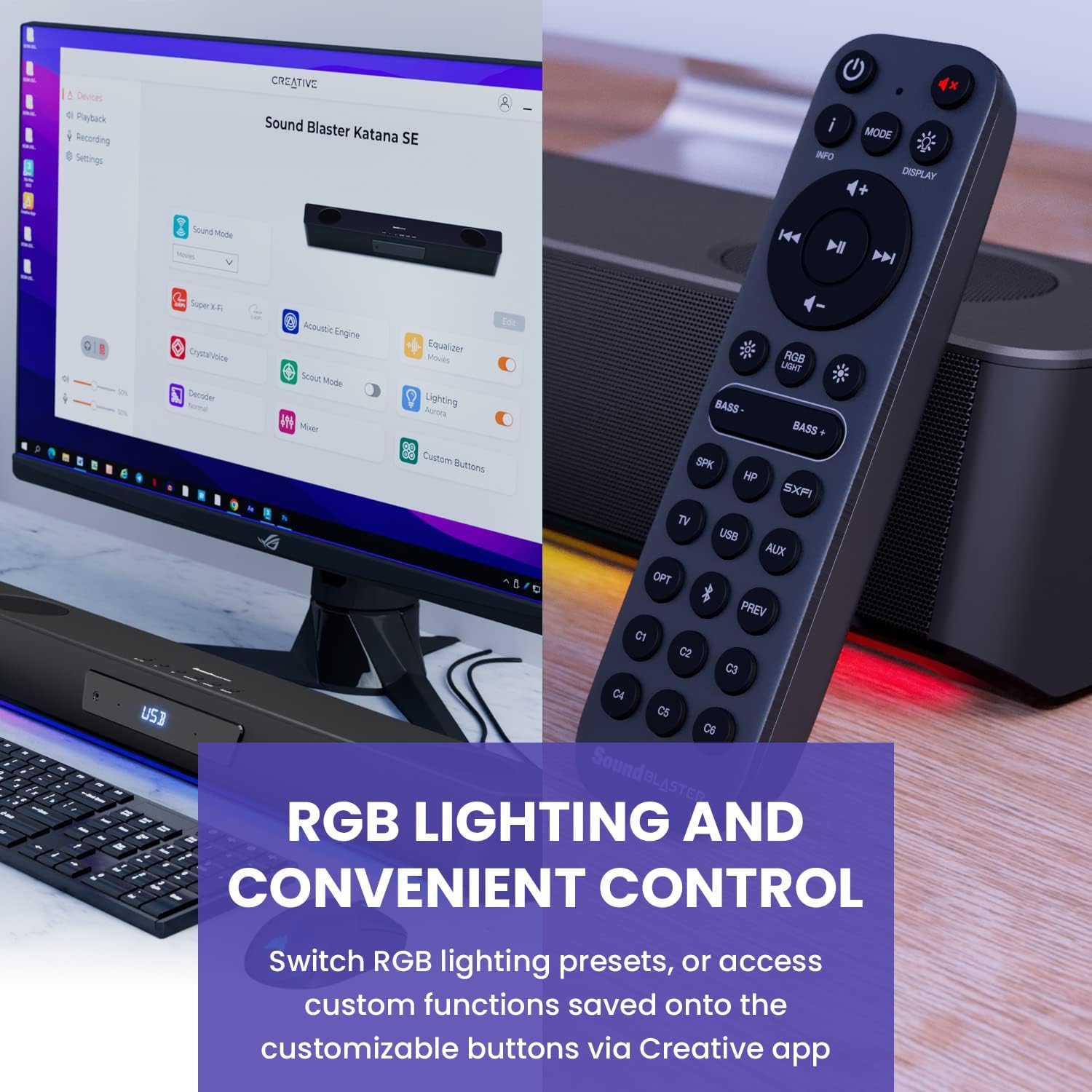
Figure 6: Remote control for the Sound Blaster Katana SE.
7.6. Creative App Customization
For advanced customization, download the Creative app on your PC or Mac. The app allows you to:
- Tune Audio Performance: Adjust EQ settings and activate Sound Blaster processing technologies.
- ปรับแต่งแสง RGB: Select from various RGB presets or create your own custom lighting effects.
- Map Custom Functions: Assign specific commands to the six customizable buttons on the remote control.

Figure 7: Creative app interface showing sound mode, Super X-Fi, Acoustic Engine, Equalizer, CrystalVoice, Scout Mode, Lighting, Decoder, Mixer, and Custom Buttons.
8. Super X-Fi Technology
Super X-Fi technology personalizes your headphone audio experience for optimized and realistic listening. It recreates the soundstage ของระบบลำโพงหลายตัวในหูฟังของคุณ
- โหมดการต่อสู้ SXFI: รับข้อได้เปรียบในการแข่งขันtage in FPS games by accurately pinpointing enemy locations through enhanced audio cues.

Figure 8: Super X-Fi and SXFI Battle Mode for enhanced gaming audio.
9. ไมโครโฟนในตัว
The Sound Blaster Katana SE includes a built-in beamforming microphone, allowing you to participate in calls or in-game voice chat directly through the soundbar.
10. แสง RGB
The integrated RGB lighting strip can be customized to match your setup or mood. Use the remote control to cycle through presets or the Creative app for advanced color and effect adjustments.
11. การบำรุงรักษา
To ensure the longevity and performance of your Sound Blaster Katana SE:
- รักษาความสะอาดของอุปกรณ์ด้วยการเช็ดด้วยผ้าแห้งเนื้อนุ่ม
- Avoid using liquid cleaners or aerosols.
- ตรวจสอบให้แน่ใจว่าช่องระบายอากาศไม่ถูกกีดขวาง
- อย่าให้อุปกรณ์สัมผัสกับอุณหภูมิหรือความชื้นสูง
12 การแก้ไขปัญหา
หากคุณพบปัญหาเกี่ยวกับซาวด์บาร์ โปรดดูวิธีแก้ไขทั่วไปต่อไปนี้:
- ไม่มีเสียง: Check all cable connections (power, audio source, subwoofer). Ensure the correct input source is selected on the soundbar. Verify the volume is not muted or too low.
- เสียงผิดเพี้ยน: Try reducing the volume. Check audio cable integrity. Ensure the audio source is providing a clean signal.
- ปัญหาการเชื่อมต่อบลูทูธ: Ensure the soundbar is in Bluetooth pairing mode. Delete the soundbar from your device's Bluetooth list and re-pair. Move closer to the soundbar to reduce interference.
- รีโมทคอนโทรลไม่ทำงาน: Check battery levels and replace if necessary. Ensure there are no obstructions between the remote and the soundbar.
- ไฟ RGB ไม่ทำงาน: Check settings in the Creative app. Ensure RGB lighting is enabled via the remote or app.
13. ข้อมูลจำเพาะ
| คุณสมบัติ | ข้อมูลจำเพาะ |
|---|---|
| ชื่อรุ่น | 51MF8415AA000 27585486 |
| ประเภทลำโพง | ซาวด์บาร์ |
| ประเภทการติดตั้ง | ที่วางบนโต๊ะ |
| คุณสมบัติพิเศษ | Bass Boost, Built In Microphone, Radio, Stereo Pairing, USB Port |
| การใช้งานที่แนะนำสำหรับผลิตภัณฑ์ | For Gaming Consoles, For Computers |
| อุปกรณ์ที่รองรับ | คอมพิวเตอร์ตั้งโต๊ะ, แล็ปท็อป, เครื่องเล่น MP3, โปรเจ็กเตอร์, สมาร์ทโฟน, แท็บเล็ต, โทรทัศน์ |
| จำนวนหน่วย | 1.0 จำนวน |
| การกำหนดค่าช่องเสียงรอบทิศทาง | 5.1 |
| สี | 180W Peak Power with Bluetooth 5.0 |
| ส่วนประกอบที่รวมอยู่ | ระยะไกล |
| ขนาดสินค้า | ลึก 25.6 นิ้ว x กว้าง 4.3 นิ้ว x สูง 3.1 นิ้ว |
| น้ำหนักสินค้า | 5.9 ปอนด์ |
| กันน้ำได้ | เท็จ |
| ประเภทการรับประกัน | จำกัด |
| จำนวนรายการ | 1 |
| วิธีการควบคุม | ระยะไกล |
| เทคโนโลยีการสื่อสารไร้สาย | บลูทูธ |
| ขนาดลำโพง | 1 นิ้ว |
| แหล่งพลังงาน | สายไฟ |
| เส้นผ่านศูนย์กลางทวีตเตอร์ | 1 นิ้ว |
| ระดับความต้านทานต่อน้ำ | ไม่ทนน้ำ |
| ประเภทแพ็กเกจลูกค้า | เอฟเอฟพี |
| ประเภทไดร์เวอร์เสียง | ไดร์เวอร์แบบไดนามิก |
| เทคโนโลยีการเชื่อมต่อซับวูฟเฟอร์ | ไร้สาย |
| จำนวนระดับพลังงาน | 1 |
| การใช้งานเฉพาะของผลิตภัณฑ์ | Gaming Consoles, Computers |
| ยูพีซี | 054651195639 |
| ผู้ผลิต | แล็บสร้างสรรค์ |
| รูปร่าง | ปริซึมสี่เหลี่ยม |
| น้ำหนักสินค้า | 5.9 ปอนด์ |
| ASIN | B0C5DFMB93 |
| หมายเลขรุ่นสินค้า | เอ็มเอฟ8415 |
| วันที่พร้อมใช้งานครั้งแรก | 16 พฤษภาคม 2023 |
| ยี่ห้อ | ความคิดสร้างสรรค์ |
| กำลังขับสูงสุดของลำโพง | 100 วัตต์ |
| การตอบสนองความถี่ | 20000 เฮิรตซ์ |
| เทคโนโลยีการเชื่อมต่อ | บลูทูธ |
| โหมดเอาต์พุตเสียง | เซอร์ราวด์, สเตอริโอ |
14. การรับประกันและการสนับสนุน
Your Creative Sound Blaster Katana SE comes with a Limited Warranty. For detailed warranty information, product registration, technical support, and customer service, please visit the official Creative webตรวจสอบรายละเอียดเพิ่มเติมได้ที่เว็บไซต์ หรือดูจากบัตรรับประกันที่อยู่ในบรรจุภัณฑ์


