1. บทนำ
The HOMEPILOT Wall-Mounted Shutter Winder Pure is designed to modernize and automate your belt-driven roller shutters, offering enhanced comfort and convenience. This device is ideal for spaces where traditional in-wall installations are not feasible or desired, providing a simple and effective solution for controlling your roller shutters.
Featuring a minimalist design with two large, intuitive buttons, the Pure model focuses on essential functionality for straightforward operation. It integrates seamlessly into your daily routine by allowing both manual control and programmable automatic functions.

Figure 1: HOMEPILOT Wall-Mounted Shutter Winder Pure, angled view.
2. ข้อมูลจำเพาะผลิตภัณฑ์
| ข้อมูลจำเพาะ | ค่า |
|---|---|
| หมายเลขรุ่น | 10152330 |
| ขนาด (กxยxส) | 15.5 x 3.7 x 18.5 ซม. |
| น้ำหนัก | 940 กรัม |
| ปฏิบัติการฉบับที่tage | 230 โวลต์ |
| กระแสไฟฟ้าที่ได้รับการจัดอันดับ | 2 Ampที่นั่น |
| Maximum Pulling Force | 30 กก. |
| Compatible Belt Width | 23 มม. |
| อุณหภูมิในการทำงาน | 0°C ถึง +40°C |
| ความยาวสายเคเบิล | 2 เมตร |
| ผู้ผลิต | ราเดมาเชอร์ เกราเต้-อิเล็คโทรนิค GmbH |
| ประเทศต้นกำเนิด | ประเทศเยอรมนี |

Figure 2: Technical dimensions of the HOMEPILOT Shutter Winder.
3. คู่มือการติดตั้ง
The HOMEPILOT Shutter Winder Pure is designed for surface mounting and does not require extensive masonry work, making it suitable for both new installations and renovations.
3.1. การเตรียมพร้อม
- Ensure the roller shutter is fully closed before beginning installation.
- Carefully remove the existing roller shutter belt from its original spring-loaded mechanism. Exercise caution during this step.
- It is recommended to remove the original roller/spring mechanism and cover the hole with a suitable plug (available at hardware stores) to provide a clean mounting surface for the winder's bracket.
3.2. การติดตั้งอุปกรณ์
- Step 1: Position and Mark. Hold the winder's mounting bracket against the wall at the desired installation height. Ensure it is level and positioned correctly relative to the roller shutter belt opening. Mark the drilling points for the screws.

Figure 3: Step 1 of installation - Positioning and marking.
- Step 2: Secure the Mounting Bracket. Drill holes at the marked points and insert appropriate wall plugs if necessary. Securely fasten the mounting bracket to the wall using the provided screws.

Figure 4: Step 2 of installation - Securing the bracket.
- ขั้นตอนที่ 3: เตรียมเข็มขัดให้พร้อม Measure the roller shutter belt. It should be approximately 20 cm longer than the distance from the roller shutter opening to the winder's mounting position. Cut the belt to this length and create a small slot or eyelet at the end using scissors.
- Step 4: Attach the Belt to the Winder. Pass the prepared belt through the slot at the top of the winder device. Hook the eyelet of the belt onto the designated hook on the central gear inside the winder.
- Step 5: Mount the Winder. Carefully attach the winder unit onto the secured mounting bracket. Ensure it clicks into place firmly.

Figure 5: Step 3 of installation - Mounting the winder.
- Step 6: Tension the Belt. Manually operate the winder (or gently pull the belt) to allow the winder to take up some slack and tension the belt.
- ขั้นตอนที่ 7: ปิดฝาครอบ Secure the protective cover over the gear compartment, ensuring it is properly closed and secured with the safety clip.
- ขั้นตอนที่ 8: เชื่อมต่อแหล่งจ่ายไฟ Plug the power cable into the winder and then into a standard European power outlet.

Figure 6: Step 4 of installation - Connecting power.
For detailed instructions on setting the upper and lower end stops for your roller shutter, please refer to the complete manual available on the HOMEPILOT official website. This crucial step ensures proper operation and prevents damage to your roller shutter.
4. คู่มือการใช้งาน
The HOMEPILOT Shutter Winder Pure offers both manual and automatic control options for your roller shutters.
4.1. คู่มือการใช้งาน
To manually control your roller shutter, simply use the two large buttons located on the front of the device:
- กดปุ่ม ปุ่มลูกศรขึ้น to raise the roller shutter.
- กดปุ่ม ปุ่มลูกศรลง to lower the roller shutter.
The roller shutter will move as long as the button is pressed, or until it reaches its programmed end stop.
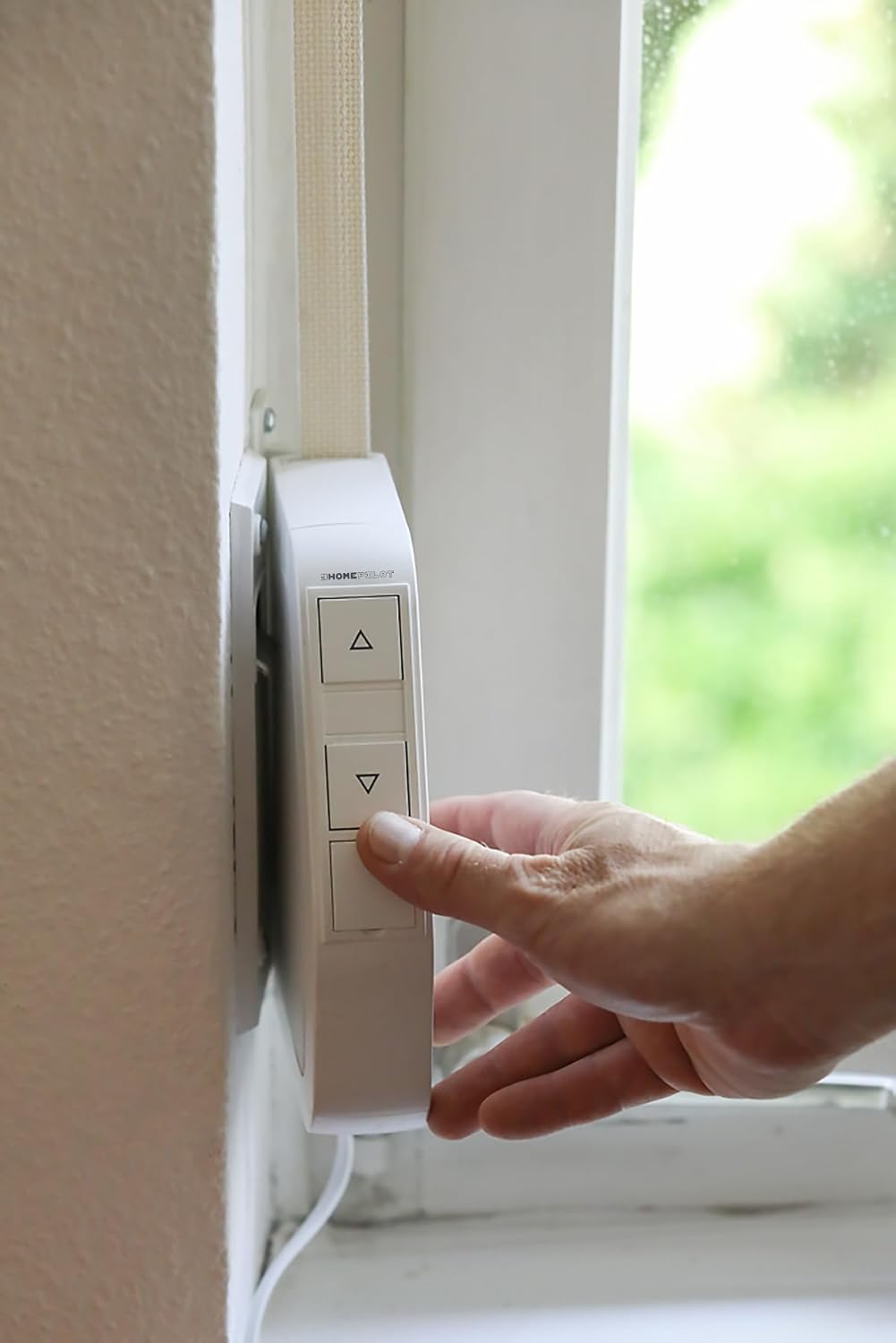
Figure 7: Manual operation using the control buttons.
4.2. Automatic Operation (Programming)
The device can be programmed to automatically open and close your roller shutters at specific times. This feature enhances daily comfort and security.
- The winder can be set to activate automatically every 24 hours.
- You can define specific opening and closing times according to your preferences.
- For detailed instructions on setting up the weekly program and other advanced automatic functions, please consult the full user manual available on the HOMEPILOT webเว็บไซต์.
5. การบำรุงรักษา
The HOMEPILOT Shutter Winder Pure is designed for durability and requires minimal maintenance.
- การทำความสะอาด: Regularly wipe the exterior of the device with a soft, dry cloth to remove dust and dirt. Do not use abrasive cleaners or solvents.
- การตรวจสอบสายพาน: Periodically inspect the roller shutter belt for any signs of wear, fraying, or damage. A damaged belt can affect the winder's performance and may require replacement.
- ส่วนประกอบภายใน: The internal components of the winder do not require user maintenance. Do not attempt to open the device, as this may void the warranty and pose a safety risk.
6 การแก้ไขปัญหา
If you encounter issues with your HOMEPILOT Shutter Winder Pure, consider the following common troubleshooting steps:
- อุปกรณ์ไม่ตอบสนอง:
- Check if the power cable is securely plugged into both the device and the wall outlet.
- ตรวจสอบว่าปลั๊กไฟใช้งานได้หรือไม่ โดยลองเสียบเครื่องใช้ไฟฟ้าอื่นเข้าไป
- Roller Shutter Not Moving or Moving Partially:
- Ensure the roller shutter belt is properly installed and tensioned within the winder.
- Check for any obstructions in the path of the roller shutter.
- The device has a maximum pulling force of 30 kg. Ensure your roller shutter's weight does not exceed this limit.
- If the end stops are not correctly set, the shutter may not move to its full open or closed position. Refer to the full manual on the HOMEPILOT website for instructions on setting end stops.
- เสียงที่ผิดปกติ:
- Slight operational noise is normal. However, if you hear loud grinding or unusual sounds, discontinue use and contact customer support.
For more complex issues or if the problem persists after attempting these steps, please refer to the comprehensive troubleshooting guide on the official HOMEPILOT webไซต์หรือติดต่อฝ่ายสนับสนุนลูกค้าของพวกเขา
7. การรับประกันและการสนับสนุน
For information regarding the product warranty, including terms, conditions, and duration, please refer to the official HOMEPILOT webไซต์หรือเอกสารการรับประกันที่รวมอยู่ในการซื้อของคุณ
For technical support, product inquiries, or assistance with installation and operation, please visit the HOMEPILOT official webหรือติดต่อฝ่ายบริการลูกค้าโดยตรง
HOMEPILOT Official Webเว็บไซต์: www.homepilot.de (โปรดทราบ: Website availability and language may vary.)


