1. บทนำ
Thank you for choosing the RisoPhy Mechanical Gaming Keyboard. This manual provides detailed instructions for setting up, operating, and maintaining your new keyboard. Please read this manual thoroughly before use to ensure optimal performance and longevity of your device.
2. สินค้าหมดview
2.1 คุณสมบัติหลัก
- Responsive Blue Switches: Offers tactile feedback and an audible click for precise and quick key presses.
- Rainbow Backlit RGB: Features 9 different backlight modes, 5 levels of light speed, and 5 brightness levels for customizable illumination.
- แป้นพิมพ์ขนาดมาตรฐาน 104 คีย์: Includes a numeric keypad and dedicated function keys for comprehensive functionality.
- ป้องกันภาพซ้อน 100%: ช่วยให้มั่นใจได้ว่าการกดปุ่มพร้อมกันทั้งหมดจะถูกบันทึกอย่างแม่นยำ
- 12 Multimedia Shortcuts: Quick access to media controls, volume, and other functions via Fn key combinations.
- การออกแบบตามหลักสรีรศาสตร์: Scientific stair-up keycap design and adjustable rear kickstands reduce hand fatigue.
- การออกแบบที่ทนต่อการรั่วไหล: Equipped with 4 hydrophobic holes to quickly drain accidental spills.
- โครงสร้างทนทาน: Ultra-durable double injection ABS engineered keycaps for long-lasting use.
2.2 เนื้อหาบรรจุภัณฑ์
- RisoPhy Mechanical Gaming Keyboard (Pink)
- สาย USB (ในตัว)
- ตัวดึงกุญแจ
- คู่มือการใช้งาน
2.3 เค้าโครงแป้นพิมพ์
The RisoPhy Mechanical Gaming Keyboard features a standard 104-key layout, including a full numeric keypad and a row of function keys (F1-F12) that can be combined with the Fn key for multimedia shortcuts.

รูปที่ 1: จากบนลงล่าง view of the RisoPhy Mechanical Gaming Keyboard, showcasing its full 104-key layout and pink color with RGB backlighting.
3. การตั้งค่า
Setting up your RisoPhy Mechanical Gaming Keyboard is a simple plug-and-play process.
- แกะคีย์บอร์ดออก: นำแป้นพิมพ์และอุปกรณ์เสริมทั้งหมดออกจากบรรจุภัณฑ์อย่างระมัดระวัง
- เชื่อมต่อกับอุปกรณ์ของคุณ: Locate an available USB-A port on your computer (PC, Mac) or gaming console (Xbox). Insert the USB connector of the keyboard into the port.
- การติดตั้งไดร์เวอร์: The keyboard is plug-and-play and does not require additional driver installation for basic functionality. Your operating system will automatically detect and configure the device.
- ปรับตามหลักสรีรศาสตร์: Flip out the two strong foldable rear kickstands located on the underside of the keyboard to adjust the typing angle for improved comfort.
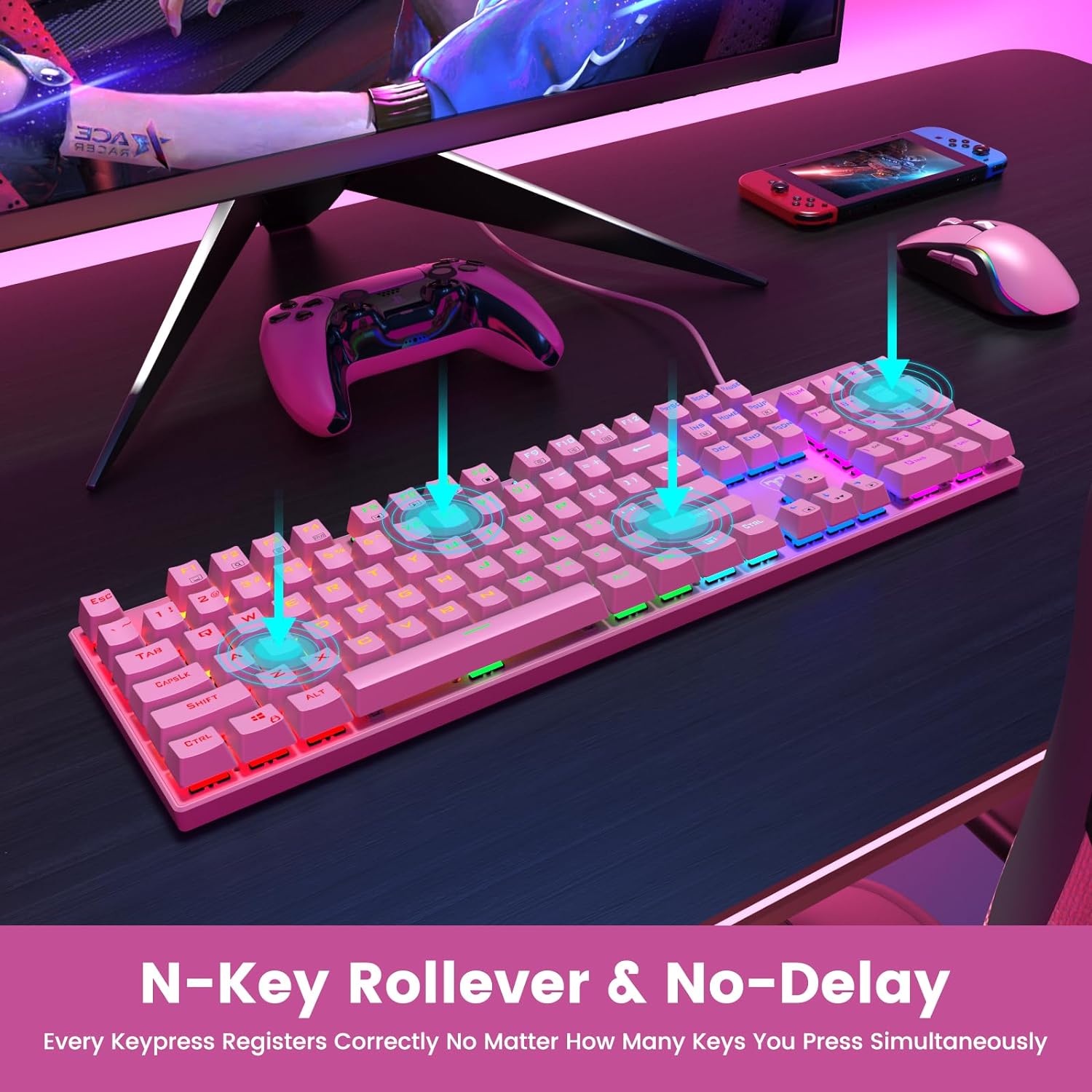
Figure 2: The underside of the RisoPhy keyboard, highlighting the adjustable rear feet that allow users to set a comfortable typing angle.
4. คู่มือการใช้งาน
4.1 การทำงานพื้นฐาน
The RisoPhy keyboard functions as a standard 104-key keyboard. Simply type as you normally would. The blue mechanical switches provide a distinct tactile and audible feedback with each keypress.
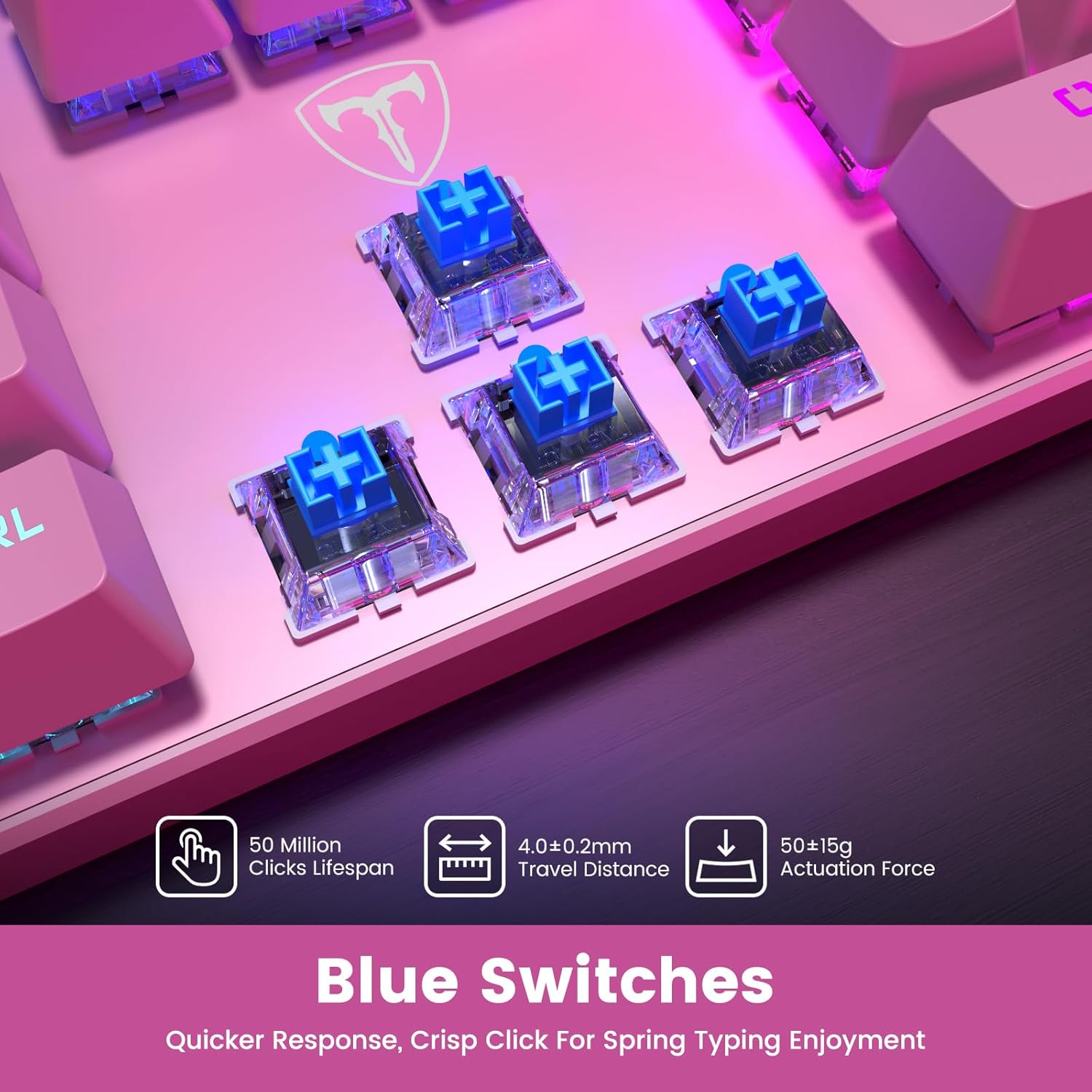
รูปที่ 3: ภาพระยะใกล้ view of the blue mechanical switches beneath the keycaps, illustrating their design for responsive and clicky feedback.
การควบคุมแบ็คไลท์ 4.2
Your RisoPhy keyboard features vibrant rainbow backlighting with multiple customization options:
- การเปลี่ยนโหมดไฟแบ็คไลท์: Use the dedicated backlight mode key (often indicated by a sun or light icon, usually near the arrow keys or F-row) to cycle through 9 different lighting effects.
- การปรับความสว่าง: กด Fn + พีจีอัพ เพื่อเพิ่มความสว่างและ Fn + พีจีดีเอ็น เพื่อลดความสว่าง (5 ระดับ)
- การปรับความเร็วแสง: กด Fn + - (on the numeric keypad) to adjust the speed of dynamic lighting effects (5 levels).
- การเปิด/ปิดไฟแบ็คไลท์: Use the dedicated ON/OFF switch if available, or a specific Fn combination (refer to keyboard markings).

Figure 4: The keyboard illuminated with its rainbow RGB backlighting, demonstrating various lighting modes and brightness levels.
4.3 มัลติมีเดียและปุ่มลัด
The keyboard includes 12 multimedia shortcut combinations accessible by pressing the Fn key simultaneously with the corresponding F-key (F1-F12).
| การผสมผสาน | การทำงาน |
|---|---|
| Fn+F1 | คอมพิวเตอร์ของฉัน |
| Fn+F2 | ค้นหา |
| Fn+F3 | เครื่องคิดเลข |
| Fn+F4 | เครื่องเล่นมัลติมีเดีย |
| Fn+F5 | เพลงก่อนหน้า |
| Fn+F6 | เพลงถัดไป |
| Fn+F7 | เล่น/หยุดชั่วคราว |
| Fn+F8 | หยุด |
| Fn+F9 | ปิดเสียง |
| Fn+F10 | ลดระดับเสียง |
| Fn+F11 | เพิ่มปริมาณ |
| Fn + วิน | Win Lock (disables Windows key during gaming) |
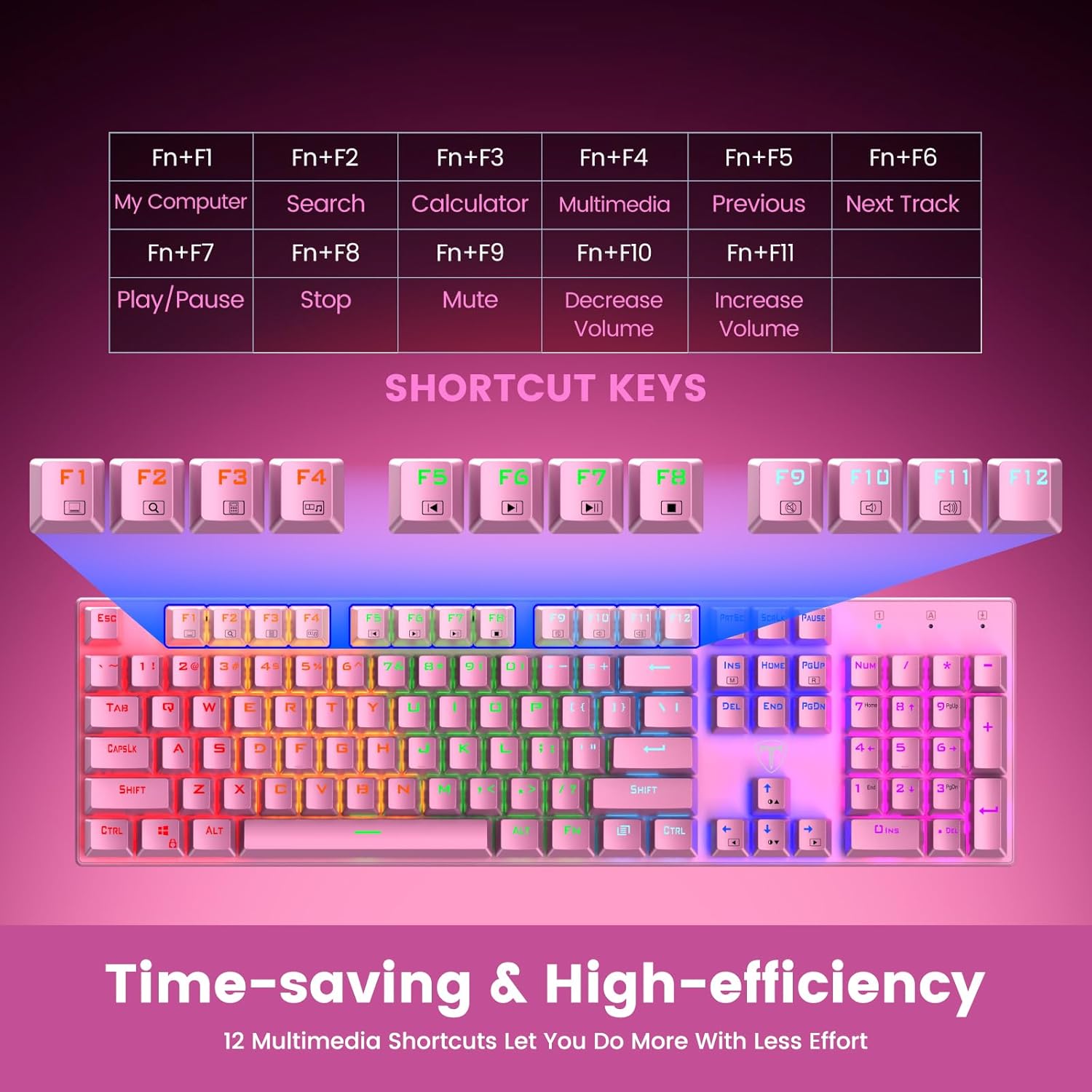
Figure 5: Visual representation of the Fn key combinations for various multimedia and system shortcuts.
4.4 การป้องกันภาพซ้อน
The 100% anti-ghosting feature ensures that every keypress is registered accurately, even when multiple keys are pressed simultaneously. This is crucial for fast-paced gaming and rapid typing.

Figure 6: An illustration demonstrating the N-Key Rollover capability, ensuring all key presses are registered without delay.
5. การบำรุงรักษา
5.1 การทำความสะอาดคีย์บอร์ดของคุณ
เพื่อรักษาประสิทธิภาพและรูปลักษณ์ของแป้นพิมพ์ แนะนำให้ทำความสะอาดเป็นประจำ:
- การตัดการเชื่อมต่อ: Always disconnect the keyboard from your device before cleaning.
- การกำจัดฝุ่น: ใช้กระป๋องลมอัดเป่าฝุ่นและเศษต่างๆ ออกจากระหว่างปุ่มต่างๆ
- การทำความสะอาดพื้นผิว: เช็ดปุ่มและพื้นผิวแป้นพิมพ์ด้วยผ้านุ่มๆ เช็ดเบาๆampใช้ผ้าที่ไม่เป็นขุย หลีกเลี่ยงสารเคมีรุนแรงหรือวัสดุที่มีฤทธิ์กัดกร่อน
- Keycap Removal (Optional): For deeper cleaning, use the included keycap puller to carefully remove individual keycaps. Gently pull straight up on the keycap. Clean the switch and keycap, then firmly press the keycap back into place until it clicks.

Figure 7: An illustration highlighting the long-lasting and non-fading properties of the double-shot detachable keycaps.
5.2 ความต้านทานต่อการหกเลอะเทอะ
The RisoPhy keyboard is designed with 4 hydrophobic holes to help drain accidental liquid spills. In case of a spill:
- Immediately Disconnect: ถอดปลั๊กคีย์บอร์ดออกจากอุปกรณ์ของคุณ
- ระบายของเหลว: Turn the keyboard upside down to allow liquid to drain through the designated holes.
- แห้งสนิท: Wipe the surface dry with a cloth and allow the keyboard to air dry completely for several hours (or overnight) before reconnecting.
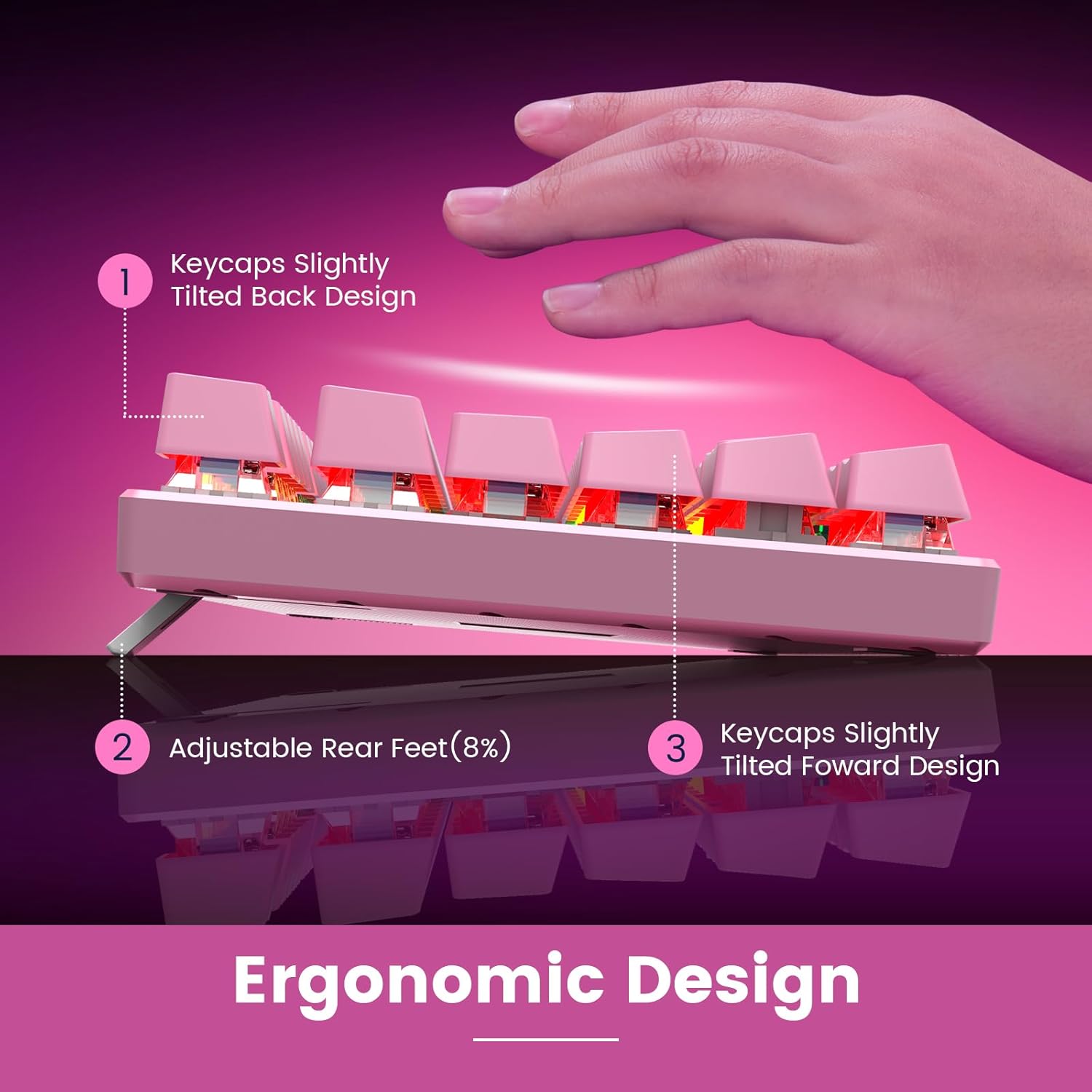
Figure 8: An image depicting water droplets on the keyboard surface, demonstrating its advanced spill-resistant design.
6 การแก้ไขปัญหา
If you encounter issues with your RisoPhy Mechanical Gaming Keyboard, please refer to the following common solutions:
| ปัญหา | สารละลาย |
|---|---|
| แป้นพิมพ์ไม่ตอบสนอง |
|
| ไฟแบ็คไลท์ไม่ทำงานหรือกระพริบ |
|
| คีย์ติดหรือไม่ตอบสนอง |
|
| ปุ่มมัลติมีเดียไม่ทำงาน |
|
7. ข้อมูลจำเพาะ
- แบบอย่าง: B0C5CV369L
- ยี่ห้อ: ริโซฟี
- ประเภทคีย์: สวิตช์สีน้ำเงินเครื่องกล
- จำนวนคีย์: 104
- การเชื่อมต่อ: USB-A แบบมีสาย
- แสงไฟด้านหลัง: Rainbow RGB (9 modes, 5 brightness, 5 speed levels)
- วัสดุปุ่มกด: Double Injection ABS
- ป้องกันภาพซ้อน: 100% (N-Key Rollover)
- ความต้านทานการรั่วไหล: Yes, with drainage holes
- อุปกรณ์ที่รองรับ: PC, Mac, Xbox, Gaming Consoles
- ขนาด : 17.48 x 6.38 x 1.81 นิ้ว (โดยประมาณ)
- น้ำหนักสินค้า: 1.92 ปอนด์ (ประมาณ)
8. การรับประกันและการสนับสนุน
RisoPhy is committed to providing high-quality products and excellent customer service.
- การรับประกัน: ผลิตภัณฑ์นี้มีการรับประกัน 2 ปี โปรดเก็บหลักฐานการซื้อไว้เพื่อใช้ในการเคลมประกัน
- การสนับสนุนลูกค้า: For any questions, technical assistance, or warranty inquiries, please contact RisoPhy customer service.
- ช่องทางการติดต่อ :
- Click on the seller's name on the product page and send messages.
- Click on the store name in your order history and click to send messages.

Figure 9: Information regarding RisoPhy's customer support and warranty details.


