1. บทนำ
This manual provides detailed instructions for the installation, operation, and maintenance of your Jennov Security Camera, model IJ1-P23WJ35-3-FAS. This device is designed to provide reliable surveillance for indoor environments, offering features such as high-definition video, night vision, and motion detection. Please read this manual thoroughly before using the product to ensure proper functionality and safety.
2. สินค้าหมดview
The Jennov Security Camera is a compact, dome-shaped device designed for discreet monitoring. It integrates seamlessly into standard light bulb sockets for easy power and installation.
คุณสมบัติหลัก:
- วิดีโอความละเอียดสูง: จับภาพ foo ได้อย่างชัดเจนtage ด้วยความละเอียด 1080p
- การมองเห็นตอนกลางคืน: Equipped with infrared LEDs for visibility up to 30 meters in low-light conditions.
- การตรวจจับการเคลื่อนไหว: Sends notifications upon detecting movement within its field of view.
- เสียงสองทาง: ช่วยให้สามารถสื่อสารผ่านกล้องได้
- การเชื่อมต่อไร้สาย: Operates via Wi-Fi for remote access.
- การจัดเก็บที่ยืดหยุ่น: Supports Micro SD card (up to 128GB) and cloud storage options.
- การรวมระบบบ้านอัจฉริยะ: Compatible with Amazon Alexa and Android devices.
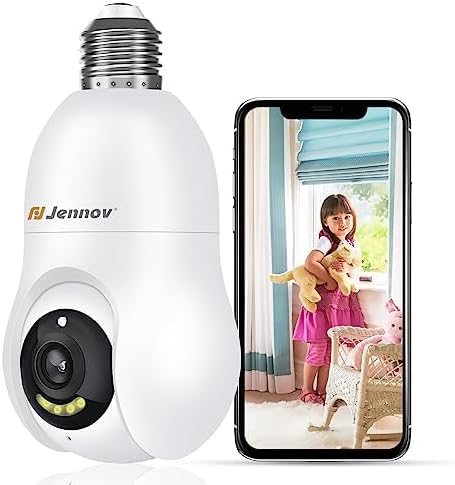
Figure 2.1: The Jennov Security Camera shown alongside a smartphone displaying live footage of a child.
3. การตั้งค่า
3.1 เนื้อหาบรรจุภัณฑ์
ตรวจสอบว่าแพ็คเกจของคุณมีรายการต่อไปนี้:
- 1 x Jennov Security Camera (Model: IJ1-P23WJ35-3-FAS)
- 1 x คู่มือผู้ใช้ (เอกสารนี้)
3.2 การติดตั้ง
The Jennov Security Camera is designed for easy installation into a standard light bulb socket.
- หมดแรง: โปรดตรวจสอบให้แน่ใจว่าได้ปิดสวิตช์ไฟที่เต้ารับแล้วก่อนทำการติดตั้ง
- สกรูเข้า: Carefully screw the camera into a standard E27/E26 light bulb socket. Ensure it is securely fastened but do not overtighten.
- เปิดเครื่อง: เสียบปลั๊กไฟกลับเข้าไปใหม่ กล้องจะเปิดทำงานและเริ่มกระบวนการเริ่มต้นระบบ

Figure 3.1: The camera is designed for quick installation by screwing it into an ordinary bulb base.
3.3 การดาวน์โหลดแอปและการเชื่อมต่อ
To operate the camera, you will need to download the companion mobile application.
- ดาวน์โหลดแอพ: ค้นหา the official Jennov security camera app in your device's app store (e.g., Google Play Store for Android, Apple App Store for iOS).
- สร้างบัญชี: เปิดแอปและทำตามคำแนะนำบนหน้าจอเพื่อสร้างบัญชีผู้ใช้ใหม่หรือเข้าสู่ระบบหากคุณมีบัญชีผู้ใช้อยู่แล้ว
- เพิ่มอุปกรณ์: Select the option to 'Add Device' or 'Add Camera' within the app.
- เชื่อมต่อกับ Wi-Fi: Follow the app's prompts to connect the camera to your 2.4GHz Wi-Fi network. Ensure your Wi-Fi password is correct.
- การจับคู่: The app will guide you through the pairing process, which may involve scanning a QR code displayed on your phone with the camera, or listening for an audible prompt.
- การกำหนดค่า: เมื่อเชื่อมต่อแล้ว คุณสามารถตั้งชื่อกล้องและปรับการตั้งค่าเริ่มต้นได้
4. คู่มือการใช้งาน
4.1 สด View และคุณภาพวิดีโอ
Access the live feed of your camera through the mobile application. The camera provides 1080p Full HD resolution for clear monitoring.

Figure 4.1: Visual comparison demonstrating the enhanced clarity of 2K Ultra HD resolution provided by the Jennov camera compared to standard 1080p.
4.2 การตรวจจับการเคลื่อนไหวและการติดตามอัตโนมัติ
The camera features intelligent motion detection and auto-tracking capabilities.
- เปิดใช้งานการตรวจจับการเคลื่อนไหว: In the app settings, activate motion detection and customize sensitivity levels.
- รับการแจ้งเตือน: When motion is detected, you will receive push notifications on your smartphone.
- การติดตามอัตโนมัติ: The camera can automatically track detected movement within its field of view, ensuring the subject remains in frame.
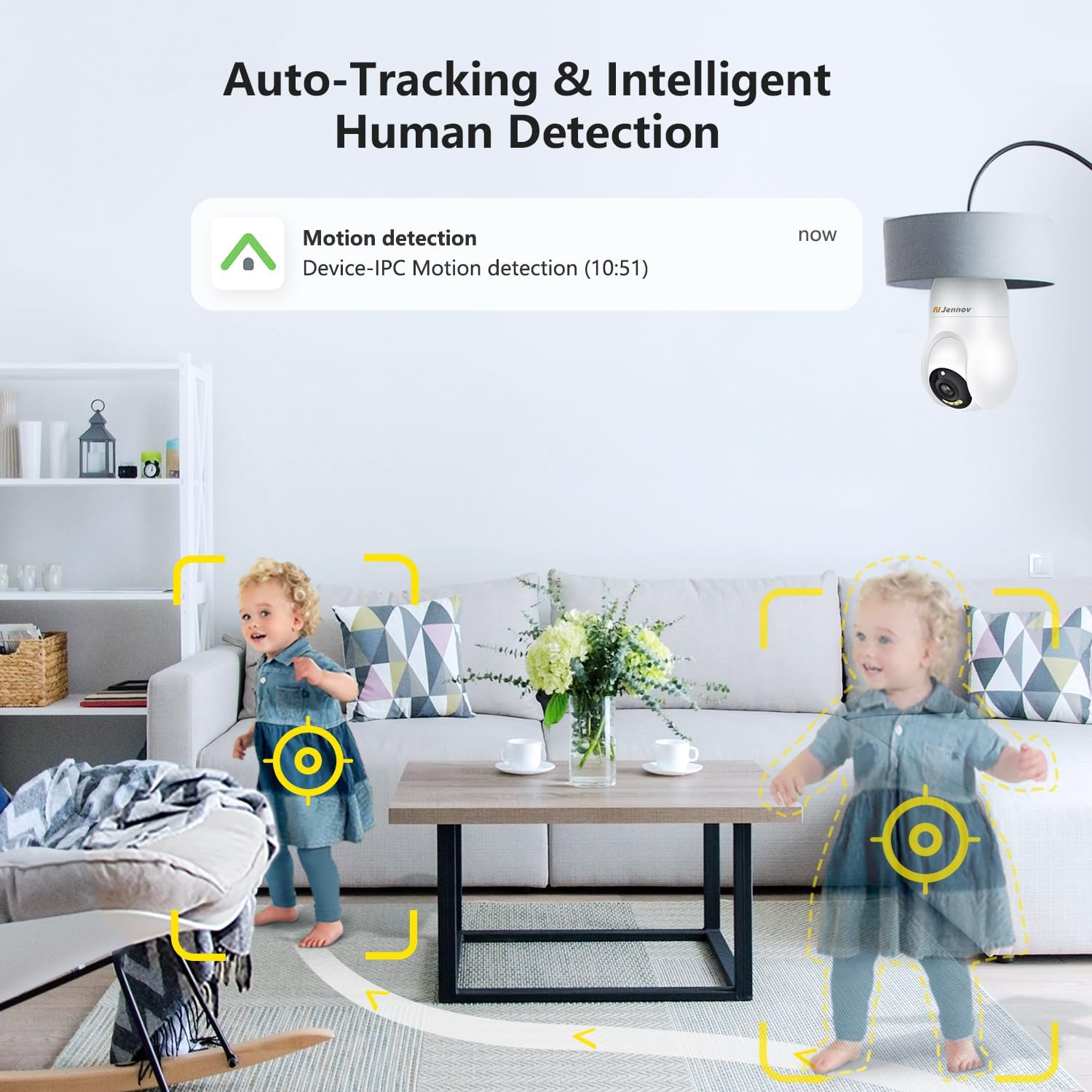
Figure 4.2: The camera's auto-tracking and intelligent human detection feature, showing a motion detection alert.
4.3 การมองเห็นตอนกลางคืน
The camera is equipped with infrared LEDs to provide clear vision in low-light or no-light conditions.
- การเปิดใช้งานอัตโนมัติ: Night vision typically activates automatically when ambient light levels drop.
- พิสัย: Effective night vision range is up to 30 feet (approximately 9 meters).
- การมองเห็นสีในเวลากลางคืนภายใต้แสงดาว: In certain low-light conditions, the camera may provide enhanced color night vision.

Figure 4.3: A visual comparison illustrating the clarity and color retention of Starlight Color Night Vision compared to traditional night vision.
4.4 เสียงสองทาง
Utilize the camera's built-in microphone and speaker for two-way communication.
- พูด: แตะไอคอนไมโครโฟนในระหว่างการถ่ายทอดสด view interface of the app to speak through the camera.
- ฟัง: The camera's microphone captures audio from its surroundings, which can be heard through the app.

Figure 4.4: Demonstration of the two-way audio feature, showing a child speaking through the camera and a parent responding via smartphone.
4.5 ที่จัดเก็บวิดีโอ
The camera supports two primary methods for video storage:
- การ์ด Micro SD: Insert a Micro SD card (up to 128GB, not included) into the designated slot on the camera for local storage of recordings.
- การเก็บข้อมูลบนคลาวด์: The camera offers optional cloud storage services, which may require a subscription. Refer to the app for details on available plans.

Figure 4.5: The camera supports both cloud storage and local storage via a Micro SD card (up to 128GB).
4.6 การรวมระบบบ้านอัจฉริยะ
The Jennov Security Camera is compatible with certain smart home platforms.
- อเมซอนอเล็กซ่า: Link your camera to Amazon Alexa through the Alexa app to view live feeds on compatible Echo Show devices or use voice commands.
- อุปกรณ์แอนดรอยด์: The camera app is compatible with Android smartphones and tablets.

Figure 4.6: The camera's compatibility with Amazon Alexa, allowing users to view camera feeds on smart displays.
5. การบำรุงรักษา
5.1 การทำความสะอาดกล้อง
To ensure optimal performance, keep the camera lens and body clean.
- หมดแรง: Disconnect the camera from its power source before cleaning.
- เลนส์: Gently wipe the camera lens with a soft, lint-free cloth. For stubborn smudges, use a lens cleaning solution designed for optics.
- ร่างกาย: Wipe the camera body with a dry or slightly damp ผ้า. หลีกเลี่ยงการใช้สารเคมีรุนแรงหรือวัสดุกัดกร่อน
การอัปเดตเฟิร์มแวร์ 5.2 รายการ
Periodically check the mobile application for available firmware updates. Updates can improve performance, add new features, and enhance security.
- ตรวจสอบการอัปเดต: Navigate to the camera settings within the app to check for and install any available firmware updates.
- การเชื่อมต่อที่เสถียร: Ensure the camera has a stable Wi-Fi connection and sufficient power during the update process. Do not interrupt the update.
6 การแก้ไขปัญหา
If you encounter issues with your Jennov Security Camera, refer to the following common problems and solutions:
- กล้องไม่เปิด:
- Ensure the light socket has power and the camera is securely screwed in.
- Test the socket with a working light bulb to confirm power supply.
- ไม่สามารถเชื่อมต่อ Wi-Fi ได้:
- Verify your Wi-Fi network is 2.4GHz. The camera does not support 5GHz networks.
- โปรดตรวจสอบให้แน่ใจว่าได้ป้อนรหัสผ่าน Wi-Fi อย่างถูกต้องในแอปแล้ว
- ขยับกล้องให้ใกล้กับเราเตอร์ Wi-Fi มากขึ้นเพื่อเพิ่มความแรงของสัญญาณ
- รีสตาร์ทเราเตอร์และกล้องของคุณ
- ไม่มีการแจ้งเตือนการตรวจจับการเคลื่อนไหว:
- Check if motion detection is enabled in the app settings.
- ปรับความไวในการตรวจจับการเคลื่อนไหว
- โปรดตรวจสอบให้แน่ใจว่าได้เปิดใช้งานการแจ้งเตือนของแอปบนสมาร์ทโฟนของคุณแล้ว
- คุณภาพวิดีโอไม่ดี:
- ตรวจสอบความแรงของสัญญาณ Wi-Fi ของคุณ สัญญาณอ่อนอาจส่งผลต่อคุณภาพการสตรีมวิดีโอ
- Clean the camera lens for any dust or smudges.
- ตรวจสอบให้แน่ใจว่ามีแสงสว่างเพียงพอสำหรับการถ่ายวิดีโอในเวลากลางวันเพื่อให้ได้ผลลัพธ์ที่ดีที่สุด
- ระบบเสียงสองทางไม่ทำงาน:
- Ensure microphone and speaker permissions are granted to the app on your smartphone.
- Check the volume settings on both your phone and within the camera app.
7. ข้อมูลจำเพาะ
| หมายเลขรุ่น | IJ1-P23WJ35-3-FAS |
| ประเภทการติดตั้ง | Light socket (Screw In) |
| ความละเอียดในการจับภาพวิดีโอ | 1080p |
| การสื่อสารแบบไร้สาย | Wi-Fi (2.4GHz เท่านั้น) |
| ฟอร์มแฟกเตอร์ | โดม |
| วัสดุ | พลาสติก |
| เล่มที่tage | 220 โวลต์ (AC) |
| วัดtage | 3 วัตต์ |
| ขนาด (กว้าง x ยาว x สูง) | 7.62 x 7.62 x 17.02 ซม. |
| น้ำหนักสินค้า | 177 กรัม |
| คุณสมบัติพิเศษ | Night Vision, Motion Detection, Two-Way Audio |
| ตัวเลือกการจัดเก็บข้อมูล | Micro SD card (Max 128GB), Cloud Storage |
| การใช้งานภายใน/ภายนอกอาคาร | ในร่ม |
| อุปกรณ์ที่รองรับ | แล็ปท็อป, สมาร์ทโฟน, แท็บเล็ต |
| ประเภทตัวควบคุม | Amazon Alexa, แอนดรอยด์ |
8. ข้อมูลการรับประกัน
The Jennov Security Camera (Model: IJ1-P23WJ35-3-FAS) comes with a รับประกันจำกัด 1 ปี นับจากวันที่ซื้อสินค้า การรับประกันนี้ครอบคลุมถึงข้อบกพร่องจากการผลิตและการทำงานผิดปกติภายใต้การใช้งานปกติ ไม่ครอบคลุมถึงความเสียหายที่เกิดจากการใช้งานผิดวิธี อุบัติเหตุ การดัดแปลงโดยไม่ได้รับอนุญาต หรือการติดตั้งที่ไม่ถูกต้อง
Please retain your proof of purchase for warranty claims. For detailed warranty terms and conditions, refer to the official Jennov webไซต์หรือติดต่อฝ่ายสนับสนุนลูกค้า
9. การสนับสนุนลูกค้า
For further assistance, technical support, or inquiries regarding your Jennov Security Camera, please refer to the following resources:
- การสนับสนุนทางออนไลน์: Visit the official Jennov website for FAQs, troubleshooting guides, and product information.
- อีเมลติดต่อ: Refer to the product packaging or the Jennov website for customer service contact email.
When contacting support, please have your product model number (IJ1-P23WJ35-3-FAS) and purchase information readily available.


