1. บทนำ
The EPOS Impact 1060T is a professional double-sided wireless headset designed for PC use, optimized for high-performance communication environments. It features advanced AI Noise Cancellation and Super Wideband Audio to ensure exceptional clarity during calls, even in noisy surroundings. The headset is Microsoft Teams Certified, providing seamless integration and optimal performance for virtual meetings.
Engineered for all-day comfort, the Impact 1060T includes soft memory foam earpads and a lightweight frame. Smart features such as a 360° busylight, mic-tip LED mute alerts, and intuitive boom-arm call control enhance efficiency and focus. This manual provides detailed instructions for setting up, operating, and maintaining your headset to ensure optimal performance and longevity.

Figure 1: EPOS Impact 1060T highlighting key features.
2. เนื้อหาบรรจุภัณฑ์
ตรวจสอบว่ามีรายการทั้งหมดอยู่ในแพ็คเกจของคุณ:
- EPOS Impact 1060T Wireless Headset
- สาย USB-C ถึง USB-C
- อะแดปเตอร์ USB-C ถึง USB-A
- กระเป๋าใส่ของแบบนุ่ม
- คู่มือความปลอดภัย
- เอกสารการปฏิบัติตาม
- คู่มือแนะนำ
- BTD 800a Dongle (for models with dongle)

Figure 2: EPOS Impact 1060T package contents.
3. การตั้งค่า
3.1 การชาร์จเริ่มต้น
Before first use, fully charge your headset. Connect the provided USB-C to USB-C cable to the headset and a power source. Use the USB-C to USB-A adapter if your power source only has USB-A ports. The headset can also be charged wirelessly if a compatible charging stand is available (charging stand sold separately for some models).
3.2 การเปิด/ปิดเครื่อง
- วิธีเปิดเครื่อง: กดปุ่มเปิด/ปิดค้างไว้จนกว่าไฟแสดงสถานะจะสว่างขึ้น
- วิธีปิดเครื่อง: กดปุ่มเปิด/ปิดค้างไว้จนกว่าไฟแสดงสถานะจะดับลง
3.3 การเชื่อมต่อกับอุปกรณ์
The EPOS Impact 1060T offers versatile connectivity options:
- การจับคู่บลูทู ธ :
- ตรวจสอบว่าชุดหูฟังปิดอยู่
- กดปุ่มเปิด/ปิดค้างไว้ประมาณ 4 วินาที จนกว่าไฟ LED จะกะพริบเป็นสีน้ำเงินและสีแดง ซึ่งแสดงว่าเข้าสู่โหมดจับคู่แล้ว
- On your device (PC, smartphone), go to Bluetooth settings and select "EPOS Impact 1060T" from the list of available devices.
- เมื่อเชื่อมต่อแล้ว ไฟ LED จะแสดงแสงสีน้ำเงินสว่างคงที่
- การเชื่อมต่อแบบมีสาย USB-C: Connect the headset directly to your device using the provided USB-C to USB-C cable. The headset will be recognized automatically.
- USB-A Wired Connection: Use the USB-C to USB-A adapter with the USB-C cable to connect to devices with USB-A ports.
- Using the BTD 800a Dongle: For optimal wireless performance and extended range, plug the BTD 800a USB dongle into your PC. The headset will automatically connect to the dongle.
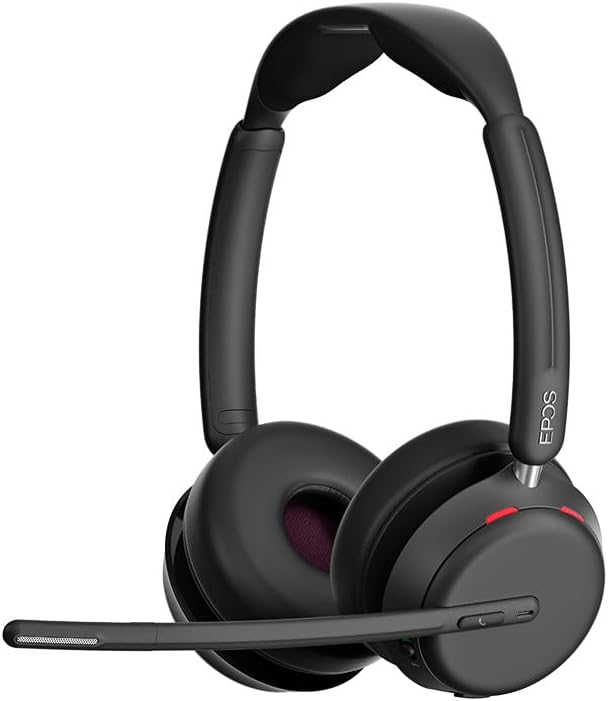
รูปที่ 3 : ด้านหน้า view of the EPOS Impact 1060T Headset.
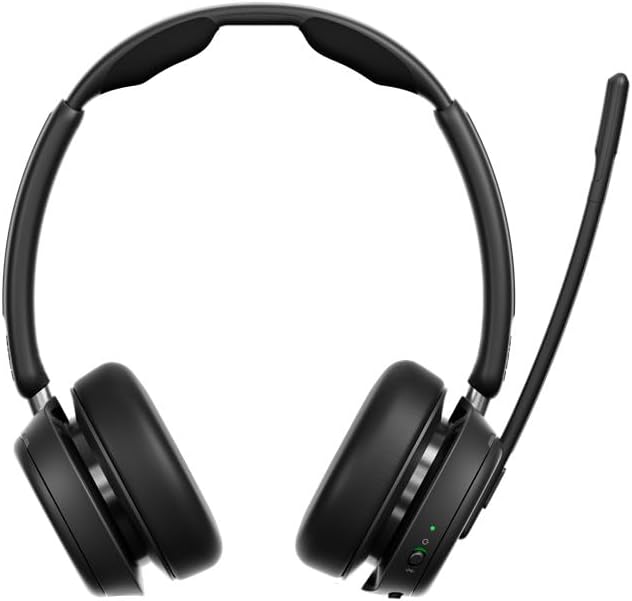
รูปที่ 4: ย้อนกลับ view of the EPOS Impact 1060T Headset.
4. คู่มือการใช้งาน
4.1 การสวมชุดหูฟัง
Adjust the headband for a comfortable and secure fit. The memory foam earpads are designed for extended wear. The microphone boom arm can be rotated to either side for optimal voice pickup.
4.2 การจัดการการโทร
- รับ/วางสาย: Use the intuitive inline controller or the dedicated call button on the earcup.
- ปิดเสียง/เปิดเสียงไมโครโฟน:
- Lower the microphone boom arm to unmute and raise it to mute.
- A mic-tip LED will alert you if the microphone is muted.
- Alternatively, use the mute button on the inline controller.
- การควบคุมระดับเสียง: Adjust the volume using the dedicated buttons on the inline controller or earcup.
4.3 Noise Cancellation and Audio Features
- ระบบตัดเสียงรบกวนด้วย AI: Three digital beamforming microphones powered by EPOS AI™ actively block out background noise, ensuring your voice is heard clearly.
- เสียงแบบซุปเปอร์ไวด์แบนด์: Provides rich, natural sound for both calls and media.
- BrainAdapt™ Technology: Designed to reduce brain fatigue and enhance focus during long calls.
4.4 คุณสมบัติอัจฉริยะ
- ไม่ว่าง: A 360° busylight on the headset signals your availability to colleagues, preventing interruptions during calls.
- ได้รับการรับรอง Microsoft Teams: Optimized for Microsoft Teams, offering dedicated controls and seamless integration for calls and meetings.

Figure 5: Headset optimized for Unified Communications.
Video 1: "Powerful Sound and Comfort for Your Workday" - An official EPOS video showcasing the features and comfort of the Impact series headsets, including the 1060T.
Video 2: "EPOS IMPACT 860T Microsoft Teams Headset" - An official EPOS video demonstrating features of the similar Impact 860T model, highlighting Microsoft Teams integration and sound quality.
Video 3: "EPOS Impact 860T ANC Headset" - An official EPOS video showcasing the Active Noise Cancellation and design of the similar Impact 860T model.
5. การบำรุงรักษา
- การทำความสะอาด: ใช้ผ้านุ่มและแห้งเช็ดทำความสะอาดชุดหูฟัง หลีกเลี่ยงการใช้น้ำยาหรือน้ำยาทำความสะอาดที่มีฤทธิ์กัดกร่อน
- พื้นที่จัดเก็บ: When not in use, store the headset in the provided soft carry pouch to protect it from dust and damage.
- การดูแลแบตเตอรี่ เพื่อยืดอายุการใช้งานแบตเตอรี่ ควรหลีกเลี่ยงการปล่อยประจุแบตเตอรี่จนหมดบ่อยๆ ควรชาร์จแบตเตอรี่เป็นประจำ
- การอัปเดตซอฟต์แวร์: Integrate with EPOS Manager for device updates and analytics to ensure optimal performance and access to the latest features.
6 การแก้ไขปัญหา
If you experience issues with your EPOS Impact 1060T, refer to the following common solutions:
| ปัญหา | สาเหตุที่เป็นไปได้ | สารละลาย |
|---|---|---|
| No audio/microphone not working | Headset not paired/connected, incorrect audio device selected, microphone muted. | Ensure headset is paired/connected. Check device audio settings to select "EPOS Impact 1060T" as input/output. Unmute microphone. |
| Poor audio quality/background noise | Weak Bluetooth signal, environmental interference, microphone not positioned correctly. | Move closer to the connected device. Ensure no obstructions. Adjust microphone boom arm for optimal voice pickup. |
| หูฟังไม่ชาร์จ | Cable not connected properly, faulty cable/charger, wireless charging misalignment. | Verify cable connections. Try a different USB port or charger. Ensure headset is correctly placed on the wireless charging pad. |
| Headset randomly restarts/disconnects | Firmware issue, device compatibility, low battery. | Ensure headset firmware is up to date via EPOS Manager. Fully charge the headset. Try connecting to a different device to isolate the issue. |
7. ข้อมูลจำเพาะ
- ชื่อรุ่น : IMPACT 1060T
- เทคโนโลยีการเชื่อมต่อ: ไร้สาย (Bluetooth)
- เวอร์ชันบลูทูธ: 5.0
- การควบคุมเสียงรบกวน: ระบบตัดเสียงรบกวนแบบปรับได้
- ไมโครโฟน: AI Noise Cancellation with three digital beamforming microphones
- เสียง: Super Wideband Audio
- รูปร่างหูฟัง: บนหู
- วัสดุ: Fabric/Silicone
- น้ำหนักสินค้า: 3.68 ออนซ์ (0.23 ปอนด์)
- ขนาดสินค้า : 19.69 x 19.69 x 11.02 นิ้ว
- แบตเตอรี่: แบตเตอรี่ลิเธียมไอออน 1 ก้อน (รวมอยู่ด้วย)
- คุณสมบัติพิเศษ: แถบคาดศีรษะปรับได้ น้ำหนักเบา ตัดเสียงรบกวน ควบคุมระดับเสียง ชาร์จไร้สาย
- ผู้ผลิต: ดีแมนท์ ซาวด์ อีพอส ออดิโอ เอ/เอส
8. การรับประกันและการสนับสนุน
The EPOS Impact 1060T is built for durability and comes with a รับประกัน 3 ปี. For technical support, warranty claims, or further assistance, please visit the official EPOS webหรือติดต่อฝ่ายบริการลูกค้า โปรดเก็บหลักฐานการซื้อไว้เพื่อใช้ยืนยันการรับประกัน
สำหรับแหล่งข้อมูลเพิ่มเติมและการอัปเดตซอฟต์แวร์ โปรดเยี่ยมชม [ลิงก์เว็บไซต์] ร้าน EPOS บน Amazon.


