การแนะนำ
The BONTEC Dual Monitor Stand is designed to enhance your workspace by elevating your monitors to an ergonomic height, reducing strain, and providing ample storage. This versatile desk organizer features adjustable length and angle, a smartphone holder, and efficient cable management, making it suitable for various desk setups.
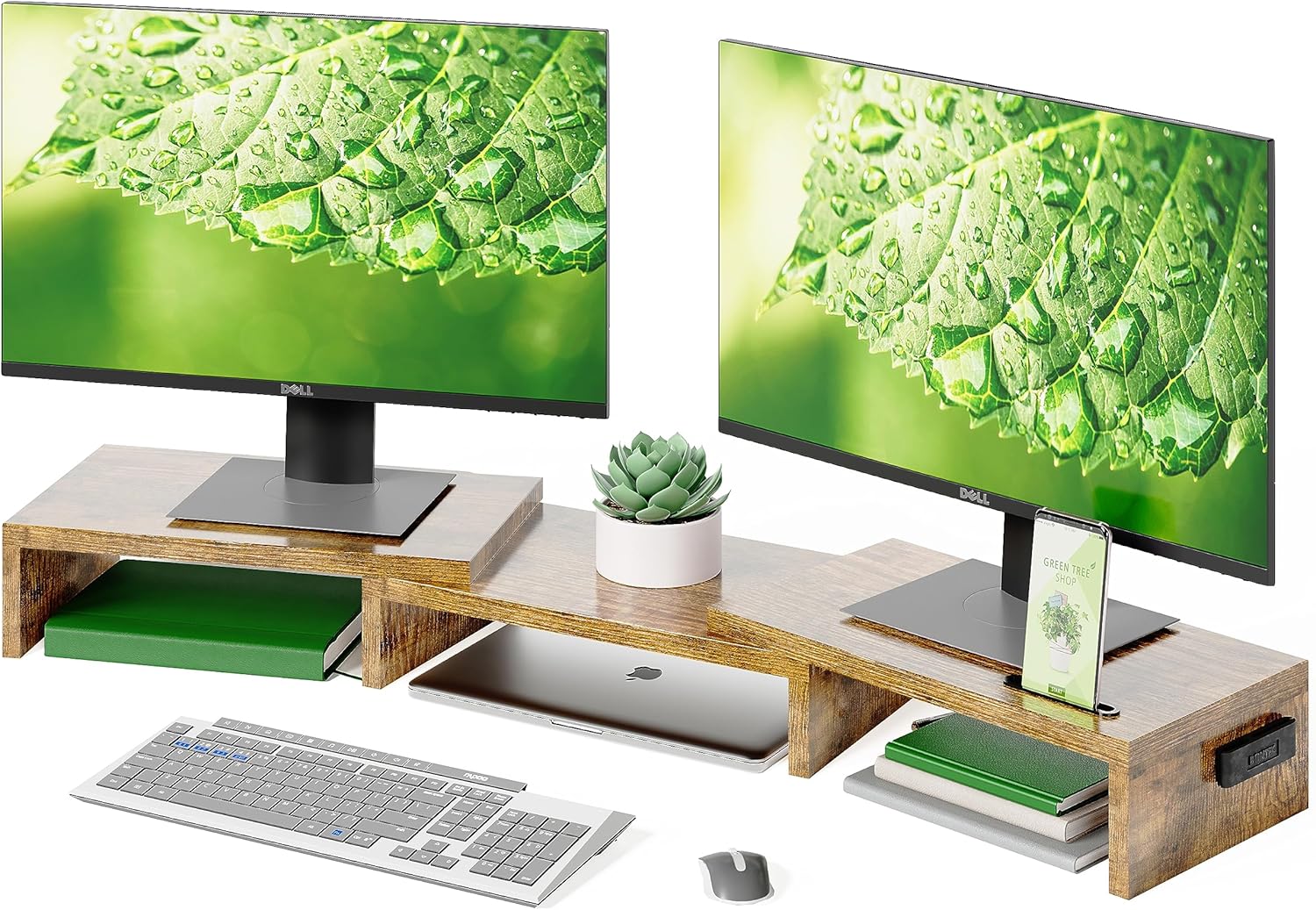
Image: The BONTEC Dual Monitor Stand, showcasing its ability to hold two monitors and provide under-shelf storage for a keyboard, mouse, and other desk items.
คุณสมบัติหลัก:
- สามารถปรับความยาวและมุมได้: Elevate two monitors to an ergonomic height. Adjustable from 31.5" to 42.5" to fit various desk sizes and configurations.
- การออกแบบตามหลักสรีรศาสตร์: Raises monitors to eye level to reduce neck, back, and shoulder strain during extended use.
- การจัดเก็บแบบอเนกประสงค์: Three spacious compartments underneath for organizing office essentials like keyboards, mice, fileและอุปกรณ์อื่นๆ
- Smartphone Holder & Cable Management: Integrated slot for smartphones and openings for cable organization, keeping your workspace tidy.
- Easy Assembly & Non-Slip Base: Quick assembly in approximately 3 minutes with included hardware. Features a non-slip base for stability and desk surface protection.
การติดตั้งและการประกอบ
The BONTEC Dual Monitor Stand is designed for quick and straightforward assembly. Please follow these steps carefully to ensure proper setup.
- แกะส่วนประกอบ: นำชิ้นส่วนทั้งหมดออกจากบรรจุภัณฑ์อย่างระมัดระวัง ตรวจสอบว่าส่วนประกอบและอุปกรณ์ทั้งหมดครบถ้วนตามรายการชิ้นส่วนที่ให้มา
- ระบุแผงควบคุม: Distinguish between the main center panel and the two side panels. Note the pre-drilled holes and connection points.
- Attach Side Panels to Center: Align the side panels with the center panel. Insert the provided metal dowels and screws into the designated holes. Use a screwdriver to tighten the screws securely, ensuring a stable connection.
- ปรับความยาวและมุม: Once assembled, the side panels can be adjusted to extend the stand's length or angled to create a corner setup. Gently slide or pivot the side sections to achieve your desired configuration.
- วางบนโต๊ะ: Position the assembled monitor stand on a flat, stable desk surface. The non-slip pads on the bottom of the stand will help prevent movement and protect your desk.

Image: Detail of screw insertion during assembly, illustrating the simple connection method.
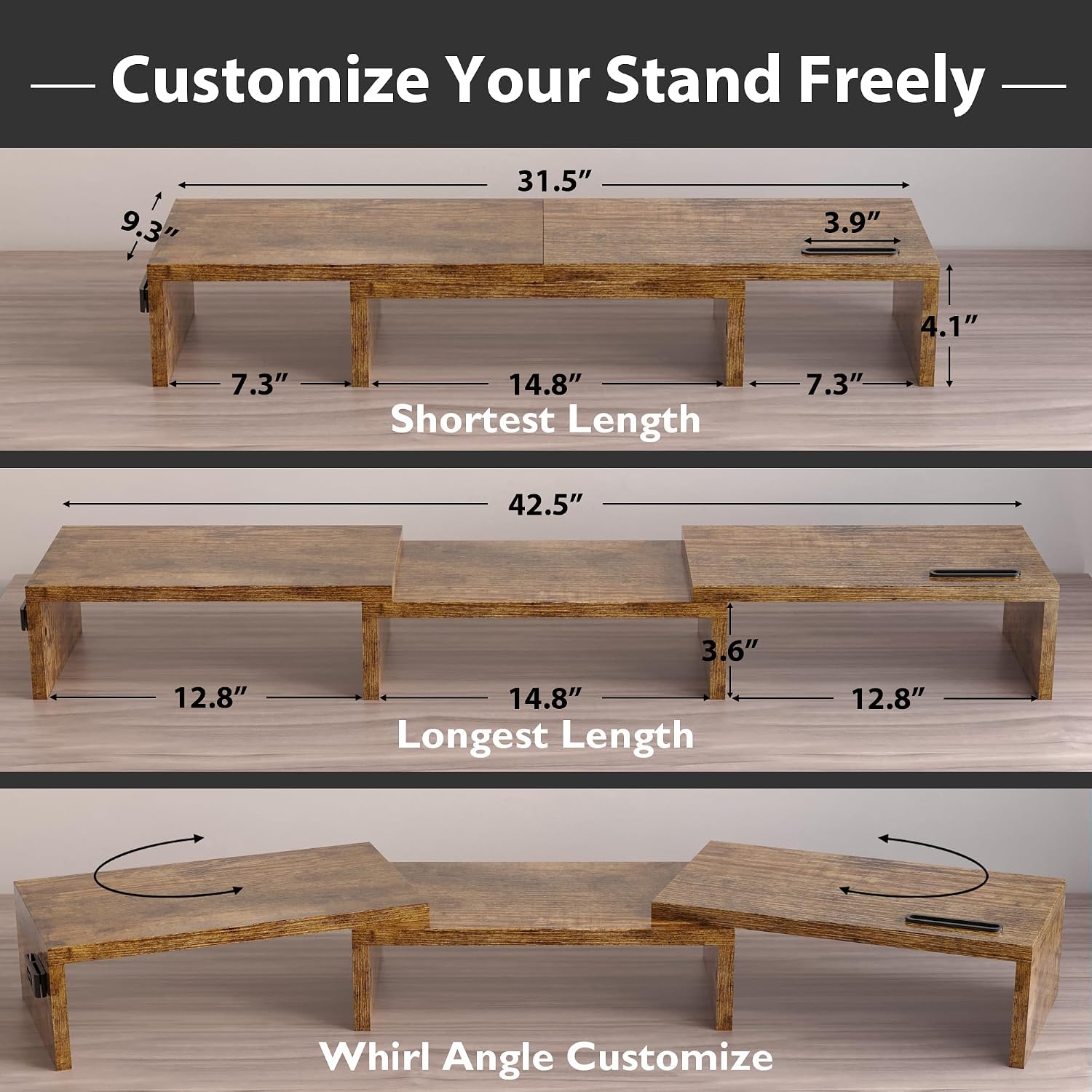
Image: Visual guide demonstrating how to customize the stand's length from 31.5 inches to 42.5 inches and adjust the angle of the side sections.
คำแนะนำการใช้งาน
Utilize the features of your BONTEC Dual Monitor Stand to optimize your workspace and improve ergonomics.
การวางตำแหน่งจอภาพ:
- Place your monitors directly on the elevated surfaces of the stand. Ensure the weight is evenly distributed.
- Adjust the stand's length and angle to position your monitors at a comfortable eye level, promoting better posture and reducing neck strain.

Image: An illustration of ergonomic benefits, showing a user with improved posture after using the monitor stand compared to slouching without it.
การจัดเก็บและการจัดระเบียบ:
- Utilize the three compartments underneath the stand to store your keyboard, mouse, notebooks, files, or other desk accessories. This helps to declutter your desk surface.
- The integrated smartphone holder allows you to keep your phone upright and easily accessible.
- Use the cable management openings to route and organize your monitor and device cables, preventing tangles and maintaining a neat appearance.

ภาพ: ระยะใกล้ view of the monitor stand's features, including the convenient slot design for a smartphone and the cable management clips.
การซ่อมบำรุง
Proper care and maintenance will ensure the longevity and appearance of your BONTEC Dual Monitor Stand.
- การทำความสะอาด: The stand's surface is designed to be waterproof and easy to clean. Wipe down the stand regularly with a soft, damp cloth to remove dust and spills. Avoid using abrasive cleaners or harsh chemicals, as these may damage the finish.
- การตรวจสอบเสถียรภาพ: Periodically check all connections and screws to ensure they remain tight. Re-tighten if necessary to maintain the stand's stability.
- แผ่นกันลื่น: Ensure the non-slip pads on the bottom of the stand are clean and intact to provide optimal grip and protect your desk surface.

ภาพ: รายละเอียด view of the monitor stand's surface being cleaned, emphasizing its waterproof nature and ease of maintenance.
การแก้ไขปัญหา
If you encounter any issues with your BONTEC Dual Monitor Stand, refer to the following common troubleshooting tips:
| ปัญหา | สาเหตุที่เป็นไปได้ | สารละลาย |
|---|---|---|
| ขาตั้งโยกเยกหรือไม่มั่นคง | น็อตหลวมหรือพื้นผิวไม่เรียบ | Ensure all assembly screws are tightened. Place the stand on a flat, level surface. Check if non-slip pads are properly attached. |
| Difficulty adjusting length or angle. | Panels are too tight or misaligned. | Gently loosen the screws connecting the panels slightly, adjust to desired position, then re-tighten. Ensure panels are aligned correctly. |
| Monitors slide on the surface. | Stand surface is slick or monitors lack sufficient grip. | Ensure the stand's surface is clean and dry. If monitors still slide, consider placing small non-slip pads under the monitor bases. |
ข้อมูลจำเพาะ
Detailed specifications for the BONTEC Dual Monitor Stand (Model: B0C4T2KMJ2).
- ยี่ห้อ: บอนเทค
- แบบอย่าง: B0C4T2KMJ2
- วัสดุ: ไม้แปรรูป
- สี: สีน้ำตาลรัสติก
- เสร็จสิ้นประเภท: ขัดเงา
- รูปร่าง: สี่เหลี่ยมผืนผ้า
- ประเภทฐาน: ขา
- จำเป็นต้องประกอบ: ใช่
- ความจุในการรับน้ำหนัก: 44 ปอนด์ (20 กก.)
- Product Dimensions (Shortest Length): 9.3 x 4.1 x 31.5 นิ้ว (ยาว x กว้าง x สูง)
- Product Dimensions (Longest Length): ประมาณ 9.3 x 4.1 x 42.5 นิ้ว (ยาว x กว้าง x สูง)
- น้ำหนักสินค้า: 7.7 ปอนด์ (3.5 กิโลกรัม)
- คุณสมบัติพิเศษ: Ergonomic, Adjustable Length and Angle, Smartphone Holder, Cable Management

Image: A visual comparison highlighting the superior load-bearing capacity of the BONTEC stand, rated for up to 88 lbs (though product specifications state 44 lbs, this image suggests higher capability).
การรับประกันและการสนับสนุน
For warranty information and customer support regarding your BONTEC Dual Monitor Stand, please refer to the documentation included with your purchase or contact BONTEC customer service directly.
You can typically find contact details on the manufacturer's official website or through the retailer where the product was purchased. Please have your model number (B0C4T2KMJ2) and purchase date ready when contacting support.
For general inquiries or to explore other BONTEC products, visit the official BONTEC store: BONTEC Store on Amazon.


