1. บทนำ
This manual provides essential information for setting up, operating, maintaining, and troubleshooting your VAIO Pro PF (Model: VJPF11C11N) notebook PC. Please read this manual thoroughly before using your device to ensure proper and safe operation.
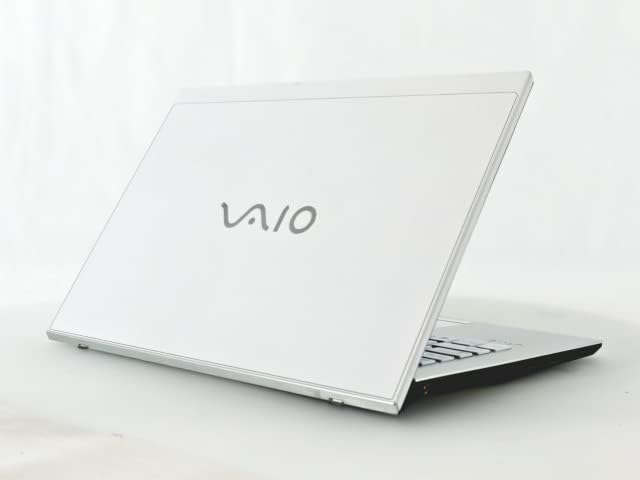
Figure 1: VAIO Pro PF Notebook PC
The VAIO Pro PF is a lightweight and compact mobile notebook designed for productivity. It features an 11.6-inch Full HD display, an Intel 8th Generation Core i5-8250U processor, 8GB of RAM, and a 256GB SSD, running on Windows 11 Pro. The device also includes a backlit keyboard for comfortable typing in various lighting conditions.
2. การตั้งค่า
2.1 การแกะกล่อง
นำส่วนประกอบทั้งหมดออกจากบรรจุภัณฑ์อย่างระมัดระวัง ตรวจสอบให้แน่ใจว่ามีส่วนประกอบต่อไปนี้:
- VAIO Pro PF Notebook PC
- อะแดปเตอร์ AC และสายไฟ
- เอกสารประกอบ (คู่มือนี้, ข้อมูลการรับประกัน)
2.2 การเชื่อมต่อกับแหล่งจ่ายไฟ
Before initial use, connect the AC adapter to the laptop's power input port and then plug the power cord into a wall outlet. Allow the battery to charge fully.
2.3 การเปิดเครื่องครั้งแรกและการตั้งค่า Windows
Press the power button to turn on the laptop. Follow the on-screen instructions to complete the initial Windows 11 Pro setup, including language selection, network connection, and user account creation.
3. Operating Your VAIO Pro PF
3.1 คีย์บอร์ดและทัชแพด
The VAIO Pro PF features a full-sized keyboard with a backlight for improved visibility. The touchpad located below the keyboard supports multi-touch gestures for navigation.

รูปที่ 2: เค้าโครงแป้นพิมพ์และทัชแพด
3.2 การเชื่อมต่ออุปกรณ์ภายนอก
แล็ปท็อปของคุณมีพอร์ตต่างๆ สำหรับเชื่อมต่ออุปกรณ์ภายนอก:
- พอร์ต USB 3.0 (x3): สำหรับเชื่อมต่ออุปกรณ์ USB เช่น ฮาร์ดไดรฟ์ภายนอก เมาส์ หรือคีย์บอร์ด
- พอร์ต HDMI: For connecting to external displays or projectors with HDMI input.
- D-SUB15 (VGA) Port: For connecting to older external displays or projectors with VGA input.
- พอร์ต LAN แบบใช้สาย: For connecting to a wired network using an Ethernet cable.
- แจ็คหูฟัง: สำหรับการเชื่อมต่อหูฟังหรือลำโพงภายนอก
3.3 การเชื่อมต่อแบบไร้สาย
The VAIO Pro PF supports both Wi-Fi and Bluetooth connectivity:
- Wi-Fi (802.11n): To connect to a wireless network, go to Windows Settings > Network & Internet > Wi-Fi, turn Wi-Fi on, and select your desired network.
- บลูทูธ: To connect Bluetooth devices, go to Windows Settings > Bluetooth & devices, turn Bluetooth on, and pair your device.
3.4 การใช้ Web กล้อง
การบูรณาการ web camera can be used for video calls and conferences. Access it through applications like Camera, Microsoft Teams, or Zoom.
4. การบำรุงรักษา
4.1 การทำความสะอาดแล็ปท็อป
To clean the exterior of your laptop, use a soft, lint-free cloth slightly dampened with water or a mild, non-abrasive cleaning solution. Avoid spraying liquids directly onto the device. For the screen, use a specialized screen cleaner.
4.2 การอัปเดตซอฟต์แวร์
Regularly check for and install Windows updates to ensure your system has the latest security patches and performance improvements. Go to Windows Settings > Windows Update.
4.3 การดูแลแบตเตอรี่
To prolong battery life, avoid extreme temperatures and fully discharging the battery frequently. For long-term storage, charge the battery to about 50-70%.
5 การแก้ไขปัญหา
This section addresses common issues you might encounter with your VAIO Pro PF.
| ปัญหา | สารละลาย |
|---|---|
| โน๊ตบุ๊คไม่สามารถเปิดเครื่องได้ | ตรวจสอบให้แน่ใจว่าอะแดปเตอร์ AC เสียบแน่นดีแล้ว และปลั๊กไฟใช้งานได้ ลองกดปุ่มเปิด/ปิดค้างไว้ 10-15 วินาที |
| ปัญหาการเชื่อมต่อ Wi-Fi | Check if Wi-Fi is enabled in Windows Settings. Restart your router and the laptop. Ensure you are within range of the Wi-Fi network. |
| ไฟแบ็คไลท์ของคีย์บอร์ดไม่ทำงาน | Check if the backlight function key (often Fn + F key) is enabled. Adjust brightness settings if available. |
| External display not detected. | Ensure the cable is securely connected to both the laptop and the display. Use Windows display settings to detect or extend displays. Try a different cable or port if available. |
6. ข้อมูลจำเพาะ
| คุณสมบัติ | รายละเอียด |
|---|---|
| ชื่อรุ่น | VAIO Pro PF (VJPF11C11N) |
| ยี่ห้อ | VAIO (Manufacturer: SONY) |
| ขนาดจอแสดงผล | 11.6 นิ้ว |
| ปณิธาน | 1920x1080 พิกเซล (Full HD) |
| ซีพียู | Intel Core i5-8250U (8th Gen, 4 Cores, 8 Threads, 1.6 GHz base, up to 3.4 GHz) |
| แรม | แรม DDR8 4GB |
| พื้นที่จัดเก็บ | 256 GB SSD (โซลิดสเตทไดรฟ์) |
| ระบบปฏิบัติการ | Windows 11 โปร (64 บิต) |
| กราฟฟิก | แบบบูรณา Intel Graphics |
| การเชื่อมต่อแบบไร้สาย | Wi-Fi (802.11n), บลูทูธ |
| พอร์ต | 3x USB 3.0, 1x HDMI, 1x D-SUB15 (VGA), 1x Wired LAN, 1x Headphone Jack |
| Web กล้อง | บูรณาการ |
| แป้นพิมพ์ | แป้นพิมพ์มีไฟแบ็คไลท์ |
| น้ำหนัก | Approx. 0.87 kg (870 g) |
| วันที่พร้อมใช้งานครั้งแรก | 10 พฤษภาคม 2023 |
7. การรับประกันและการสนับสนุน
For information regarding your product's warranty, please refer to the warranty card included with your purchase or visit the official VAIO support website. For technical assistance, driver downloads, or further inquiries, please contact VAIO customer support through their official channels.


