1. บทนำ
This manual provides detailed instructions for the safe and efficient use of your CoolBox TWS-01 Wireless Headphones. Please read this manual thoroughly before using the product and retain it for future reference.
2. สินค้าหมดview
2.1 เนื้อหาบรรจุภัณฑ์
- CoolBox TWS-01 Wireless Headphones (Left and Right)
- เคสชาร์จไฟ
- สายชาร์จ USB-C
- จุกหูฟัง
- คู่มือการใช้งาน
2.2 ส่วนประกอบ
Familiarize yourself with the main components of your CoolBox TWS-01 headphones and charging case.

Image: The CoolBox TWS-01 wireless headphones, white in color, are shown inside their open charging case. The case is also white and has the "CoolBox" logo on the front. This image provides a clear view of both earbuds and the charging case.
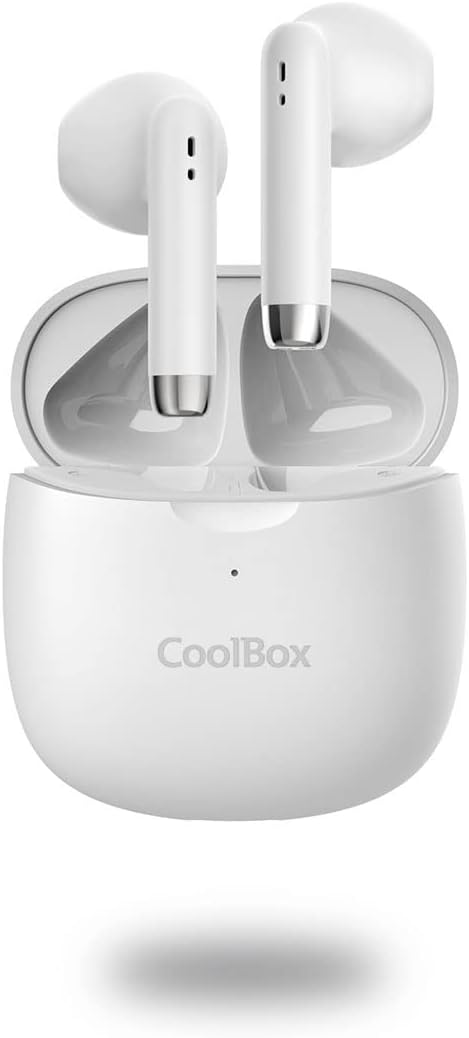
ภาพ: หันหน้าไปทางด้านหน้า view of the CoolBox TWS-01 wireless headphones, nestled within their open charging case. The earbuds are white with silver accents at the bottom of the stems, and the case is white with the CoolBox logo.

Image: A close-up shot of the two CoolBox TWS-01 wireless headphones, showing their individual design with white bodies and silver accents at the bottom of the stems. The ear tips are black.

Image: A graphic displaying the CoolBox TWS-01 wireless headphones against a blue background, highlighting their exceptional sound quality, Bluetooth 5.1 + EDR technology, and up to 10m range.

Image: A graphic illustrating the touch control functionality of the CoolBox TWS-01 wireless headphones, showing concentric circles emanating from the earbud to represent touch interaction for play/pause, volume control, track skipping, and power.
3. การตั้งค่า
3.1 การชาร์จเริ่มต้น
ก่อนใช้งานครั้งแรก ควรชาร์จหูฟังและเคสชาร์จให้เต็ม
- ใส่หูฟังเอียร์บัดทั้งสองข้างลงในกล่องชาร์จ
- เสียบสายชาร์จ USB-C เข้ากับพอร์ตชาร์จบนเคส และเสียบปลายอีกด้านหนึ่งเข้ากับแหล่งจ่ายไฟ USB (เช่น คอมพิวเตอร์ อะแดปเตอร์ติดผนัง)
- The LED indicator on the case will show charging status. A full charge takes approximately 1.5 hours.
3.2 การจับคู่กับอุปกรณ์
To pair your CoolBox TWS-01 headphones with a Bluetooth-enabled device:
- ตรวจสอบให้แน่ใจว่าหูฟังชาร์จไฟเต็มแล้วและอยู่ในกล่องชาร์จ
- Open the charging case. The headphones will automatically enter pairing mode (or manually activate by pressing and holding the touch control area on both earbuds for a few seconds if they don't pair automatically).
- บนอุปกรณ์ของคุณ (สมาร์ทโฟน แท็บเล็ต คอมพิวเตอร์) ไปที่การตั้งค่าบลูทูธ และเปิดบลูทูธ
- ค้นหา available devices. You should see "CoolBox TWS-01" or a similar name appear in the list.
- Select "CoolBox TWS-01" to connect. Once connected, a voice prompt will confirm successful pairing.
- หากการจับคู่ล้มเหลว ให้ปิดบลูทูธบนอุปกรณ์ของคุณ ใส่หูฟังกลับเข้าไปในกล่อง ปิดฝา รอสักครู่ แล้วเปิดฝาและลองใหม่อีกครั้ง
4. คู่มือการใช้งาน
4.1 เปิด/ปิดเครื่อง
- เปิดเครื่อง: Open the charging case, and the earbuds will automatically power on and connect to the last paired device. Alternatively, press and hold the touch control area on both earbuds for 3 seconds.
- หมดแรง: Place the earbuds back into the charging case and close the lid. They will automatically disconnect and power off. Alternatively, press and hold the touch control area on both earbuds for 5 seconds.
4.2 ระบบควบคุมแบบสัมผัส
The CoolBox TWS-01 headphones feature intuitive touch controls:
| การกระทำ | เอียร์บัดข้างซ้าย | เอียร์บัดด้านขวา |
|---|---|---|
| เล่น/หยุดชั่วคราว | แตะเพียงครั้งเดียว | แตะเพียงครั้งเดียว |
| เพลงถัดไป | แตะสองครั้ง | แตะสองครั้ง |
| เพลงก่อนหน้า | แตะสามครั้ง | แตะสามครั้ง |
| เพิ่มระดับเสียง | ไม่มีข้อมูล | กดค้างไว้ |
| ลดระดับเสียง | กดค้างไว้ | ไม่มีข้อมูล |
| รับสาย/วางสาย | แตะเพียงครั้งเดียว | แตะเพียงครั้งเดียว |
| ปฏิเสธการรับสาย | กดค้างไว้ 2 วินาที | กดค้างไว้ 2 วินาที |
| เปิดใช้งานผู้ช่วยเสียง | แตะสี่เท่า | แตะสี่เท่า |
4.3 การชาร์จหูฟัง
Place the earbuds into the charging case. They will automatically begin charging. The LED indicators on the earbuds (if present) or case will indicate charging status. A full charge provides approximately 5 hours of playback.
4.4 การชาร์จเคส
Connect the USB-C cable to the charging port on the case and a power source. The case provides up to 15 hours of additional battery life for the headphones. It takes approximately 1.5 hours to fully charge the case.
5. การบำรุงรักษา
- การทำความสะอาด: ใช้ผ้านุ่ม แห้ง และไม่เป็นขุยทำความสะอาดหูฟังและกล่องชาร์จ ห้ามใช้น้ำยาทำความสะอาดหรือสารละลายที่มีฤทธิ์กัดกร่อน
- พื้นที่จัดเก็บ: เมื่อไม่ใช้งาน ควรเก็บหูฟังไว้ในกล่องชาร์จเพื่อป้องกันความเสียหายและรักษาการชาร์จไฟ
- ความต้านทานน้ำ: These headphones are not water-resistant. Avoid exposure to liquids, moisture, and extreme temperatures.
- การดูแลแบตเตอรี่ To preserve battery life, charge the headphones and case regularly, even if not in frequent use. Avoid fully depleting the battery for extended periods.
6 การแก้ไขปัญหา
| ปัญหา | วิธีแก้ปัญหาที่เป็นไปได้ |
|---|---|
| หูฟังไม่จับคู่ |
|
| เอียร์บัดตัวเดียวเท่านั้นที่ใช้งานได้ |
|
| ไม่มีเสียง |
|
| ปัญหาการชาร์จ |
|
7. ข้อมูลจำเพาะ
| คุณสมบัติ | รายละเอียด |
|---|---|
| หมายเลขรุ่น | COO-AUB-TWS01 |
| เวอร์ชันบลูทูธ | 5.1 + EDR |
| ช่วงสาย | สูงสุด 10 เมตร |
| เวลาการเล่น | 5 hours (headphones), up to 15 hours (with charging case) |
| ระยะเวลาในการชาร์จ (เคส) | 1.5 ชั่วโมง (ชาร์จเต็ม) |
| พอร์ตชาร์จ | ยูเอสบี-ซี |
| น้ำหนัก (ต่อเอียร์บัด) | 4g |
| น้ำหนักรวม (รวมกล่อง) | 44กรัม |
| ช่วงความถี่ | 20 เฮิรตซ์ - 20,000 เฮิรตซ์ |
| อิมพีแดนซ์ | 32 โอห์ม |
| วัสดุ | พลาสติก |
| สี | สีขาว |
| โปรที่เข้ากันได้files | HSP, HFP, A2DP, AVRCP |
8. การรับประกันและการสนับสนุน
CoolBox products are designed for reliability and performance. For warranty information and technical support, please refer to the warranty card included with your purchase or visit the official CoolBox webไซต์นี้ โปรดเก็บหลักฐานการซื้อไว้เพื่อใช้ยืนยันการรับประกัน
For further assistance, you may contact CoolBox customer service through their official channels. Please have your model number (COO-AUB-TWS01) ready when contacting support.