1. สินค้าหมดview
The EPOMAKER Aura75 is a 75% layout mechanical keyboard kit designed for customization and versatile connectivity. It features a compact design, hot-swappable switch sockets, and dynamic RGB backlighting. This kit supports multiple connection modes and is compatible with various operating systems.
คุณสมบัติหลัก:
- 75% เค้าโครง: Optimized for functionality and space efficiency.
- การเชื่อมต่อสามโหมด: รองรับการเชื่อมต่อไร้สาย 2.4GHz, Bluetooth 5.0 และการเชื่อมต่อแบบมีสาย USB-C
- แผงวงจรพิมพ์แบบ Hot-Swappable: Allows for easy installation and removal of 3-pin and 5-pin mechanical switches without soldering.
- ไฟแบ็คไลท์ RGB แบบไดนามิก: Features per-key RGB lighting and unique side lighting effects.
- ปุ่มควบคุมมัลติฟังก์ชั่น: Provides control over volume and RGB brightness.
- การดูดซับเสียง: Equipped with silicone pads and IXPE switch cushioning for a quieter typing experience.
- โครงสร้างทนทาน: Crafted with a robust injection-molded casing and PC plate.
2. คู่มือการติดตั้ง
เนื้อหาแพ็คเกจ:
- EPOMAKER Aura75 Keyboard Kit
- สาย USB-C
- ดองเกิลไร้สาย 2.4GHz
- ตัวดึงกุญแจ
- ตัวดึงสวิตช์
2.1 การติดตั้งสวิตช์และปุ่มกด
The Aura75 is a barebone kit, meaning switches and keycaps are not pre-installed. You will need to install your preferred 3-pin or 5-pin mechanical switches and keycaps.
- Align the pins of your mechanical switch with the hot-swappable socket on the PCB.
- Gently press the switch until it clicks into place. Ensure the pins are straight to avoid bending.
- Repeat for all desired switch positions.
- Place your chosen keycaps onto the installed switches, pressing firmly until they are secure.
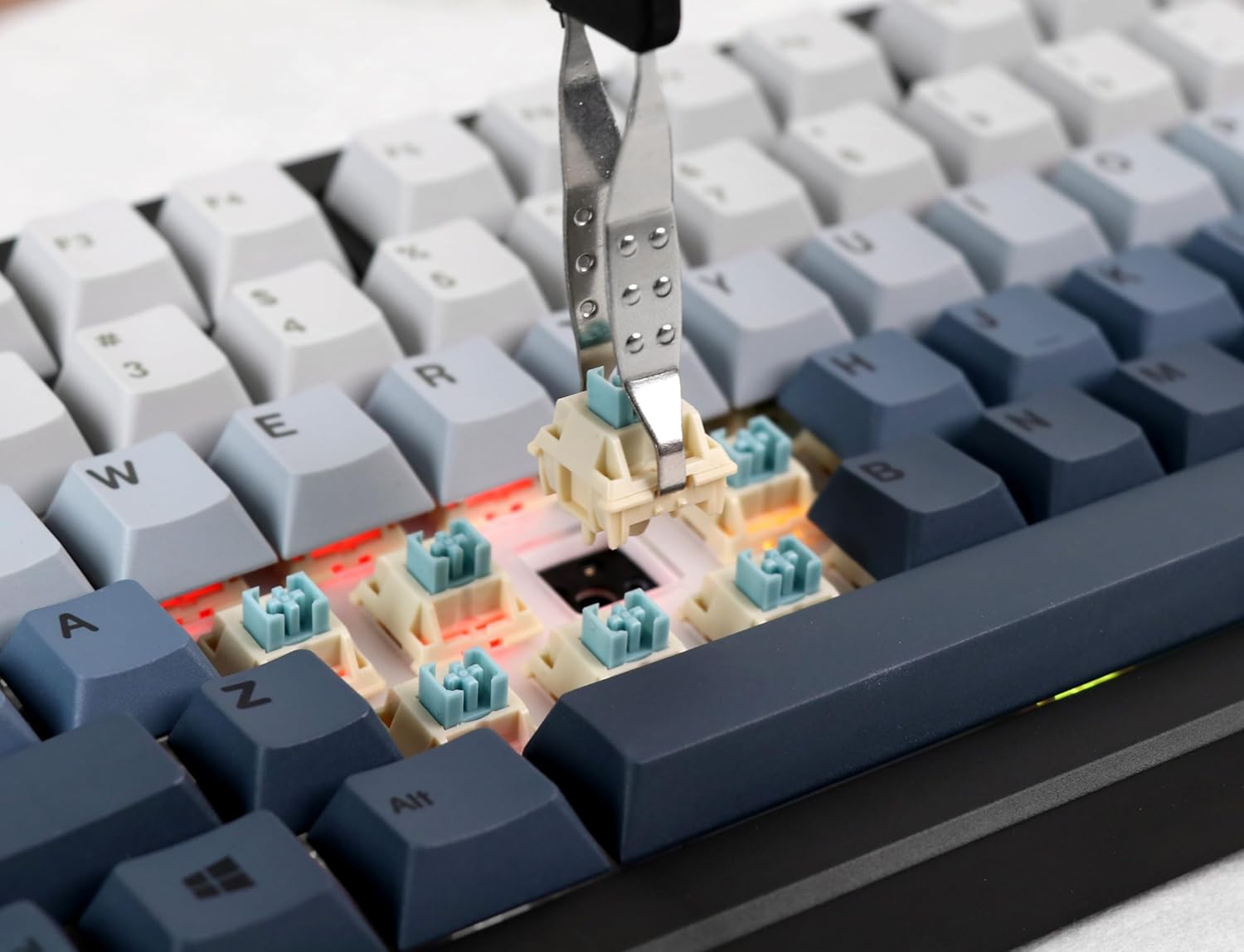
Image: Proper installation of a mechanical switch into the hot-swappable PCB.

Image: The hot-swappable barebone kit featuring south-facing RGB LEDs and tuned plate-mounted stabilizers.
2.2 Connecting the Keyboard:
The Aura75 offers three connectivity options:
- USB-C แบบมีสาย: เชื่อมต่อแป้นพิมพ์โดยตรงกับอุปกรณ์ของคุณโดยใช้สาย USB-C ที่ให้มา
- ไร้สาย 2.4GHz: Insert the 2.4GHz USB dongle into your device. Flip the switch on the back of the keyboard to the 2.4G position.
- Bluetooth 5.0: Flip the switch on the back of the keyboard to the Bluetooth position. Press FN+1/2/3 to enter pairing mode for up to three different devices. The indicator light will flash, then become solid upon successful connection.
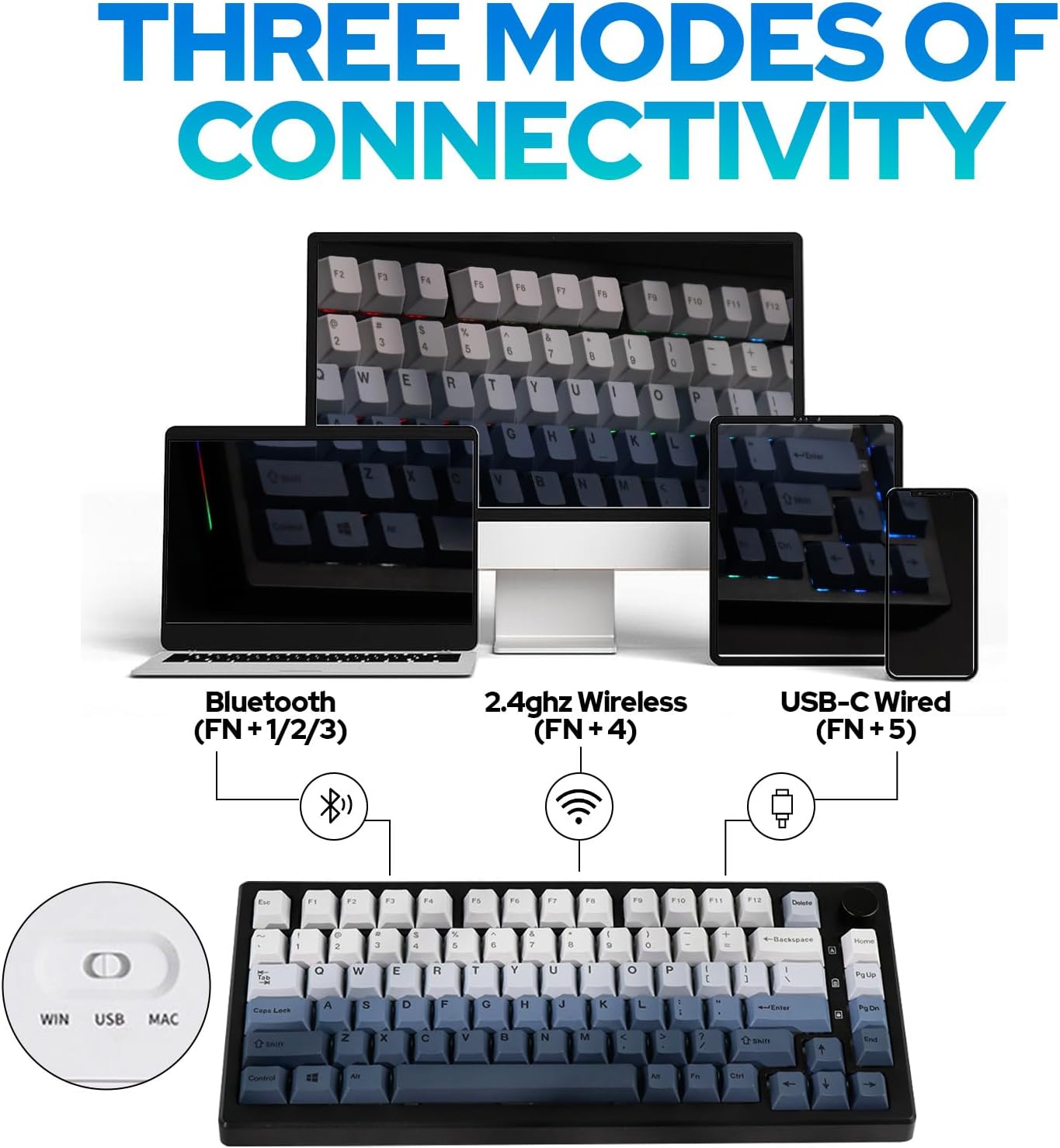
ภาพ: เหนือview of the three connectivity modes: Bluetooth (FN+1/2/3), 2.4GHz Wireless (FN+4), and USB-C Wired (FN+5).

ภาพ: รายละเอียด view of the keyboard's rear, highlighting the connectivity switch, 2.4GHz dongle storage, and USB-C port.
2.3 Adjusting Keyboard Height:
แป้นพิมพ์มีปุ่มสองปุ่มtage adjustable feet on the underside to customize the typing angle for ergonomic comfort.
3. คู่มือการใช้งาน
3.1 RGB Backlight Control:
The Aura75 features extensive RGB lighting options, including per-key and side lighting.
- ฟน + \|: Cycle through different backlight effects (Light Effect 1-20).
- FN + Home/PU: Cycle through different backlight colors/brightness (Light Effect 1-10).
- FN + ล: เปิด/ปิดไฟแบ็คไลท์
- FN + L_Ctrl: Toggle sidelight effect on/off.
- FN + L_Alt: Cycle through sidelight colors.
- FN + Z/X: Adjust sidelight brightness/speed.

ภาพ: แป้นพิมพ์ที่แสดงอยู่asing its RGB backlight and unique side light effects.

Image: FN key combinations for adjusting backlight effects, colors, brightness, and speed.
3.2 Multifunction Knob:
The knob located on the top right of the keyboard serves dual functions:
- หมุน: Adjusts system volume or RGB brightness.
- กด: Toggles between volume control and RGB brightness control.

Image: The multifunction knob, used to switch between volume and RGB brightness adjustments.
3.3 Operating System Mode Switching:
The keyboard supports both Windows and Mac operating systems.
- โหมด Windows: กด FN + ว.
- โหมดแมค: กด FN + อี. If this does not work, try เอฟเอ็น + คิว.
3.4 การเขียนโปรแกรมซอฟต์แวร์:
The EPOMAKER Aura75 is programmable using the dedicated EPOMAKER software. This software allows for:
- การรีแมปคีย์
- การสร้างมาโคร
- Customizing lighting effects
- Setting sleep modes

Image: The EPOMAKER software interface for advanced keyboard customization.
4. การบำรุงรักษา
Regular maintenance helps ensure the longevity and optimal performance of your EPOMAKER Aura75 keyboard.
- การทำความสะอาดคีย์แคป: Use a keycap puller to remove keycaps. Clean them with a mild soap solution and a soft cloth, then air dry completely before reattaching.
- Cleaning the PCB/Switches: Use compressed air to remove dust and debris from between switches. For deeper cleaning, carefully remove switches with a switch puller and clean the PCB with a soft brush.
- การดูแลสายเคเบิล: หลีกเลี่ยงการโค้งงออย่างแรงหรือการดึงสาย USB-C มากเกินไปเพื่อป้องกันความเสียหาย
- การดูแลแบตเตอรี่ For wireless modes, ensure the keyboard is charged regularly. Avoid fully depleting the battery for extended periods.
5 การแก้ไขปัญหา
ปัญหาทั่วไปและวิธีแก้ไข:
- แป้นพิมพ์ไม่ตอบสนอง:
- ตรวจสอบให้แน่ใจว่าคีย์บอร์ดชาร์จแบตเตอรี่เต็มแล้ว หรือเชื่อมต่อผ่านสาย USB-C แล้ว
- Check the connectivity switch on the back of the keyboard (Wired, 2.4G, Bluetooth).
- For 2.4GHz, ensure the dongle is securely inserted.
- สำหรับบลูทูธ ให้ทำการจับคู่ใหม่หากจำเป็น
- Incorrect key functions in Mac OS:
- Ensure the keyboard is set to Mac mode by pressing FN + อี. If this does not resolve the issue, try pressing เอฟเอ็น + คิว.
- RGB lights not working or flickering:
- Check brightness settings using the multifunction knob or FN key combinations.
- ตรวจสอบให้แน่ใจว่าแป้นพิมพ์ไม่ได้อยู่ในสถานะพลังงานต่ำ
- Update keyboard firmware using the EPOMAKER software.
- Accidental key presses (high sensitivity):
- Some users may find the actuation point of certain switches sensitive. Adjust your typing style or consider different switch types if customization is desired.
6. ข้อมูลจำเพาะ
| คุณสมบัติ | รายละเอียด |
|---|---|
| ยี่ห้อ | อีโปเมกเกอร์ |
| หมายเลขรุ่น | ออร่า75 |
| เค้าโครง | 75% |
| เทคโนโลยีการเชื่อมต่อ | 2.4GHz ไร้สาย, บลูทูธ 5.0, USB-C แบบมีสาย |
| อุปกรณ์ที่รองรับ | เครื่องเล่นเกมคอนโซล, แล็ปท็อป, พีซี, สมาร์ทโฟน, แท็บเล็ต |
| คุณสมบัติพิเศษ | Backlit, Ergonomic, Hot-Swappable, Programmable Keys |
| แป้นพิมพ์แบ็คไลท์ | อาร์จีบี |
| วัสดุ | พลาสติก |
| น้ำหนักสินค้า | 2.12 ปอนด์ |
| ขนาดแพ็คเกจ | 14.92 x 8.11 x 1.77 นิ้ว |
| ผู้ผลิต | อีโปเมกเกอร์ |
| มีจำหน่ายครั้งแรก | 6 พฤษภาคม 2023 |
7. การรับประกันและการสนับสนุน
For warranty information and technical support, please refer to the official EPOMAKER webหรือติดต่อฝ่ายบริการลูกค้าโดยตรง เก็บใบเสร็จรับเงินไว้เพื่อใช้ในการเคลมประกัน
Official EPOMAKER Store: Visit EPOMAKER Store
8. แหล่งข้อมูลเพิ่มเติม
วิดีโอผลิตภัณฑ์:
EPOMAKER Sea Salt Switch VS Sea Salt Silent Switch
Video: A comparison between EPOMAKER Sea Salt Switches and Sea Salt Silent Switches, demonstrating their sound and feel differences.
AURA75 Keyboard Kit Typing Sound
Video: Demonstrates the typing sound profile of the AURA75 Keyboard Kit, highlighting its acoustic characteristics.
F75 purple gaming keyboard
วิดีโอ: สั้นๆ สั้นๆview of the F75 keyboard, showcasing its design and RGB lighting in a purple variant.
Typing Video Epomaker AULA F75 Black Pink Gradient
Video: A short typing demonstration on an Epomaker AULA F75 keyboard with a black and pink gradient keycap set.


