การแนะนำ
This user manual provides detailed instructions for the operation and maintenance of your Jensen CD-660 Portable Stereo CD Player Boombox. Please read this manual thoroughly before using the device to ensure proper function and to maximize your listening experience. Keep this manual for future reference.
คำแนะนำด้านความปลอดภัยที่สำคัญ
เพื่อลดความเสี่ยงจากไฟฟ้าช็อต ไฟไหม้ หรือการบาดเจ็บ ควรปฏิบัติตามข้อควรระวังด้านความปลอดภัยพื้นฐานเหล่านี้เสมอ:
- อย่าให้เครื่องนี้โดนฝนหรือความชื้น
- ห้ามปิดกั้นช่องระบายอากาศใดๆ
- ห้ามติดตั้งใกล้แหล่งความร้อน เช่น หม้อน้ำ เครื่องทำความร้อน เตา หรืออุปกรณ์อื่น ๆ (รวมถึง ampเครื่องให้ความร้อน) ที่ผลิตความร้อน
- ปกป้องสายไฟจากการถูกเหยียบหรือถูกหนีบ
- ใช้เฉพาะอุปกรณ์เสริม/สิ่งที่แนบตามที่ผู้ผลิตกำหนดเท่านั้น
- ถอดปลั๊กเครื่องนี้ระหว่างที่เกิดพายุฝนฟ้าคะนองหรือเมื่อไม่ได้ใช้งานเป็นเวลานาน
- ส่งต่อการบริการทั้งหมดไปยังบุคลากรบริการที่มีคุณสมบัติเหมาะสม
เนื้อหาแพ็คเกจ
ตรวจสอบว่ารายการทั้งหมดที่ระบุไว้ด้านล่างนี้รวมอยู่ในแพ็คเกจของคุณ:
- Jensen CD-660 Portable Stereo CD Player Boombox
- อะแดปเตอร์ไฟ (120V)
- คู่มือของเจ้าของ
สินค้าเกินview
Familiarize yourself with the various parts and controls of your Jensen CD-660 boombox.
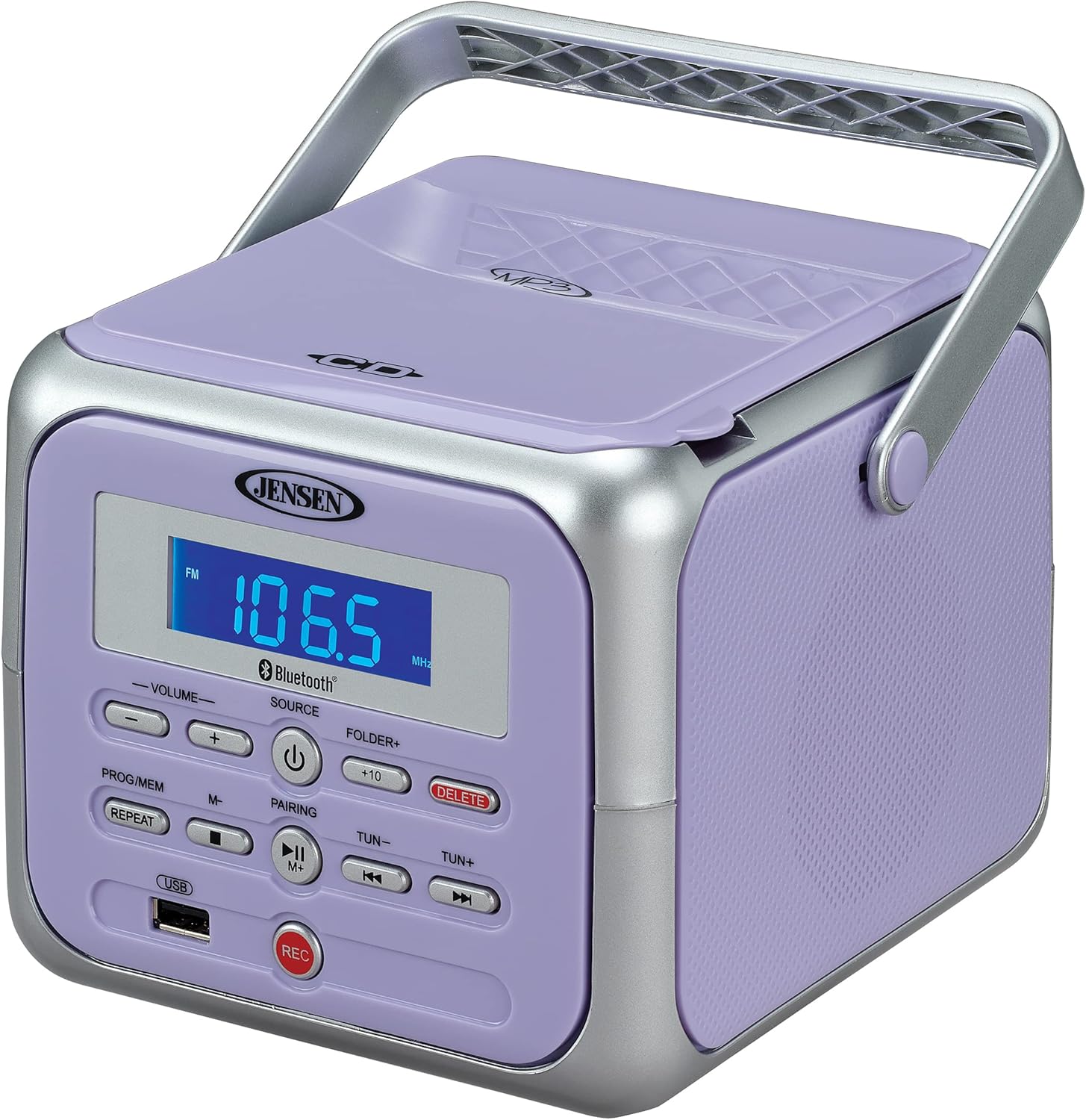
รูปที่ 1 : ด้านหน้า view of the Jensen CD-660 with the carrying handle extended. This image displays the main control panel, including the display screen, volume controls, source selection, and playback buttons.

รูปที่ 2 : ด้านหน้า view of the Jensen CD-660 with the carrying handle folded down. This perspective highlights the compact design and the arrangement of buttons and the LCD display.

รูปที่ 3: ด้านบน view of the Jensen CD-660 with the CD compartment lid open, revealing the CD tray. This illustrates the top-loading mechanism for disc insertion.
คุณสมบัติของแผงควบคุม:
- จอแสดงผล LCD: Shows current mode, track number, frequency, and other information.
- ปุ่มปรับระดับเสียง +/-: ปรับระดับเอาท์พุตเสียง
- ปุ่มแหล่งที่มา: Selects between CD, Bluetooth, FM Radio, and Aux-in modes.
- ปุ่มเพาเวอร์: เปิดหรือปิดเครื่อง
- PROG/MEM Button: Programs CD tracks or stores FM radio presets.
- ปุ่ม REPEAT: เล่นซ้ำแทร็กปัจจุบันหรือทุกแทร็ก
- ปุ่มจับคู่: เริ่มโหมดการจับคู่บลูทูธ
- ปุ่มเล่น/หยุดชั่วคราว: เริ่มหรือหยุดเล่นชั่วคราว
- ปุ่มหยุด: หยุดการเล่น
- SKIP/SEARCH Buttons (◀◀ / ▶▶): ข้ามแทร็กหรือค้นหาภายในแทร็ก
- TUN +/- Buttons: Tunes FM radio frequency.
- FOLDER+ Button: Navigates to the next folder on a USB device.
- ปุ่ม +10: Skips 10 tracks forward on CD/USB.
- ปุ่มลบ: Deletes recorded fileจาก USB
- ปุ่ม REC: เริ่มการบันทึกไปยังแฟลชไดรฟ์ USB
- พอร์ต USB: For USB flash drive playback and recording.
- แจ็ค Aux-in: เชื่อมต่ออุปกรณ์เสียงภายนอก
- แจ็คหูฟัง: สำหรับการฟังส่วนตัว
การตั้งค่า
การจ่ายไฟให้กับหน่วย
The Jensen CD-660 can be powered by either the included AC adapter or batteries.
การทำงานด้วยไฟฟ้ากระแสสลับ:
- Plug the AC adapter into the AC IN jack located on the back of the unit.
- เสียบปลายอีกด้านของอะแดปเตอร์ AC เข้ากับเต้ารับไฟฟ้ากระแสสลับมาตรฐาน 120V
การทำงานของแบตเตอรี่:
For portable use, the unit requires 6 x 'C' (UM-2) batteries (not included).
- เปิดฝาช่องใส่แบตเตอรี่ที่ด้านล่างของตัวเครื่อง
- Insert 6 'C' size batteries, ensuring correct polarity (+/-) as indicated inside the compartment.
- ปิดฝาช่องใส่แบตเตอรี่ให้แน่น
บันทึก: Disconnect the AC adapter when operating on battery power. Remove batteries if the unit will not be used for an extended period.
คำแนะนำการใช้งาน
การดำเนินการทั่วไป:
- กดปุ่ม พลัง ปุ่มเพื่อเปิดเครื่อง
- กดปุ่ม แหล่งที่มา button repeatedly to select your desired mode (CD, Bluetooth, FM, USB, AUX).
- ปรับระดับเสียงโดยใช้ปุ่ม ปริมาณ +/- ปุ่ม
การเล่นซีดี:
The unit supports CD, CD-R/RW, MP3, and WMA disc formats.
- เปิดฝาช่องใส่ซีดี
- วางแผ่นซีดีโดยให้ด้านที่มีฉลากหงายขึ้นบนแกนหมุน
- ปิดฝาช่องใส่ซีดี
- กดปุ่ม แหล่งที่มา ปุ่มเพื่อเลือกโหมดซีดี
- กดปุ่ม เล่น/หยุดชั่วคราว ปุ่มเพื่อเริ่มเล่น
- ใช้ ข้าม/ค้นหา buttons (◀◀ / ▶▶) to navigate tracks.
- กดปุ่ม หยุด ปุ่มเพื่อหยุดเล่น
การทำงานของบลูทูธ:
สตรีมเสียงแบบไร้สายจากอุปกรณ์ที่รองรับบลูทูธของคุณ
- กดปุ่ม แหล่งที่มา button to select Bluetooth mode. The display will show "BT" and flash, indicating pairing mode.
- บนอุปกรณ์ Bluetooth ของคุณ ให้เปิดใช้งาน Bluetooth และค้นหาอุปกรณ์ที่พร้อมใช้งาน
- Select "JENSEN CD-660" from the list of devices.
- Once paired, the display will stop flashing and show "BT".
- Start playing audio on your connected device.
- ใช้ เล่น/หยุดชั่วคราว และ ข้าม/ค้นหา buttons on the boombox or your device to control playback.
วิทยุ FM:
ฟังสถานีวิทยุ FM ที่คุณชื่นชอบ
- กดปุ่ม แหล่งที่มา ปุ่มเพื่อเลือกโหมดวิทยุ FM
- Extend the FM wire antenna for optimal reception.
- กดปุ่ม TUN +/- ปุ่มสำหรับปรับจูนสถานีด้วยตนเอง
- กดปุ่มค้างไว้ TUN +/- ปุ่มสำหรับสแกนอัตโนมัติไปยังสถานีที่ว่างถัดไป
Storing and Recalling Presets:
The unit can store up to 30 FM presets.
- ปรับไปยังสถานี FM ที่ต้องการ
- กดปุ่ม PROG/เมม button. The display will show a flashing preset number.
- ใช้ ข้าม/ค้นหา buttons (◀◀ / ▶▶) to select the desired preset number.
- กดปุ่ม PROG/เมม กดปุ่มอีกครั้งเพื่อยืนยันและบันทึกสถานี
- To recall a preset, press the PROG/เมม กดปุ่มซ้ำๆ เพื่อวนดูสถานีที่บันทึกไว้
การเล่น USB:
Play MP3, WAV, or FLAC audio fileจากแฟลชไดรฟ์ USB
- ใส่แฟลชไดรฟ์ USB เข้ากับพอร์ต USB
- กดปุ่ม แหล่งที่มา ปุ่มเพื่อเลือกโหมด USB
- เครื่องจะเริ่มเล่นไฟล์เสียงที่เข้ากันได้ไฟล์แรกโดยอัตโนมัติ file.
- ใช้ ข้าม/ค้นหา buttons (◀◀ / ▶▶) to navigate tracks.
- ใช้ โฟลเดอร์+ button to navigate between folders on the USB drive.
- การ +10 button can be used to skip 10 tracks forward.
การบันทึก USB:
Record audio directly to a USB flash drive from CD, FM Radio, Aux-in, or Bluetooth sources.
- ใส่แฟลชไดรฟ์ USB เข้ากับพอร์ต USB
- Select the desired audio source (CD, FM, AUX, or Bluetooth).
- Start playback of the audio you wish to record.
- กดปุ่ม บันทึก button to begin recording. The display will indicate recording status.
- กดปุ่ม บันทึก ปุ่มอีกครั้งเพื่อหยุดการบันทึก
- หากต้องการลบบันทึก file, นำทางไปที่ file in USB playback mode and press the ลบ ปุ่ม.
ช่องต่อ Aux-in:
Connect external audio devices like smartphones or tablets.
- Connect one end of a 3.5mm audio cable (not included) to the Aux-in jack on the boombox.
- ต่อปลายอีกด้านของสายเคเบิลเข้ากับช่องเสียบหูฟังหรือช่องสัญญาณเสียงออกของอุปกรณ์ภายนอกของคุณ
- กดปุ่ม แหล่งที่มา button to select Aux-in mode.
- เริ่มเล่นไฟล์เสียงจากอุปกรณ์ภายนอกของคุณ
- Adjust the volume on both the boombox and your external device for optimal sound.
การซ่อมบำรุง
การทำความสะอาดหน่วย:
- เช็ดด้านนอกของตัวเครื่องด้วยผ้านุ่มdamp ผ้า ห้ามใช้สารทำความสะอาดที่มีฤทธิ์กัดกร่อนหรือตัวทำละลาย
- สำหรับเลนส์ซีดี ให้ใช้แผ่นทำความสะอาดเลนส์ซีดีโดยเฉพาะ
การดูแลแบตเตอรี่
- ถอดแบตเตอรี่ออกหากจะไม่ได้ใช้งานเครื่องเป็นเวลานานเพื่อป้องกันการรั่วไหล
- อย่าใช้แบตเตอรี่เก่าและใหม่ผสมกัน หรือแบตเตอรี่ประเภทต่างๆ
การแก้ไขปัญหา
If you encounter issues with your Jensen CD-660, refer to the following table for common problems and solutions.
| ปัญหา | สาเหตุที่เป็นไปได้ | สารละลาย |
|---|---|---|
| ไม่มีไฟฟ้า | อะแดปเตอร์ไฟไม่ได้เชื่อมต่อ; แบตเตอรี่หมดหรือใส่ไม่ถูกต้อง | Ensure AC adapter is securely plugged in; Replace batteries or check polarity. |
| ไม่มีเสียง | ระดับเสียงเบาเกินไป; เลือกแหล่งสัญญาณไม่ถูกต้อง; เสียบหูฟังอยู่ | Increase volume; Select correct source; Disconnect headphones. |
| ซีดีไม่เล่น | CD inserted incorrectly; Disc is dirty or scratched; CD compartment not closed. | Insert CD with label side up; Clean or replace disc; Close compartment securely. |
| การจับคู่บลูทูธล้มเหลว | Device too far; Bluetooth not enabled on external device; Boombox not in pairing mode. | Move device closer; Enable Bluetooth; Ensure boombox is in BT pairing mode. |
| การรับสัญญาณ FM ไม่ดี | เสาอากาศไม่ยืดออก สัญญาณอ่อน | Fully extend the FM wire antenna; Reposition the unit for better reception. |
| ปัญหาการเล่นไฟล์ผ่าน USB | ไม่ได้รับการสนับสนุน file format; USB drive not properly inserted or corrupted. | ทำให้มั่นใจ files are MP3/WAV/FLAC; Reinsert USB drive; Try a different USB drive. |
ข้อมูลจำเพาะ
| คุณสมบัติ | รายละเอียด |
|---|---|
| หมายเลขรุ่น | ซีดี-660 |
| แหล่งพลังงาน | AC 120V (included adapter) or 6 x 'C' (UM-2) batteries (not included) |
| การเชื่อมต่อ | Bluetooth 5.1 (A2DP, AVRCP), USB, Aux-in |
| ความเข้ากันได้ของซีดี | ซีดี, ซีดี-อาร์/อาร์ดับเบิลยู, เอ็มพี3, ดับเบิลยูเอ็มเอ |
| การเล่นผ่าน USB | MP3,WAV,FLAC |
| วิทยุเอฟเอ็ม | Stereo Receiver with 30 Presets, PLL Digital Tuning |
| ขนาด (กว้าง x สูง x ลึก) | 6.38" x 5.2" x 6.57" (16.2 ซม. x 13.2 ซม. x 16.7 ซม.) |
| น้ำหนัก | ประมาณ 2.46 ปอนด์ (1.12 กก.) |
การรับประกันและการสนับสนุน
This Jensen CD-660 Portable Stereo CD Player Boombox comes with a manufacturer's warranty. Please refer to the included Owner's Manual for specific details regarding warranty coverage, terms, and conditions. For technical support or service inquiries, please contact Jensen customer service directly. Contact information can typically be found in the Owner's Manual or on the official Jensen webเว็บไซต์.


