Keychron Q6P-M1

คู่มือผู้ใช้คีย์บอร์ดเชิงกลแบบกำหนดเอง Keychron Q6 Pro ตัวเรือนอะลูมิเนียมทั้งตัว

Model: Q6P-M1

1. บทนำ

Welcome to the user manual for your Keychron Q6 Pro Full Aluminum QMK/VIA Programmable Knob Bluetooth Custom Mechanical Keyboard. This keyboard is designed to provide an exceptional typing experience with its full-size layout, durable aluminum body, and advanced customization options. It features hot-swappable Keychron K Pro Red mechanical switches, KSA double-shot PBT keycaps, a double-gasket design, screw-in stabilizers, and south-facing RGB backlighting.

The Q6 Pro offers both wireless (Bluetooth 5.1) and wired (USB Type-C) connectivity, making it versatile for various devices including laptops, phones, and tablets. Its QMK/VIA compatibility allows for extensive key remapping and macro creation, powered by an ultra-low-power ARM Cortex-M4 32-bit STM32L432 chip.

Keychron Q6 Pro keyboard with red switch detail

Image 1.1: Keychron Q6 Pro Full Aluminum Custom Mechanical Keyboard with a close-up of a red switch.

2. เนื้อหาบรรจุภัณฑ์

โปรดตรวจสอบว่าสินค้าทั้งหมดมีอยู่ในแพ็คเกจของคุณ:

  • 1x แป้นพิมพ์ที่ประกอบเสร็จสมบูรณ์
  • 1x เคสอลูมิเนียม
  • 1x แผ่นวงจรพิมพ์ (PCB)
  • 1x แผ่นพีซี
  • 1x โฟมดูดซับเสียง
  • 1x เคส โฟม
  • ปะเก็น 16x (ติดตั้งแล้ว 12 ชิ้นและในกล่อง 4 ชิ้น)
  • 8 ชุด x สเตบิไลเซอร์
  • 1 set x Keycaps (Double-Shot KSA PBT)
  • 1 ชุด x สวิตช์
  • สายเคเบิล Type-C ถึง Type-C 1 เส้น
  • 1x อะแดปเตอร์ Type-A ถึง Type-C
  • ตัวดึงสวิตช์ 1x
  • 1x ที่ดึงปุ่มกด
  • ไขควง 1x
  • คีย์ Hex 1x
Diagram showing contents of the Keychron Q6 Pro package

Image 2.1: Visual representation of the Keychron Q6 Pro package contents, including the keyboard, cables, and tools.

3. การตั้งค่า

3.1 การชาร์จเริ่มต้น

Before first use, it is recommended to fully charge the keyboard. Connect the provided USB Type-C cable to the keyboard's Type-C port and the other end to a USB power source (e.g., computer, wall adapter). The keyboard contains a 4000 mAh rechargeable Li-polymer battery.

3.2 การเชื่อมต่อแบบมีสาย

To use the keyboard in wired mode, connect the USB Type-C cable from the keyboard to your computer. The keyboard will automatically detect the wired connection. The polling rate in wired mode is 1000 Hz.

3.3 การเชื่อมต่อไร้สายบลูทูธ

The Q6 Pro can connect to up to 3 devices wirelessly via Bluetooth 5.1.

  1. ตรวจสอบให้แน่ใจว่าแป้นพิมพ์มีประจุไฟแล้ว
  2. Toggle the switch on the back of the keyboard to the Bluetooth (BT) mode.
  3. บนอุปกรณ์ของคุณ (แล็ปท็อป โทรศัพท์ แท็บเล็ต) เปิดใช้งานบลูทูธและค้นหาอุปกรณ์ที่ใช้งานได้
  4. Select "Keychron Q6 Pro" from the list of devices.
  5. หากได้รับแจ้ง ให้ป้อนรหัสการจับคู่ที่ปรากฏบนหน้าจอของคุณ
  6. To switch between paired devices, use the designated function keys (refer to the keyboard layout or QMK/VIA software for specific key combinations). The polling rate in wireless mode is 90 Hz.
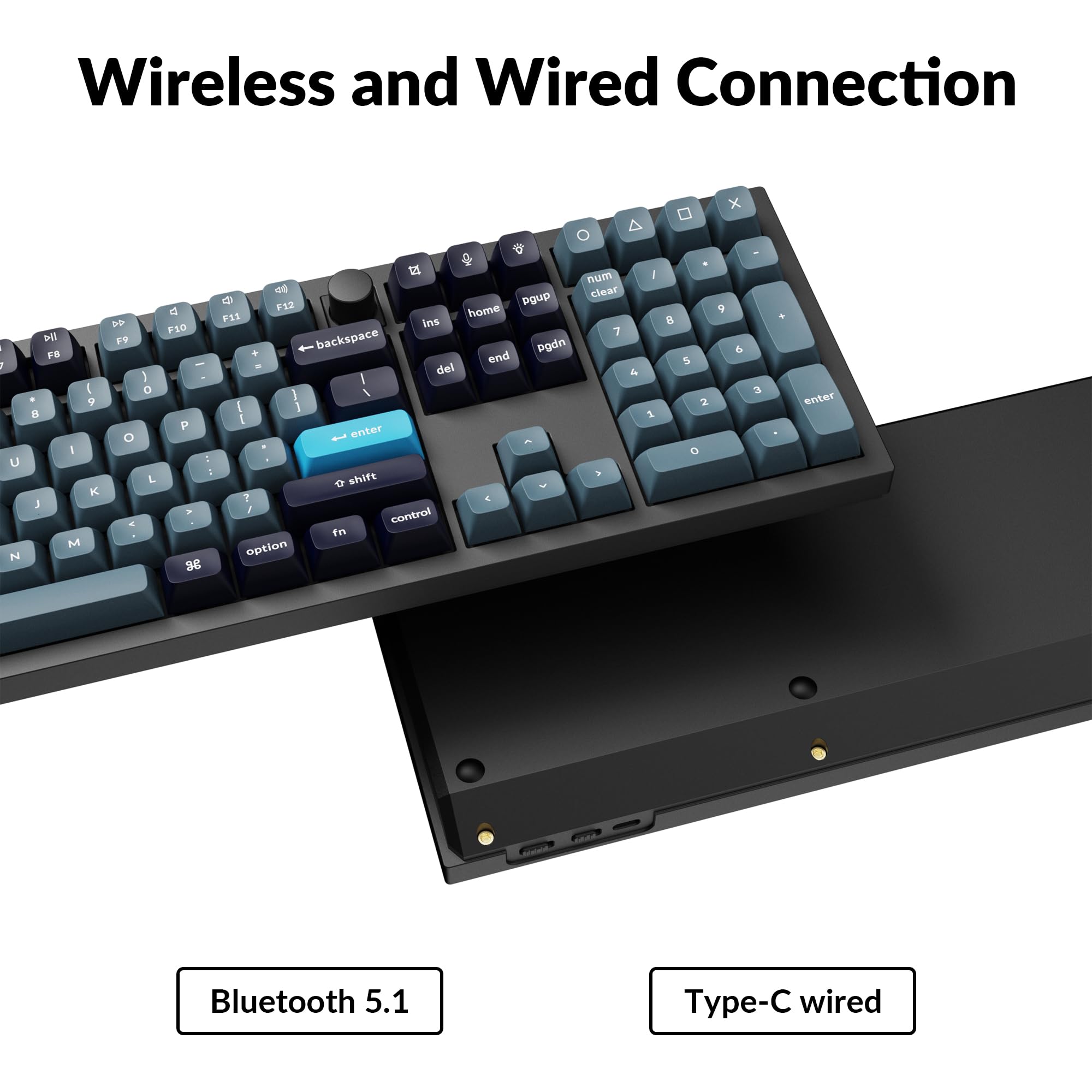
Close-up of Keychron Q6 Pro's USB-C port and wireless switch

Image 3.1: The USB Type-C port and the wireless/wired mode switch on the Keychron Q6 Pro keyboard.

3.4 สวิตช์ระบบปฏิบัติการ

The keyboard is compatible with both Mac and Windows operating systems. Use the OS switch located on the back of the keyboard to select the appropriate mode for your system. This ensures correct key mapping for modifier keys like Command/Alt.

4. คู่มือการใช้งาน

4.1 การปรับแต่ง QMK/VIA

The Keychron Q6 Pro supports QMK/VIA firmware, allowing extensive customization of key functions, macros, and lighting effects. To use VIA:

  1. ดาวน์โหลดซอฟต์แวร์ VIA จากเว็บไซต์ทางการของ Keychron webงาน (www.keychron.com/pages/qmk-via).
  2. Connect your keyboard to your computer via the USB Type-C cable.
  3. Launch the VIA application. The software should automatically detect your Q6 Pro keyboard.
  4. You can now remap any key, create complex macros, and customize lighting settings across multiple layers.
ภาพหน้าจอของอินเทอร์เฟซซอฟต์แวร์ VIA สำหรับการปรับแต่งแป้นพิมพ์

Image 4.1: The VIA software interface demonstrating key remapping and layer management.

4.2 RGB แบ็คไลท์

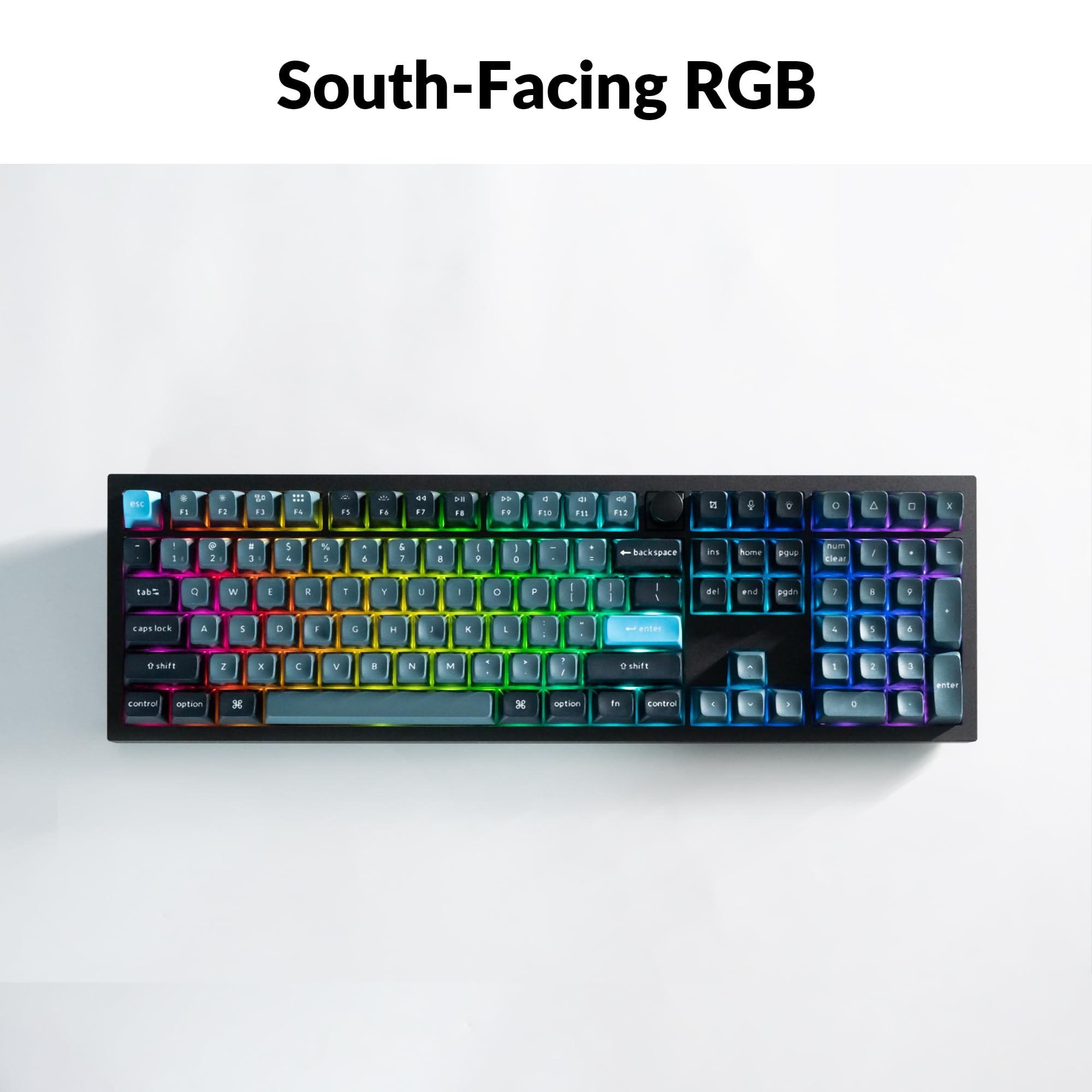
The Q6 Pro features south-facing RGB backlighting with 22 types of preset effects. You can adjust the RGB hue, saturation, brightness, and effect speed directly on the keyboard using specific key combinations (refer to the keyboard's default layout or VIA software for details). These settings can also be remapped via QMK/VIA.

Keychron Q6 Pro keyboard displaying vibrant RGB backlighting

Image 4.2: The Keychron Q6 Pro keyboard illuminated with south-facing RGB backlighting.

4.3 ปุ่มหมุนตั้งโปรแกรมได้

The integrated programmable knob typically controls volume by default (turn to adjust, press to mute/unmute). Its function can be fully customized using the QMK/VIA software to perform other actions such as scrolling, zooming, or switching applications.

5. การบำรุงรักษา

5.1 การทำความสะอาดแป้นพิมพ์

เพื่อรักษาประสิทธิภาพและรูปลักษณ์ที่เหมาะสม ควรทำความสะอาดแป้นพิมพ์ของคุณเป็นประจำ:

5.2 สวิตช์แบบถอดเปลี่ยนได้ขณะทำงาน

The Q6 Pro features hot-swappable sockets, allowing you to change switches without soldering. It is compatible with most 3-pin and 5-pin MX-style mechanical switches.

  1. ถอด Keycap: ใช้เครื่องมือถอดคีย์แคปเพื่อถอดคีย์แคปที่ต้องการออกอย่างเบามือ
  2. ถอดสวิตช์: ใช้เครื่องมือถอดสวิตช์จับที่คลิปด้านบนและด้านล่างของสวิตช์อย่างระมัดระวัง แล้วดึงขึ้นตรงๆ
  3. ติดตั้งสวิตช์ใหม่: Align the pins of the new switch with the holes on the PCB. Ensure the pins are straight to avoid bending. Press the switch firmly until it clicks into place.
  4. ติดฝาครอบปุ่มกลับเข้าไป: Place the keycap onto the new switch stem and press down gently.

Always ensure the keyboard is disconnected from power before hot-swapping switches to prevent damage.

Close-up of hot-swappable switches on the Keychron Q6 Pro keyboard

Image 5.1: Demonstrating the hot-swappable feature of the Keychron Q6 Pro, showing switches being removed and inserted.

6 การแก้ไขปัญหา

6.1 แป้นพิมพ์ไม่ตอบสนอง

6.2 ปัญหาการเชื่อมต่อบลูทูธ

6.3 คีย์ไม่ลงทะเบียนหรือพิมพ์ซ้ำ

6.4 ไฟแบ็คไลท์ RGB ไม่ทำงาน

7. ข้อมูลจำเพาะ

Table of Keychron Q6 Pro technical specifications

Image 7.1: Detailed technical specifications for the Keychron Q6 Pro keyboard.

Keychron Q6 Pro Technical Specifications
คุณสมบัติรายละเอียด
แบบอย่างQ6P-M1
ขนาด (กว้าง x ยาว x สูง)17.56 x 5.39 x 1.28 นิ้ว (446 x 137 x 32.6 มม.)
น้ำหนัก6.69 ปอนด์ (3034 กรัม)
วัสดุตัวเครื่องFull CNC machined aluminum
ปุ่มกดKSA double-shot PBT (not shine-through)
สวิตซ์Keychron K Pro Red Mechanical Switches (Hot-swappable)
แสงไฟแบ็คไลท์South-facing RGB LED
การเชื่อมต่อBluetooth 5.1 / USB Type-C wired
อัตราการสำรวจความคิดเห็น1000 Hz (wired) / 90 Hz (wireless)
แบตเตอรี่4000 mAh Rechargeable Li-polymer battery
Battery Life (Backlight off)นานถึง 300 ชั่วโมง
Battery Life (RGB)ใช้งานได้นานสูงสุด 100 ชั่วโมง (ความสว่างต่ำสุด)
ระบบที่เข้ากันได้macOS/วินโดวส์/ลินุกซ์
มหาเทพUltra-low-power ARM Cortex-M4 32-bit STM32L432 (128KB Flash)
การพลิกแป้น N-Key (NKRO)Yes (both wireless and wired modes)
สภาพแวดล้อมการทำงาน-10 ถึง 50°C

8. การรับประกันและการสนับสนุน

Keychron products are manufactured with high-quality standards. For warranty information, technical support, or to access additional resources (such as firmware updates or VIA keymap files), please visit the official Keychron webเว็บไซต์:

www.keychron.com

คุณอาจพิจารณาซื้อasing extended protection plans for your device. Details on available protection plans can be found where you purchased the product or through authorized retailers.

เอกสารที่เกี่ยวข้อง - Q6P-M1

พรีview คีย์บอร์ดเชิงกลบลูทูธ Keychron Q2 Pro: คู่มือผู้ใช้ การตั้งค่า และคุณสมบัติ
คู่มือฉบับสมบูรณ์สำหรับคีย์บอร์ดเชิงกลบลูทูธ Keychron Q2 Pro เรียนรู้เกี่ยวกับคุณสมบัติ การตั้งค่า การแมปปุ่ม VIA เลเยอร์ การเชื่อมต่อ การแก้ไขปัญหา ข้อมูลจำเพาะ และข้อมูลด้านความปลอดภัย
พรีview คู่มือเริ่มต้นใช้งานอย่างรวดเร็วสำหรับ Keychron C2 Pro: การตั้งค่า ซอฟต์แวร์ VIA และการปรับแต่ง
คู่มือเริ่มต้นใช้งานฉบับย่อที่ครอบคลุมสำหรับคีย์บอร์ดเชิงกล Keychron C2 Pro ครอบคลุมถึงการสลับระบบ การตั้งค่าซอฟต์แวร์ VIA การแมปปุ่มใหม่ การปรับแสงไฟ และขั้นตอนการรีเซ็ตเป็นค่าจากโรงงาน
พรีview คู่มือการใช้งานและคำแนะนำสำหรับคีย์บอร์ดเชิงกลบลูทูธ Keychron Q5 Pro
คู่มือการใช้งานฉบับสมบูรณ์สำหรับคีย์บอร์ดเชิงกลบลูทูธ Keychron Q5 Pro ครอบคลุมการตั้งค่า การเชื่อมต่อ การปรับแต่งด้วยซอฟต์แวร์ VIA การควบคุมแสงไฟ การแก้ไขปัญหา และข้อมูลจำเพาะ
พรีview คู่มือเริ่มต้นใช้งานอย่างรวดเร็วสำหรับคีย์บอร์ดเชิงกลไร้สาย Keychron K2 Pro QMK/VIA
คู่มือเริ่มต้นใช้งานฉบับย่อสำหรับคีย์บอร์ดเชิงกลไร้สาย Keychron K2 Pro QMK/VIA ครอบคลุมการเชื่อมต่อบลูทูธและแบบใช้สาย การตั้งค่าปุ่มใหม่ด้วยซอฟต์แวร์ VIA การควบคุมไฟแบ็คไลท์ การรับประกัน และการรีเซ็ตเป็นค่าจากโรงงาน
พรีview คู่มือผู้ใช้และคำแนะนำเกี่ยวกับคีย์บอร์ดเชิงกล Bluetooth Keychron K2 Pro
คู่มือการใช้งานฉบับสมบูรณ์สำหรับคีย์บอร์ดเชิงกลบลูทูธ Keychron K2 Pro คู่มือนี้ครอบคลุมถึงการตั้งค่า การเชื่อมต่อ (บลูทูธและแบบมีสาย) การปรับแต่งแผนผังปุ่มด้วยซอฟต์แวร์ VIA การจัดการเลเยอร์ การควบคุมแสงไฟ การแก้ไขปัญหา ข้อมูลจำเพาะ และข้อควรระวังด้านความปลอดภัย
พรีview คู่มือผู้ใช้คีย์บอร์ดเชิงกลไร้สาย Keychron K10 เวอร์ชัน 2
เอกสารนี้เป็นคู่มือการใช้งานฉบับสมบูรณ์สำหรับคีย์บอร์ดเชิงกลไร้สาย Keychron K10 เวอร์ชัน 2 ครอบคลุมการตั้งค่า คุณสมบัติ การแก้ไขปัญหา และข้อมูลจำเพาะ เรียนรู้วิธีการเชื่อมต่อผ่านบลูทูธหรือแบบมีสาย ปรับแต่งแสงไฟด้านหลัง จัดการเลเยอร์ และใช้งานแอป Keychron Launcher