Ctronics 4K 5G Wi-Fi Outdoor Security Camera User Manual
Model: CTSC-5S
1. สินค้าหมดview
The Ctronics 4K 5G Wi-Fi Outdoor Security Camera (Model: CTSC-5S) is an advanced surveillance solution designed for comprehensive outdoor monitoring. Featuring an 8-megapixel sensor, it delivers stunning 4K (3840x2160) ultra-high-definition video, ensuring clear and detailed footage. This camera supports both 2.4GHz and 5GHz Wi-Fi bands for stable and high-speed connectivity, minimizing interference and ensuring reliable operation.
Equipped with intelligent detection capabilities, it can accurately identify and track humans, vehicles, and even pets, providing precise alerts and reducing false alarms. Its 360-degree pan and tilt functionality allows for extensive coverage without blind spots. The camera also boasts versatile night vision modes, including full-color night vision and smart mode, ensuring visibility in low-light conditions. With support for various storage options and remote access via the Ctronics app, this camera offers robust security and peace of mind.

Figure 1.1: Ctronics 4K 5G Wi-Fi Outdoor Security Camera (Model: CTSC-5S)
2. เนื้อหาบรรจุภัณฑ์
Please check the package contents carefully. If any items are missing or damaged, please contact Ctronics customer support.
- Ctronics 4K 5G Wi-Fi Outdoor Security Camera
- อะแดปเตอร์แปลงไฟ
- ชุดสกรูยึด
- ชุดกันน้ำ
- สาย LAN
- Anti-theft Sticker
- คู่มือการใช้งาน
3. คู่มือการติดตั้ง
3.1 การติดตั้งทางกายภาพ
The camera is designed for wall-mounted outdoor use. Choose a suitable location that provides optimal viewing angles and is within Wi-Fi range. Ensure the mounting surface is sturdy enough to support the camera's weight.
- เตรียมพื้นผิวการติดตั้ง: Use the provided mounting template (if included) or mark the drill holes based on the camera's base.
- เจาะรู: Drill pilot holes into the marked positions. Insert wall anchors if mounting on masonry or concrete.
- รักษาความปลอดภัยกล้อง: Attach the camera base to the wall using the provided screws. Ensure it is firmly secured.
- เชื่อมต่อพลังงาน: Connect the power adapter to the camera and plug it into a power outlet. Ensure the connection is waterproof using the provided kit for outdoor installations.

Figure 3.1: The camera features IP66 weather resistance, suitable for outdoor installation and capable of withstanding various weather conditions.
3.2 การดาวน์โหลดแอปและการเชื่อมต่อ
To set up and manage your camera, download the Ctronics app on your smartphone or tablet.
- ดาวน์โหลดแอป: ค้นหา "Ctronics" or "Ctronics Pro" in the App Store (iOS) or Google Play Store (Android) and install it.
- ลงทะเบียนบัญชี: เปิดแอปพลิเคชันและทำตามคำแนะนำบนหน้าจอเพื่อลงทะเบียนบัญชีใหม่ หรือเข้าสู่ระบบหากคุณมีบัญชีอยู่แล้ว
- เพิ่มกล้อง: Tap the "+" icon to add a new device. Select "Wi-Fi Camera" and choose your Wi-Fi network (supports 2.4GHz and 5GHz).
- สแกนรหัส QR: The app will display a QR code. Hold your phone in front of the camera lens (approx. 15-20 cm) until you hear a prompt sound from the camera, indicating successful scanning.
- เชื่อมต่อกับ Wi-Fi: Follow the app's instructions to connect the camera to your Wi-Fi network. Once connected, the camera will appear in your device list.

Figure 3.2: Step-by-step guide for connecting the camera using the Ctronics app, including QR code scanning.
4. คู่มือการใช้งาน
4.1 สด View และการควบคุมแพน/เอียง
Once connected, you can access the live feed from your camera and control its movement.
- เข้าถึงสด View: Open the Ctronics app and select your camera from the device list to view การถ่ายทอดสดวิดีโอแบบเรียลไทม์
- การควบคุมการหมุน/เอียง: ไลฟ์สด view screen, swipe your finger across the video to pan (horizontal movement up to 355°) and tilt (vertical movement up to 90°) the camera.
- ซูมดิจิตอล: Pinch in or out on the live view screen to digitally zoom in or out on the image.

Figure 4.1: The camera offers 360-degree pan and tilt functionality for comprehensive area coverage.
4.2 เสียงสองทาง
กล้องรองรับการสื่อสารด้วยเสียงสองทาง ทำให้คุณสามารถฟังและพูดผ่านกล้องได้
- เปิดใช้งานไมโครโฟน: ไลฟ์สด view screen, tap the microphone icon to enable two-way audio.
- พูด: Hold down the microphone button to speak. Release it to listen.

Figure 4.2: Engage in real-time two-way conversations through the camera, useful for communicating with visitors or deterring intruders.
4.3 การบันทึกการเล่น
Review บันทึกเสียงฟูtage stored on the MicroSD card or connected NVR/NAS.
- การเข้าถึงการเล่น: From the app's main screen, select your camera and tap the "Playback" or "History" icon.
- เลือกวันที่/เวลา: Use the calendar and timeline to select the desired recording date and time.
- ดาวน์โหลด Footage: You can download specific video clips to your phone's local storage.

รูปที่ 4.3: View live feeds from multiple cameras simultaneously on your smartphone for comprehensive monitoring.
5. คุณสมบัติขั้นสูง
5.1 4K Resolution and Digital Zoom
The camera captures video in stunning 4K (3840x2160) resolution, providing exceptional clarity. The 4x digital zoom allows you to magnify specific areas of the image for closer inspection without significant loss of detail, unlike lower resolution cameras.
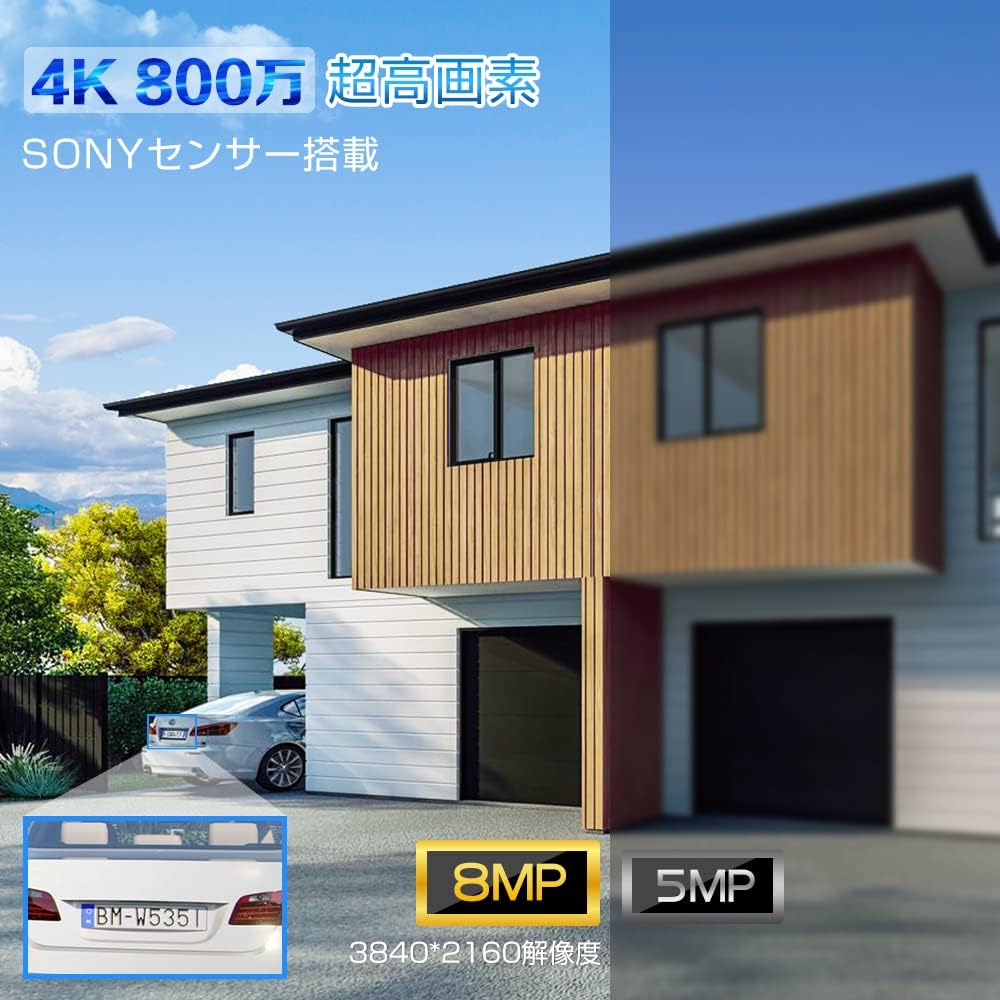
Figure 5.1: Visual comparison demonstrating the superior clarity of 4K 8MP resolution compared to lower resolutions, highlighting details like vehicle license plates.
5.2 Human, Vehicle, and Pet Detection with Auto-Tracking
Beyond basic motion detection, this camera features advanced AI-powered recognition for humans, vehicles, and pets. When a detected object enters the surveillance area, the camera can automatically track its movement, ensuring continuous monitoring.
- การตรวจจับของมนุษย์: Identifies human figures, reducing false alarms from swaying trees or small animals.
- การตรวจจับยานพาหนะ: Specifically recognizes vehicles, useful for monitoring driveways or parking areas.
- Pet Recognition: แยกแยะสัตว์เลี้ยงออกจากวัตถุเคลื่อนไหวอื่นๆ
- การติดตามอัตโนมัติ: The camera automatically adjusts its pan/tilt to follow the detected object within its 360-degree range.

Figure 5.2: The camera's intelligent detection system highlights detected humans and vehicles, sending alerts and initiating auto-tracking.
5.3 โหมดการมองเห็นตอนกลางคืน
The camera offers three distinct night vision modes to suit various needs:
- อินฟราเรดคืนวิสัยทัศน์: Provides clear black-and-white video in complete darkness using infrared LEDs.
- การมองเห็นตอนกลางคืนแบบสีเต็มรูปแบบ: Utilizes built-in spotlights to capture full-color video even in low-light conditions.
- ระบบมองเห็นสีในเวลากลางคืนอัจฉริยะ: The camera operates in infrared mode normally, but automatically switches to full-color mode and activates spotlights when motion is detected, deterring intruders and capturing detailed evidence.

Figure 5.3: Illustration of the camera's night vision capabilities, including infrared and full-color modes, and the smart mode activation.
5.4 5G Wi-Fi Connectivity
This camera supports both 2.4GHz and the latest 5GHz Wi-Fi bands. 5GHz Wi-Fi offers higher speeds and less interference from other devices, providing a more stable and reliable connection for high-resolution video streaming, especially over shorter distances.

Figure 5.4: The camera's dual-band Wi-Fi antennas ensure stable and high-speed data transmission, reducing signal interference.
5.5 ตัวเลือกการจัดเก็บข้อมูล
The camera offers flexible recording and storage options:
- การ์ด MicroSD: Supports up to 256GB MicroSD cards for local storage. The camera will automatically overwrite older footagเช่นเมื่อบัตรเต็ม
- NVR/NAS: Compatible with Network Video Recorders (NVR) and Network Attached Storage (NAS) devices for continuous recording and larger storage capacity.
- เอฟทีพี: Supports FTP protocol for uploading recorded videos to an FTP server.
- โหมดการบันทึก: Choose from 24-hour continuous recording, motion-triggered recording, or scheduled recording based on your needs.

รูปที่ 5.5: เกินview of storage capabilities, including 256GB MicroSD card support, and compatibility with FTP, NAS, and ONVIF systems.
6. การบำรุงรักษา
- ทำความสะอาดเลนส์: Regularly wipe the camera lens with a soft, clean cloth to ensure clear image quality. Avoid abrasive cleaners.
- ตรวจสอบการเชื่อมต่อ: Periodically inspect all cable connections, especially power and network cables, to ensure they are secure and waterproof.
- อัพเดตเฟิร์มแวร์: Check the Ctronics app regularly for firmware updates. Keeping your camera's firmware up-to-date ensures optimal performance, new features, and security enhancements.
- วงจรไฟฟ้า: If the camera experiences minor issues, try power cycling it by unplugging and re-plugging the power adapter.
7 การแก้ไขปัญหา
| ปัญหา | สาเหตุที่เป็นไปได้ | สารละลาย |
|---|---|---|
| กล้องออฟไลน์/ไม่สามารถเชื่อมต่อได้ | Weak Wi-Fi signal, incorrect Wi-Fi password, power issue. |
|
| คุณภาพของภาพไม่ดี | Dirty lens, low light, network bandwidth. |
|
| การตรวจจับการเคลื่อนไหวไม่ทำงาน | Detection sensitivity too low, detection zone not set. |
|
| No audio/Two-way audio issues | Microphone/speaker disabled, network delay. |
|
8. ข้อมูลจำเพาะ
| คุณสมบัติ | รายละเอียด |
|---|---|
| หมายเลขรุ่น | CTSC-5S |
| ความละเอียดในการจับภาพวิดีโอ | 4K (3840x2160) |
| เทคโนโลยีการสื่อสารไร้สาย | Wi-Fi (2.4GHz และ 5GHz) |
| ทุ่งแห่ง View | 90 องศา |
| ประเภทการติดตั้ง | ติดผนัง |
| อัตราเฟรม | 15 เฟรมต่อวินาที |
| วัสดุ | โลหะ |
| น้ำหนักสินค้า | 980 กรัม |
| แหล่งพลังงาน | สายไฟ |
| โปรโตคอลการเชื่อมต่อ | Wi-Fi, ONVIF, FTP, HTTP, DHCP |
| ประเภทตัวควบคุม | ไอโอเอส/แอนดรอยด์/วินโดวส์ |
| คุณสมบัติพิเศษ | Auto Tracking, Vehicle Detection, Human Detection, Two-Way Audio, Night Vision |
| การใช้งาน | การรักษาความปลอดภัยภายนอกอาคาร |
9. การรับประกันและการสนับสนุน
Ctronics provides customer support for its products. For warranty information, technical assistance, or any inquiries, please refer to the official Ctronics webหรือติดต่อฝ่ายบริการลูกค้าโดยตรง โปรดเก็บใบเสร็จรับเงินไว้เป็นหลักฐานการซื้อสำหรับการเรียกร้องการรับประกัน
For further assistance, you may visit the Ctronics store on Amazon: Ctronics Store


