การแนะนำ
Thank you for choosing the HiOazo Programmable Water Timer with Flow Meter. This device is designed to automate your watering tasks, ensuring your plants receive optimal hydration while conserving water. Please read this manual thoroughly to understand the features and proper operation of your new water timer.

Image: The HiOazo Programmable Water Timer with Flow Meter, showing its display and control dial.
การตั้งค่า
1. การติดตั้งแบตเตอรี่
The water timer requires two (2) AA batteries (not included). Open the battery compartment on the back of the device, insert the batteries according to the polarity markings, and securely close the compartment. The device will retain settings even if batteries run out, but fresh batteries are needed for operation.
2. Attaching the Water Timer
- ตรวจสอบให้แน่ใจว่าก๊อกน้ำกลางแจ้งของคุณปิดอยู่
- Screw the water timer's inlet (NH3/4"-11.5) onto your outdoor faucet. Hand-tighten firmly. A 3/4" standard hose adapter is included for compatibility.
- If you experience leaks, apply Teflon tape (not included) to the faucet threads before attaching the timer.
- Connect your garden hose to the outlet of the water timer.
- Turn on your outdoor faucet completely. The timer will control the water flow.
3. การตั้งนาฬิกา
- หมุนปุ่มไปที่ ตั้งนาฬิกา ตำแหน่ง.
- ใช้ + และ - buttons to select either 12H or 24H format. Press OK เพื่อยืนยัน.
- Adjust the current hour using + และ -. กด OK.
- Adjust the current minute using + และ -. กด OK เพื่อบันทึก
4. การเขียนโปรแกรมเบื้องต้น
The timer supports three independent watering plans (P1, P2, P3). You can set the start time, watering duration, and frequency for each plan.
For a visual guide on setting up your timer, please refer to the official setup video:
Video: HiOazo Sprinkler Timer HO-WT-1 With Flow Meter Setup Guide. This video demonstrates the step-by-step process of installing and initially configuring the water timer, including setting the clock and basic watering schedules.
คำแนะนำการใช้งาน
1. Programming Watering Plans
The timer offers three flexible programming modes:
- Scientific Intermittent Watering: This mode includes a soaking function, allowing soil to absorb water effectively and preventing runoff. You can set watering and soaking times within a defined period.
- Interval Watering: Set the timer to water every X hours (e.g., every 12 hours).
- Assigned-day Watering: Select specific days of the week for watering.
- Everyday Watering: Water daily at your set times.
To set a plan:
- หมุนแป้นหมุนไปที่ เวลาเริ่มต้น, นานแค่ไหน, หรือ บ่อยแค่ไหน.
- ใช้ โซน button to select the desired watering plan (P1, P2, or P3).
- ใช้ + และ - buttons to adjust the settings (start time, duration in hours/minutes, frequency). Press OK เพื่อยืนยันแต่ละขั้นตอน

Image: Diagram illustrating the Scientific Intermittent Watering Program with alternating watering and soaking periods.

ภาพ: อดีตamples of three independent watering plans (P1, P2, P3) for different garden areas.

Image: Visual representation of Interval, Assigned-day, and Everyday watering frequency modes.
2 การรดน้ำด้วยมือ
To water manually without affecting your programmed schedule:
- กดปุ่มค้างไว้ คู่มือ ปุ่ม.
- ใช้ โซน button to select the desired zone.
- ใช้ + และ - to set the desired watering duration (from 1 minute to 23 hours 59 minutes).
- กด OK to start manual watering. The timer will automatically turn off after the set duration.
- For unlimited manual watering, simply press คู่มือ หนึ่งครั้ง แล้วกด OK. The timer will run until manually turned off.
3. ฟังก์ชั่นหน่วงเวลาฝน
หากต้องการหยุดการรดน้ำชั่วคราวเนื่องจากฝนตก ให้ทำดังนี้:
- กดปุ่ม ล่าช้า ปุ่ม.
- ใช้ + และ - to select a delay period (24 hours, 48 hours, or 72 hours).
- กด OK to activate the rain delay. The schedule will automatically resume after the selected period.

Image: The water timer displaying the Rain Delay function and Child Lock icon.
4. ล็อคเด็ก
To prevent accidental changes to your watering program:
- กดปุ่มค้างไว้ ล็อค button for 3 seconds to activate the child lock. A lock icon will appear on the screen.
- Repeat the process (press and hold ล็อค for 3 seconds) to deactivate the child lock.
5. Accurate Water Measurement
The integrated flow meter provides real-time water usage data:
- The screen displays water flow speed, single water flow, the average water flow of the last 7 days (excluding today), and total water flow.
- Water flow data refreshes every 1 minute.

Image: The water timer displaying water flow information on its screen, with key specifications listed.
6. ระบบป้องกันแบตเตอรี่ต่ำ
When the battery power is low, the timer automatically closes the water valve to prevent water waste. All your programmed settings are preserved even when the batteries run out, eliminating the need for re-programming after battery replacement.

Image: The water timer showing a low battery indicator on its screen, with a visual representation of the valve closing.
For a quick guide on setting the watering frequency, please watch this video:
Video: How to set How Often to days. This short video demonstrates how to adjust the watering frequency settings on the timer.
การซ่อมบำรุง
1. การเตรียมพร้อมสำหรับฤดูหนาว
If temperatures are expected to drop below freezing, disconnect the water timer from the faucet and store it indoors in a dry, frost-free location. Freezing water inside the timer can cause irreparable damage.
2. การเปลี่ยนแบตเตอรี่
Replace the two (2) AA batteries annually or when the low battery indicator appears to ensure continuous operation. All settings will be saved during battery replacement.
3. การทำความสะอาด
The timer features IP54 waterproof construction. Clean the exterior with a damp ผ้า ห้ามใช้น้ำยาทำความสะอาดที่มีฤทธิ์กัดกร่อนหรือจุ่มตัวเครื่องลงในน้ำ
การแก้ไขปัญหา
| ปัญหา | สาเหตุที่เป็นไปได้ | สารละลาย |
|---|---|---|
| Water leaking from faucet connection | Loose connection, worn washer, or insufficient sealing. | Ensure the connection is hand-tight. Replace the rubber washer if worn. Apply Teflon tape to the faucet threads before attaching the timer. |
| การไหลของน้ำหรือแรงดันต่ำ | Obstruction at the inlet, or internal diameter restriction. | Check the screen washer at the timer's inlet for debris and clean if necessary. Be aware that the timer's internal diameter may slightly reduce flow compared to a direct hose connection. |
| Timer not watering as programmed | Incorrect programming, child lock active, or low batteries. | Review your watering program settings (start time, duration, frequency). Check if the child lock is active (unlock if necessary). Replace batteries if low. |
| หน้าจอแสดงผลของตัวจับเวลาว่างเปล่า | แบตเตอรี่หมด | Replace the two (2) AA batteries. |
ข้อมูลจำเพาะ
- ยี่ห้อ: ไฮโอซ่า
- หมายเลขรุ่น: HO-WTUS-1
- สี: สีฟ้า
- วัสดุ: โลหะ, พลาสติก
- ขนาดสินค้า : ลึก 2 นิ้ว x กว้าง 5.5 นิ้ว x สูง 5.5 นิ้ว
- น้ำหนักสินค้า: 8.8 ออนซ์ (0.55 ปอนด์)
- จำนวนการตั้งค่า: 3 independent watering plans
- ช่วงแรงดันน้ำ: 1 to 10 bar (15~145psi)
- ช่องรับน้ำ: NH3/4"-11.5 (fits most water taps)
- อะแดปเตอร์ท่อ: Included for 3/4" standard hose
- ระดับการกันน้ำ: IP54
- Water Flow Measurement: 0-9999 GAL
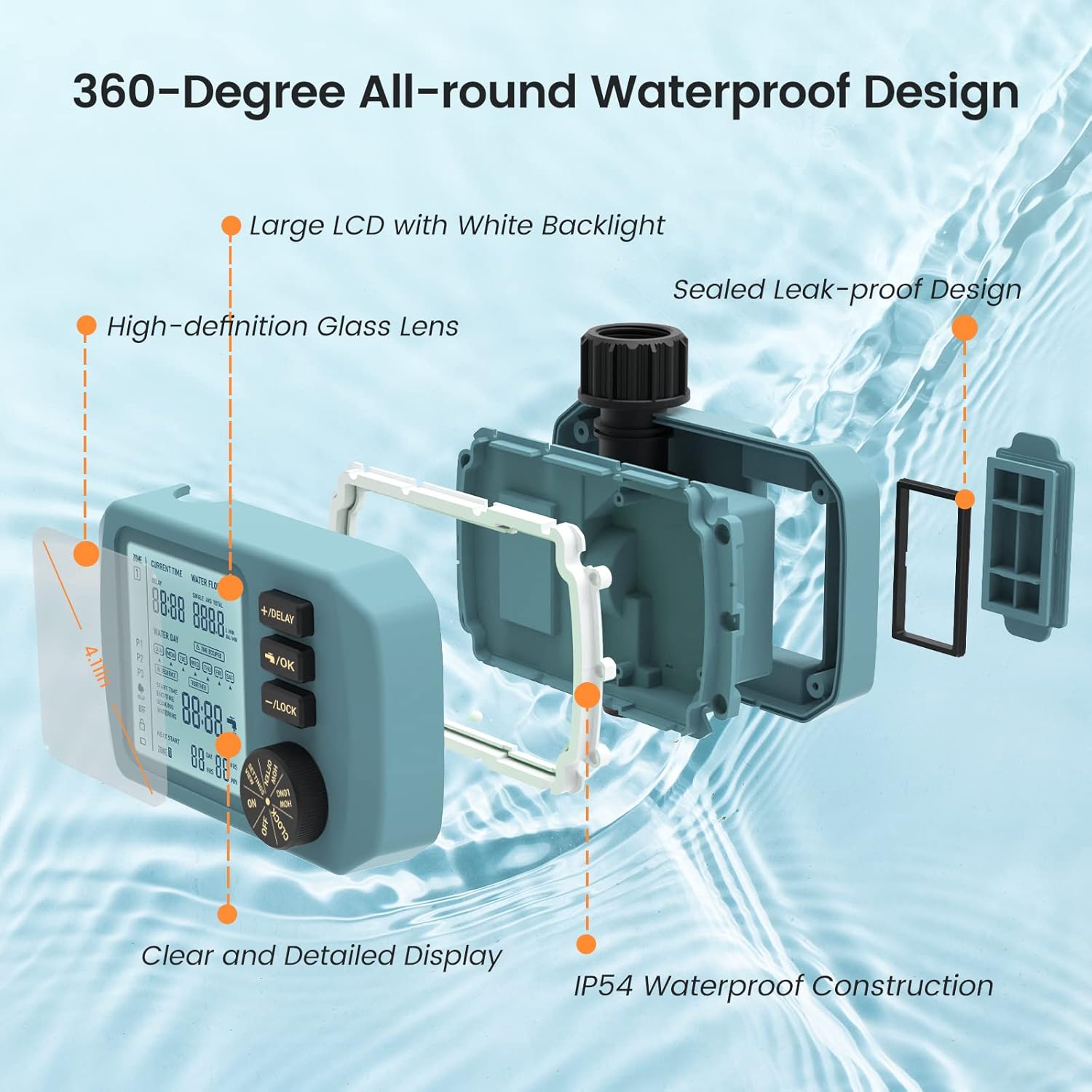
ภาพ: ระเบิด view of the water timer highlighting its waterproof design features.
การรับประกันและการสนับสนุน
The HiOazo Programmable Water Timer comes with a TWO-YEAR Quality Promise. We stand behind our products. If you have any questions, concerns, or require assistance, please do not hesitate to contact our customer service team. We are committed to ensuring your satisfaction.


