1. บทนำ
Thank you for choosing Inspireyes Mini Ranger Rechargeable Walkie Talkies. These 2-way radios are designed for clear and reliable communication, ideal for children aged 3-12 during various indoor and outdoor activities. This manual provides essential information for safe and effective use of your device.

Figure 1: Inspireyes GL-528 Mini Ranger Walkie Talkies (3-pack)
2. ข้อมูลด้านความปลอดภัย
- อย่าให้อุปกรณ์สัมผัสกับอุณหภูมิที่สูงหรือถูกแสงแดดโดยตรง
- เก็บอุปกรณ์ให้ห่างจากน้ำและความชื้น
- อย่าพยายามถอดประกอบหรือดัดแปลงอุปกรณ์
- ใช้เฉพาะสายชาร์จที่ให้มาเท่านั้น
- ควรดูแลเด็กเล็กอย่างใกล้ชิดขณะใช้งาน
3. เนื้อหาบรรจุภัณฑ์
- Inspireyes Mini Ranger Walkie Talkies (3 units)
- USB Type-C Charging Cables (3 units)
- Lanyards (3 units)
- คู่มือการใช้งาน
4. สินค้าหมดview
ทำความคุ้นเคยกับส่วนประกอบหลักและปุ่มควบคุมของวิทยุสื่อสารของคุณ:
- เสาอากาศ: สำหรับการส่งและรับสัญญาณ
- หน้าจอ LCD: Displays channel, volume, battery level, and other indicators.
- ปุ่มเปิด/ปิด: กดค้างไว้เพื่อเปิด/ปิด
- ปุ่มเมนู: Access settings and functions.
- ปุ่มขึ้น/ลง: Adjust channel, volume, or navigate menus.
- ปุ่ม PTT (Push-to-Talk): Located on the side, press and hold to transmit your voice.
- ลำโพง/ไมโครโฟน: สำหรับเอาท์พุตและอินพุตเสียง
- Lamp ปุ่ม: เปิดใช้งานไฟฉายในตัว
- ปุ่ม SOS: Activates an emergency siren.
- พอร์ต USB Type-C: สำหรับการชาร์จอุปกรณ์
5. การตั้งค่า
5.1. การชาร์จวิทยุสื่อสาร
Your Inspireyes walkie talkies feature a built-in rechargeable lithium polymer battery. Before first use, fully charge each unit.
- Open the rubber cover on top of the walkie talkie to expose the USB Type-C charging port.
- Connect the provided USB Type-C cable to the walkie talkie and to a 5V/1A USB power adapter (not included).
- ตัวแสดงสถานะแบตเตอรี่บนหน้าจอ LCD จะแสดงสถานะการชาร์จ
- Once fully charged, the battery icon will indicate full capacity. Disconnect the charging cable and close the rubber cover to protect the port.
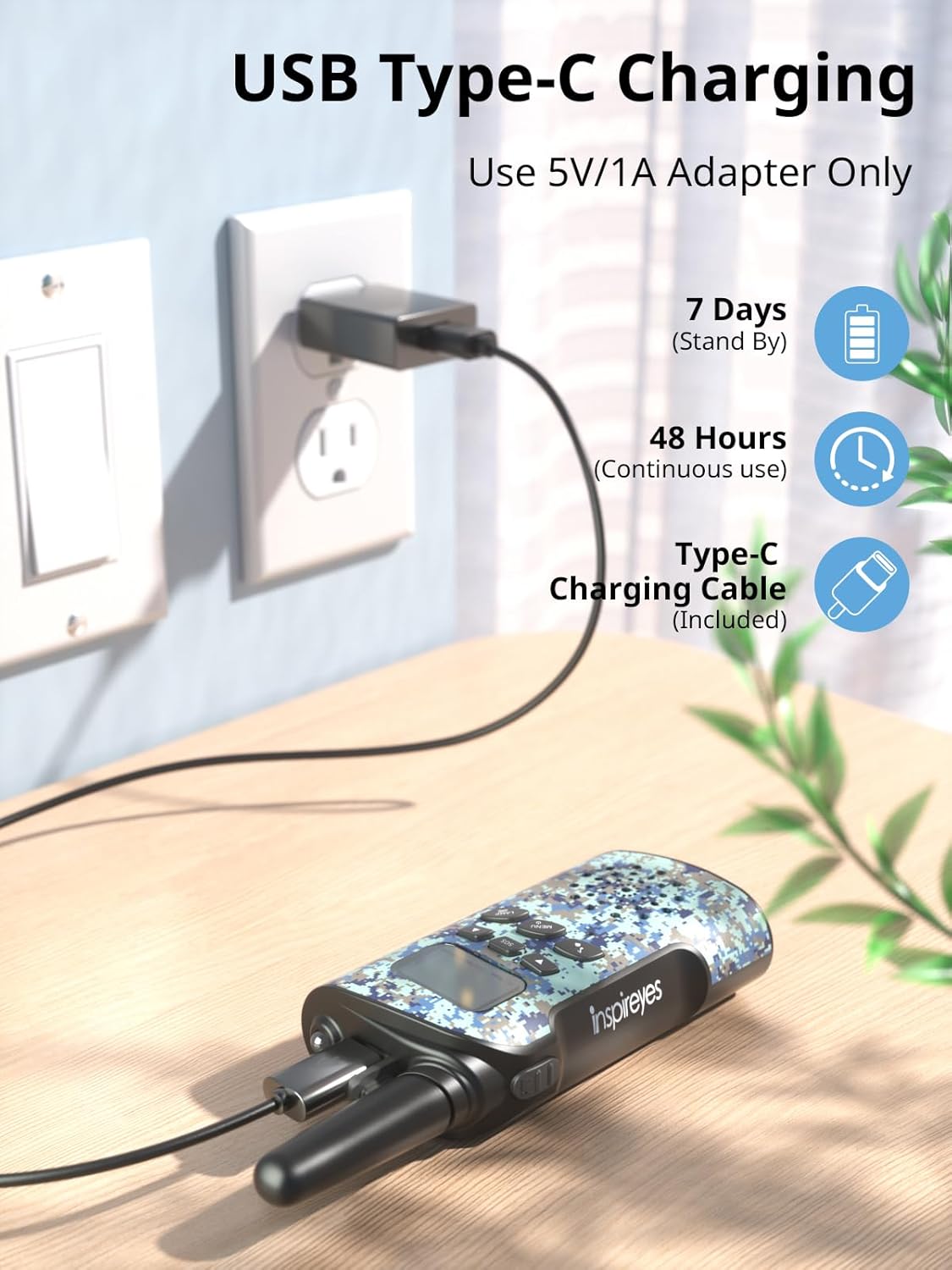
รูปที่ 2: การชาร์จ USB Type-C
A full charge provides up to 48 hours of continuous use and 7 days of standby time.
5.2. การติดสายคล้องคอ
To prevent accidental drops, attach the included lanyards:
- Thread the thin loop of the lanyard through the small hole located near the antenna on the top of the walkie talkie.
- Pass the larger part of the lanyard through the thin loop and pull tight to secure.
5.3. การเปิด/ปิดเครื่อง
- การเปิดเครื่อง: Press and hold the Power button (usually located on the front panel) until the LCD screen illuminates.
- วิธีปิดเครื่อง: Press and hold the Power button until the LCD screen turns off.
5.4. คู่มือวิดีโอการตั้งค่า
For a visual guide on setting up your walkie talkies, please watch the official setup video:
Video 1: Let’s set up your Inspireyes Walkie Talkies together!
6. คู่มือการใช้งาน
6.1. การเลือกช่อง
The walkie talkies offer 22 channels for communication.
- Press the Menu button once. The channel number on the LCD screen will flash.
- Use the Up (▲) or Down (▼) buttons to select your desired channel (1-22).
- Press the Menu button again to confirm your selection or wait a few seconds for it to set automatically.
- Ensure all walkie talkies intended for communication are set to the same channel.
6.2. การปรับระดับเสียง
Adjust the speaker volume to a comfortable level:
- Use the Up (▲) or Down (▼) buttons directly when not in menu mode to increase or decrease the volume. The volume level will be displayed on the LCD screen.
6.3. Push-to-Talk (PTT) Communication
To communicate with other users:
- Ensure all devices are on the same channel.
- Press and hold the PTT button located on the left side of the walkie talkie.
- พูดใส่ไมโครโฟนอย่างชัดเจน
- ปล่อยปุ่ม PTT เพื่อฟังคำตอบ
6.4. VOX Hands-Free Communication
The VOX function allows for hands-free transmission:
- Press the Menu button multiple times until the VOX icon flashes on the LCD screen.
- Use the Up (▲) or Down (▼) buttons to select a VOX sensitivity level (e.g., 1-3, with 3 being most sensitive).
- Press the Menu button to confirm. When VOX is active, the walkie talkie will automatically transmit when it detects your voice.

Figure 3: VOX Hands-Free Communication
6.5. เสียงเรียกเข้า
To alert other users on the same channel, briefly press the Call/Ring button (often indicated by a music note icon). This will send an audible tone to all connected walkie talkies.
6.6.ไฟฉาย
The built-in flashlight provides illumination in low-light conditions:
- กดปุ่ม LAMP button to turn the flashlight on.
- กดปุ่ม LAMP button again to turn the flashlight off.
6.7. ฟังก์ชั่น SOS
In emergency situations, the SOS function can be used to alert others:
- Press the SOS button to activate a loud emergency siren.
- Press the SOS button again to deactivate the siren.

Figure 4: SOS Sirens and Flashlight
6.8. รหัสความเป็นส่วนตัว (CTCSS/DCS)
To ensure private communication and reduce interference, your walkie talkies support 99 sub-codes using CTCSS (Continuous Tone-Coded Squelch System) and DCS (Digitally Coded Squelch) technology.
- Press the Menu button multiple times until the CTCSS/DCS code flashes.
- Use the Up (▲) or Down (▼) buttons to select your desired code.
- Press the Menu button to confirm. All communicating devices must use the same channel and privacy code.
6.9. ระบบส่งสัญญาณระยะไกล
These walkie talkies offer long-range transmission capabilities:
- Up to 3 miles in open areas with no obstructions.
- Approximately 0.5 to 1.5 miles in typical environments with partial obstructions.
- Note that range can be affected by terrain, buildings, and other environmental factors.

Figure 5: Long Range Transmission
7. การบำรุงรักษา
- การทำความสะอาด: เช็ดเครื่องเบาๆงamp ผ้า. อย่าใช้สารเคมีที่รุนแรงหรือน้ำยาทำความสะอาดที่มีฤทธิ์กัดกร่อน
- พื้นที่จัดเก็บ: ควรเก็บวิทยุสื่อสารไว้ในที่แห้งและเย็นเมื่อไม่ได้ใช้งาน
- การดูแลแบตเตอรี่ Recharge the batteries regularly to maintain optimal performance, even if not in frequent use. Avoid fully depleting the battery for extended periods.
8 การแก้ไขปัญหา
- ไม่มีไฟฟ้า: Ensure the device is fully charged. Press and hold the Power button to turn it on.
- ไม่สามารถติดต่อสื่อสารได้: Verify that all walkie talkies are on the same channel and privacy code. Check battery levels.
- Unclear Sound: Adjust the volume. Ensure you are within range and there are no major obstructions. Speak clearly into the microphone.
- ขอบเขตจำกัด: Environmental factors such as hills, buildings, and dense foliage can reduce transmission range. Try moving to an open area.
9. ข้อมูลจำเพาะ
| คุณสมบัติ | ข้อมูลจำเพาะ |
|---|---|
| หมายเลขรุ่น | จีแอล-528 |
| น้ำหนักสินค้า | 3.07 ออนซ์ |
| ขนาดสินค้า | 2.17 x 1.3 x 5.91 นิ้ว |
| แบตเตอรี่ | ต้องใช้แบตเตอรี่ลิเธียมโพลิเมอร์ 1 ก้อน (รวมอยู่ด้วย) |
| ประเภทจอภาพ | จอแอลซีดี |
| จำนวนช่องสัญญาณ | 22 |
| ช่วงความถี่ | 462.5625-462.7125 เมกะเฮิรตซ์ |
| ระยะการสนทนาสูงสุด | 3 กิโลเมตร (ประมาณ 1.86 ไมล์) |
| เล่มที่tage | 3.7 โวลต์ |
| ระดับความต้านทานต่อน้ำ | ไม่ทนน้ำ |
10. การรับประกัน
This Inspireyes product comes with a 1-year warranty from the date of purchase, covering manufacturing defects. Please retain your proof of purchase for warranty claims.
11. การสนับสนุน
For further assistance or inquiries, please refer to the contact information provided with your purchase or visit the official Inspireyes webเว็บไซต์.
12. Additional Product Videos
Explore more features and usage tips with these official product videos:
Video 2: Inspireyes Rechargeable Walkie Talkies for Kids Age 3-12
Video 3: Inspireyes Walkie Talkies for Kids Rechargeable


