1. สินค้าหมดview
The VCELINK Tool-Free RJ45 Connector is designed for quick and easy termination of CAT6 and CAT5E Ethernet cables. Its innovative tool-less design eliminates the need for a crimping tool, making installation straightforward for both DIY enthusiasts and professionals. Featuring gold-plated contacts, these modular plugs ensure high-speed and reliable data transmission, supporting speeds up to 1Gbps. The robust nut-type strain relief boot provides a secure connection, resistant to stretching, and its compact size allows for side-by-side installation in various networking environments.
2. อะไรอยู่ในกล่อง
- 24 x VCELINK Tool-Free RJ45 Connectors
3. คุณสมบัติหลัก
- ติดตั้งง่าย: Tool-free design for quick and effortless connection without a crimping tool. Disassembly and reassembly are simple for error correction.
- การส่งข้อมูลความเร็วสูง: Specifically designed for CAT6/CAT5E Ethernet cables (23-26AWG, Wire OD 0.4-1.2mm). Gold-plated contacts ensure reliable signal transmission up to 1Gbps.
- การเชื่อมต่อที่เสถียร: Nut-type strain relief boot supports network cables with 6.0-7.6mm cable jacket OD, providing a secure and stretch-resistant connection.
- การประยุกต์ใช้ที่กว้าง: Small size allows for side-by-side plugging, ideal for switches, routers, and PCs.

Image: The tool-free design simplifies the connection process, eliminating the need for specialized crimping tools.

Image: Internal components highlighting the gold-plated contacts for superior signal transmission and the robust strain relief boot.

Image: The compact design allows multiple connectors to be installed closely together, optimizing space in network setups.
4. คู่มือการติดตั้งและตั้งค่า
Follow these steps to properly install the VCELINK Tool-Free RJ45 Connector onto your Ethernet cable:
Video: Official installation guide for VCELINK Tool-Free RJ45 Connectors, demonstrating each step of the termination process.
- Insert the Boot: Slide the nut-type strain relief boot onto the Ethernet cable.
- Strip the Cable Sheath: Carefully strip approximately 2cm (0.79 inches) of the outer cable sheath to expose the twisted pairs.
- Arrange and Straighten Wires: Untwist the exposed wire pairs and straighten each individual wire.
- Follow Color Code and Thread: Based on your desired wiring standard (T568A or T568B), arrange the wires according to the color code diagram provided on the load bar. Thread each wire into its corresponding slot on the load bar. Ensure the wires are fully seated.
- Cut Excess Wires: Use a wire cutter to trim the excess wires flush with the load bar. The top and bottom rows of wires may need to be cut to varying lengths to ensure a clean termination.
- จัดแนวและกด: Align the load bar with the main connector body, ensuring the grooves match. Press the two parts firmly together until they click into place.
- ปิดฝาครอบ: Securely close the clear cover over the terminated wires.
- ขันน็อตให้แน่น: Twist the nut-type strain relief boot to tighten it onto the connector body, providing strain relief and securing the cable.
- สมบูรณ์: The connector is now installed.
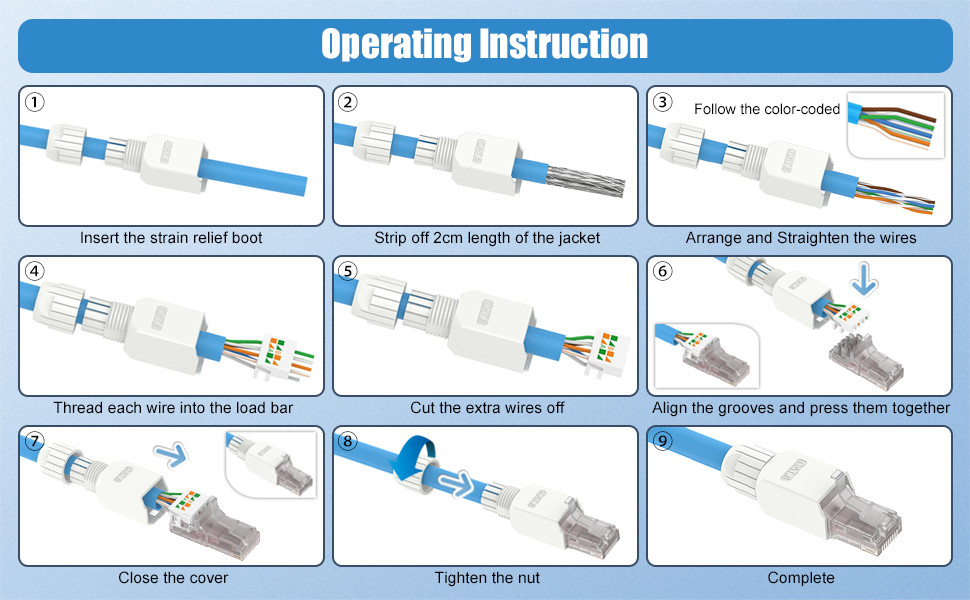
Image: Step-by-step visual instructions for the installation process of the tool-free RJ45 connector.
5. คู่มือการใช้งาน
Once the VCELINK Tool-Free RJ45 Connector is successfully installed on your Ethernet cable, it functions as a standard RJ45 plug. Simply insert the terminated cable into any compatible RJ45 port on devices such as modems, personal computers, printers, routers, or servers. Ensure a firm connection is made to establish network communication.
6. การบำรุงรักษา
To ensure optimal performance and longevity of your VCELINK RJ45 connectors:
- รักษาขั้วต่อให้สะอาดปราศจากฝุ่นและเศษผง
- Avoid excessive bending or pulling on the cable near the connector to prevent damage to the internal wires or the connector itself.
- Store unused connectors in a dry, cool environment.
7 การแก้ไขปัญหา
If you experience issues with your connection after installing the connector:
- No Signal or Intermittent Connection:
- Use a cable tester (e.g., VCELINK GJ468 Network Cable Tester) to verify the integrity of the connection. The video demonstrates this process.
- Check the wire arrangement on the load bar against the T568A or T568B color code. Ensure all wires are correctly seated and making contact.
- If the connection is not successful, the tool-free design allows for easy disassembly and reinstallation. Carefully open the connector, re-arrange and re-trim the wires if necessary, and reassemble.
- ความเร็วช้า:
- Ensure your Ethernet cable is rated for CAT6 or CAT5E and is in good condition.
- Verify that all network devices (router, switch, computer) support the desired speed (e.g., 1Gbps).
- Check for any kinks or damage along the length of the Ethernet cable.
8. ข้อมูลจำเพาะ
| ขนาดสินค้า | 2.06 x 0.57 x 0.52 นิ้ว |
| หมายเลขรุ่นสินค้า | KJ22-C6-24P-US |
| ผู้ผลิต | วีซีลิงก์ |
| ประเภทขั้วต่อ | อีเธอร์เน็ต (RJ45) |
| ประเภทสายเคเบิล | Ethernet (CAT6/CAT5E) |
| อุปกรณ์ที่รองรับ | Modem, Personal Computer, Printer, Router, Server |
| คุณสมบัติพิเศษ | Data Transfer, High Speed, Lightweight |
9. การรับประกันและการสนับสนุน
Customer experience is our top priority. If you have any issues or suggestions regarding your VCELINK Tool-Free RJ45 Connectors, please do not hesitate to contact us directly. Our support team is available to assist you.


