1. บทนำ
The Tapo C420 is an add-on outdoor wireless security camera designed to expand your existing Tapo smart home security system. This camera requires the Tapo Smart IoT Hub H200 (sold separately) to function. It offers 2K QHD video resolution, color night vision, and intelligent detection features for enhanced outdoor surveillance. This manual provides essential information for the proper installation, operation, and maintenance of your Tapo C420 camera.
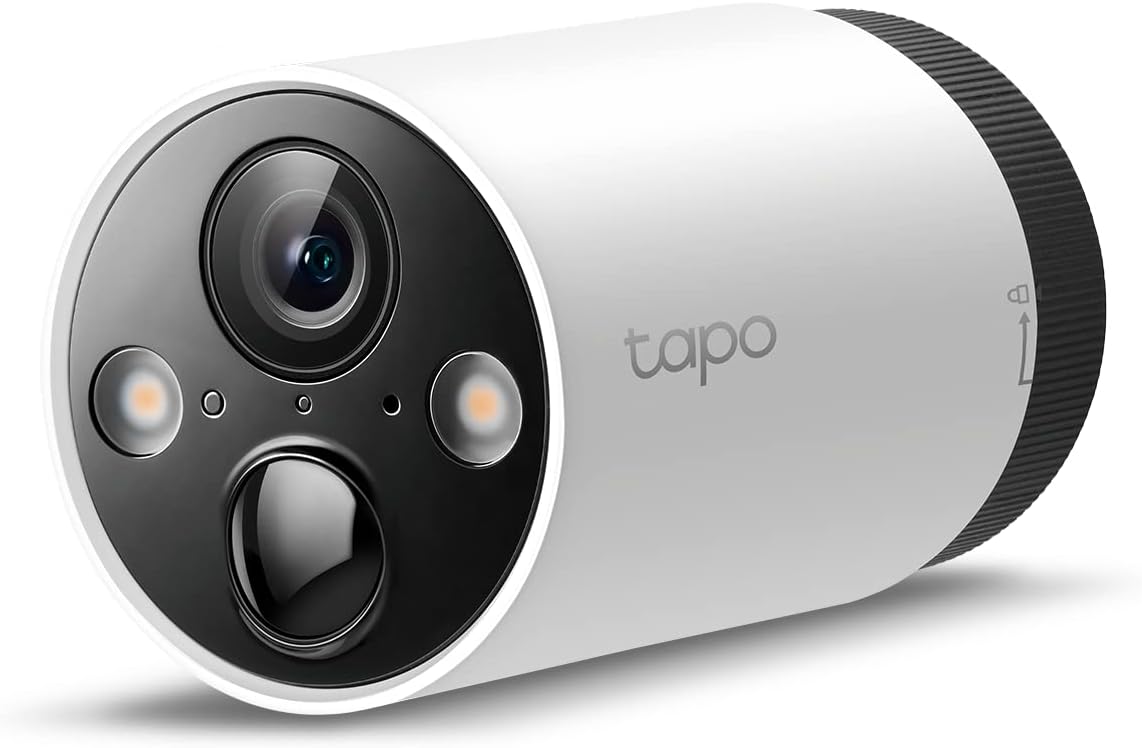
ภาพที่ 1.1: ด้านหน้า view of the Tapo C420 Outdoor Wireless Security Camera.
2. อะไรอยู่ในกล่อง
ตรวจสอบว่ามีส่วนประกอบทั้งหมดอยู่ในแพ็คเกจของคุณ:
- 1x Tapo C420 Camera (Battery Included)
- อะแดปเตอร์ USB
- สายเคเบิลอะแดปเตอร์ USB
- สกรูยึด
- แม่แบบการติดตั้ง
- ขายึดกล้อง
- คู่มือเริ่มต้นอย่างรวดเร็ว
3. คำแนะนำในการตั้งค่า
3.1 ข้อกำหนดเบื้องต้น
- Tapo Smart IoT Hub H200 (sold separately)
- Stable Wi-Fi network (2.4 GHz)
- Smartphone with the Tapo App installed (available on Android and iOS)

Image 3.1: The Tapo C420 camera requires the Tapo H200 Hub to operate. The H200 Hub supports up to 4 cameras.
3.2 การชาร์จแบตเตอรี่
Before initial use, fully charge the camera's battery using the provided USB adapter and cable. The battery is removable for convenient charging.

ภาพที่ 3.2: ภายใน view of the Tapo C420 showing the removable battery and key components.
3.3 การติดตั้งกล้อง
- เลือกสถานที่: Choose an outdoor location that provides the desired viewing angle and is within range of your Tapo H200 Hub. The camera is weatherproof (IP65 rated).
- ติดวงเล็บ: Use the mounting template and screws to securely attach the camera bracket to a wall or other suitable surface.
- ติดกล้อง: Secure the Tapo C420 camera to the mounted bracket. Adjust the angle for optimal coverage.
Image 3.3: The Tapo C420 camera is designed for outdoor deployment with robust weatherproofing.
3.4 Connecting to the Tapo App
- ดาวน์โหลดแอป Tapo: ค้นหา 'Tapo' in the App Store (iOS) or Google Play Store (Android) and install the application.
- เข้าสู่ระบบหรือลงทะเบียน: Open the Tapo App and log in with your TP-Link ID. If you don't have one, create a new account.
- เพิ่มอุปกรณ์: Tap the '+' icon in the app, select your Tapo C420 camera, and follow the on-screen instructions to pair it with your Tapo H200 Hub.
4. คู่มือการใช้งาน
4.1 สด View และการบันทึก
Access the live feed of your camera through the Tapo App. You can view real-time video, take snapshots, and manually record footage. The camera records in 2K QHD (2560x1440) resolution, providing clear and detailed images.

Image 4.1: Comparison illustrating the enhanced clarity of 2K QHD (4MP) resolution over 1080p Full HD.
4.2 การมองเห็นตอนกลางคืน
The Tapo C420 features advanced night vision capabilities:
- เซ็นเซอร์แสงดาว: Captures high-quality images in low-light conditions.
- F1.6 Aperture: Allows more light to enter the lens for improved visibility in darker environments.
- การมองเห็นตอนกลางคืนแบบสีเต็มรูปแบบ: Dual integrated spotlights enable full-color video at night. An 850nm IR sensor provides visibility up to 49 feet in darkness.

Image 4.2: Visual comparison of different night vision modes, including standard infrared and full-color with starlight sensor and spotlights.
4.3 AI Detection and Activity Zones
Receive instant push notifications for detected motion. The camera supports free AI detection for persons, vehicles, and pets. You can also define custom activity zones to focus detection on specific areas.

Image 4.3: The Tapo App interface for configuring AI detection and activity zones.
4.4 เสียงสองทาง
Utilize the built-in microphone and speaker to communicate with visitors or deter unwanted guests directly through the Tapo App.
Image 4.4: Illustration of the two-way audio function, allowing communication through the camera.
4.5 ตัวเลือกการจัดเก็บข้อมูล
The Tapo C420 offers flexible storage solutions:
- การจัดเก็บข้อมูลภายในเครื่อง: บันทึกฟูtage on a microSD card (up to 512 GB, not included) inserted into the Tapo H200 Hub.
- การเก็บข้อมูลบนคลาวด์: Subscribe to Tapo Care for cloud storage, which provides a 30-day video history and additional features.

Image 4.5: The Tapo H200 Hub supports local microSD card storage, and the Tapo App integrates with Tapo Care cloud services.
4.6 Built-in Siren
Activate the integrated siren through the Tapo App to deter intruders or alert others to an event.

Image 4.6: The Tapo C420 camera can activate its siren and spotlights to deter unwanted activity.
5. การบำรุงรักษา
5.1 การจัดการแบตเตอรี่
The Tapo C420 camera is equipped with a battery designed for up to 180 days of use under laboratory conditions (triggering 10-20 events per day). Actual battery life may vary based on device settings, usage frequency, and environmental factors. Recharge the battery when indicated by the Tapo App.

Image 5.1: Illustration of inserting the battery into the Tapo C420 camera.
5.2 การทำความสะอาด
เพื่อรักษาประสิทธิภาพการทำงานให้อยู่ในระดับสูงสุด ควรทำความสะอาดเลนส์และตัวกล้องด้วยผ้าเนื้อนุ่มเป็นระยะamp ใช้ผ้าเช็ดทำความสะอาด หลีกเลี่ยงการใช้สารเคมีรุนแรงหรือวัสดุที่มีฤทธิ์กัดกร่อนซึ่งอาจทำให้กล้องเสียหายได้
การอัปเดตเฟิร์มแวร์ 5.3 รายการ
Ensure your camera's firmware is always up to date. The Tapo App will notify you of available updates. Firmware updates often include performance improvements, new features, and security enhancements.
6 การแก้ไขปัญหา
If you encounter issues with your Tapo C420 camera, consider the following common solutions:
- กล้องออฟไลน์: Check the battery level. Ensure the camera is within range of the Tapo H200 Hub and that the Hub is powered on and connected to the internet.
- ปัญหาการตรวจจับ: Verify that AI detection and activity zones are configured correctly in the Tapo App. Ensure there are no obstructions (e.g., windows, screens) directly in front of the camera that could interfere with detection.
- คุณภาพวิดีโอไม่ดี: Check your Wi-Fi signal strength. Ensure the lens is clean and free from smudges or dirt.
- แบตเตอรี่ไม่ชาร์จ: Confirm the USB adapter and cable are properly connected and functional.
For more detailed troubleshooting steps, refer to the FAQ section within the Tapo App or visit the official TP-Link support webเว็บไซต์.
7. ข้อมูลจำเพาะ
| คุณสมบัติ | ข้อมูลจำเพาะ |
|---|---|
| ชื่อรุ่น | ทาโป้ C420 |
| ความละเอียดในการจับภาพวิดีโอ | 2K QHD (2560x1440p) / 4 MP |
| ทุ่งแห่ง View | 97 องศา |
| ช่วงการมองเห็นตอนกลางคืน | 49 Feet (with 850nm IR sensor) |
| แหล่งพลังงาน | ใช้พลังงานจากแบตเตอรี่ (รวมแบตเตอรี่ลิเธียมไอออน 1 ก้อน) |
| โปรโตคอลการเชื่อมต่อ | Wi-Fi, Sub-1G (to Hub) |
| ทนทานต่อสภาพอากาศ | IP65 (กันน้ำ) |
| ประเภทตัวควบคุม | Android, iOS (via Tapo App) |
| ขนาด (กว้าง x ยาว x สูง) | 7.17 x 2.6 x 2.6 นิ้ว |
| น้ำหนักสินค้า | 5.8 ออนซ์ (164 กรัม) |
| ตัวเลือกการจัดเก็บข้อมูล | MicroSD card (up to 512GB, not included), Tapo Care Cloud Storage |
| คุณสมบัติพิเศษ | Motion Sensor, Night Vision, Starlight Sensor, Full-Color Night Vision, AI Detection (Person/Vehicle/Pet), Two-Way Audio, Built-in Siren |
8. ข้อมูลการรับประกัน
Warranty information for the Tapo C420 camera is typically provided with the product packaging or can be found on the official TP-Link webไซต์ โปรดเก็บหลักฐานการซื้อไว้เพื่อใช้ในการเรียกร้องการรับประกัน
9. การสนับสนุน
For technical assistance, product inquiries, or further support, please contact TP-Link Tapo customer service:
- โทรศัพท์: (866) 225-8139
- Webเว็บไซต์: myproducts.tp-link.com/us
- อีเมล: support.USA@tp-link.com


