1. บทนำ
This user manual provides essential information for the safe and efficient operation of your HYCHIKA 3.6V Cordless Electric Rechargeable Screwdriver Drill Set. Please read this manual thoroughly before first use and keep it for future reference.
The HYCHIKA 3.6V Cordless Electric Screwdriver is designed for various screwing and light drilling tasks around the home. It features a maximum torque of 6 N-m, a 6.35 mm quick-change chuck, and a versatile design that allows for both pistol and straight grip configurations.
2. คำแนะนำด้านความปลอดภัย
ปฏิบัติตามข้อควรระวังด้านความปลอดภัยพื้นฐานเสมอเมื่อใช้เครื่องมือไฟฟ้า เพื่อลดความเสี่ยงต่อการเกิดไฟไหม้ ไฟฟ้าช็อต และการบาดเจ็บส่วนบุคคล
- ความปลอดภัยในพื้นที่ทำงาน: รักษาพื้นที่ทำงานให้สะอาดและมีแสงสว่างเพียงพอ พื้นที่ที่รกหรือมืดอาจก่อให้เกิดอุบัติเหตุได้ ห้ามใช้เครื่องมือไฟฟ้าในสภาพแวดล้อมที่อาจเกิดการระเบิด เช่น ในบริเวณที่มีของเหลวไวไฟ ก๊าซ หรือฝุ่น
- ความปลอดภัยทางไฟฟ้า: Avoid body contact with earthed or grounded surfaces such as pipes, radiators, ranges, and refrigerators. Do not expose power tools to rain or wet conditions.
- ความปลอดภัยส่วนบุคคล: Always wear eye protection. Use safety glasses, goggles, or a face shield. Wear hearing protection when operating noisy tools. Dress properly; avoid loose clothing or jewelry.
- การใช้และการดูแลเครื่องมือ: อย่าฝืนใช้เครื่องมือไฟฟ้า ใช้เครื่องมือไฟฟ้าที่ถูกต้องตามการใช้งาน ถอดปลั๊กออกจากแหล่งจ่ายไฟและ/หรือถอดชุดแบตเตอรี่ออกก่อนทำการปรับแต่ง เปลี่ยนอุปกรณ์เสริม หรือจัดเก็บเครื่องมือไฟฟ้า
- การใช้และการดูแลแบตเตอรี่: ชาร์จแบตเตอรี่ด้วยที่ชาร์จที่ผู้ผลิตกำหนดเท่านั้น ห้ามใช้แบตเตอรี่แพ็คกับเครื่องมือไฟฟ้าอื่นๆ เมื่อไม่ได้ใช้งานแบตเตอรี่แพ็ค ให้เก็บให้ห่างจากวัตถุโลหะอื่นๆ
3. เนื้อหาบรรจุภัณฑ์
ตรวจสอบว่าสินค้าทั้งหมดที่ระบุไว้ด้านล่างนี้รวมอยู่ในแพ็คเกจของคุณแล้ว หากมีสินค้าใดสูญหายหรือเสียหาย โปรดติดต่อฝ่ายสนับสนุนลูกค้า
- 1 x HYCHIKA 3.6V Cordless Screwdriver
- 19 x ดอกไขควง
- 1 x แถบส่วนขยาย
- อะแดปเตอร์ชาร์จไฟ 1 ตัว
- 1 x คู่มือผู้ใช้

Figure 3.1: Contents of the HYCHIKA 3.6V Cordless Screwdriver package, including the screwdriver, various bits, and charging adapter.
4. คุณสมบัติและส่วนประกอบของผลิตภัณฑ์
Familiarize yourself with the different parts of your cordless screwdriver.

Figure 4.1: Key components of the screwdriver, including the magnetic chuck, PUSH button, front LED light, On/Off switch, LED charger indicator, 3.5mm charger port, and forward & reverse button.
- Magnetic Chuck: 1/4 inch (6.35mm) quick-change chuck for easy bit installation and removal.
- ไฟหน้า LED: Illuminates the work area for improved visibility in dark environments.
- สวิตช์เปิด/ปิด: Activates and deactivates the screwdriver.
- Forward & Reverse Button: Controls the rotation direction for screwing and unscrewing.
- LED Charger Indicator: Provides status of battery charging.
- 3.5mm Charger Port: Connection point for the charging adapter.
- ปุ่มกด: Used to adjust the grip configuration from pistol to straight.
5. การตั้งค่า
5.1 การชาร์จแบตเตอรี่
The screwdriver is powered by a 3.6V 2000 mAh Lithium-Ion battery. Before first use, fully charge the battery.
- Connect the charging adapter to the 3.5mm charger port on the screwdriver.
- เสียบอะแดปเตอร์ชาร์จเข้ากับเต้ารับไฟฟ้ามาตรฐาน
- The LED charger indicator will illuminate during charging. Once fully charged, the indicator may change color or turn off depending on the model.
- ถอดปลั๊กเครื่องชาร์จเมื่อชาร์จเสร็จแล้ว

Figure 5.1: The screwdriver connected to its charging adapter, indicating a full charge.
The screwdriver is designed to maintain full power output even when the battery is low, ensuring consistent performance until the battery is depleted.
5.2 การติดตั้งดอกไขควง
The screwdriver features a 1/4 inch (6.35mm) magnetic quick-change chuck for easy bit installation.
- เลือกดอกไขควงที่เหมาะกับงานของคุณ
- Insert the bit into the magnetic chuck until it is securely seated. The magnetic chuck will hold the bit firmly in place.
- To remove a bit, simply pull it out of the chuck. Bits with grooves are designed for easier removal.

Figure 5.2: Visual guide for inserting a bit into the magnetic chuck and removing it.
6. คู่มือการใช้งาน
6.1 Adjusting Grip Configuration
The screwdriver can be used in two grip configurations: pistol grip or straight grip, for enhanced versatility and comfort.
- To change the grip, press and hold the "PUSH" button located at the top of the screwdriver.
- While holding the button, rotate the handle ninety degrees to switch between pistol and straight configurations.
- Release the "PUSH" button once the desired configuration is achieved. The handle will lock into place.
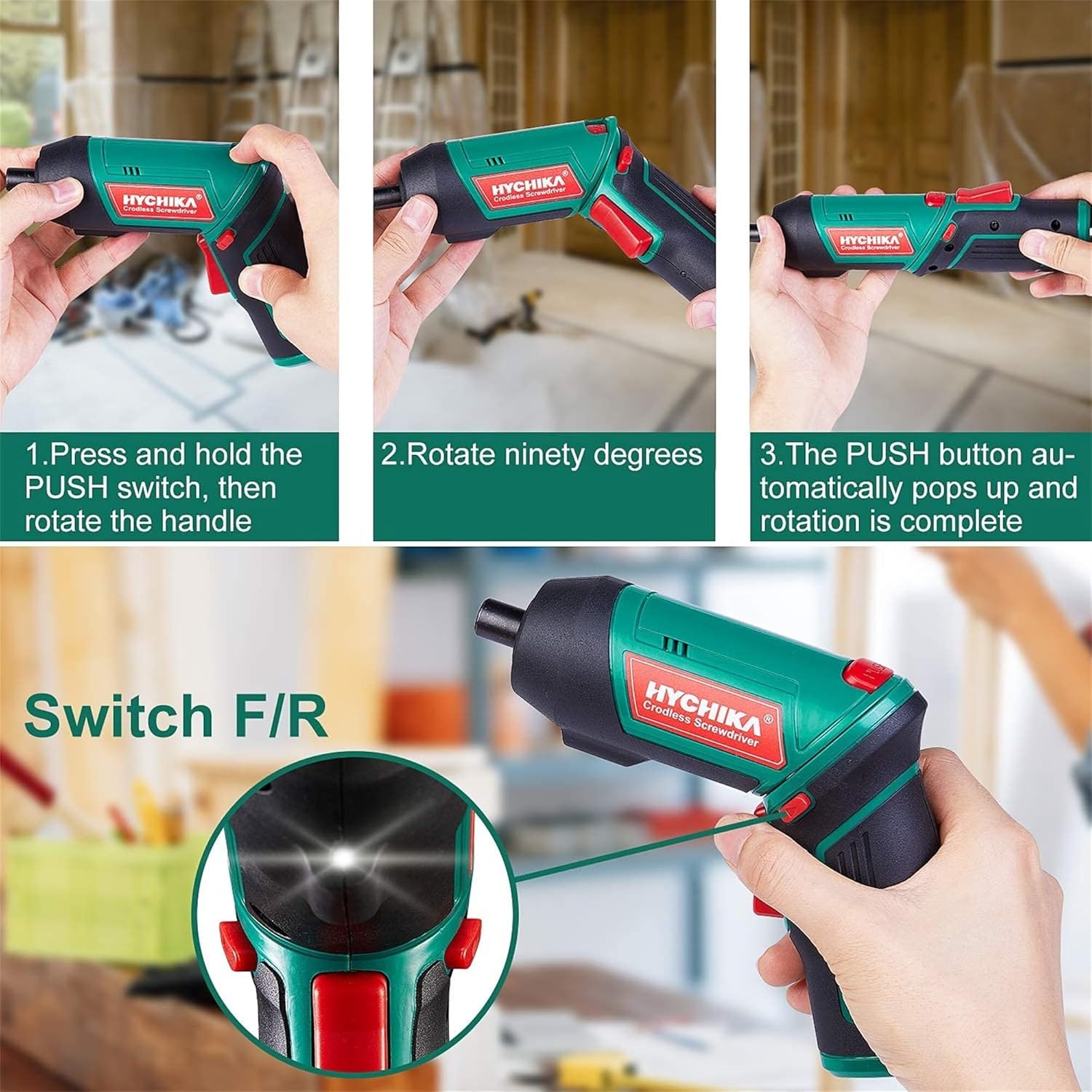
Figure 6.1: Demonstrates the process of transforming the screwdriver's grip by pressing the PUSH button and rotating the handle.
6.2 Forward and Reverse Operation
The forward/reverse button controls the direction of rotation for screwing and unscrewing.
- To drive screws (forward rotation), push the forward/reverse button to the left (when viewed จากด้านหลังของเครื่องมือ)
- To remove screws (reverse rotation), push the forward/reverse button to the right.
- When the button is in the center position, the tool is locked, preventing accidental activation.
6.3 การใช้ไฟทำงาน LED
The built-in LED light automatically illuminates when the screwdriver is in operation, providing visibility in dimly lit areas.

Figure 6.2: The integrated LED light provides clear illumination for working in dark environments.
7. การบำรุงรักษา
Regular maintenance ensures the longevity and optimal performance of your screwdriver.
- การทำความสะอาด: รักษาช่องระบายอากาศให้สะอาดและปราศจากฝุ่น ใช้ผ้าเนื้อนุ่มและแห้งเช็ดทำความสะอาดamp ผ้าเช็ดทำความสะอาดเครื่องมือasing. ห้ามใช้สารเคมีรุนแรงหรือน้ำยาทำความสะอาดที่มีฤทธิ์กัดกร่อน
- การดูแลบิต: Clean screwdriver bits after use. Store them in the provided case to prevent loss and damage.
- การจัดเก็บแบตเตอรี่: If storing the tool for an extended period, ensure the battery is partially charged (around 50%) and store it in a cool, dry place. Recharge the battery every 3-6 months to maintain its health.
- การตรวจสอบทั่วไป: Periodically check for any loose screws, damaged cords, or worn parts. Do not use the tool if any damage is observed.
8 การแก้ไขปัญหา
This section addresses common issues you might encounter with your screwdriver.
| ปัญหา | สาเหตุที่เป็นไปได้ | สารละลาย |
|---|---|---|
| ไขควงไม่หมุน | แบตเตอรี่หมด Forward/Reverse switch is in the center (locked) position. | ชาร์จแบตเตอรี่ให้เต็ม กดสวิตช์เดินหน้า/ถอยหลังไปทางซ้ายหรือขวา |
| ไขควงไฟฟ้ากำลังตกอย่างรวดเร็ว | แบตเตอรี่ไม่ได้ชาร์จเต็ม Battery life degraded. | ตรวจสอบให้แน่ใจว่าแบตเตอรี่ชาร์จเต็มก่อนใช้งาน If battery life is significantly reduced, contact customer support for replacement options. |
| Bits are not held securely in the chuck. | Bit is not fully inserted. Chuck is dirty or damaged. | Push the bit firmly into the chuck until it clicks into place. Clean the chuck area. If damage is visible, contact customer support. |
หากปัญหายังคงมีอยู่หลังจากพยายามแก้ไขปัญหาเหล่านี้แล้ว โปรดติดต่อฝ่ายสนับสนุนลูกค้า
9. ข้อมูลจำเพาะ
| คุณสมบัติ | ข้อมูลจำเพาะ |
|---|---|
| ยี่ห้อ | Overstock (HYCHIKA) |
| หมายเลขรุ่น | c131a012-0da9-4306-aeab-b1d9ff5cd4b7 |
| เล่มที่tage | 3.6 โวลต์ |
| แหล่งพลังงาน | ใช้พลังงานจากแบตเตอรี่ |
| ความเร็ว | 180 รอบต่อนาที |
| รายการ แรงบิด | 6 Newton Meters (6 N-m) |
| ประเภทแบตเตอรี่ | ลิเธียมไอออน |
| ความจุของแบตเตอรี่ | 2000 มิลลิแอมป์ |
| ขนาดเชย | 1/4 นิ้ว (6.35 มม.) |
| วัสดุ | พลาสติก, ยาง |
| สี | สีเขียว |
| ยูพีซี | 616859793583 |
10. การรับประกันและการสนับสนุน
Overstock offers lifetime after-sales service for this product. For any questions, concerns, or technical assistance, please contact our customer support team.
Please have your model number (c131a012-0da9-4306-aeab-b1d9ff5cd4b7) and purchase information ready when contacting support.


