1. บทนำ
ขอบคุณสำหรับการซื้อasing the Aspen 40-inch Washable Tower Fan. This manual provides important information regarding the safe operation, installation, maintenance, and troubleshooting of your new fan. Please read this manual thoroughly before use and retain it for future reference.
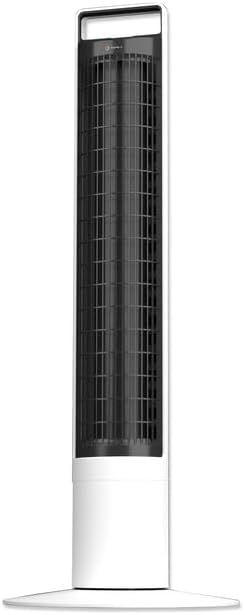
ภาพ: ด้านหน้า view of the Aspen 40-inch Washable Tower Fan.
2. ข้อมูลด้านความปลอดภัย
ปฏิบัติตามข้อควรระวังด้านความปลอดภัยขั้นพื้นฐานเสมอเมื่อใช้เครื่องใช้ไฟฟ้า เพื่อลดความเสี่ยงต่อการเกิดไฟไหม้ ไฟฟ้าช็อต และการบาดเจ็บต่อบุคคล
- ห้ามใช้งานพัดลมหากสายไฟหรือปลั๊กชำรุด
- ห้ามเดินสายไฟใต้พรม ห้ามคลุมสายไฟด้วยพรมเช็ดเท้า พรมยาว หรือวัสดุคลุมที่คล้ายกัน จัดสายไฟให้ห่างจากบริเวณที่มีคนสัญจรไปมาและบริเวณที่สายไฟจะไม่สะดุดล้ม
- ถอดปลั๊กพัดลมทุกครั้งก่อนเคลื่อนย้าย ทำความสะอาด หรือบำรุงรักษา
- Do not immerse the main unit (base) in water or other liquids. Only the detachable tower is designed for washing.
- Ensure the fan is completely dry before reassembling and plugging in after cleaning.
- พัดลมนี้สำหรับใช้ภายในอาคารเท่านั้น
3. เนื้อหาบรรจุภัณฑ์
ตรวจสอบว่ามีส่วนประกอบทั้งหมดอยู่ในแพ็คเกจ:
- Aspen 40-inch Tower Fan (Main Unit and Detachable Tower)
- Base Assembly (2 parts)
- Remote Control (with 1 CR2 battery included)
- คู่มือการใช้งาน (เอกสารนี้)
4. การตั้งค่า
Follow these steps to assemble and set up your tower fan:
- การประกอบฐาน: Connect the two halves of the base assembly. Align the fan tower with the assembled base and twist clockwise to secure it. A screwdriver may be needed for initial base assembly.
- การจัดวาง: Place the fan on a firm, level surface. Ensure there is adequate space around the fan for proper airflow and oscillation.
- การเชื่อมต่อไฟฟ้า: เสียบสายไฟเข้ากับเต้ารับไฟฟ้ามาตรฐาน

Image: Illustration of the fan base assembly process.
5. คู่มือการใช้งาน
Your Aspen Tower Fan can be operated using the control panel on top of the unit or the included magnetic RF remote control.
แผงควบคุมและฟังก์ชั่นระยะไกล:

Image: Close-up of the fan's top control panel and the magnetic remote control, showing button functions.
- เปิด/ปิดเครื่อง: กดปุ่มเพาเวอร์ (⏻) เพื่อเปิดหรือปิดพัดลม
- ความเร็วพัดลม: Cycle through 4 fan speeds (Low, Medium, High, Turbo) by pressing the fan speed button (⇋).
- การสั่น: กดปุ่มการสั่น (↻) to activate or deactivate the 60-degree narrow-angle oscillation feature. This provides a consistent, focused breeze.

Image: Visual representation of the fan's 60-degree narrow-angle oscillation, showing airflow.
- ตัวจับเวลา: Set the auto-off timer for up to 8 hours by pressing the timer button (◷). Each press adds an hour to the timer.
- ไฟกลางคืน: Activate the 3-color LED nightlight by pressing the nightlight button (💡). Cycle through colors or turn off the light.

Image: The Aspen Tower Fan with its base illuminated by the built-in nightlight.
คุณสมบัติที่สะดวกสบาย:
- หูหิ้ว: The integrated handle on top of the fan allows for easy transport.

Image: A hand holding the fan by its convenient top carry handle.
- Magnetic Remote: The remote control magnetically attaches to the top of the fan for convenient storage.
6. การบำรุงรักษา
The Aspen Tower Fan features an easy-wash design for convenient cleaning. Regular cleaning ensures optimal performance and extends the life of your fan.
Cleaning the Detachable Fan Tower:
- ถอดรีโมต: First, remove the magnetic remote control from the top of the fan.
- Detach Tower: Twist the fan tower counter-clockwise from the base and gently pull it up to detach.
- ล้าง: The detached fan tower can be washed or rinsed with soap and water. You can soak it or spray it with a water nozzle.
- แห้งสนิท: Allow the fan tower to dry completely before reassembling. Ensure no moisture remains inside.
- ประกอบกลับเข้าที่: Align the line on the fan tower with the unlock symbol on the base, then push down and twist clockwise to lock it into place. Reinsert the remote.

Image: A person rinsing the detached fan tower with a shower head in a bathtub.

Image: A visual sequence showing a dusty fan, the rinsing process, and a clean, fresh fan.
วีดีโอการสอน:
Video: Official Aspen video demonstrating how to clean the tower fan. This video shows the steps for detaching the tower, washing it, and reassembling it.
7 การแก้ไขปัญหา
If you encounter issues with your Aspen Tower Fan, refer to the following common problems and solutions:
| ปัญหา | สาเหตุที่เป็นไปได้ | สารละลาย |
|---|---|---|
| พัดลมไม่เปิด | ไม่มีไฟเลี้ยง, การเชื่อมต่อหลวม, แบตเตอรี่รีโมทเหลือน้อย | Check power cord connection. Ensure outlet is working. Replace remote battery (CR2). |
| ลดการไหลของอากาศ | Dust buildup in tower. | Clean the detachable fan tower as per Maintenance section. |
| พัดลมมีเสียงผิดปกติ | Obstruction, improper assembly. | Ensure no foreign objects are inside. Check if the tower is securely locked into the base. |
| รีโมทคอนโทรลไม่ทำงาน | Battery depleted, obstruction between remote and fan. | Replace the CR2 battery in the remote. Ensure no objects are blocking the signal path. |
If the problem persists after trying these solutions, please contact Aspen customer support.
8. ข้อมูลจำเพาะ
| คุณสมบัติ | รายละเอียด |
|---|---|
| ยี่ห้อ | แอสเพน |
| ชื่อรุ่น | Aspen Tower Fan Black (ASTF-A40-BLK) |
| ขนาดสินค้า | ลึก 12 นิ้ว x กว้าง 12 นิ้ว x สูง 41 นิ้ว |
| น้ำหนักสินค้า | 9.9 ปอนด์ |
| สี | สีขาว |
| แหล่งพลังงาน | สายไฟ |
| จำนวนระดับพลังงาน | 4 ความเร็ว |
| วิธีการควบคุม | ระยะไกล |
| คุณสมบัติพิเศษ | Lightweight, Oscillating, Detachable for Washing, 3-Color Nightlight, 4 Timers, Magnetic RF Remote |
| ประเภทห้อง | ห้องนอน, ห้องนั่งเล่น, โฮมออฟฟิศ |
| ส่วนประกอบที่รวมอยู่ | ระยะไกล |
| การใช้งานภายใน/ภายนอกอาคาร | ในร่ม |
| แบตเตอรี่ | ต้องใช้แบตเตอรี่ CR1 2 ก้อน (รวมอยู่ด้วย) |
9. การรับประกันและการสนับสนุน
Specific warranty details are not provided in this manual. For warranty information, product support, or to purchase replacement parts, please contact Aspen customer service.
You can visit the official Aspen store on Amazon for more information: Aspen Store


