1. บทนำ
This manual provides essential instructions for the proper installation, operation, and maintenance of your Interphone Cellularline U-Com 6R Motorcycle Bluetooth Intercom. Please read this manual thoroughly before using the device to ensure optimal performance and safety.
The U-Com 6R is designed to enhance your riding experience with reliable Bluetooth 5.2 communication, allowing connection with up to two riders over a distance of 1 kilometer. It offers compatibility with various OEM and GPS systems and features a long-lasting, replaceable battery.
2. ข้อมูลด้านความปลอดภัย
Always prioritize safety while riding. Operating the intercom should not distract you from road conditions or traffic. Ensure the device is securely mounted and all cables are properly routed to avoid interference with helmet functionality or rider movement.
- อย่าพยายามถอดประกอบหรือดัดแปลงอุปกรณ์
- เก็บอุปกรณ์ให้ห่างจากอุณหภูมิที่สูงหรือต่ำเกินไปและถูกแสงแดดโดยตรง
- ตรวจสอบให้แน่ใจว่าฝาปิดพอร์ตชาร์จปิดอย่างแน่นหนาเมื่อไม่ได้ชาร์จเพื่อรักษาความทนทานต่อน้ำ
- ปรับระดับเสียงให้อยู่ในระดับที่ปลอดภัย ซึ่งจะช่วยให้คุณได้ยินเสียงการจราจรโดยรอบ
3. เนื้อหาบรรจุภัณฑ์
ตรวจสอบว่ารายการทั้งหมดที่ระบุไว้ด้านล่างนี้รวมอยู่ในแพ็คเกจของคุณ:
- U-Com 6R Main Unit
- Helmet Mounting Bracket (Clip and Adhesive options)
- ชุดลำโพง
- ไมโครโฟนบูม
- ไมโครโฟนแบบมีสาย
- สายชาร์จ USB-C
- แผ่นตีนตุ๊กแกสำหรับลำโพงและไมโครโฟน
- ฟองน้ำไมโครโฟน
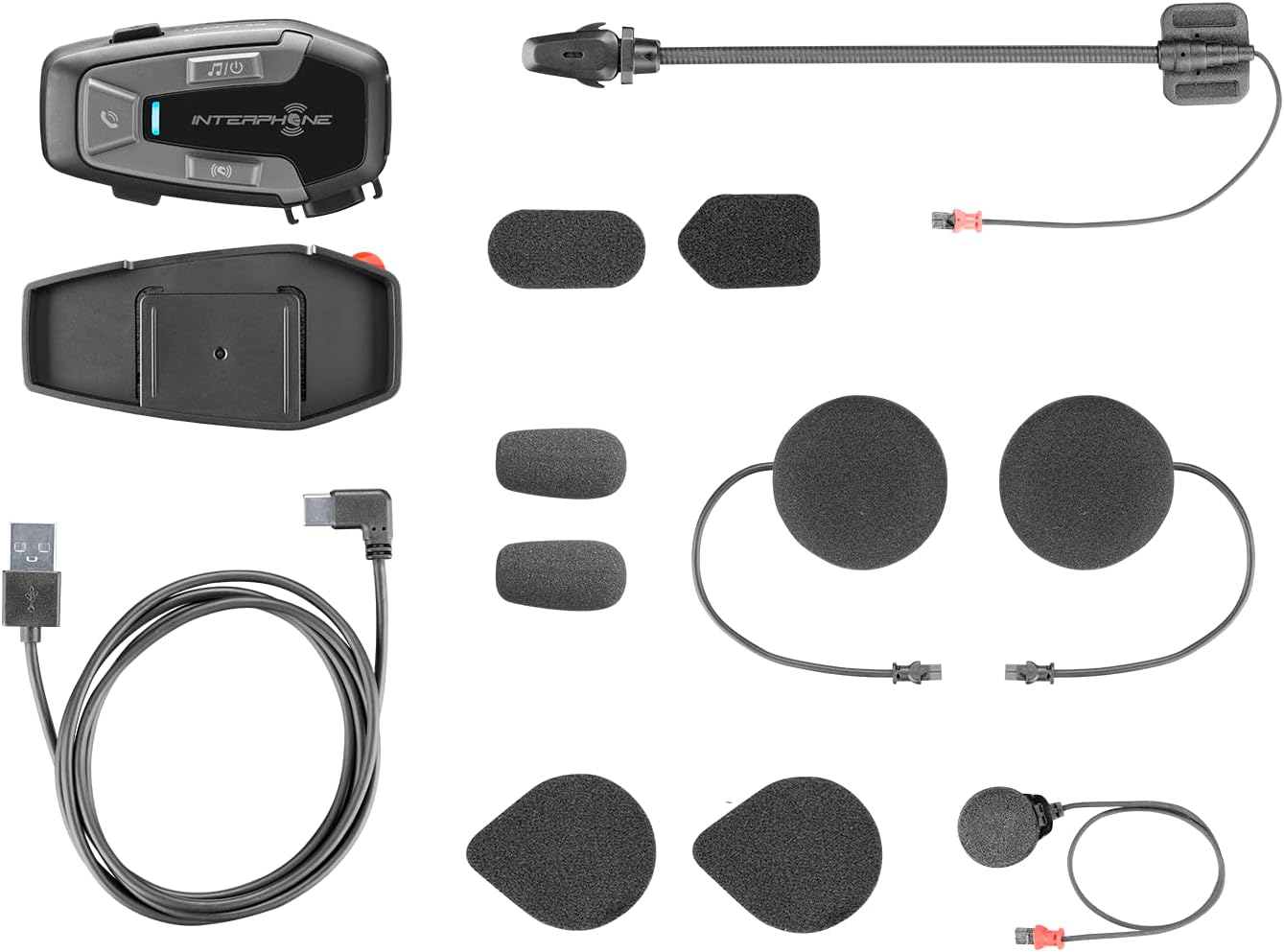
รูปที่ 3.1: All components included in the Interphone U-Com 6R package. This image displays the main intercom unit, mounting accessories, speakers, two types of microphones (boom and wired), and the USB-C charging cable.
4. อุปกรณ์โอเวอร์view
4.1. การควบคุมหน่วยหลัก

รูปที่ 4.1: ด้านหน้า view of the Interphone U-Com 6R main unit. This image highlights the primary control buttons for music, call management, and intercom functions, along with the LED indicator.
- ปุ่มเพลง: ควบคุมการเล่นเพลง (เล่น/หยุดชั่วคราว, ข้ามแทร็ก)
- ปุ่มโทรออก: Manages phone calls (answer/end, voice assistant).
- ปุ่มอินเตอร์คอม: Initiates and manages intercom conversations.
- ไฟแสดงสถานะ LED: Displays device status (pairing, charging, power).
4.2. พอร์ตและขั้วต่อ

รูปที่ 4.2: ด้านข้าง view of the Interphone U-Com 6R unit. This image clearly shows the USB-C charging port and the speaker/microphone connector.
- พอร์ต USB-C: ใช้สำหรับชาร์จอุปกรณ์
- Speaker/Microphone Connector: Connects the speaker and microphone assembly to the main unit.
5. การติดตั้ง
5.1. การติดตั้งยูนิตหลัก
The U-Com 6R can be mounted to your helmet using either the clip mount or the adhesive mount.
- คลิปยึด: Slide the clip between the helmet shell and the inner padding on the left side. Ensure it is securely fastened.
- ติดกาว: Clean the desired mounting area on the left side of your helmet. Peel off the protective film from the 3M adhesive on the bracket and firmly press it onto the helmet for at least 30 seconds. Allow 24 hours for the adhesive to fully cure before use.
รูปที่ 5.1: Adhesive mounting bracket for the Interphone U-Com 6R. This image shows the bracket with the 3M adhesive backing, ready for attachment to a helmet.
5.2 การติดตั้งลำโพงและไมโครโฟน
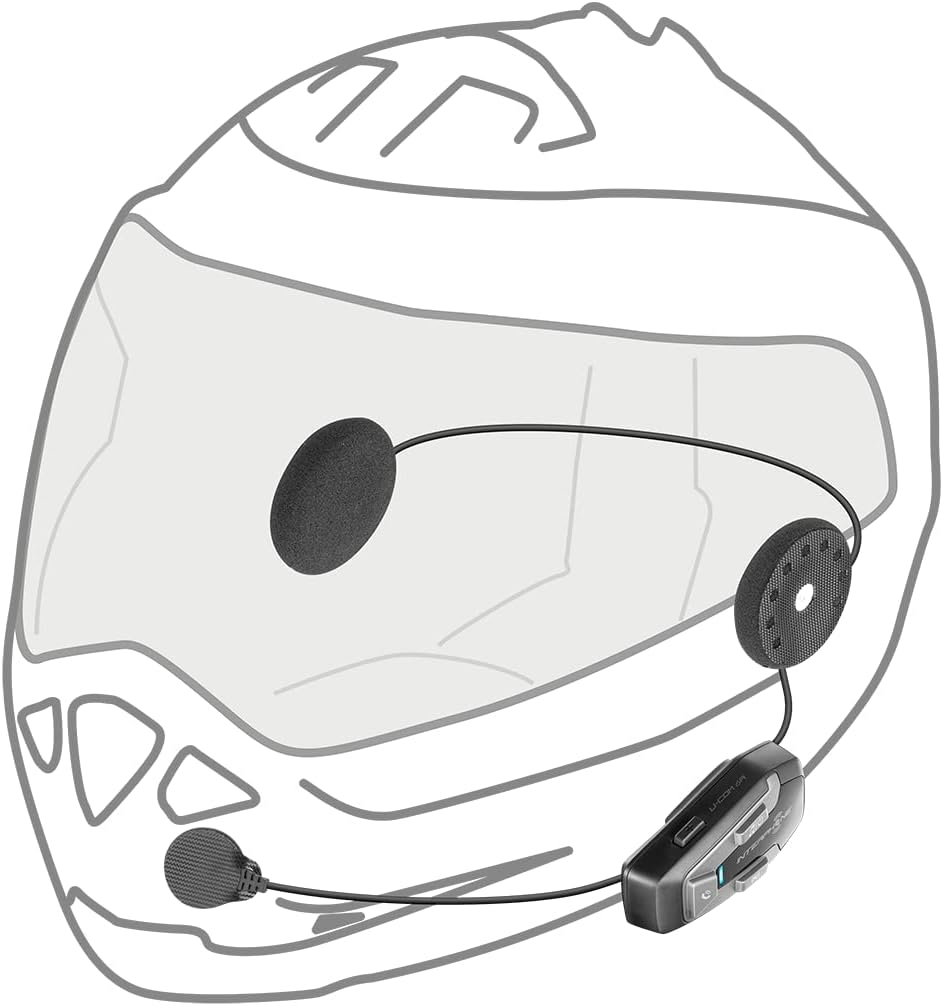
Position the speakers inside the helmet's ear pockets. The microphone should be placed in front of your mouth, ensuring clear voice pickup.
- Attach the speakers to the helmet's interior using the provided Velcro pads. Ensure the speaker with the shorter wire is for the left ear and the longer wire for the right.
- เลือกไมโครโฟนที่เหมาะสมกับประเภทหมวกกันน็อคของคุณ:
- ไมโครโฟนแบบบูม: Ideal for open-face or modular helmets. Attach it to the inside of the helmet near your mouth.
- ไมโครโฟนแบบมีสาย: Suitable for full-face helmets. Attach it to the inside of the chin bar, close to your mouth.
- Connect the speaker and microphone assembly to the main U-Com 6R unit.
- Tuck all wires neatly under the helmet padding to prevent discomfort or entanglement.

รูปที่ 5.2: Installation of speakers and wired microphone inside a full-face helmet. This diagram illustrates the placement of the flat speakers in the ear recesses and the wired microphone near the chin bar.

รูปที่ 5.3: Installation of speakers and boom microphone inside an open-face helmet. This diagram shows the placement of speakers and the flexible boom microphone extending towards the rider's mouth.
6. การติดตั้งและการใช้งานเบื้องต้น
6.1. การชาร์จอุปกรณ์
Before first use, fully charge the U-Com 6R. Connect the supplied USB-C cable to the charging port on the unit and to a USB power source. The LED indicator will show charging status and turn off when fully charged. A full charge provides approximately 15 hours of talk time.
6.2. เปิด/ปิดเครื่อง
- เปิดเครื่อง: Press and hold the Music button for 3 seconds. The LED will flash blue.
- หมดแรง: Press and hold the Music button for 5 seconds. The LED will turn red and then off.
6.3 การจับคู่บลูทูธกับโทรศัพท์มือถือ
- With the U-Com 6R powered off, press and hold the Call button for 5 seconds until the LED flashes red and blue alternately, indicating pairing mode.
- บนโทรศัพท์มือถือของคุณ ให้เปิดใช้งานบลูทูธและค้นหาอุปกรณ์ใหม่
- Select "Interphone U-Com 6R" from the list of available devices.
- Once paired, the LED on the U-Com 6R will flash blue periodically.
6.4. Intercom Pairing (Up to 2 Riders)
The U-Com 6R supports communication with one other rider. For Mesh 2.0 technology with multiple riders, refer to the advanced features section or the full online manual.
- Ensure both U-Com 6R units are powered on and not connected to other devices.
- On both units, press and hold the Intercom button for 5 seconds until the LED flashes red and blue alternately.
- The units will automatically search and pair with each other. Once connected, the LEDs will flash blue.
- To initiate an intercom conversation, briefly press the Intercom button on either unit.
7. การดำเนินการ
7.1. โทรศัพท์
- รับสาย: กดปุ่มโทรสั้นๆ
- วางสาย: กดปุ่มโทรสั้นๆ
- ปฏิเสธสาย: กดปุ่มโทรค้างไว้ 2 วินาที
- ผู้ช่วยเสียง: Briefly press the Call button twice to activate your phone's voice assistant (Siri, Google Assistant).
7.2. การเล่นเพลง
- เล่น/หยุดชั่วคราว: Briefly press the Music button.
- เพลงถัดไป: Press the Music button twice.
- แทร็กก่อนหน้า: Press the Music button three times.
7.3. การปรับระดับเสียง
The U-Com 6R features dedicated buttons for volume control, typically integrated with the main control panel. Refer to the device overview (Figure 4.1) for button locations.
- เพิ่มปริมาณ: กดปุ่ม 'เพิ่มเสียง'
- ลดระดับเสียง: กดปุ่ม 'ลดเสียง'
7.4. GPS and OEM System Compatibility
The U-Com 6R is designed with Bluetooth 5.2 to ensure broad compatibility with various GPS navigation devices and original equipment manufacturer (OEM) systems found on motorcycles. Pair these devices as you would a mobile phone, following their respective pairing instructions.
8. การบำรุงรักษา
- การทำความสะอาด: ใช้แบบนุ่มๆamp cloth to clean the unit. Do not use abrasive cleaners or solvents.
- ความต้านทานน้ำ: The U-Com 6R is waterproof. However, ensure the USB-C port cover is fully sealed to maintain its water-resistant properties.
- การดูแลแบตเตอรี่ For optimal battery life, avoid fully discharging the battery frequently. Charge the device regularly, especially if it will be stored for extended periods. The integrated battery is replaceable, extending the product's lifespan.
- พื้นที่จัดเก็บ: เก็บอุปกรณ์ไว้ในที่แห้งและเย็นเมื่อไม่ใช้งาน
9 การแก้ไขปัญหา
| ปัญหา | สาเหตุที่เป็นไปได้ | สารละลาย |
|---|---|---|
| อุปกรณ์ไม่เปิดเครื่อง | แบตเตอรี่อ่อน | ชาร์จอุปกรณ์ให้เต็ม |
| ไม่สามารถเชื่อมต่อกับโทรศัพท์/อินเตอร์คอมได้ | Device not in pairing mode; distance too far; interference. | Ensure device is in pairing mode (flashing red/blue). Move closer to the other device. Turn off other Bluetooth devices. |
| ไม่มีเสียงหรือคุณภาพเสียงไม่ดี | Volume too low; speakers incorrectly positioned; loose connection. | Increase volume. Check speaker placement and connections. Ensure microphone is correctly positioned. |
| การเชื่อมต่อระบบอินเตอร์คอมหลุดบ่อยครั้ง | อยู่นอกช่วงที่กำหนด; มีสัญญาณรบกวนจากสิ่งแวดล้อม | Stay within 1 km range. Avoid areas with strong radio interference. |
9.1. รีเซ็ตเป็นค่าโรงงาน
If issues persist, a factory reset may resolve them. Consult the full online manual or contact customer support for specific instructions on performing a factory reset for the U-Com 6R.
10. ข้อมูลจำเพาะ
| คุณสมบัติ | รายละเอียด |
|---|---|
| หมายเลขรุ่น | INTERPHOUCOM6R |
| เวอร์ชันบลูทูธ | 5.2 |
| ช่วงอินเตอร์คอม | Up to 1 Kilometer (between 2 riders) |
| เวลาสนทนา | ประมาณ 15 ชั่วโมง |
| ประเภทแบตเตอรี่ | Lithium Polymer (included, replaceable) |
| การเชื่อมต่อ | Bluetooth, Mesh 2.0 (compatible with Sena) |
| ความต้านทานต่อน้ำ | ใช่ |
| น้ำหนัก | 0.36 กิโลกรัม (12.7 ออนซ์) |
| ขนาด | 9.09 x 5.83 x 2.64 นิ้ว (บรรจุภัณฑ์) |
| ความเข้ากันได้ | GPS and OEM systems, most other brands on the market |
11. การรับประกันและการสนับสนุน
Interphone products are manufactured to high-quality standards. For warranty information, please refer to the warranty card included with your product or visit the official Interphone website. For technical support or further assistance, please contact Interphone customer service through their official channels.
คุณสามารถค้นหาข้อมูลเพิ่มเติมและทรัพยากรสนับสนุนได้โดยไปที่ Interphone Store on Amazon.


